1
• The ”File” menu that allows the user to read and write input parameters
into text files.
Text files includes all data of the rotor and stores the unit system which was
used during simulation.
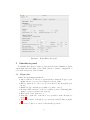
There are for panels to operate the GyroRotor program. Theses panels are :
• The ”Data” panel that contains the physical characteristics of the rotor
as well as atmosphere and induced velocity models ;
• The ”Simulation” panel that includes the flight parameters and computation results ;
• The ”Derivatives” panel that includes all rotor characteristics derivative
with respect to no-feathering plane frame and fuselage frame ;
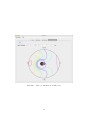
• The ”Aoa distribution” panel that shows the blade angle of attack angle
distribution all over the rotor disc.
~S and X
~ S define the
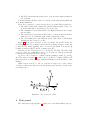
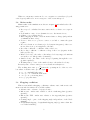
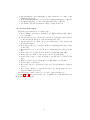
Figure 1 shows forces and axes of the rotor frame. Y
~
~
no-feathering plane, YS pointing forward and XS pointing sideway to starboard
~ S is pointing upwards. Rotor forces are the thrust T along Z
~S , H
so that Z
~
~
pointing rearward along YS and Y pointing along XS .
~ is supposed to be in the Y
~S , Z
~ S plane. Incidence with
Aircraft velocity U
~ is the rotor lift (perpendicular
respect to plane of no-feathering is denote αS . L
~
to aircraft velocity) and D the rotor drag.
~ F lies to the body-fixed coordinate system pointing forward. Y
~F and Z
~F
X
(not represented on figure 1) complete the body-fixed coordinate system pointing respectively to starboard and downward. Finally αF is the incidence of the
fuselage.
When viewed from above, the rotor blades are supposed to spin counterclockwise so that starboard side is the advancing region and the port side is the
retreating region.
Figure 1 – Forces and rotor axes
4
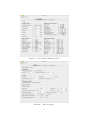
Data panel
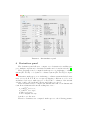
The data panel is shown figure 3. Values are for the Kelett KD-1 autogiro.
3