1
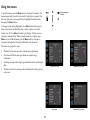
Setup menu
Auto Source: When this feature is On, the projector automatically finds the
active source, checking the selected Power-up Source first. When this
feature is Off, the projector defaults to the source selected in Power-up
Source. To display another source, you must manually select one by
pressing the Source button on the remote or keypad.
Language: allows you to select a language for the onscreen display.
Key Click: turns the key click sound on or off. When this setting is on,
pressing keys on the keypad causes the projector’s speaker to play a “click”
sound.
Custom Key: allows you to assign a different function to the Custom
button, allowing you to quickly and easily use the effect. Highlight an effect
and press Select to choose a different one.
•
•
•
Source Info: the default action. Shows the Source Info menu.
Projector Info: Shows the Projector Info menu.
Aspect Ratio: toggles among 4:3, 16:9, and Native (see page 12 and
page 28).
• Auto Image: resets the projector to the source (page 24).
• Overscan: removes noise around the image.
• Blank Screen: displays an empty screen.
• Freeze Screen: pauses the projected image.
• Mute: turns off all sound.
• Source: cycles through available sources.
AC Power On: When this feature is on, the projector automatically turns on
when electrical power is connected. This allows control of ceiling mounted
projectors with a wall power switch.
Setup menu
Power-up Source: determines which source the projector checks first for
active video during power-up.
HDMI DDC: When this feature is set to On, the projector will support an
older DVD player for HDMI port.
Video Standard: When this feature is set to Auto, the projector attempts to
automatically pick the video standard based on the input signal it receives.
(The video standard options may vary depending on your region of the
world.) If the projector is unable to detect the correct standard, the colors
may not look right or the image may appear “torn.” If this happens,
manually select a video standard by selecting NTSC, PAL, or SECAM from
the Video Standard menu.
Auto Off Time: automatically turns the projector off after no signals are
detected for a preset number of minutes. If an active signal is received
before the projector powers down, the image will be displayed.
Screen Save Time: automatically blanks the screen with a black color after
no signals are detected for a preset number of minutes. The image returns
when an active source is detected or a remote or keypad button is pressed.
Closed Captions: controls closed caption display while audio is not muted.
If this setting is not off, and audio is not muted, and the source is NTSC and
contains captions on the selected channel, then the projector must display
caption text overlaid on the image.
Lamp Low Power: toggles between on and off. Turn it on to lower the light
output of the lamp. This also lowers the fan speed, making the projector
quieter.
Ceiling Mount: turns the image upside down for ceiling-mounted
projection.
Power Sounds: controls whether the projector makes a sound when
powered on and off.
30