1
SETTING UP
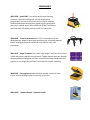
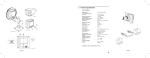
USING THE TRIVET MOUNT: This is the preferred method. It keeps the instrument low to the
deck and closer to your reference point. Also, since the unit is only about five inches off the
ground it won’t be so vulnerable to getting knocked over like with a tripod.
A)
B)
C)
D)
Attach the Quad 1000 to the trivet using the spring loaded 5/8 x 11 mounting bolt.
Place the trivet over your reference point on the ground floor.
Level the Quad 1000 bulls-eye bubble by using the adjustable legs on the trivet.
Power up the Quad 1000 and allow it to self-level. The plumb-bob laser will blink until it
has leveled.
E) Once leveled, slide the trivet until the plumb laser is directly over your point. The
instrument is now projecting a beam reference at Zenith.
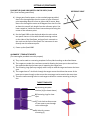
TRIVET MOUNT
Carrying
handles
(2)
Adjustable leveling
legs with knobs (2)
5/8 x 11 Threaded
mounting screw
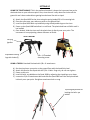
USING A TRIPOD: Standard flat head with 5/8 x 11 attachment
A)
B)
C)
D)
E)
Set the tripod over your point on the ground floor with the head fairly level.
Attach the Quad to the tripod with the 5/8 x 11 bolt. Snug only, do not over tighten.
Power up the unit.
Level the bulls- eye bubble on the Quad 1000 by adjusting the tripod legs up or down.
Loosen the 5/8 x 11 attachment bolt and slide the Quad 1000 until the laser plumb-bob
is directly over your point. Re-tighten attachment bolt to snug.
Tripod leg adjustment for
leveling the bulls- eye
bubble