1
1.
Main Menu
DMX Address
From the Main Menu, press Enter to adjust the DMX start address
Overview
The new Chroma-Q™ Inspire LED house light is a multi-purpose fixture with a single light engine featuring 36 high
powered LEDs (combination of white, red, green and blue) and a fully homogenized optic. The Inspire is equipped with a
built-in power supply, operates as a standalone unit or can be controlled remotely through the ANSI E1.11 USITT DMX
512-A protocol.
Control Mode
No.
2.
Safety
Caution
3.
1. This product is for professional use only. It is NOT intended for domestic or outdoor use.
2. The bright flash of light during power-up & continuous strobe may cause epileptic seizure.
3. This product must be used with safety cable.
Cabling
PowerCon connectors are used for power input. XLR 5-pin connectors are used for data signal from an external DMX
control console. The chassis is ground bonded.
4.
Mounting
A mounting bracket is built into the enclosure for overhead applications. Secure the fixture with a safety bond. A fixing
hold is built into the enclosure.
5.
Optics
Control
(Enter) Stores the menu choice
Increases (+) the mode level or value
Decreases ((- ) the mode level or value
Back to the previous menu
2
sRGBW
5
1 x Intensity Effects Channel + Red, Green, Blue, White
3
HSI
3
Hue, Saturation & Intensity
4
RGBW
4
Red, Green, Blue, White
11
Look sel
1
Look Select (Effects engine, programmable presets and user programmed
Looks)
12
Mastr StndAlon
Assigns the unit as Master in standalone operation
13
Slave StndAlon
Assigns the unit as Slave in standalone operation
OFF
Fixture has no light output
HOLD
Fixture holds the last valid DMX state
LOOK 01 – 31
Fixture snaps to the selected Look
Reset to
to Default
In this menu, all control menu commands are reset to factory defaults:
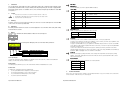
On power-up, the display shows the Main Menu. The Main Menu shows the model name, software version, DMX start
address, set control mode, number of channels assigned.
Display Mode:
The LCD display is backlit when you access the menu and turns off when left undisturbed for 5 seconds.
Control Menu
Inspire Quick Start Guide V2.1
4 x channels for Effects (Colour speed, range, step, intensity effects)
+ Hue, Saturation, Intensity
Technical
In this menu, the frequency setting of the fixture can be changed. The Inspire fixture has four frequency settings
available - 1200, 2400, 4800, 9600. This allows for the LED scan rate to be synchronised with the video camera
and avoid a flickering effect.
Power-Up Display:
To navigate the Control Menu options from the Main Menu,
•
Use the Up and Down arrows to navigate the control menu options
•
Press the Back arrow (Enter) to select a control menu option
•
Press and hold the Back arrow (Enter) to save the setting
•
Press Exit to return to the Main Menu
Description
7
Look Store
31 internal preset FX Looks are available for stand-alone operation, 1-23 are pre-programmed.
To replay a Look in stand-alone operation, press Up/Down to select Look Store, press Enter, press Up/Down to select
the desired Look & press Enter for 2 seconds to save settings.
To replay a Look with a DMX console, press Up/Down to Control Mode11& press Enter for 2 seconds. Use the DMX
console with the assigned channel to playback the various looks stored. (1-31 looks in 1 single channel) Note:: DMX
has priority over internal Looks.
Looks can be recorded in the internal flash memory by users & will be preserved on power down. Looks will be
returned to default settings upon reset. There are two ways to record a look: Simple, with DMX console & Advanced,
stand-alone. (DMX is unplugged): refer to user manual for control details.
The control functions are accessed through the LCD display at the rear of the fixture with 4 push buttons:
Back Arrow
Up Arrow
Down Arrow
Exit
Ch
fxHSI
When DMX is Lost
If DMX is not detected, various output options can be selected:
The Inspire can be built with either Narrow, Medium or Wide lens. The beam angles are:
Narrow
~32°
Medium ~42°
Wide
~65°
6.
Display
1
7.
DMX address
001
Control Mode
RGBW
When DMX is Lost
HOLD
Look Store
01
Further Information
Please refer to the Chroma-Q Inspire manual for more detailed information. A copy of the manual can be found at the
Chroma-Q website – www.chroma-q.com – under Support.
Inspire Quick Start Guide V2.1