1
Applications
Pocket Word
Pocket Word works with Microsoft Word on the host computer to give you access to copies of
documents. You can create new documents on the mobile computer, or copy documents from the host
computer to the mobile computer. Synchronize documents between the host computer and the mobile
computer so that you have the most up-to-date information in both locations.
To create a new document in Pocket Word, such as a letter, meeting minutes, or a trip report, tap Start
- Programs - Pocket Word - New icon. A blank document appears. Or, if you've selected a template
for new documents in the Options dialog box, that template appears with appropriate formatting
applied. You can open only one document at a time; when you open a second document, you'll be
asked to save the first. You can save a document in a variety of formats, including Word (.doc), Pocket
Word (.psw), Rich Text Format (.rtf), and Plain Text (.txt).
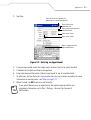
Pocket Word contains a list of the files stored on the mobile computer. Tap a file in the list to open it.
To delete, make copies of, or send a file, tap and hold a file in the list. Then, select the appropriate
action on the pop-up menu.
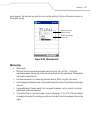
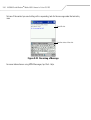
Select the type of folder you
want displayed in the list.
Tap to change the sort
order of the list.
Tap to open a document.
Tap and hold an item to see a
pop-up menu of actions.
Tap to create a new item.
Figure 9-15. Using Pocket Word
9-21