1
Mobile Broadband Wireless-N Router MBRN3000
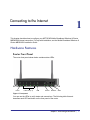
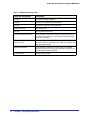
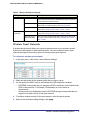
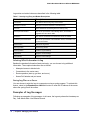
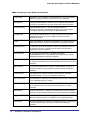
Table 1. LED and Front Panel Button Descriptions
LED
Power
LED Activity
Description
Solid green
Solid green. Power is supplied to the router.
Solid Red
POST (Power-On Self-Test) failure or device malfunction
Off
Power is not supplied to the router
Restore Factory Settings Press button for 6 seconds. Power LED lights briefly. When
button
released, the LED blinks red three times and then turns green
as the gateway resets to the factory defaults.
LAN
(Ethernet)
USB
Internet
Wireless
WPS
Button
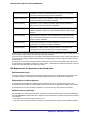
Solid green
The Local port has detected an Ethernet link with a device.
Blinking green
Data is being transmitted or received.
Off
No link is detected on this port.
Off
• No USB device is connected.
• An error has occurred with the device.
Solid blue
USB device is ready to use.
Blinking blue
Data is being transmitted or received.
Solid green
There is an Internet session.
Solid red
No Internet connection.
Blinking green
Data is being transmitted over the USB port.
Blinking green and red
Traffic meter limit has been reached.
Off
No Internet connection detected or device in bridged mode.
Solid green
Indicates that the Wireless port is initialized.
Blinking green
Data is being transmitted or received over the wireless link.
Off
The Wireless Access Point is turned off.
Solid green
WPS wireless security is being enabled.
Blinking green
The device is in the 2-minute interval to synchronize security.
Off
WPS is not being set or enabled.
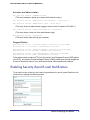
Description
Turn the wireless radio in the router on and off. The wireless radio is on by default. The
LED located below this button indicates if the wireless radio is on or off.
Wireless
WPS
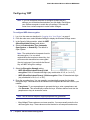
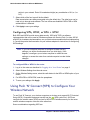
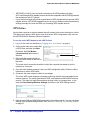
Press this button to open a 2-minute window for the router to connect with other
WPS-enabled devices. For more information, about using the WPS method to implement
security, see “Using Push 'N' Connect (WPS) to Configure Your Wireless Network” on
page 19.
Chapter 1: Connecting to the Internet
|
7