1
Chapter
7
Communications
Overview
The SMC-Flex provides advanced communications capabilities that
allow it to be started and stopped from multiple sources as well as
provide diagnostic information through the use of communication
interfaces. The SMC-Flex uses the DPI method of communication,
therefore all standard DPI communication interfaces used by other
devices (i.e., PowerFlex™ Drives) can be used in the SMC-Flex.
ScanPort devices are not supported by the SMC-Flex.
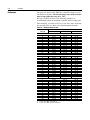
Standard DPI communications cards are available for various
protocols including DeviceNet, ControlNet, Remote I/O, ModBus™,
and Profibus® DP. Other modules may be available in the future. For
specific programming examples, configuration, or programming
information, refer to the user manual for the communication interface
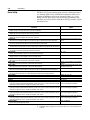
being used. A list of available interfaces is located below.
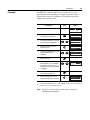
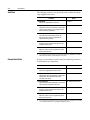
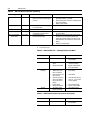
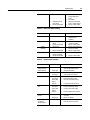
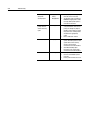
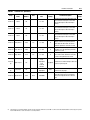
Table 7.A
➊
Communication Ports
Protocol Type
Cat. No.
User Manual
DeviceNet
20-COMM-D
20COMM-UM002➊-EN-P
ControlNet
20-COMM-C
20COMM-UM003➊-EN-P
Remote I/O
20-COMM-R
20COMM-UM004➊-EN-P
Profibus®
20-COMM-P
20COMM-UM006➊-EN-P
RS-485
20-COMM-S
20COMM-UM005➊-EN-P
InterBus
20-COMM-I
20COMM-UM007➊-EN-P
EtherNet/IP
20-COMM-E
20COMM-UM010➊-EN-P
RS485 HVAC
20-COMM-H
20COMM-UM009➊-EN-P
ControlNet (Fiber)
20-COMM-Q
20COMM-UM003➊-EN-P
Denotes revision level of user manual. Example: Publication 20COMM-UM002C-EN-P is at
revision C.
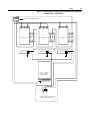
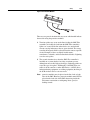
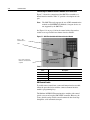
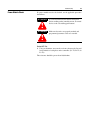
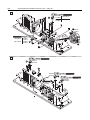
The SMC-Flex supports three DPI ports for communication. Ports 2
and 3 are supported through the serial connection on the side of the
device and are typically used to interface with a Human Interface
Module (HIM). Port 2 is the default connection with port 3 available
by installing a splitter on port 2. Port 5 is supported by connecting one
of the communication cards listed above to the internal DPI comm
card connection.