1
DL441 OPERATORS’ MANUAL
5
CONTROL DESCRIPTION
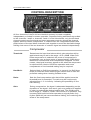
All four channels of the DL441 are identical and may be used completely
independently or linked for stereo operation. Separate linking switches are provided
to link channels 1 and 2 or channels 3 and 4. In the linked mode, only the left hand
channel controls are functional and serve as master controls, though the channel
bypass switches remain independent. In linked mode, the compressor/limiters and
peak limiters of the two linked channels track together to avoid the inevitable image
shifting that occurs if the two channels of a stereo signal are treated independently.
Compressor
Threshold:
Determines the input level above which gain reduction will be
applied and may be set in the range -40 to +20dB. When Soft
Knee compression is selected, the onset of compression is
progressive over an input range of approximately 15dB, above
which level conventional ratio compression is applied. For this
reason, the signal level may appear to fall when the compressor
is switched from Hard to Soft Knee operation and some
readjustment of the threshold setting may be required.
Hard/Soft:
Selects Hard or Soft Knee operation. In general, the Soft Knee
mode provides the least obtrusive gain control and is often the
preferred setting when treating finished mixes.
Ratio:
Sets the final compression ratio that will be applied once the
threshold level is exceeded. The ratio may be continuously
adjusted from 1.2:1 to infinity:1 allowing the possibility of true
hard limiting.
Gain:
During compression, the signal is attenuated depending on the
dynamics of the signal. As a result, gain may need to be applied
in order to produce the desired output level. The GAIN control
has a range of !20dB to +20dB. If the limiter is in operation, only
increase GAIN until the limiter operates on signal peaks. Any
further GAIN will just cause excessive limiting, thus reducing the
effect of the compressor.