1
SECTION 2
SETTINGS
There are three buttons on GRAFIX module. The buttons that are in the back of GRAFIX are named
as ENT (Enter), (↓) (increase) and (↑) (decrease). You can do settings mostly by using this buttons.
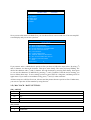
To enter the GRAFIX menu press ENT button until the menu occurs on the screen. Firstly you will see
the sub-menu alternative. You can see GRAFIX menu by clicking direction ((↑) ve (↓)) buttons. To
choose an item, click ENT button when the cursor is on that item. If you press ENT button for a short
time you enter that menu, but if you press ENT button for a short time you leave that menu.
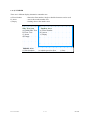
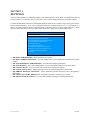
MAIN MENU
M0
M1
M2
M3
M4
M5
M6
M7
M8
<<
MAIN PARAMETERS
MAIN SCREEN SETTINGS
FLOOR DISPLAY PARAMETERS
FLOOR TEXT SETTINGS
CLOCK/DATE
LANGUAGE/LİSAN
ARROW DISPLAY SETTINGS
SET TO FACTORY DEFAULTS
SIMULATOR SETTINGS
EXIT
• M0-MAIN PARAMETERS : Main parameters of system.
• M1-MAIN SCREEN SETTINGS : You can change texts, service mode and overload texts by this
button.
• M2-FLOOR DISPLAY PARAMETERS : Text and clock display parameters
• M3-FLOOR TEXT : Floor texts and numbers are set by this button and preview can be done.
• M4-CLOCK / DATE : You can set the time and set show font by this button.
• M5-LANGUAGE / LiSAN : Menu language can be set (Turkish/English) by this button.
• M6-ARROW DISPLAY SETTINGS : Arrow animation position and style can be designed by
this button.
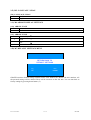
• M7-SET TO FACTORY DEFAULTS : It returns to the fabric settings if you accept.
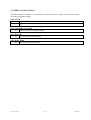
• M8-SIMULATOR SETTINGS: You can reach simulator settings by clicking this button.
F/7.5.5.02.77 R:0
6 / 12
GRAFIX