1
4. Homepage
The homepage displays following logos: the logo of the TMP² and OTeforThesaurus in the top left
corner. In the left corner at the bottom you can see the logos of Europeana, LinkedHeritage and
Page | 2 AthenaPlus. The OTeforThesaurus logo is repeated in the right corner at the bottom.
It displays the version number (V2.1.10 2015-02-13) and a link to the site of the Équipe de Condillac
(University of Savoie).
When you are not logged in, the homepage displays all imported and created thesauri set as public.
Each thesaurus is described in three metadata types. Two are obligatory when importing or creating
a thesaurus: the title (defined by the creator) and the author (automatically set as the creator of the
thesaurus, but can be altered). The thesaurus can be illustrated with an image.
The thesauri can be displayed on the homepage as a grid with images or as a flat list, organised
alphabetically according to title.
When you are not logged in, the only functionalities available are “view” (represented by a button
with a symbol of an eye) and “search”. Clicking the eye-symbol allows you to view the linguistic and
conceptual pane of the thesaurus and to scroll through the concepts. To go back to the homepage,
you can click on the “public thesauri”-tab.
You can search for public thesauri displayed on the homepage in the “search”-field. You can search
the thesaurus metadata (title, author, description, coverage, subject, publisher and language) and
you can also search for thesaurus concepts.
The homepage also displays a tab “Create thesaurus” and “Import Thesaurus”. At the moment, only
the “Create thesaurus” is developed and can be used. For importing vocabularies, we refer to the
Importing thesauri-chapter.
5. Creating and Editing
In the right corner you can enter a login and password to access the TMP. When you scroll over the
“connect”-button a message for an account request appears: “Login request? Send a message to
[email protected]”.
5.1 My Thesauri vs Other Thesauri
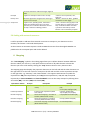
Once logged in you can see a change in the layout of the homepage. Instead of showing all public
thesauri in one frame, there is now a separation between “My thesauri” and “Public thesauri”. “My
thesauri” displays the thesauri that were created or uploaded by yourself (all rights). “Public
thesauri” all the other thesauri that are in the TMP (limited rights). You have full user rights in “My
thesauri” and limited rights in “Other thesauri”.
TMP User Manual (v.3) – January 30 2015