1
BarSTORM Barcode Printing System
3- Installing the BarSTORM Device
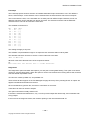
Please see separate BarSTORM Installation Guide.
The BarSTORM unit must first be configured with an IP address and network settings for
input, then the printers may be configured directly connected or via network bridge.
Once the unit is tested to print “basic” data, then you can proceed on how to use the PCLLike control codes to select and generate barcode printing, as described in this manual.
Please verify that the printer(s) you are installing are compatible with the output from the
barcode printing engine (PCL5e).
4- Testing the BarSTORM
There are two different features sets built in the BarSTORM : the “BarDIMM code”
firmware and the font & form overlay processing. These work independently, and can be
configured and tested differently.
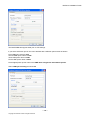
See the BarSTORM Installation Guide to configure and test the unit for networking,
printing, barcode processing and font & form processing.
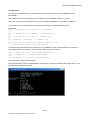
Test files are provided with the BarSTORM.
These can be tested, by sending them to the unit from the operating system and utilities
provided.
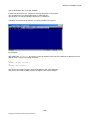
Sending these files to the unit will confirm that the Barcode processing is active.
The unit should work in all aspects, and should be checked prior to using any custom PCL
Coding or drivers.
Fonts: The BarSTORM contains the Fontware Barcode Plus data set compatible with the
HP Barcode&More fonts and some special additional fonts and Form Overlays.
These are supplied within the unit.
Page 10
www.fontware.com
2004-2005 Fontware