1
Table of contents
3
Introduction / Preface.................................................................................................... 7
4
Safety notes.................................................................................................................... 8
5
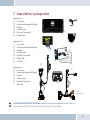
Scope of delivery / package content............................................................................... 9
6
Installation guide............................................................................................................ 10
6.1
Determination of required configuration......................................................................................................10
6.1.1
Vehicle................................................................................................................................................................................. 10
6.1.2
Mobile Telephone................................................................................................................................................................ 10
6.1.3
Muting (radio muting)......................................................................................................................................................... 10
6.1.4
Converting the EGO FLASH into an already-installed Funkwerk hands-free car kit..................................................... 10
6.1.5
Add-on speakers / Car audio telephone connection......................................................................................................... 11
6.1.6
Car audio line-in input........................................................................................................................................................ 11
6.2
Installation locations.....................................................................................................................................11
6.2.1
Checking cable lengths...................................................................................................................................................... 11
6.2.2
6.2.3
Selection of the installation location for the electronics box........................................................................................... 11
Selection of the point of installation for the microphone................................................................................................. 12
6.2.4
Selection of site for installing the control unit with integrated display........................................................................... 12
6.3
Installation.....................................................................................................................................................13
6.3.1
Mounting the electronics box............................................................................................................................................. 13
6.3.2
Mounting the microphone.................................................................................................................................................. 13
6.3.3
Mounting the control unit with integrated display............................................................................................................ 14
6.4
Connection scheme.......................................................................................................................................14
6.4.1
Preface................................................................................................................................................................................ 14
6.4.2
EGO mute cable................................................................................................................................................................... 15
6.5
Installation of the ISO connecting cable.......................................................................................................16
6.5.1
Checking the mute inputs / ISO-Profi................................................................................................................................ 16
6.5.2
Checking the installation.................................................................................................................................................... 19
2
|3