1
Playing
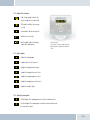
The following functions are available for playing and are shown in the display:
→ Play
→ Pause
→ Stop
→ Forward (track-by-track in the current playlist)
→ Backward (track-by-track in the current playlist)
→ Volume control
7.5.4 Music player
Symbol:
The music player is activated through the main menu. The music player may also be activated without a mobile phone being couple
to the EGO FLASH. In order to play back music, the EGO FLASH must be coupled to an A2DP-capable device (such as a mobile
phone with A2DP, an iPod™ or an MP3-Player with A2DP adapter).
Connection / coupling
Under the “Option” menu item, a “New device” may be coupled, or an already coupled device may be connected. A total of 10 devices may be coupled, whereas only one device may be active. If a “New device” is selected, a Bluetooth® device search is performed. The desired device can be selected from there.
If the music device does not support coupling from other devices, it is also possible to couple the EGO FLASH from the music
device via the “Couple from device” menu item. In both cases, a four-digit PIN code is displayed by the EGO FLASH, which must be
entered into the music device. Is the PIN is incorrect, the menu jumps back to device selection, and you must repeat the process. If
an iPod™ or MP3 player with an A2DP adapter is used, these devices couple automatically with the EGO FLASH. For this, the “Couple from device” menu item must be selected during the search for devices. After coupling, all playback functions are available to
the user.
Playback
The following functions are available for playback and are shown in the display:
→ Play
→ Pause
→ Stop
EGO FLASH