1
A N D R O I D
T A B L E T
User Manual
Please read this manual before operating your
device and keep it for future reference.
Intellectual Property
All Intellectual Property, as defined below, owned by or which is otherwise the property of Samsung or its respective suppliers
relating to the SAMSUNG Phone, including but not limited to, accessories, parts, or software relating there to (the “Phone
System”), is proprietary to Samsung and protected under federal laws, state laws, and international treaty provisions. Intellectual
Property includes, but is not limited to, inventions (patentable or unpatentable), patents, trade secrets, copyrights, software,
computer programs, and related documentation and other works of authorship. You may not infringe or otherwise violate the
rights secured by the Intellectual Property. Moreover, you agree that you will not (and will not attempt to) modify, prepare
derivative works of, reverse engineer, decompile, disassemble, or otherwise attempt to create source code from the software. No
title to or ownership in the Intellectual Property is transferred to you. All applicable rights of the Intellectual Property shall remain
with SAMSUNG and its suppliers.
Open Source Software
Some software components of this product incorporate source code covered under GNU General Public License (GPL), GNU Lesser
General Public License (LGPL), OpenSSL License, BSD License and other open source licenses. To obtain the source code covered
under the open source licenses, please visit:
http://opensource.samsung.com.
Disclaimer of Warranties; Exclusion of Liability
EXCEPT AS SET FORTH IN THE EXPRESS WARRANTY CONTAINED ON THE WARRANTY PAGE ENCLOSED WITH THE PRODUCT, THE
PURCHASER TAKES THE PRODUCT "AS IS", AND SAMSUNG MAKES NO EXPRESS OR IMPLIED WARRANTY OF ANY KIND
WHATSOEVER WITH RESPECT TO THE PRODUCT, INCLUDING BUT NOT LIMITED TO THE MERCHANTABILITY OF THE PRODUCT OR
ITS FITNESS FOR ANY PARTICULAR PURPOSE OR USE; THE DESIGN, CONDITION OR QUALITY OF THE PRODUCT; THE
PERFORMANCE OF THE PRODUCT; THE WORKMANSHIP OF THE PRODUCT OR THE COMPONENTS CONTAINED THEREIN; OR
COMPLIANCE OF THE PRODUCT WITH THE REQUIREMENTS OF ANY LAW, RULE, SPECIFICATION OR CONTRACT PERTAINING
i957MR_UM_English_UCLK4_WC_121012_F6
THERETO. NOTHING CONTAINED IN THE INSTRUCTION MANUAL SHALL BE CONSTRUED TO CREATE AN EXPRESS OR IMPLIED
WARRANTY OF ANY KIND WHATSOEVER WITH RESPECT TO THE PRODUCT. IN ADDITION, SAMSUNG SHALL NOT BE LIABLE FOR
ANY DAMAGES OF ANY KIND RESULTING FROM THE PURCHASE OR USE OF THE PRODUCT OR ARISING FROM THE BREACH OF
THE EXPRESS WARRANTY, INCLUDING INCIDENTAL, SPECIAL OR CONSEQUENTIAL DAMAGES, OR LOSS OF ANTICIPATED PROFITS
OR BENEFITS.
SAMSUNG IS NOT LIABLE FOR PERFORMANCE ISSUES OR INCOMPATIBILITIES CAUSED BY YOUR EDITING OF REGISTRY SETTINGS,
OR YOUR MODIFICATION OF OPERATING SYSTEM SOFTWARE.
USING CUSTOM OPERATING SYSTEM SOFTWARE MAY CAUSE YOUR DEVICE AND APPLICATIONS TO WORK IMPROPERLY.
Samsung Telecommunications America (STA), LLC
Headquarters:
Customer Care Center:
1301 E. Lookout Drive
1000 Klein Rd.
Richardson, TX 75082
Plano, TX 75074
Toll Free Tel:
1.888.987.HELP (4357)
Internet Address: http://www.samsungusa.com
©
2011 Samsung Telecommunications America, LLC. Samsung is a registered trademark of Samsung Electronics Co., Ltd.
Do you have questions about your Samsung Mobile Phone?
For 24 hour information and assistance, we offer a new FAQ/ARS System (Automated Response System) at:
www.samsung.com/us/support
Nuance®, VSuite™, T9® Text Input, and the Nuance logo are trademarks or registered trademarks of Nuance Communications,
Inc., or its affiliates in the United States and/or other countries.
ACCESS® and NetFront™ are trademarks or registered trademarks of ACCESS Co., Ltd. in Japan and other countries.
The Bluetooth® word mark, figure mark (stylized “B Design”), and combination mark (Bluetooth word mark and “B Design”) are
registered trademarks and are wholly owned by the Bluetooth SIG.
microSD™ and the microSD logo are Trademarks of the SD Card Association.
Openwave® is a registered Trademark of Openwave, Inc.
Google, the Google logo, Android, the Android logo, Google Play, Gmail, Google Mail, Google Maps, Google Music, Google Talk,
Picasa, YouTube and other marks are trademarks of Google Inc.
Wi-Fi is a registered trademark of the Wireless Fidelity Alliance, Inc.
Swype and the Swype logos are trademarks of Swype, Inc. © 2010 Swype, Inc. All rights reserved.
Devices purchased for use on AT&T's system are designed for use exclusively on AT&T's system. You agree that you won't make
any modifications to the Equipment or programming to enable the Equipment to operate on any other system. Some devices or
plans may require you to subscribe to a data plan.
Your tablet is designed to make it easy for you to access a wide variety of content. For your protection, AT&T wants you to be
aware that some applications that you enable may involve the location of your tablet being shared. For applications available
through AT&T, AT&T offers privacy controls that let you decide how an application may use the location of your tablet and other
phones on your account.
, DivX®, DivX Certified® and associated logos are trademarks of Rovi Corporation or its subsidiaries and are used under
license.
DivX Certified® to play DivX® video up to HD 720p, including premium content.
ABOUT DIVX VIDEO: DivX® is a digital video format created by DivX, LLC, a subsidiary of Rovi Corporation. This is an official DivX
Certified® device that plays DivX video. Visit www.divx.com for more information and software tools to convert your files into DivX
videos.
TM
ABOUT DIVX VIDEO-ON-DEMAND: This DivX Certified® device must be registered in order to play purchased DivX Video-onDemand (VOD) movies. To obtain your registration code, locate the DivX VOD section in your device setup menu (tap Applications
> Settings > About device > Legal information > License settings > DivX® VOD > Register). Go to vod.divx.com for more information
on how to complete your registration.
Table of Contents
Section 1: Getting Started ...........................6
Understanding This User Manual . . . . . . . . . . . . 6
Battery . . . . . . . . . . . . . . . . . . . . . . . . . . . . . . . 7
Installing the SIM Card . . . . . . . . . . . . . . . . . . . 9
Turning Your Device On and Off . . . . . . . . . . . . 10
Setting Up Your Device . . . . . . . . . . . . . . . . . . 10
Creating a New Google Account . . . . . . . . . . . 11
Retrieving Your Google Account Password . . . . 12
Task Manager . . . . . . . . . . . . . . . . . . . . . . . . . 12
Galaxy Tab Accessories . . . . . . . . . . . . . . . . . . 13
Securing Your Device . . . . . . . . . . . . . . . . . . . 13
Troubleshooting . . . . . . . . . . . . . . . . . . . . . . . 14
Section 2: Understanding Your Device .....15
Features . . . . . . . . . . . . . . . . . . . . . . . . . . . . . 15
Front View . . . . . . . . . . . . . . . . . . . . . . . . . . . . 16
Top and Bottom Views . . . . . . . . . . . . . . . . . . . 17
Back View . . . . . . . . . . . . . . . . . . . . . . . . . . . . 17
Home Screen . . . . . . . . . . . . . . . . . . . . . . . . . 18
Navigating Your Device . . . . . . . . . . . . . . . . . . 21
1
Notifications . . . . . . . . . . . . . . . . . . . . . . . . . .22
Status Details . . . . . . . . . . . . . . . . . . . . . . . . .23
Quick Settings . . . . . . . . . . . . . . . . . . . . . . . . .23
Status Bar . . . . . . . . . . . . . . . . . . . . . . . . . . . .24
Primary Shortcuts . . . . . . . . . . . . . . . . . . . . . .26
Widgets . . . . . . . . . . . . . . . . . . . . . . . . . . . . . .26
App Shortcuts . . . . . . . . . . . . . . . . . . . . . . . . .27
Folders . . . . . . . . . . . . . . . . . . . . . . . . . . . . . .28
Wallpapers . . . . . . . . . . . . . . . . . . . . . . . . . . .28
Mini App Tray . . . . . . . . . . . . . . . . . . . . . . . . .29
Apps Screen . . . . . . . . . . . . . . . . . . . . . . . . . .30
Applications . . . . . . . . . . . . . . . . . . . . . . . . . . .31
AT&T Communication Manager . . . . . . . . . . . .36
Section 3: Entering Text ........................... 37
Virtual QWERTY Keyboard . . . . . . . . . . . . . . . .37
Text Input Methods . . . . . . . . . . . . . . . . . . . . .37
Entering Text Using the Android Keyboard . . . .38
Changing the Text Input Mode - Keypad . . . . .38
Using Abc Mode . . . . . . . . . . . . . . . . . . . . . . .38
Using Symbol/Numeric Mode . . . . . . . . . . . . .
Using the Samsung Keypad . . . . . . . . . . . . . .
Configuring the Keypad . . . . . . . . . . . . . . . . .
Entering Upper and Lower Case Letters . . . . .
Entering Symbols and Numbers . . . . . . . . . . .
Using XT9 Predictive Text . . . . . . . . . . . . . . . .
Editing Text . . . . . . . . . . . . . . . . . . . . . . . . . .
Using the Handwriting Feature . . . . . . . . . . . .
Using Speech Recognition . . . . . . . . . . . . . . .
Entering Text Using Swype . . . . . . . . . . . . . . .
Using Google Voice Typing . . . . . . . . . . . . . . .
39
39
39
40
40
40
41
42
44
44
47
Section 4: Contacts and Accounts ........... 48
Accounts . . . . . . . . . . . . . . . . . . . . . . . . . . . .
Contacts . . . . . . . . . . . . . . . . . . . . . . . . . . . .
Groups . . . . . . . . . . . . . . . . . . . . . . . . . . . . . .
Favorites . . . . . . . . . . . . . . . . . . . . . . . . . . . .
48
48
55
57
Section 5: Multimedia .............................. 58
Media Hub . . . . . . . . . . . . . . . . . . . . . . . . . . .
Play Music Application . . . . . . . . . . . . . . . . . .
Google Play Music . . . . . . . . . . . . . . . . . . . . .
Viewing Your Music Library . . . . . . . . . . . . . .
Music Player . . . . . . . . . . . . . . . . . . . . . . . . .
58
58
59
66
71
Video Player . . . . . . . . . . . . . . . . . . . . . . . . . .
Movies . . . . . . . . . . . . . . . . . . . . . . . . . . . . . .
Play Movies & TV . . . . . . . . . . . . . . . . . . . . . .
Qik Lite . . . . . . . . . . . . . . . . . . . . . . . . . . . . .
Gallery . . . . . . . . . . . . . . . . . . . . . . . . . . . . . .
Using the Camera . . . . . . . . . . . . . . . . . . . . . .
Using the Camcorder . . . . . . . . . . . . . . . . . . .
Photo Editor . . . . . . . . . . . . . . . . . . . . . . . . . .
Games . . . . . . . . . . . . . . . . . . . . . . . . . . . . . .
73
74
75
75
76
78
83
86
87
Section 6: Messaging ................................88
Types of Messages . . . . . . . . . . . . . . . . . . . . 88
Creating and Sending Messages . . . . . . . . . . 88
Viewing New Received Messages . . . . . . . . . . 89
Deleting Messages . . . . . . . . . . . . . . . . . . . . . 90
Message Search . . . . . . . . . . . . . . . . . . . . . . 90
Messaging Settings . . . . . . . . . . . . . . . . . . . . 91
Email . . . . . . . . . . . . . . . . . . . . . . . . . . . . . . . 91
Incoming Server Settings . . . . . . . . . . . . . . . . 96
Outgoing Server Settings . . . . . . . . . . . . . . . . 96
Gmail . . . . . . . . . . . . . . . . . . . . . . . . . . . . . . . 97
Google Talk . . . . . . . . . . . . . . . . . . . . . . . . . . 99
Talk Options . . . . . . . . . . . . . . . . . . . . . . . . . 100
2
Google+ . . . . . . . . . . . . . . . . . . . . . . . . . . . . 103
Messages Application . . . . . . . . . . . . . . . . . . 103
Messenger . . . . . . . . . . . . . . . . . . . . . . . . . . 104
Section 7: Settings ..................................105
Accessing Settings . . . . . . . . . . . . . . . . . . . . 105
Wireless and Networks . . . . . . . . . . . . . . . . . 105
Sound Settings . . . . . . . . . . . . . . . . . . . . . . . 110
Display Settings . . . . . . . . . . . . . . . . . . . . . . 111
Power Saving Mode . . . . . . . . . . . . . . . . . . . . 112
Storage . . . . . . . . . . . . . . . . . . . . . . . . . . . . . 113
Applications . . . . . . . . . . . . . . . . . . . . . . . . . 114
Accounts and Sync . . . . . . . . . . . . . . . . . . . . 115
Location Services . . . . . . . . . . . . . . . . . . . . . 116
Security . . . . . . . . . . . . . . . . . . . . . . . . . . . . . 117
Language and Input . . . . . . . . . . . . . . . . . . . . 120
Backup and Reset . . . . . . . . . . . . . . . . . . . . . 126
Dock Settings . . . . . . . . . . . . . . . . . . . . . . . . 127
Date and Time . . . . . . . . . . . . . . . . . . . . . . . . 127
Accessibility Settings . . . . . . . . . . . . . . . . . . . 128
Motion Settings . . . . . . . . . . . . . . . . . . . . . . . 130
Developer Options . . . . . . . . . . . . . . . . . . . . . 130
3
Section 8: Connections ........................... 133
Internet Browsing . . . . . . . . . . . . . . . . . . . . .133
Wi-Fi . . . . . . . . . . . . . . . . . . . . . . . . . . . . . . .138
Bluetooth . . . . . . . . . . . . . . . . . . . . . . . . . . . .142
Managing Downloads . . . . . . . . . . . . . . . . . .144
PC Connections . . . . . . . . . . . . . . . . . . . . . . .145
Section 9: Applications ........................... 147
Alarm . . . . . . . . . . . . . . . . . . . . . . . . . . . . . .147
AllShare . . . . . . . . . . . . . . . . . . . . . . . . . . . . .148
Amazon Kindle . . . . . . . . . . . . . . . . . . . . . . . .149
AT&T Code Scanner . . . . . . . . . . . . . . . . . . . .150
AT&T Communication Manager . . . . . . . . . . .150
AT&T FamilyMap . . . . . . . . . . . . . . . . . . . . . .151
AT&T Navigator . . . . . . . . . . . . . . . . . . . . . . .151
Calculator . . . . . . . . . . . . . . . . . . . . . . . . . . .151
Calendar . . . . . . . . . . . . . . . . . . . . . . . . . . . .152
Camera . . . . . . . . . . . . . . . . . . . . . . . . . . . . .154
Contacts . . . . . . . . . . . . . . . . . . . . . . . . . . . .154
Downloads . . . . . . . . . . . . . . . . . . . . . . . . . .154
Email . . . . . . . . . . . . . . . . . . . . . . . . . . . . . . .155
Gallery . . . . . . . . . . . . . . . . . . . . . . . . . . . . . .156
Gmail . . . . . . . . . . . . . . . . . . . . . . . . . . . . . . .156
Google+ . . . . . . . . . . . . . . . . . . . . . . . . . . . .
Google Search . . . . . . . . . . . . . . . . . . . . . . .
Internet . . . . . . . . . . . . . . . . . . . . . . . . . . . .
Latitude . . . . . . . . . . . . . . . . . . . . . . . . . . . .
Local . . . . . . . . . . . . . . . . . . . . . . . . . . . . . .
Maps . . . . . . . . . . . . . . . . . . . . . . . . . . . . . .
Media Hub . . . . . . . . . . . . . . . . . . . . . . . . . .
Memo . . . . . . . . . . . . . . . . . . . . . . . . . . . . .
Messages Application . . . . . . . . . . . . . . . . .
Messaging . . . . . . . . . . . . . . . . . . . . . . . . . .
Messenger . . . . . . . . . . . . . . . . . . . . . . . . . .
Movies . . . . . . . . . . . . . . . . . . . . . . . . . . . . .
Music Player . . . . . . . . . . . . . . . . . . . . . . . .
myAT&T . . . . . . . . . . . . . . . . . . . . . . . . . . . .
My Files . . . . . . . . . . . . . . . . . . . . . . . . . . . .
Navigation . . . . . . . . . . . . . . . . . . . . . . . . . .
Pen Memo . . . . . . . . . . . . . . . . . . . . . . . . . .
Photo Editor . . . . . . . . . . . . . . . . . . . . . . . . .
Play Books . . . . . . . . . . . . . . . . . . . . . . . . . .
Play Movies & TV . . . . . . . . . . . . . . . . . . . . .
Play Music . . . . . . . . . . . . . . . . . . . . . . . . . .
Play Store . . . . . . . . . . . . . . . . . . . . . . . . . .
156
156
157
157
159
159
162
162
163
164
164
164
164
164
165
166
167
169
169
170
170
170
Polaris Office . . . . . . . . . . . . . . . . . . . . . . . .
Pulse . . . . . . . . . . . . . . . . . . . . . . . . . . . . . .
Qik Lite . . . . . . . . . . . . . . . . . . . . . . . . . . . .
Real Racing 2 . . . . . . . . . . . . . . . . . . . . . . . .
Settings . . . . . . . . . . . . . . . . . . . . . . . . . . . .
Social Hub . . . . . . . . . . . . . . . . . . . . . . . . . .
Talk . . . . . . . . . . . . . . . . . . . . . . . . . . . . . . .
Task Manager . . . . . . . . . . . . . . . . . . . . . . .
Video Player . . . . . . . . . . . . . . . . . . . . . . . . .
World Clock . . . . . . . . . . . . . . . . . . . . . . . . .
YouTube . . . . . . . . . . . . . . . . . . . . . . . . . . . .
YPmobile . . . . . . . . . . . . . . . . . . . . . . . . . . .
Zinio . . . . . . . . . . . . . . . . . . . . . . . . . . . . . . .
Information on GPS Applications . . . . . . . . . .
170
171
172
172
172
172
173
173
173
173
174
174
175
176
Section 10: Health and Safety
Information ...........................................177
Exposure to Radio Frequency (RF) Signals . .
Specific Absorption Rate (SAR) Certification
Information . . . . . . . . . . . . . . . . . . . . . . . .
FCC Part 15 Information to User . . . . . . . . . .
Smart Practices While Driving . . . . . . . . . . .
Battery Use and Safety . . . . . . . . . . . . . . . . .
177
182
184
184
186
4
Samsung Mobile Products and Recycling . . . 187
UL Certified Travel Charger . . . . . . . . . . . . . . 187
Display / Touch-Screen . . . . . . . . . . . . . . . . . 188
GPS . . . . . . . . . . . . . . . . . . . . . . . . . . . . . . . . 188
Care and Maintenance . . . . . . . . . . . . . . . . . 189
Responsible Listening . . . . . . . . . . . . . . . . . . 190
Operating Environment . . . . . . . . . . . . . . . . . 192
Restricting Children's Access to Your
Mobile Device . . . . . . . . . . . . . . . . . . . . . . 194
FCC Notice and Cautions . . . . . . . . . . . . . . . . 194
Other Important Safety Information . . . . . . . . 195
Section 11: Warranty Information ..........197
Standard Limited Warranty . . . . . . . . . . . . . . 197
End User License Agreement for Software . . . 202
Social Hub . . . . . . . . . . . . . . . . . . . . . . . . . . . 209
LIMITATION OF LIABILITY . . . . . . . . . . . . . . . . 214
Social Hub Privacy Policy . . . . . . . . . . . . . . . . 217
INFORMATION THAT WE COLLECT . . . . . . . . . 217
USE OF INFORMATION WE COLLECT . . . . . . . 218
DISCLOSURE OF INFORMATION TO THIRD
PARTIES . . . . . . . . . . . . . . . . . . . . . . . . . . . 219
CHILDREN . . . . . . . . . . . . . . . . . . . . . . . . . . . 220
5
SECURITY OF THE INFORMATION WE
COLLECT . . . . . . . . . . . . . . . . . . . . . . . . . .220
CHAT ROOMS AND OTHER PUBLIC AREAS . . .220
CONTESTS AND SWEEPSTAKES . . . . . . . . . . .221
ACCURACY OF THE INFORMATION WE
COLLECT . . . . . . . . . . . . . . . . . . . . . . . . . .221
CHANGES TO PRIVACY POLICY . . . . . . . . . . . .222
Social Hub End User License Agreement . . . .222
Section 12: Samsung Product
Registration ......................................... 227
Index ......................................................... 228
Section 1: Getting Started
This section helps you to quickly start using your device.
Understanding This User Manual
The sections of this manual generally follow the features of
your device.
Also included is important safety information, beginning on
page 177, that you should know before using your device.
This manual gives navigation instructions according to the
default display settings. If you select other settings,
navigation steps may be different.
Unless otherwise specified, all instructions in this manual
assume that you are starting from a Home screen. To get to a
Home screen, you may need to unlock the device. For more
information, refer to “Securing Your Device” on page 13.
Note: Instructions in this manual are based on default settings
and may vary from your device depending on the
software version on your device and any changes to the
device’s settings.
Note: All screen images in this manual are simulated. Actual
displays may vary depending on the software version of
your device and any changes to the device’s settings.
Special Text
In this manual, some text is set apart from the rest. This
special text is intended to point out important information,
share quick methods for activating features, define terms,
and more. The definitions for these methods are as follows:
• Notes: Presents alternative options for the current feature, menu,
or sub-menu.
• Tips: Provides quick or innovative methods or useful shortcuts.
• Important: Points out important information about the current
feature that could affect performance.
• Warning: Brings important information to your attention that can
help to prevent loss of data or functionality or damage to your
device.
Getting Started
6
Text Conventions
This manual provides condensed information about how to
use your device. To make this possible, the following text
conventions are used to represent often-used steps:
➔ Arrows are used to represent the sequence of selecting
successive options in longer, or repetitive, procedures. For
example:
From a Home screen, touch
➔ Wi-Fi.
Apps ➔
Settings
Battery
Your device is powered by a rechargeable, standard Li-Ion
battery. The USB Charger that is used to charge the battery,
is included with your device.
Note: The battery comes partially charged. You must fully
charge the battery before using your device for the first
time.
After the first charge, you can use the device while
charging.
7
Warning! Use only approved charging devices. Approved
accessories are designed to maximize battery life.
Using other accessories may invalidate your
warranty and may cause damage.
Battery Indicator
The Battery icon in the Status Bar shows the battery
power level. When battery power is 15% or less, your device
prompts you to charge the battery. If you continue to operate
the device without charging, the device powers off. For
battery use information, see “About Device” on page 132.
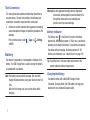
Tip: Touch the time in the lower right-hand corner of the
screen to display battery charge status.
Charging the Battery
Your device comes with a Wall/USB Charger (Outlet
Connector, Charging Head, and USB cable) to charge your
device from any standard AC power outlet.
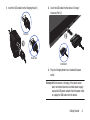
1. Insert the USB cable into the Charging Head (1).
2. Insert the USB cable into the device’s Charger/
Accessory Port (2).
Correct
Incorrect
Incorrect
3. Plug the Charging Head into a standard AC power
outlet.
Warning! While the device is charging, if the touch screen
does not function due to an unstable power supply,
unplug the USB power adapter from the power outlet
or unplug the USB cable from the device.
Getting Started
8
4. When charging is complete, unplug the Charging Head
from the power outlet and remove the USB cable from
the device.
Note: You cannot charge the battery using the USB cable and
your PC.
Important! The plug-in SIM card information and its contacts
can be easily damaged by scratching or bending,
so be careful when handling, inserting, or
removing the card. Keep all SIM cards out of reach
of small children.
Note: If the battery is completely discharged, you cannot turn
on the device, even with the USB power adapter
connected. Allow a depleted battery to charge for a few
minutes before you try to turn on the device.
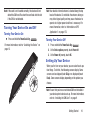
Carefully slide the SIM card into the SIM card socket
(as shown) until the card locks into place. The
illustration shows the screen facing up.
• Make sure that the card’s gold contacts face downward and
that the notched corner of the card goes in first.
Top of Screen
Installing the SIM Card
When you subscribe to a cellular network, you are provided
with a plug-in SIM card loaded with your subscription details,
such as your PIN, available optional services, and many
others features.
Correct
Incorrect
9
Note: If the card is not inserted correctly, the device will not
detect the SIM card. Re-orient the card back into the slot
if the SIM is not detected.
Turning Your Device On and Off
Turning Your Device On
Press and hold the Power/Lock Key
.
For more information, refer to “Unlocking the Device” on
page 13.
Note: Your device’s internal antenna is located along the top
back of the device. Do not block the antenna; doing so
may affect signal quality and may cause the device to
operate at a higher power level than is necessary. For
more information, refer to “Information on GPS
Applications” on page 176.
Turning Your Device Off
1. Press and hold the Power/Lock Key
.
2. At the Device options prompt, touch Power off.
3. At the Power off prompt, touch OK.
Setting Up Your Device
When you first turn on your device, you are asked to set up a
few things. To do that, the following screens display. Some
screens can be skipped (touch Skip) or re-displayed (touch
Back). Some screens display depending on the options you
choose.
Note: Ensure that you have an activated SIM card installed in
your device prior to device set-up. For more information,
refer to “Installing the SIM Card” on page 9.
Getting Started
10
1. A Welcome screen displays. The device language is set
to English by default. To change the language, touch
English and scroll through the list and touch the
language you want your device to use.
2. Touch Start.
3. Set the date and time, or tap Automatic date and time if
you want the device to keep time in your time zone
automatically, then tap Next.
4. Your new device uses your Google account to fully use
its Android features, including Gmail, Maps,
Navigation, Google Talk, and the Google™ Play Store.
The Make it Google screen allows you to create a new
Google account or sign in, if you already have a Google
account.
• Touch Sign in and enter the email address and password for
your existing account.
• Touch Get an account to sign up for a Google Account.
• Touch Not now to perform this task later. For more information,
refer to “Setting Up Your Gmail Account” on page 97.
The main Home screen displays.
11
5. Read the Use Google location screen information and
enable either or both of the Google location services,
then touch Next.
6. Enter your First and Last name in the This tablet
belongs to... screen to personalize some of your
applications and touch Next.
7. Read the information on the Google services screen
and touch Next.
8. Touch Finish at the Setup complete screen.
Creating a New Google Account
In order to utilize your device to the fullest extent, you will
need to create a Google™ Account when you first use your
device. With a Google Account, Google applications will
always be in sync between your tablet and computer.
If you did not create a new account during the setup
procedure when you first turned your tablet on, follow these
steps:
1. From a Home screen, touch
Apps ➔
Gmail.
The Add a Google Account screen displays.
2. Tap New to create a new Google account.
3. Follow the on-screen instructions to add the account.
Retrieving Your Google Account
Password
A Google account password is required for Google
applications. If you misplace or forget your Google Account
password, follow these instructions to retrieve it:
1. From your computer, use an Internet browser to
navigate to http://google.com/accounts.
2. Once the URL loads, click on the Can’t access your
account? link and follow the on-screen instructions.
Task Manager
Your device can run applications simultaneously and some
applications run in the background.
Use Task Manager to see which applications are running on
your device and to end running applications to extend battery
life. You can also uninstall applications from your device and
see how much memory is used by applications.
To access the Task Manager:
1. From a Home screen, touch
➔
Task manager.
Apps
The Task Manager options display on the side of the
screen.
2. Touch one of these options:
• Active applications: displays all of the applications that are
presently running on your tablet. Tap End to end an application,
or tap End all to end all running applications.
• Downloaded: displays the size of your downloaded application
programs.
• RAM manager: displays the Random Access Memory (RAM)
and allows you to clear different levels of RAM.
• Storage: displays a summary of the tablet’s storage.
• Help: displays information on how to extend battery life.
Task Manager provides information about Active applications
and includes a RAM manager.
Getting Started
12
Galaxy Tab Accessories
To find accessories for your Galaxy Tab:
1. Go to http://www.samsung.com/us/mobile/galaxy-tabaccessories.
Galaxy Tab accessories display.
Locking the device manually
Press the Power/Lock Key
.
Unlocking the Device
1. Press the Power/Lock Key
.
2. Swipe the screen in any direction to unlock the device.
2. Use your model number to find compatible
accessories.
Securing Your Device
By default, the device locks automatically when the screen
times out or you can lock it manually. You can unlock the
device using one of the default Unlock screens or, for
increased security, use a personal screen unlock pattern.
For more information about creating and enabling a Screen
unlock pattern, see “Screen Lock” on page 117.
For other settings related to securing your device, see
“Security” on page 117.
Note: Unless stated otherwise, instructions in this User Manual
start with the device unlocked, at the Home screen.
The last accessed screen displays.
Note: You can choose the type of Screen Unlock you want to
use, from Swipe, Face unlock, Pattern, PIN or Password.
For more information, refer to “Security” on page 117.
13
Troubleshooting
If your device experiences fatal errors, hangs up, or freezes,
you may need to reset the device to regain functionality.
• Press and hold the Power/Lock Key
for
approximately 8-10 seconds.
Getting Started
14
Section 2: Understanding Your Device
This section outlines key features of your device and
describes the screen and the icons that appear when the
device is in use. It also shows how to navigate through the
device.
Features
• 8.9-inch WXGA PLS TFT LCD touch screen
• AndroidTM 4.0, Ice Cream Sandwich
• High speed data network supporting LTE and HSPA+ technologies
• Play StoreTM for access to over 200,000 Apps
• Full HTML Web Browser with Adobe® Flash® Technology
• Bluetooth® 3.0 Wireless technology.
• Built-in Wi-Fi technology (802.11 a/b/g/n)
• 3.2 Megapixel Camera/Camcorder with Flash, plus 2 Megapixel
forward-facing Camera for Video Chat
• Messaging Features:
– Gmail
– Email (corporate and personal)
– Google Talk (Instant Messaging)
– Google+
– Messenger
15
• Photo Gallery that supports JPEG, PNG, GIF, WBMP, BMP, and AGIF
formats
• Video Player supports MP4/3GP, WMV/ASF, AVI, MKV, DivX, FLV,
and WebM formats
• DivX Certified® to play DivX® video up to HD 720p, including
premium content. May play DivX® video up to 1080p on external
device.
• Music Player supports AAC, AMR, WMA, 3GP, MP4/M4A, MP3,
FLAC, OGG, WAV, MID/XMF/MXMF, RTTL/RTX, OTA, and IMY
formats
• 1GB RAM memory and 16GB on-board memory, which is used for
data storage and access
• Photo Editor for editing your pictures
• Polaris Office® for easy document viewing and editing
• Social Hub
Note: This device does not support external memory cards.
Warning! This device does not support some USB storage
media devices. For more information, refer to
“Galaxy Tab Accessories” on page 13.
3. Display Screen: The orientation of the display screen
rotates with the tablet as you turn it. You can turn this
feature on and off. For more information, refer to
“General Display Settings” on page 112.
Front View
The following items can be found on the front of your device
as illustrated.
1. Light Sensor: Used to control screen brightness
automatically and when taking photos with the
Front-facing Camera.
1
2
3
2. Front-facing Camera Lens: Used when taking photos of
yourself or using video chat.
Understanding Your Device
16
Top and Bottom Views
The following items can be found on the top and bottom of
your device.
1. Power/Lock Key: Press
and hold to turn the
1
device on or off. Press
to lock the device or to
2
wake the screen for
6
3
unlocking.
2. Volume Key: From any
Home screen, press to
adjust Master Volume.
During music
playback, press to
adjust volume.
7
7. Charger/Accessory Port: Plug in a USB cable for
charging or to sync music and files.
Back View
The following items can be found on the back of your device.
1. Camera Lens: Used when taking photos or recording
videos.
2. Camera Flash: Used when taking photos.
4
1
6
5
3. 3.5mm Headset Jack:
Plug in for
headphones.
4. Microphone: Used to pick up your voice or audio during
recording.
5. SIM Card Port: Insert your SIM card here.
17
6. External Speakers: Used in music or video playback,
notification tones, and for other sounds.
2
Home Screen
The Home screen is the starting point for using your device.
Note: Unless stated otherwise, instructions in this user manual
start with the device unlocked, at the Home screen.
1
2
3
4
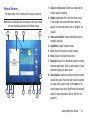
1. Google and Voice Search: Search your tablet and the
web by typing or speaking.
2. Widgets: Applications that run on the Home screen.
These widgets are found on the Home screen by
default. For more information, refer to “Widgets” on
page 26.
3. Home screen indicator: shows which Home screen is
presently displayed.
4. Applications: Display the Apps screen.
5. Back: Return to the previous screen or option.
6. Home: Display the central Home screen.
7. Navigation: Open a list of thumbnail images for recently
accessed applications. Touch an App to open it. Touch
and hold to display the Apps screen.
14
5
7
6
9
8
10
13
11
12
8. Screen Capture: Capture an image of the current screen
and edit the image. Touch and hold to capture and add
an image of the current screen to the clipboard. The
screen images saves to the /Root/Pictures/Screenshots
folder. For more information, refer to “My Files” on
page 165.
Understanding Your Device
18
9. MIni App Tray: Shortcuts to apps that you can use
anytime, such as such as: Alarm, Email, Music player,
Pen memo, and World clock. For more information,
refer to “Mini App Tray” on page 29.
10. Primary Shortcuts. These shortcuts display on the
device by default. You can add your own shortcuts. For
more information, refer to “App Shortcuts” on page
27.
11. System Bar: The area along the bottom of the Home
screen where you can find navigation buttons and
icons that display notifications, time, connection
status, and battery power.
12. Notification Icons: Displays icons that reflect system
notifications or application notifications. Touch a
Notification Icon to display details. For a list of icons,
see “Status Bar” on page 24.
13. Time/Quick Settings: Displays the current time. For
more information, refer to “Date and Time” on page
127. Touch to display the Quick Settings panel.
19
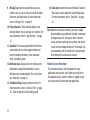
14. Status Icons: Indicate the status of the tablet. Touch the
Status Icons area to display the Quick Settings panel.
For more information, refer to “Status Bar” on page
24.
Note: Network status icons turn blue if you have a Google
Account added to your tablet and the tablet is connected
to Google services for syncing your Gmail, Calendar
events, contacts, backing up your settings, and more. If
you do not have a Google Account or if, for example, you
are connected to a Wi-Fi network that is not connected
to the Internet, the network icons are gray.
Home Screen Overview
The main home screen is the starting point for many
applications and functions, and it allows you to add items
like application icons, shortcuts, folders, or widgets to give
you instant access to information and applications.
Navigating Through the Home Screens
Your device initially has 3 home screens but you can add
home screens up to a total of 7 different screens. If you like,
you can place different applications on each of the home
screens. Slide your finger horizontally across the screen to
scroll to the left or right side screens.
Note: The main Home screen displays when you touch
Home.
Customizing the Home Screens
Screen Settings
You can customize display screen settings to your
preferences. For more information, refer to “Display
Settings” on page 111.
Adding and Removing Home Screen Panels
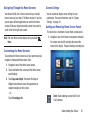
This device has a maximum of seven Home screen panels.
1. Navigate to one of the Home screen panels and pinch
the screen from the left and right side toward the
center of the display. The panel editing screen displays.
To customize the Home screens to suit your preferences just
navigate to the desired Home screen, then:
1. Navigate to one of the Home screen panels.
2. Touch and hold on the screen until the Home screen
panel displays.
3. Touch Apps and widgets, then touch the Apps or
Widgets tab and touch one of the applications or
widgets to display on this screen.
– or –
Touch Set wallpaper for.
Delete: Touch and drag a screen to the Trash
Can to remove.
Understanding Your Device
20
Add: Touch to add a new screen (up to 7 total).
This option is available when less than 7
screens are added.
Default Home Page: Touch the Home icon to
set the selected screen as the main Home
screen.
2. Touch and drag a screen to a new location to rearrange
the order of the panels.
Use command buttons and the touch screen to navigate.
Command Buttons
Back to return to the previous screen, option, or
Close
21
3. Touch a screen capture file to display it.
Other Buttons
Touch
Google to search the web or your device.
Context-Sensitive Menus
Context-sensitive menus offer options for features or
screens. To access context-sensitive menus:
• Touch
Menu to display a list of options.
• Touch an option in the list.
Home
Touch
Touch
Screen Capture to take a snapshot of the screen
currently displayed. To view the screen shots:
1. From a Home screen, touch
Apps ➔
My Files
➔ Pictures.
Google Search
Back
Note: When the on-screen keyboard is active,
Keyboard displays.
Touch
Recent Apps to open a list of thumbnail images of
apps you have worked with recently. Touch an App to open it.
Also, you can access the Task manager.
Screen Capture
2. Touch ScreenCapture.
Navigating Your Device
Touch
step.
Recent Apps
Home to display the first center Home screen.
Screen Navigation
Touch
Touch items to select or launch them. For example:
• Touch the on-screen keyboard to enter characters or text.
• Touch a menu item to select it.
• Touch an application icon to launch the application.
Touch and Hold
Activate on-screen items. For example:
• Touch and hold a widget on the home screen to move it.
• Touch and hold on a field to display a pop-up menu of options.
Swipe, Flick, or Slide
Swipe, flick, or slide your finger vertically or horizontally
across the screen. For example:
• Unlocking the screen
• Scrolling the Home screens or a menu
Pinch
Use two fingers, such as your index finger
and thumb, to make an inward pinch
motion on the screen, as if you are picking
something up, or an outward motion by
sweeping your fingers out. For example:
• Pinch a photo in Gallery to zoom in.
• Pinch a web page to zoom in or out.
Panning
To pan, touch and hold a selected icon, then move the device
to the left or right to reposition it to another page. You must
first activate Motion on your device. Use panning to:
• Move icons on your Home screens or Application Menus to
another page.
For more information, refer to “Motion Settings” on page
130.
Notifications
Notification icons appear in the System Bar, to the left of the
Time when you receive a notification. Notifications indicate
the arrival of Gmail, Email, alarms, calendar events, and so
on.
Touch a Notification icon for more detail. For example, touch
a Gmail Notification icon to see who sent the message.
Touch the time in the lower right-hand corner of the screen
to open the Notifications list to view all of your current
notifications. Touch a Notification in the list to display the
item. For example, touch a Gmail entry to open the Gmail
application and view the message.
Understanding Your Device
22
Most apps that send notifications, such as Gmail and Google
Talk, have their own settings, which you can use to configure
whether and how they send notifications, whether they
sound a ringtone, and so on. See the settings for individual
applications in the applications section for details.
The Quick Settings pop-up displays.
Status Details
To display the current date and time, battery status, and WiFi connectivity status, open Status Details.
1. Touch the Time in the Status Bar.
The Status Details displays. If you have any current
notifications, their summaries are listed below the
Notifications heading. Touch a notification summary to
respond to it.
2. Close the Status Details by touching any other part of
the screen.
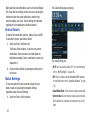
Quick Settings
To view and control the most common settings for your
tablet, as well as accessing the complete Settings
application, open the Quick Settings.
1. Touch the Time in the System bar.
23
The Quick Settings are:
• Wi-Fi: Touch to enable or disable Wi-Fi. For more information,
refer to “Wi-Fi Settings” on page 105.
• GPS: Touch to enable or disable Standalone GPS services.
For more information, refer to “Location Services” on page
116.
• Sound/Vibrate/Mute: Touch to enable or disable sound mode.
• Screen rotation: Touch to enable or disable automatic rotation.
When disabled, the screen does not rotate when you turn the
tablet.
• Power saving: Power Saving mode allows you to manage the
device to conserve power. For more information, refer to
“Power Saving Mode” on page 112.
• Notification: Touch to enable or disable system and application
notifications. For more information, refer to “Notifications”
on page 22. You must sweep the Quick Settings screen to the
left to show this option.
• Mobile data: Disables mobile data so you can no longer use
applications such as Internet, Email, and YouTube using a
mobile network.
• Bluetooth: Touch to turn on Bluetooth. For more information,
refer to “Bluetooth” on page 142.
• Driving mode: Touch to turn on Driving mode and activate the
Driving mode settings. For more information, refer to “Speech
Settings” on page 125. You must sweep Quick Settings
screen to the left to show this option.
• Sync: Synchronizing the device with the network. Synchronizes
contacts, email, time, and a variety of other accounts.
2. Touch Clear to remove Notification Icons from the
System Bar.
4. Touch the X in the upper, right corner of the Quick
Settings panel to close Quick Settings. Or touch outside
the Quick Settings screen.
Status Bar
The Status Bar displays icons to show network status,
battery power, and other details.
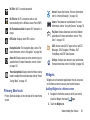
Battery Level: Shown fully charged.
Charging Indicator: Battery is charging.
Device Power Critical: Battery has only three percent
power remaining. At about 15 percent power
remaining, a popup displays to remind you to charge
immediately.
USB Charging Indicator: The device is connected to a
computer using a USB cable, but it is not charging. The
battery is only charged while connected to a computer,
if the device is turned off. When the device is off, press
the Power/Lock key to see the battery charging
indicator.
3. Touch a Notification entry to display details.
Understanding Your Device
24
Signal Strength: Displays your current signal strength.
The greater the number of bars, the stronger the
signal.
Connected as a media device: Displays when the device
is connected to a computer with a supported USB
cable.
New Text Message: Displays when a new text message
is received.
Displays when your connection to a UTMS, HSDPA,
HSPA, or HSPA+ network is active.
New Email Message: You have new email. Touch the
icon for additional information.
Displays when your tablet is communicating with the
UTMS, HSDPA, HSPA, or HSPA+ network.
New Gmail Message: You have new Gmail. Touch the
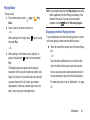
icon for additional information.
Displays when your connection to a 4G LTE network is
active.
Google Talk Invitation: Someone has invited you to chat
using Google Talk.
Displays when your tablet is communicating with the
4G LTE network.
Configure input methods: When the keyboard displays,
touch this icon to display a menu of quick keyboard
settings.
Updates Available: Updates to the applications you
have downloaded are available.
Download in progress: An application is being
downloaded to the device.
Download Successful: A recent application download
or update completed successfully.
25
Airplane Mode: Indicates that the Airplane Mode is
active, which allows you to use many of your device’s
features, but it cannot access online information or
applications.
Bluetooth Active: Bluetooth is turned on. For more
information, refer to “Bluetooth” on page 142.
Music Player: A song is playing. Touch the Music icon
or touch the Status Details to see the song title and
music player controls. For more information, refer to
“Changing Library View” on page 60.
Wi-Fi On: Wi-Fi is on and connected.
Wi-Fi Active: Wi-Fi is connected, active, and
communicating with a Wireless Access Point (WAP).
Wi-Fi networks available: An open Wi-Fi network is in
range.
GPS Active: Displays when GPS is active.
Internet: Access the Internet. For more information,
refer to “Internet Browsing” on page 133.
Camera: Take photos or record videos. For more
information, refer to “Using the Camera” on page 78.
Play Store: Browse, download, and install Android
applications.For more information, refer to “Play
Store” on page 170.
Navigation Active: The Navigation App is active. For
more information, refer to “Navigation” on page 166.
AT&T: Access several AT&T apps such as myAT&T,
Messages, AT&T Navigator, YPmobile, AT&T
FamilyMap, and AT&T Code Scanner.
Alarm Set: Displays when you set an alarm to ring at a
specified time. For more information, refer to “Alarm”
on page 147.
Settings: Configure your device to your preferences.
For more information, refer to “Settings” on page 105.
Power Saving Mode: Displays when the Power saving
mode is enabled. For more information, refer to “Power
Saving Mode” on page 112.
Primary Shortcuts
Primary Shortcuts display at the right side of the main Home
screen.
Widgets
Widgets are self-contained applications that you can place
on the Home screens to access your favorite features.
Adding Widgets to a Home screen
1. Navigate to the Home screen on which you want to
place the Widget, then touch
Apps.
2. Touch the Widgets tab.
Understanding Your Device
26
3. Swipe horizontally across the screen to view all the
widgets.
4. Touch and hold a Widget icon, then drag the icon onto
the Home screen panel and release it.
Note: There must be room on the screen where you want to
place the widget, otherwise the widget will not add on
the Home screen.
The Home screen options screen displays.
3. Touch Apps and widgets, then touch an application to
add it to the Home screen. You can select the Apps tab
or the Widgets tab. Sweep the screen to the left to see
more Apps or widgets.
For a list of applications, see “Apps Screen” on
page 30.
4. Touch
5. Touch
Back to return to the Home screen.
Removing Widgets
Touch and hold the Widget then slide it toward the top
Delete icon appears, then
of the screen until the
drop the application over the trash can to remove it.
App Shortcuts
Use App Shortcuts for quick access to applications or
features, such as Email or other applications.
Adding Shortcuts from a Home Screen
1. Navigate to the Home screen on which you want the
App Shortcut to be placed.
2. Touch and hold on the screen.
27
Back to return to the Home screen.
Adding App Shortcuts from the Apps Screen
1. From a Home screen, touch
Apps.
2. Touch and hold on an application icon, then slide your
finger where you want to place the icon and release it.
3. Touch and hold the App Shortcut, then drag the
application icon to reposition it on the Home screen.
Removing App Shortcuts
Touch and hold the App Shortcut until
Delete
appears at the top of the screen, then drag the App
Shortcut on top of the icon and release it.
Folders
Place items inside folders to organize them on the Home
screen.
Adding Folders
1. Navigate to the desired Home screen.
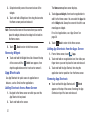
To remove an App shortcut from a folder:
1. Touch the folder to view the contents.
2. Touch the App shortcut, drag it out of the folder, and
drop it on the Home screen.
Removing Folders
2. Touch and hold on the screen until the Home screen
pop-up displays.
1. Touch and hold the Folder then slide it toward the top
of the screen until the
Delete icon appears.
3. Touch Folder.
A new folder displays on the Home screen.
2. Drag the Folder on top of the
release it to delete the folder.
Managing Folders
To name a folder:
Touch the folder, touch the Unnamed folder field, and
use the keyboard to enter a name for the folder.
To add an App shortcut to a folder:
1. Add the App shortcut to the Home screen where the
folder resides.
2. Touch and hold the App shortcut, drag it to the folder,
and drop it.
Delete icon and
Wallpapers
You can choose a picture to display in the background of the
Home screen. Choose from preloaded wallpaper images or
select a photo you have downloaded or taken with the
Camera.
1. From a Home screen, touch and hold on the screen.
The Home screen options screen displays.
2. Touch Set wallpaper for, then touch Home screen, Lock
screen, or Home and lock screens.
3. Choose a source for images:
• Gallery: Touch a picture then drop and resize it. Touch Done to
save the picture as wallpaper. Touch Cancel.
Understanding Your Device
28
• Live wallpapers: Choose from pre-loaded interactive animated
wallpapers. Touch a wallpaper to view an example. If available,
touch Settings to view options for the selection. Touch Set
wallpaper to save your choice. Touch
Back to return to
the Wallpapers menu.
• Wallpapers: Choose from pre-loaded wallpaper images. Touch
an image to view it. Touch Set wallpaper to save it as
wallpaper.
4. Touch
Back to return to the Home screen.
Mini App Tray
There are shortcuts available that link to apps that you might
need while working in other apps, such as an alarm, Email,
Music Player, writing a memo, or the World Clock. In some
cases, these shortcuts are actually links to the part of the
app you need most and they contain link to the actual app
where you can use other functions.
1. From any screen, touch
Mini App Tray at the
bottom, center of the screen.
The Mini App Tray icons display.
29
2. Touch one of the following icons to use the app.
Alarm: set alarms for reminders or for wake-up
times.
Calculator: perform basic arithmetic functions to
solve simple arithmetic problems and advanced
operators to solve more complex problems.
Calendar: schedule and view events, set an
agenda, create a task, and synchronize with your
Google account calendar all in one application.
Email: view and manage all your email accounts
in one application.
Music player: Displays the Music player. Touch
to link to the Music app. Touch
to display
your songs list. Touch
to close the app.
Pen memo: Displays the Pen memo app, which
you can use to create and save a memo. Touch
to link to the Pen memo app. Touch Done to
save your memo. Touch
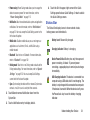
to close the app. For
more information, refer to “Pen Memo” on page
167.
Task manager: Use Task manager to view
running applications, end running applications
to extend battery life. You can also unintstall
applications and view the amount of memory
used by applications. For more information, refer
to “Task Manager” on page 12.
World clock: Displays the time for the locations
you have set up. Touch
to link to the World
Clock app. Touch
to close the app. For more
information, refer to “World Clock” on page 173.
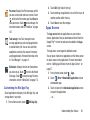
Customizing the Mini App Tray
Select applications to display in the Mini App Tray and
arrange them in any order.
Mini App Tray.
1. From a Home screen, touch
2. Touch Edit (right side of the tray).
3. Touch and drag an application in or out of the tray or to
another position within the tray.
4. Touch Done to save the changes.
Apps Screen
The Apps screen holds all applications on your wireless
device. Applications that you download and install from the
Google Play or from the web are also added to the Apps
screen.
The Apps icons are arranged in alphabetic order.
You can place shortcuts to applications on the Home screen
for quick access to the application. For more information,
refer to “Adding App Shortcuts from the Apps Screen” on
page 27.
1. From a Home screen, touch
Apps.
Menu ➔ Downloaded applications to view
2. Touch
downloaded apps.
3. Touch an icon on the Downloaded applications screen
to launch the application.
– or –
Understanding Your Device
30
Add an App Shortcut to a Home screen by dragging an
App icon onto the Home screen. For more information,
refer to “Adding App Shortcuts from the Apps Screen”
on page 27.
Applications
The following is an alphabetical list of the applications that
come preloaded on your device.
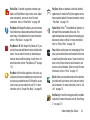
Alarm: Schedule alarms to remind you of
appointments or events, or as a wake-up. For more
information, refer to “Alarm” on page 147.
AllShare: Synchronize your device with your TV. For
more information, refer to “AllShare” on page 148.
Amazon Kindle: This application allows you to
download books, magazines, and newspapers to read
on your tablet. For more information, refer to “Amazon
Kindle” on page 149.
AT&T Code Scanner: AT&T Code Scanner allows you to
scan 2D (QR and data matrix codes) and 1D (UPC and
EAN) barcodes found in magazines, stores, and
online. For more information, refer to “AT&T Code
Scanner” on page 150.
31
AT&T Communication Manager: AT&T Communication
Manager is the easy-to-use, all-in-one tool that helps
you view and manage your data plan. For more
information, refer to “AT&T Communication
Manager” on page 36.
AT&T FamilyMap: Provides peace of mind by being able
to conveniently locate a family member from your
wireless tablet or PC and know that your family's
location information is secure and private. For more
information, refer to “AT&T FamilyMap” on page 151.
AT&T Navigator: AT&T Navigator provides you with
access to real-time GPS-driven applications. For more
information, refer to “AT&T Navigator” on page 151.
Calculator: The calculator provides the basic
arithmetic functions to solve simple arithmetic
problems and advanced operators to solve more
complex problems. For more information, refer to
“Calculator” on page 151.
Calendar: Record events and appointments to manage
your schedule. For more information, refer to
“Calendar” on page 152.
Camera: Take photos or record videos. A shortcut to
Camera appears on the Home screen by default. For
more information, refer to “Using the Camera” on
page 78.
Contacts: Save and manage contact information for
your friends and colleagues. For more information,
refer to “Contacts” on page 48.
Downloads: Files, apps, and other items you download
in Browser, Gmail, Email, or in other ways, are stored
on your tablet’s internal storage. Use the Downloads
app to view, reopen, or delete what you have
downloaded. For more information, refer to
“Downloads” on page 154.
Email: Send and receive email from your device. For
more information, refer to “Email” on page 91.
Gallery: View and manage photos stored on your
device. For more information, refer to “Gallery” on
page 76.
Gmail: Send and receive email with Gmail, Google’s
web-based email. For more information, refer to
“Gmail” on page 97.
Google+: Google+ makes messaging and sharing with
your friends a lot easier. You can set up Circles of
friends, visit the Stream to get updates from your
Circles, use Messenger for fast messaging with
everyone in your Circles, or use Instant Upload to
automatically upload videos and photos to your own
private album on Google+. For more information, refer
to “Google+” on page 103.
Internet: Access the Internet. For more information,
refer to “Internet Browsing” on page 133.
Latitude: Use Google Latitude to locate your friends on
a map and share or hide your location. For more
information, refer to “Latitude” on page 157.
Local: Use Google Maps to find places of interest, plus
add your own favorite places. For more information,
refer to “Local” on page 159.
Maps: Find locations and get directions with Google
maps. A shortcut to Maps appears on the Home screen
by default. For more information, refer to “Maps” on
page 159.
Understanding Your Device
32
Media Hub: Browse the latest movies and TV shows,
then rent or purchase the media for viewing on your
device. For more information, refer to “Media Hub” on
page 58.
Memo: Create text memos and use Bluetooth to send
memos. For more information, refer to “Memo” on
page 162.
Messages: AT&T Messages brings your texts, calls,
and voicemail messages together into a single
conversation thread and is accessible by tablet or
computer. For more information, refer to “Messages
Application” on page 103.
Messaging: You can send and receive different types
of messages. For more information, refer to
“Messaging” on page 88.
Messenger: Messenger allows you to bring groups of
friends together into a simple group conversation.
When you get a new conversation in Messenger,
Google+ sends an update to your device. For more
information, refer to “Messenger” on page 104.
33
Movies: The Movies application allows you to rent
movies to watch on your tablet. For more information,
refer to “Movies” on page 74.
Music Player: Play music and other audio files that you copy
from your computer. For more information, refer to
“Changing Library View” on page 60.
My Files: Find, view, and manage files stored on your
tablet. For more information, refer to “My Files” on
page 165.
myAT&T: myAT&T allows you to manage your AT&T
account. You can review and pay your bill, check
minutes and data usage, upgrade to a new device, or
change your rate plan. For more information, refer to
“myAT&T” on page 164.
Navigation: Use Google Maps Navigation to search for
locations, with turn-by-turn directions. For more
information, refer to “Navigation” on page 166.
Pen Memo: This app is not only useful, but lots of fun,
if you like to draw. Pen Memo lets you type memos or
draw pictures. For more information, refer to “Pen
Memo” on page 167.
Photo Editor: To perfect any photos stored on your
tablet, use Photo Editor to crop, rotate, resize, adjust
color and contrast, and much more. For more
information, refer to “Photo Editor” on page 169.
Play Store: Browse, download, and install Android
applications. A shortcut to Play Store appears on the
Home screen by default. For more information, refer to
“Play Store” on page 170.
Play Books: With Google Play Books, you can find more
than 3 million free e-books and hundreds of thousands
more to buy in the eBookstore.For more information,
refer to “Play Books” on page 169.
Polaris Office: Polaris® Office Mobile for Android is a
Microsoft Office compatible office suite. This
application provides a central place for managing your
documents online or offline. For more information,
refer to “Polaris Office” on page 170.
Play Movies & TV: With Google Play Movies & TV, you
can rent thousands of different movies and television
shows. You can watch instantly, or download your
movie or show for offline viewing at a later time. For
more information, refer to “Play Movies & TV” on page
170.
Play Music: With the Music application, while online, you
can play music that you have added to your music file as well
as any music you copied from your PC. While offline, you can
listen to music you have copied from your PC. For more
information, refer to “Google Play Music” on page 59.
Pulse: Makes reading news fun and engaging. Pulse
takes your favorite websites and transforms them into
a colorful and interactive mosaic. Tap on an article to
view a story. Share stories to social networks and
services such as Facebook, Twitter, or email. For more
information, refer to “Pulse” on page 171.
Qik Lite: Allows you to record and share live video from
your tablet with your friends, family and your favorite
social networks. For more information, refer to “Qik
Lite” on page 75.
Real Racing 2: A realistic racing game with incredible
resolution. For more information, refer to “Real Racing
2” on page 172.
Understanding Your Device
34
Search: Use the Google search engine to search the
internet and your device. A shortcut to Google Search
appears on a Home screen by default. For more
information, refer to “Google Search” on page 21.
Settings: Configure your device to your preferences.
For more information, refer to “Settings” on page 105.
Social Hub: Access your social networks, like
Facebook, YouTube, and Twitter, all in one place. A
shortcut to Social Hub appears on a Home screen by
default. For more information, refer to “Social Hub” on
page 172.
Talk: Chat with other Google Talk users. For more
information, refer to “Google Talk” on page 99.
Task manager: The Task manager application provides
information about the processes and programs
running on your tablet, as well as the memory status.
It can also be used to terminate processes and
applications.
Video Player: Play and manage videos stored on your
tablet. For more information, refer to “Video Player”
on page 73.
35
World Clock: View the date and time in any time zone.
For more information, refer to “World Clock” on page
173.
YouTube: View and upload YouTube videos, right from
your device. A shortcut to YouTube appears on the
Home screen by default. For more information, refer to
“YouTube” on page 174.
YPmobile: The YPmobile (Yellow pages) application
provides quick and ready access to businesses, map
locations, and storage of your favorite searches. For
more information, refer to “YPmobile” on page 174.
Zinio: Zinio is an app for reading and downloading your
favorite magazines. You can browse for magazines,
download subscriptions or single issues and sync your
magazines on multiple devices. For more information,
refer to “Zinio” on page 175.
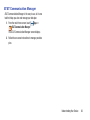
AT&T Communication Manager
AT&T Communication Manager is the easy-to-use, all-in-one
tool that helps you view and manage your data plan.
Apps ➔
1. From the main Home screen, touch
AT&T Communication Manager.
The AT&T Communication Manager screen displays.
2. Follow the on-screen instructions to manage your data
plan.
Understanding Your Device
36
Section 3: Entering Text
This section describes how to enter words, letters,
punctuation and numbers when you need to enter text.
• Samsung Keyboard: Samsung’s on-screen QWERTY
Your device uses a virtual QWERTY keyboard for text entry.
Use the keyboard to enter letters, punctuation, numbers, and
other characters into text entry fields or applications. Access
the keyboard by touching any text entry field.
• Swype: a new way to enter text on touch screens. Instead
Virtual QWERTY Keyboard
The virtual QWERTY keyboard displays at the bottom of the
screen. By default, when you rotate the device, the screen
orientation updates to display the keyboard at the bottom of
the screen.
Text Input Methods
There are four text input methods available:
• Android Keyboard (default): an on-screen QWERTY keypad
that can be used in both portrait and landscape orientation
(see page 38).
• Google voice typing: You can use your voice to enter text
using the Voice input feature. Your device recognizes your
speech and enters text for you. (see page 44).
37
keyboard is used in both portrait and landscape orientation
(see page 39).
of tapping each key, use your finger to trace over each
letter of a word (see page 44).
Changing the Input Method
When entering text, you can select the text input method.
Set up input methods in the Status bar.
1. Touch
The Set up input methods pop-up displays.
2. Touch an input method to activate it.
3. Touch
to display the input method’s settings.
For more information, refer to “Keyboards and Input
Methods” on page 121.
Note: You must enable Swype before it displays in the Set up
input methods list.
Entering Text Using the Android
Keyboard
From a screen where you can enter text, rotate your tablet
counterclockwise to a Landscape orientation. The on-screen
QWERTY keypad will display.
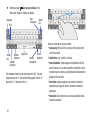
Text Input Mode
?123
Symbol/Numeric Mode: activates the number,
symbol, and emoticon keys.
ABC
ABC Mode: activates the default alphabet keys.
Can also be set to Abc or abc by using the shift
(
) key.
Delete Key
Note: When in Abc mode, the Sym button will appear. When in
Sym mode, the Abc/ABC/abc button will appear.
Using Abc Mode
Shift Emoticons
Key
Input options
Space Bar
Input Methods
New
Paragraph
Changing the Text Input Mode - Keypad
There are two main keypad layout keys that will change the
on-screen keys within the QWERTY keypad.
The available Text Input modes are: Sym and Abc.
1. If desired, rotate your tablet counterclockwise to a
Landscape orientation.
2. Touch the Text field.
3. Tap the desired alphabetic characters.
4. The screen initially opens in ABC mode. After typing the
first letter, the shift key (
) will change to
and
following letters are lowercase.
Entering Text
38
5. Touch
to input another upper-case letter or touch
twice to switch to ABC mode. The shift key will
change to
in ABC mode. All following letters are
uppercase until you tap the shift key again.
Using Symbol/Numeric Mode
Your tablet also provides handwriting recognition to make the
task of text entry that much easier.
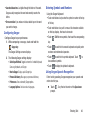
New
Paragraph
Resize
Keypad
Delete
Key
Use Symbol/Numeric Mode to add numbers, symbols, or
emoticons.
1. Touch ?123 on the screen.
2. Touch the desired number, symbol, or punctuation
mark.
3. Touch the
4. Touch
ABC
~\ {
button to access additional symbols.
Keypad
Settings
Space Bar
Emoticons
Clipboard
Handwriting
Recognition
to return to Abc mode.
Using the Samsung Keypad
The Samsung Keypad is a custom virtual QWERTY keyboard,
featuring predictive text. Input characters by touching the
on-screen keys with your finger.
As you enter characters, predictive text matches your key
touches to common words and displays them. Select a word
from the display to insert it into your text.
39
Shift
Key
Configuring the Keypad
To configure the Samsung Keypad to your preferences:
While entering text, touch
Settings.
The Samsung keypad settings screen displays. For
more information, refer to “Keyboards and Input
Methods” on page 121.
Entering Upper and Lower Case
Letters
The default case is lower case (abc). Enter upper and lower
case alphabet letters by touching the Shift key
to toggle
the case, before touching the letter key(s).
• Touch once to switch from abc to Abc mode
• Touch and hold to switch to ABC mode
Entering Symbols and Numbers
To enter a number, touch
key.
?123
, then touch the corresponding
To enter common symbols, touch ?123 to switch to Symbols
mode, then touch the corresponding key.
There are three pages of symbols. Touch
the next page.
to switch to
Touch
to toggle between a large and small keypad.
Touch
to access your clipboard.
Touch
to use the Handwriting feature. For more
information, refer to “Using the Handwriting Feature” on
page 42.
Using XT9 Predictive Text
XT9 is a predictive text system that has next-letter prediction
and regional error correction, which compensates for users
pressing the wrong keys on QWERTY keyboards.
1. Touch
Settings non the bottom left corner of the
keyboard.
The Samsung keypad settings screen displays.
2. Touch the XT9 field so a green check mark appears
next to the field.
Touch and hold a vowel key (A, E, I, O, U, or Y) or the C, N, or
S key to open a small window where you can touch an
accented vowel or other alternate letter.
3. Touch the XT9 advanced settings field to modify XT9
associated settings. For more information, refer to
“Keyboards and Input Methods” on page 121.
Touch and hold the Period key ( . ) to open a small window
with a set of common symbols.
4. Press
Emoticons key to open a small
Touch and hold the
window with a set of Emoticons.
to return to your message.
Note: The XT9 option is available only when Abc mode has
been selected.
Entering Text
40
5. Begin typing a word. A list of word options displays.
Touch one of the words to replace the word that has
already been typed.
– or –
Touch
and then touch Add word to register a new
word to XT9.
Note: The
icon is not available when using the Samsung
keypad from the Browser.
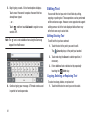
Editing Text
You can edit the text you enter in text fields by cutting,
copying, or pasting text. These operations can be performed
within and across apps. However, some apps do not support
editing some or all of the text displayed while others may
offer their own way to select text.
Editing Existing Text
To edit text that you have entered:
1. Touch the text at the point you want to edit.
The
Cursor displays at the point you touched.
2. Touch and drag the Cursor to a better position, if
necessary.
3. Enter additional text or delete text by repeatedly
touching the
Delete key.
Copying, Deleting, or Replacing Text
6. Continue typing your message. XT9 mode can be used
in portrait or landscape mode.
41
To select and copy, delete, or replace text:
1. Touch hold the text or word you want to select.
The selected text is highlighted with a tab at each end
of the selection as shown below.
Text
Pasting Text
To paste previously copied text where the
Cursor is
positioned:
1. Touch the text at the point you want to paste the copied
text.
The Cursor displays at the point you touched.
2. Touch and drag either tab to select more or less text.
Tip: Touch Select all in the Application bar to select all text in
the field. Touch on another area of the screen or touch
Cancel to unselect the text.
2. Touch and hold the Cursor and touch Paste in the popup.
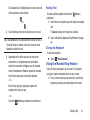
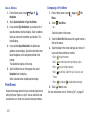
Closing the Keyboard
To close the keyboard:
3. Depending on the action you want to take for the
selected text, in the Application bar touch Cut to
remove the selected text, Copy to save the selected
text to the clipboard, or Paste to replace the selected
text with text previously saved to the clipboard.
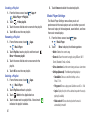
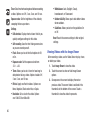
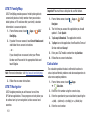
– or –
Enter text by typing or speaking to replace the
selection with what you type.
Touch
Close Keyboard.
Using the Handwriting Feature
Using the Samsung keypad, you can enter text simply by
using your finger to handwrite letters on your screen.
1. From a screen where you can enter text, activate the
keypad by touching a text input field on the screen.
– or –
Touch the
Delete key to delete the selected text.
Entering Text
42
2. Touch
. The handwriting pad displays.
Space Key
Numbers
Clipboard
& SymbolsText Input Mode
Delete
Tab to
Key Line
Display
Next Field
Return Keypad
Settings
Handwriting Tips
• For uppercase letters, write the letter larger than the lowercase
letters.
• Write a dash (horizontal line) to add a space.
• Delete words by sweeping backward across them.
• To change from letters to numbers and symbols, touch
• To return to the keyboard, touch
.
?123
.
Handwriting Settings
To change the Handwriting settings:
1. Touch
, then touch Handwriting settings.
The following settings can be changed:
Handwriting area
3. Use your finger tip to write out each character.
Note: To properly recognize the written characters and to
prevent scratching of the LCD, do not use script.
As you write, suggestions are offered in the word options
area in case the correct letters were not recognized.
43
• Recognition time: Set how long it takes to redisplay a letter
after you have drawn it.
• Pen thickness: Change the pen thickness to 1, 3, 5, 7, or 9
pixels. The examples show the actual thicknesses.
• Pen color: Change the pen color to black, red, blue, green, or
brown.
• Recognition type: Set the way your tablet recognizes what you
write.
– Stroke recognition: The letters are entered in the text field as
you write.
– Complete recognition: The letters are not entered in the text
field until you touch
word options.
Enter, which gives you time to choose
• Gesture guide: Describes how to make corrections using
gestures.
• About: Describes the version, date, and manufacturer of the
handwriting software.
2. Press
twice to return to your message.
Using Speech Recognition
You can use your voice to enter text using the Voice input
feature. Your device recognizes your speech and enters text
for you.
Note: To enable Voice Input on the Samsung keypad, touch
Settings ➔ Voice input. For more information, refer to
“Keyboards and Input Methods” on page 121.
1. Touch
if using the Android keyboard or touch
if using the Samsung keypad.
2. At the Speak now prompt, speak clearly and distinctly
into the microphone.
3. Working... displays while the software is converting
your voice to text.
The text displays in the message.
4. Touch
text.
or
again to speak and add more
Note: The feature works best when you break your message
down into smaller segments.
Entering Text Using Swype
Swype™ is a new way to enter text on touch screens.
Instead of touching each key, use your finger to trace over
each letter of a word. For each word, place your finger on the
first letter and glide to the subsequent letters, lifting on the
last letter.
Configuring Swype
The Android Keyboard is the default text input method, so to
use Swype, you must first change the default keyboard
setting.
Entering Text
44
When you touch
Set up input methods in the
Status bar, Swype is listed as an option.
New
Paragraph
Language
Shift
Numeric
Swype
Keyboard
Key
Symbols
Keyboard
Space Bar
Delete
Key
Resize
Keyboard
Speech
Recognition
This example shows how to enter the word “this”. Put your
finger down on the “t” and, without lifting, glide it to the “h”,
then to the “i”, then over to the “s”.
Here are a few tips to get you started:
• Auto-spacing: When you finish a word, just lift your finger and
start the next word.
• Double letters: Just “scribble” on the key.
• Auto-capitalization: Swype recognizes and capitalizes the first
word of sentences. If you want to capitalize a word that is not at
the beginning of a sentence, just glide above the keyboard before
gliding over the next letter.
• Contractions: Swype recognizes most words that include an
apostrophe, just swype the letters of the word, including the
apostrophe.
• Punctuation: Touch and hold a key to view a punctuation menu
and make a selection.
45
• Accented characters: Just glide through the letters of the word.
Swype usually recognizes the word and correctly accents the
letters.
• Error correction: If you make a mistake, double-tap on the word
you want to change.
Configuring Swype
Configure Swype to your preferences.
1. While composing a message, touch and hold the
Swype key.
The Swype Settings screen displays.
2. The following Swype settings display:
• Select Input Method: Toggles between the Android Keyboard,
Samsung Keyboard, and Swype.
• How to Swype: Displays quick Swype tips.
• Personal dictionary: Manages your personal dictionary.
• Preferences: View and modify Swype options.
• Language Options: Activate and set languages.
Entering Symbols and Numbers
Using the Swype Keyboard:
• Touch and hold on a key to enter the symbol or number at the top
of the key.
• Touch and hold on a key until a menu of all characters available
on that key displays, then touch a character.
• Touch
Shift for more symbols, then touch the corresponding
key.
• Touch
123 to switch to the numeric keyboard and quickly enter
numbers and mathematical operators.
• Touch
to switch to the symbols keyboard. Touch
view additional symbols.
• Touch
ABC
to
to display the alphabetic keyboard.
Using Swype Speech Recognition
Enter text by speaking. Swype recognizes your speech and
enters text for you.
Touch
prompt.
. Say the text to enter at the Speak now
Entering Text
46
Editing Keyboard
The Editing Keyboard provides a quick way to move the
cursor and highlight text. If the application in which you are
working supports editing, you can cut, copy, or paste
highlighted text.
To display the Editing Keyboard:
1. Swype from the
Swype Key to the 123 Numeric
Key.
2. Touch the edit key.
1. From the Swype keyboard, touch the text input field.
2. Touch
Set up input methods in the Status bar.
The Set up input methods pop-up displays.
3. Touch Google voice typing to enable Voice Input. For
more information, refer to “Text Input Methods” on
page 37.
4. Speak clearly and distinctly into the microphone at the
Listening prompt.
The software converts your voice to text, which
displays in the message.
5. Continue speaking to add more text.
6. Tap Done when finished entering the message.
Using Google Voice Typing
This feature allows the tablet to provide a verbal readout of
on-screen data such as messages and incoming caller
information.
Note: You must select Google voice typing as the default input
method before managing its settings.
47
Section 4: Contacts and Accounts
This section explains how to manage contacts and accounts.
Accounts
Your device can synchronize with a variety of accounts. With
synchronization, information on your device is updated with
any information that changes in your accounts.
• Facebook: Add your Facebook account to sync data with
Facebook.
• LinkedIn: Add your LinkedIn account to sync data with LinkedIn.
• Email: Add an Email account to sync Contacts. For more
information, refer to “Email” on page 91.
• Google: Add your Google account to sync your Contacts, Calendar,
and Gmail. For more information, refer to “Gmail” on page 97.
• Corporate: Add your Microsoft Exchange ActiveSync account to
sync Contacts, Calendar, and Email.
Setting Up Your Accounts
Set up and manage your synchronized accounts with the
Accounts and sync setting.
Apps ➔
Settings
1. From a Home screen, touch
➔ Accounts and sync.
2. Touch
Add account, then touch the account type.
3. Follow the prompts to enter your account credentials to
complete the set-up process.
4. The device communicates with account servers to set
up your account. When complete, your account
appears in the Manage accounts area of the Accounts
and sync screen.
Contacts
Store contact information for your friends, family, and
colleagues to quickly access information or to send a
message.
To access Contacts:
From a Home screen, touch
Contacts.
Apps ➔
Creating Contacts
1. From a Home screen, touch
Contacts ➔
New.
Apps ➔
2. Choose from a list of address books,
SIM, exchange, Google, or Device.
Contacts and Accounts
48
3. Touch the Photo ID to set up a photo to identify the
contact.
• Picture: Choose a photo from the Gallery.
• Address: Enter an address, then touch the
drop-down list
box to choose a label from Home, Work, Other, or Custom to
create a custom label.
• Take picture: Display the Camera and take a photo of the
contact.
• Events: Touch
to display an event label and field. Enter the
event date, then touch the
Label tab and select a label
such as Birthday, Anniversary, Other, or Custom to create a
custom event. Touch
to add additional events.
4. Touch contact fields to display the keyboard and enter
information:
Tip: Touch the screen and swipe up or down to display
additional fields or touch Next on the keypad to move to
the next field.
• Name: Enter a first name for the contact. Touch to enter a
Name prefix, First name, Middle name, Last name, and
Name suffix.
• Phone: Enter a telephone number, then touch the
drop-down list box to choose a label from Mobile, Home,
Work, Work Fax, Home Fax, Pager, Other, Custom to create
a custom label, or Callback.
• Email: Enter an email address, then touch the
drop-down
list box to choose a label from Work, Home, Other, or Custom
to create a custom label.
49
• Groups: Assign the contact to a group, then touch the
drop-down list box to choose a group from Co-workers,
Family, Friends, and so on. For more information about
Groups, see “Groups” on page 55
5. Touch
to add additional fields.Touch
unused field.
to remove an
6. Touch Add another field to add additional fields.
7. Touch
Back to remove the keyboard.
8. Touch
Save when you finish entering information.
Tip: Display a contact’s record and touch the Email field to
send an email, touch the Phone number field to send a text
message, or touch the Website field to link to the website.
Updating Contacts
To make changes to update an existing contact:
1. From a Home screen, touch
Apps ➔
Contacts.
2. Touch a contact in the Contacts list to view its
information:
3. Touch
in the upper right-hand corner.
4. Continue entering contact information. For more
information, refer to “Creating Contacts” on page 48.
Deleting Contacts
To delete a contact:
1. From a Home screen, touch
Contacts.
2. Touch
Send email from Contacts
1. From a Home screen, touch
Contacts.
2. Touch
Apps ➔
Menu ➔ Send email.
3. Touch each contact you want to send an email
message. A check mark indicates contact selection.
4. Touch Done.
5. Touch Compose Email or Compose Gmail.
Apps ➔
Menu ➔ Delete contacts.
3. Touch each contact to delete, then touch Delete.
Merge Contacts with Google
You can merge a current contact with your Google account
contacts.
Apps ➔
1. From a Home screen, touch
Contacts.
2. Touch
3. Touch OK at the prompt to merge this contact with your
Google account.
6. Touch Use by default for this action if you want the
same selection each time.
7. Compose your email, then touch Send.
Send message from Contacts
1. From a Home screen, touch
Contacts.
2. Touch
Apps ➔
Menu ➔ Send message.
3. Touch each contact you want to send a message. A
check mark indicates contact selection.
4. Touch Done.
Menu ➔ Merge with Google.
Contacts and Accounts
50
5. Compose the message and touch Send.
Managing Photo IDs
To remove or update a contact’s Photo ID:
1. From a Home screen, touch
Apps ➔
Contacts.
2. Touch
in the upper right-hand corner.
3. Touch the Photo ID, then touch Picture, Take picture, or
Remove.
Contacts Display Options
There are various ways to display your Contacts and general
Contacts settings.
1. From a Home screen, touch
Apps ➔
Contacts.
2. Touch Groups, Contacts, or Favorites above the
Contacts List, to view contacts various ways:
• Groups: Displays the possible Groups, such as Not assigned,
Coworkers, Family, Friends, and more. Touch a group name to
show only contacts in that group. For more information, refer to
“Creating a New Group” on page 55.
51
• Contacts: Show all your contacts. Touch the Search contacts
field and enter a keyword to list contacts that contain that
keyword.
• Favorites: Show only your favorite, or starred, contacts. For
more information, refer to “Favorites” on page 57.
3. Touch
Menu ➔ Contacts to display and select the
method for display:
• All contacts: Displays all contacts in the Contacts list.
• <account>: Displays only contacts associated with this
account.
• SIM: Displays only contacts saved to the SIM card.
• Device: Displays only Device contacts.
• Customized list: Create a customized list of contacts to
display.
Contact Options
While viewing the contacts list you can select these options:
1. From a Home screen, touch
Apps ➔
Contacts.
2. From the Contacts list touch
Contact specific options:
Menu to display these
• Delete contacts. Touch and check mark the box next to each
Delete and then touch OK.
contact to delete. Touch
• Merge with Google: Merges the current contact with your
Google account contacts.
• Send email: Sends an email to the selected contact.
• Send message: Allows you to select a Contact in which to
send a message.
• History: Displays information about the selected contact.
• Join contact: Join a contact to one or more other contacts. For
more information, refer to “Joining Contacts” on page 54.
• Mark as default: If a contact has multiple email addresses, for
example, touch the field that should be the default value.
• Share namecard via: Shares the selected namecard using
Bluetooth, Email, Gmail, or through Wi-Fi Direct.
• Print namecard: Select each field to print and then touch Print.
You can only print on a Samsung printer.
• Contacts to display: Select the contacts you want to display in
this inbox (All contacts, Google, Device, or Customized list).
• Import/Export: Use the USB cable to import your contacts
from, or export your contacts to, a storage device, such as a
PC. For more information, refer to “Importing and
Exporting Contacts” on page 54.
• Accounts: Displays the Accounts and sync screen so you can
manage or synchronize this account.
• Settings: Configure contact settings:
– Only contacts with phones: Touch to check the box to only
display contacts that have phone numbers.
– List by: List contacts by First name or Last name.
– Display contacts by: Display contact names as First name
first or Last name first.
– Send contact: Sets parameters for sending contact
information:
- Send all namecards: Allows you to transmit all of your
current Contact entries at a single time. If the recipient device
does not support this feature, some or all Contact entries might
not be received.
- Send individual contacts and namecards: Allows you to
transmit single contacts, one at a time. The recipient must
accept each namecard as it is received. This method of
transmission ensures all contacts are received.
Contacts and Accounts
52
3. From the Groups list touch
Group specific options:
• Create: Creates a new group.
Menu to display these
• Search: Searches the group for a contact.
• Add to favorites: Adds a selected contact to the Favorites list.
• Change order: Changes the order of how the groups display.
• Remove from favorites: Removes a selected contact from the
Favorites list.
• Delete groups: Touch one or more groups to delete and touch
Done.
• Remove member: Removes a selected member from this
group.
• Send message: Allows you to select a Group in which to send
a message.
• Send email: Sends an email.
• Edit: Change the Group name or touch Add member to add or
delete group members.
53
4. From the Favorites list touch
Menu to display these
Favorites specific options:
• Search: Searches the favorites list for a contact.
• Grid view: Toggles from List view to Grid view.
Linked Contacts
Your device can synchronize with multiple accounts,
including Google, Exchange, and other email providers. When
you synchronize contacts from these accounts with your
device, you may have multiple contacts for one person.
Linking, or joining, imported contact records allows you to
see all the contact’s numbers and addresses together in one
contact entry. Linking also helps you keep your contacts
updated, because any changes that your contacts make to
their information in the respective accounts is automatically
updated the next time you synchronize with the account.
Joining Contacts
1. From a Home screen, touch
Contacts.
Importing and Exporting Contacts
Apps ➔
2. Touch a contact in the Contacts list to view its
information.
3. Touch
Menu ➔ Join contact.
4. Touch the contact to join.
The joined contact’s information displays with the
original contact’s information.
5. Repeat Steps 3 and 4 to join other contacts.
Separating Joined Contacts
1. From a Home screen, touch
Contacts.
Apps ➔
2. Touch a contact in the Contacts list to view its
information.
3. Touch
Menu ➔ Separate contact.
A list of Joined contacts displays.
4. Touch
To back up and restore contacts information, you can export
your contacts list to a storage device, such as a PC, or import
your contacts list (previously exported) from a storage
device.
1. Connect your device using a USB cable to the storage
device.
2. From a Home screen, touch
Contacts.
3. Touch
Apps ➔
Menu ➔ Import/Export.
4. Touch Import from USB storage, Export to USB storage,
Import from SIM card, Export to SIM card, Delete
contacts from SIM, or Share namecard via, then follow
the prompts to complete the operation.
Synchronize Contacts with Accounts
1. From a Home screen, touch
Contacts.
2. Touch
Apps ➔
Menu ➔ Accounts.
➔ OK to separate a joined contact.
The contact is removed from the list.
Contacts and Accounts
54
OFF / ON icon to turn off Auto-sync.
3. Touch the
Auto-synch controls whether changes made to
information on your device or the web automatically
synchronize.
4. Touch
to synchronize a particular account.
Contact Settings
Configure the contacts list to display Only contacts with
phones, by first or last name, or send all namecards at once
to reduce transmission time.
1. From a Home screen, touch
Apps ➔
Contacts.
2. Touch
Menu ➔ Settings.
3. Touch one of the following options:
• Only contacts with phones: Displays only contacts that have
phone numbers.
Groups
Assign contacts to Groups to make searching for contacts
faster or to quickly send messages to group members.
Creating a New Group
Create a new group when you add or edit a contact.
1. From a Home screen, touch
Apps ➔
Contacts.
2. Touch the Groups tab.
3. Touch
New.
4. Touch the Group name field and use the keyboard to enter a
new Group name.
5. Touch
Save to save the new group name.
Tip: Contacts can belong to more than one group. Just touch
the contact’s Groups field and touch each group.
• List by: Displays contacts by First name or Last name.
• Display contacts by: Displays contacts by First name first, or
Last name first.
• Send contact: Determines how to transfer contacts when
using Bluetooth. Options are: Sending all namecards, or
Sending individual contacts and namecards.
55
Once you create a new group, the Contacts List can be set to
display only the contacts in that group. For more information,
refer to “Contacts Display Options” on page 51.
Renaming a Group
To rename a group that you created:
1. From a Home screen, touch
Contacts.
7. Touch Delete to delete the group.
Apps ➔
2. Touch the Groups tab.
3. Touch the Group you want to rename.
4. Touch
Menu ➔ Edit.
5. Use the keyboard to enter a new group name.
6. Touch
Save to save the new group name.
Deleting a Group
To rename a group that you created:
1. From a Home screen, touch
Contacts.
Adding Group Members
To add a contact to a group, just Edit a contact’s Group field.
For more information, refer to “Updating Contacts” on page
50.
Removing Group Members
Apps ➔
2. Touch the Groups tab.
3. All the groups display on the left side of the screen.
4. Touch the Group to delete.
5. Touch
Note: The group (or groups) is deleted from any contact
information in which it appears. The contact’s in the
group are not deleted. The group name no longer
appears as a Contacts List display option.
Menu ➔ Delete.
The groups that can be deleted display.
6. Touch the check box next to the group you want to
delete.
To remove contacts from a group:
1. From a Home screen, touch
Contacts.
Apps ➔
2. Touch the Groups tab.
3. All the groups display on the left side of the screen.
4. Touch the group from which you want to remove
members.
5. Touch
Menu ➔ Remove member.
6. Touch each contact to remove and touch Done.
Contacts and Accounts
56
The group name is removed from the contact’s Group
field and the contact is removed from the group.
Favorites
Mark contact records with an
them as favorites.
orange star to identify
You can set your contacts display options to display only your
favorites (Starred in Android) for fast viewing or messaging.
Adding Favorites
To add a contact to your Favorites list:
Apps ➔
1. From a Home screen, touch
Contacts.
2. Touch the Contacts tab.
3. Touch a contact to display the contact record.
Accessing Favorites
To view your favorites list:
1. From a Home screen, touch
Contacts.
Apps ➔
2. Touch the Favorites tab.
Only your starred contacts display.
Removing Favorites
To remove a contact from your favorites list:
1. From a Home screen, touch
Apps ➔
Contacts.
2. Touch the Favorites tab.
Only your starred contacts display.
4. Touch a contact to display it.
3. Touch the contact in which to remove from the
Favorites list.
Star next to the contact name so that it
5. Touch the
turns orange
.
4. Touch the
turns gray
The contact stores in the Favorites list.
Tip: You do not have to edit the contact to change the Starred
status.
57
Star next to the contact’s name so that it
to remove it from the Favorites list.
Section 5: Multimedia
Media Hub
• Movies: Movies you can rent or purchase.
Samsung Media Hub is your one stop for the hottest movie
and TV content. With hundreds of titles available at your
fingertips, entertaining on the go has never been easier. You
can rent or purchase your favorite content and conveniently
watch anywhere. Featuring the stunning viewing quality
Samsung is known for, Samsung Media Hub is your gateway
to mobile video like you have never experienced it before.
Note: Media Hub service requires a Media Hub account and
depends on service availability.
1. From a Home screen, touch
Hub.
Apps ➔
Media
2. Read the Terms and Conditions.
• TV Shows: TV shows you can rent or purchase.
• My Media: Content you have previously purchased or rented.
6. When you find media you want to view, use these
options:
• Preview: View a short clip from the movie or show.
• Own: Purchase the media for unlimited viewing on your device.
Follow the prompts to enter payment details.
• Rent: Purchase a time-limited download of the media. Follow
the prompts to enter payment details.
Play Music Application
The Play Music application contains a music player that plays
music and other audio files that you copy from your
computer or store online.
3. Touch the I agree to the Terms and Conditions checkbox.
4. Touch Accept to continue or Decline to exit.
The Media Hub screen displays.
Note: Some options described in this manual may not be
available until you sign in to your Google account.
5. Browse content using these options:
• What’s new: Recently-added titles for rent or purchase.
Multimedia
58
Google Play Music
Google Play™ Music is a new service from Google that gives
you instant access to your personal music collection on the
Internet and your compatible Android devices without the
hassle of wires or synchronizing. For more information, visit
music.google.com.
Accessing the Music App
1. From a Home screen, touch
Music.
Apps ➔
Play
The Play Music app searches your online library and
your device’s internal storage for music and playlists.
This can take from a few seconds to several minutes,
depending on the amount of new music added since
you last opened the application.
A carousel view of your new and recent music,
organized by album displays.
59
2. Swipe left or right to spin the carousel and browse
through your new and recent music.
3. Touch an album to open it.
4. Return to the Library screen from most other screens
in the Music application by touching the Music
application icon
at the top-left of the Application
bar.
Changing Library View
You can change the way you view the contents of your
library.
1. From a Home screen, touch
Apps ➔
Play
Music.
2. Touch the name of the current view, such as Recent,
near the top-left of the Application bar.
3. Touch an option to set how you view your library.
The choices are: Recent, Albums, Artists, Songs,
Playlists, or Genres.
Note: The contents of your library display in a scrolling grid,
list, or carousel, depending on the view.
Searching for Music
To find music in your library:
1. From a Home screen, touch
Music.
2. Touch
Search.
3. Type the name of an artist, album, song, or playlist.
Touch
on the keyboard to remove the keyboard.
Matching songs are displayed in a list below the search
box.
4. Touch a matching song to play it, touch a matching
album, artist, or playlist to view a list of its songs, or
touch
next to an item in the list to play it, add it to
a playlist, or shop for other music by the artist online.
Changing Music Settings
To change settings in the Music application:
1. From a Home screen, touch
Apps ➔
Music.
2. Touch
Play
Menu
The following options display depending on the library
view:
Apps ➔
Play
• Shuffle all: Play all songs in a random order.
• Hide now playing bar / Show now playing bar: Hide or show
the Now Playing bar that displays at the bottom of the screen.
You can return to the Now playing screen from other Music
screens by touching the name of the current song in the Now
Playing bar.
Multimedia
60
• Make available offline: In addition to playing the music that
you add to your online library, you can play music stored on
your device’s internal storage. Then you can listen to music
when you have no Internet connection. To do this, make some
of your online music available offline.
• Offline music only: Display only the music that is available
offline.
• Settings: Displays the Settings screen. Choose a Google
account to use to connect to Google Play™ Music and set the
Music settings as indicated on the screen. The Music
application version also displays.
• Help: Opens the Browser with information about the Music
application.
Listening to Music
You can listen to music by using your device’s built-in
speakers, through a wired headset, or through a wireless
Bluetooth stereo headset. For more information, refer to
“Bluetooth” on page 142.
Touch the Volume Key on the side of the device to activate
on-screen volume control, then touch and drag on the scale
to set volume. You can also press the Volume Key to adjust
playback volume.
61
Options While Selecting a Song
The following options are available for playing songs,
albums, or playlist, finding more information about artists,
finding more music, and deleting songs:
1. From a Home screen, touch
Apps ➔
Play
Music.
2. Touch an album or song.
3. Touch the label area
under an item.
The following options display depending on the item
view:
• Play: Plays the selected song, album, or playlist.
• Add to playlist: Add the song to a new playlist or an existing
playlist.
• Shop for artist: Launches Google to search for more songs by
the selected artist.
• Delete: Delete the song.
• Search: Search Amazon MP3, Internet, Music Player, Play
Music, or YouTube for an artist, album, or song.
Playing Music
To play a song:
1. From a Home screen, touch
Music.
Apps ➔
Play
2. Touch a song in the library to listen to it.
– or –
While viewing a list of songs, touch
and touch Play.
Note: If you navigate away from the Now playing screen in the
Music application, the Now Playing bar displays at the
bottom of the screen. You can use this to control
playback or touch
Menu ➔ Hide now playing bar.
Displaying the Now Playing Screen
next to a song
– or –
3. While viewing a list of albums, artists, playlists, or
genres, the label area
under an item and touch
Play.
The Now playing screen opens and the song you
touched or the first song in the album or playlist starts
to play. The tracks in the current list play in order until
you reach the end of the list (unless you choose a
repeat option). Otherwise, playback stops only if you
stop it, even when you switch applications.
If you navigate away from the Now playing screen, to return
to the Now playing screen from other Music screens:
Touch the name of the current song in the Now Playing
bar.
– or –
Touch the Music notification icon in the System Bar,
and in the Status Details panel, touch the song title.
You can also pause and resume playback and skip to
the next or previous song in the Status Details panel.
For more information, refer to “Notifications” on page
22.
Multimedia
62
Options While Playing a Song
When you play a song, the Now playing screen displays.
There are various options and controls available while a song
is playing:
1. From a Home screen, touch
Apps ➔
Play
Music.
2. Play a song. For more information, refer to “Playing
Music” on page 62.
– Open source licenses: Displays the open source licenses for
Google Play Music.
– Music version: The Google Play Music app version is
displayed.
• Help: View online help from Google.
7. The Now playing screen contains several buttons that
you can touch to control the playback of songs,
albums, and playlists:
The Now playing screen displays.
3. Touch the SONG title to add the song to a playlist.
4. Touch the ARTIST name to view information about the
artist associated with this song.
5. Touch ALBUM to list and play the songs on the album.
6. Touch
Menu to display the following options:
• Sound effects: Adjust the FX Booster, Bass boost, and 3D
effect for sound effects.
Touch Thumbs up or Thumbs down to add the
song to a Thumbs up or Thumbs down playlist.
Touch to go back to the previous song. Touch
and hold to scan backward through the current
song.
Touch to pause playback.
• Settings: Displays the Music settings screen.
– Google Play account: Choose a Google account to use to
connect to Google Play™ Music and then set the Music
settings as indicated on the screen. This option only appears if
you have added a Google account on your device.
63
Touch to resume playback
Touch to advance to the next song. Touch and
hold to scan forward through the current song.
Touch to repeat the current song, repeat all
songs, or disable repeat mode.
When Shuffle mode is enabled, songs play in
random order. When disabled, songs play in the
order they appear in List view.
Creating a Playlist
1. From a Home screen, touch
Music.
Apps ➔
Play
2. Touch Playlists library view.
3. Touch
.
The New playlist pop-up displays.
4. Touch the NAME field to enter a name for the playlist.
5. Touch OK to save the new playlist.
Adding Songs To a Playlist
To add a song to a new or existing playlist while the song is
playing:
1. From a Home screen, touch
Apps ➔
Play
Music.
2. Touch an album or song list and play a song.
3. Touch SONG.
4. If the Add to new playlist pop-up displays, touch the
NAME field to enter a name for the playlist.
– or –
If the Add to playlist pop-up displays, touch the playlist
to which you want to add the song or touch New
playlist to create a new playlist.
5. Touch OK.
The playlist is saved with the song added to it.
Playing, Renaming, or Deleting a Playlist
To play, rename, or delete a playlist:
1. From a Home screen, touch
Music.
Apps ➔
Play
2. Display the Playlists library view.
Multimedia
64
3. Touch
next to a playlist title.
• Touch Play to play the songs in the playlist.
• Touch Rename and use the keyboard to enter a new name for
the playlist.
• Touch Delete and then touch OK to delete the playlist. Only the
playlist is deleted.
Shopping for Music at the Play Store
To visit the Google Play™ Store where you can find and buy
music:
Apps ➔
Play
1. From a Home screen, touch
Music.
2. Touch
Play Store in the Application Bar.
The Google Play Store music section displays.
Menu ➔ Help ➔ Music to view information
3. Touch
about finding and buying music.
Making Online Music Available Offline
In addition to playing the music that you add to your online
library, you can play music stored on your device’s internal
storage. Then you can listen to music when you have no
Internet connection. To do this, make some of your online
music available offline.
65
Tip: You can also copy music directly from your computer to
your device.
To make your online music available offline on your device:
Apps ➔
Play
1. From a Home screen, touch
Music.
2. Change your library view to Albums, Artists, or
playlists.
Menu ➔ Make available offline and touch
3. Touch
the album or playlist you want to make available
offline.
A green pin
indicates that the item is already
available offline.
Gray pins appear next to the items you can make
available offline. A bar at the bottom of the screen
shows how much space is available on your device for
music and other files.
Dim green pins indicate songs or albums that you
copied directly from a computer to your device.
4. Touch the gray pin next to each item you want to make
available offline or touch a green pin to stop making it
available offline. You can switch to other views of your
library to make other kinds of items available offline as
well.
5. Touch Done in the bar at the bottom of the screen.
The Music application starts downloading the items to
your device.
Viewing Your Music Library
The Music Player plays music and other audio files that you copy
from your computer.
1. From the Home screen, touch
Apps ➔
Music Player.
The Music Player application searches your device’s
internal storage for music and playlists. This can take
from a few seconds to several minutes, depending on
the amount of new music added since you last opened
the application. It then displays your music in several
ways.
2. Touch Songs, Playlists, Albums, Artists, Genres, Folders,
Composers, or Years to change the way you view the
contents of your library.
3. Touch the Music application icon
at the top-left of
the Application bar to return to the previous Music
screen.
Managing Your Music
Searching for Music
To find music in your library:
1. From the Home screen, touch
Music Player.
2. Touch
Apps ➔
Search.
3. Type the name of an artist, album, or song.
Matching songs are displayed in a list below the search
box.
4. Touch a matching song to play it. Touch a matching
album, or artist to view a list of its songs.
The Music Player displays to the right of the music
listing.
Multimedia
66
Creating a Playlist
1. From the Home screen, touch
Music Player ➔ Playlists.
2. Touch
5. Touch Remove to delete the selected playlist.
Apps ➔
➔ New playlist.
3. Touch the name field to enter a name for the playlist.
4. Touch OK to save the new playlist.
Renaming a Playlist
1. From a Home screen, touch
Music Player.
➔
Apps
2. Touch Playlists, touch a playlist, and then touch
Menu ➔ Rename playlist.
3. Touch the name field to enter a new name for the
playlist.
4. Touch OK to save the new playlist.
Deleting a Playlist
1. From a Home screen, touch
➔
Music Player.
Delete in the Application bar.
4. Touch the box next to a playlist title. A check mark
indicates the playlist to delete.
67
The Music Player Settings menu allows you to set
preferences for the music player such as whether you want
the music to play in the background, sound effects, and how
the music menu displays.
1. From the Home screen, touch
Apps
➔
Music Player.
Menu to display the following options:
2. Touch
• Delete: Deletes the current song.
• Share via: Share the current song by using AllShare, Wi-Fi
Direct, Bluetooth, Email, or Gmail.
• Set as alarm tone: Use the current song and as an alarm tone.
• Settings (Advanced): The following settings display:
– SoundAlive: Choose sound effect settings such as
Apps
2. Touch Playlists and touch a playlist.
3. Touch
Music Player Settings
Virtual 7.1 ch.
– Play speed: Choose a play speed. Selections are: 0.5x - 2.0x.
– Lyrics: Displays the lyrics to the selected song when the song is
playing (if available).
– Music auto off: Choose how long before the music is
automatically turned off.
– Select each item to display in the Music menu:
Albums, Artists, Genres, Folders, Composers, or Years.
Viewing Your Music Library
The Music Player stores all of your music in a Music Library.
1. From a Home screen, touch
Apps
Music Player.
➔
The Music application searches your device’s internal
storage for music and playlists. This can take from a
few seconds to several minutes, depending on the
amount of new music added since you last opened the
application. It then displays your music in several ways
2. Touch Songs, Playlists, Albums, Artists, Genres, Folders,
Composers, or Years to change the way you view the
contents of your library.
3. Touch the Music application icon
at the top-left of
the Application bar to return to the previous screen.
Creating a Playlist
Playlists are used to assign songs to a list of preferred media
which can then be grouped into a list for later playback.
These Playlists can be created via either the tablet’s Music
Player options menu or from within a 3rd party music
application (such as Windows Media Player) and then
downloaded to the handset.
1. From a Home screen, touch
Apps
➔
Music Player.
2. Touch Playlists.
3. Touch
➔ New playlist.
4. Enter a name for this playlist in the highlighted field.
5. Touch OK to save the new playlist.
Adding Music to a Playlist
1. From a Home screen, touch
➔
Music Player.
2. Touch
– or –
Apps
and touch a playlist.
Touch Playlists, touch a playlist, and then touch
Add music.
All songs display.
Multimedia
68
next each song you want to add or Add all to
3. Touch
add all songs to the playlist.
The songs display under the playlist to the right of the
songs list.
Apps
2. Touch Playlists, touch a playlist, and then touch
Menu ➔ Rename playlist.
3. Touch the name field to enter a new name for the
playlist.
4. Touch OK to save the new playlist.
Removing Songs from Playlists
1. From a Home screen, touch
➔
Music Player.
2. Touch
Apps
and touch a playlist.
All songs are displayed to the left of the playlist and the
songs in the playlist are displayed on the right, under
the playlist name.
3. Touch
69
Apps
2. Touch Playlists and touch a playlist.
4. Touch Done to save the playlist.
Renaming a Playlist
1. From a Home screen, touch
➔
Music Player.
4. Touch Done to save the playlist.
Changing the Order of a Playlist
1. From a Home screen, touch
➔
Music Player.
to remove a song from the playlist.
Reorder to change the order of the songs.
3. Touch
Touch the grid
on an entry and drag the entry to a
new position in the list.
4. Touch Done to change the order and save the playlist.
Playing a Playlist
1. From a Home screen, touch
➔
Music Player.
Apps
2. Display the Playlists library view.
3. Touch Favorites, Most played, or Recently added, or
touch a playlist title that you created and touch a song
to play.
Deleting a Playlist
1. From a Home screen, touch
Music Player.
➔
Apps
2. Touch Playlists and touch a playlist.
3. Touch
Delete in the Application bar.
4. Touch the box next to a playlist title. A check mark
indicates the playlist is to be deleted.
5. Touch
Remove to delete the selected playlist.
Changing Music Settings
playing (if available).
– Music auto off: Choose how long before the music is
automatically turned off.
To change settings in the Music application:
1. From a Home screen, touch
Apps
➔
Music Player.
Music menu
Touch each item to display in the Music menu:
Menu to display the following options:
2. Touch
• Delete: Touch the box for any song or album you want to delete
or touch the box for Select all to select every song or album. A
check mark
indicates the song or album is to be deleted.
Touch Delete to delete the selected items, then touch Done.
• Share via: Share your music by using AllShare, Bluetooth,
Gmail, or Email. Select the songs you want to share and touch
Share.
• Set as alarm tone: Choose a song and touch
the song as an alarm tone.
– Play speed: Choose a play speed. Selections are: 0.5x - 2.0x.
– Lyrics: Displays the lyrics to the selected song when the song is
Set to use
• Albums, Artists, Genres, Folders, Composers, or Years.
Listening to Music
You can listen to music by using your device’s built-in
speakers, through a wired headset or through a wireless
Bluetooth stereo headset.
For more information, refer to “Bluetooth” on page 142.
Touch the Volume Key at the top of the device to activate
on-screen volume control, then touch and drag on the scale
to set volume. You can also press the Volume Key to adjust
playback volume.
• Settings: The following settings display:
Advanced
– SoundAlive: Choose sound effect settings such as Virtual
7.1 ch.
Multimedia
70
Playing Music
To play a song:
1. From a Home screen, touch
Music Player.
➔
Apps
2. Touch a song in your library to listen to it.
– or –
While viewing a list of albums or genres, touch the
album thumbnail and then touch a song in the list of
songs on the album.
The song you touch starts to play. The tracks in the
current list play in order until you reach the end of the
list (unless you choose a repeat option). Otherwise,
playback stops only if you stop it, even when you
switch applications.
Accessing the Music Player
If you navigate away from the Music Player application and
music is playing, you can change songs or easily return to
the Music Player:
1. Touch the Music notification icon
in the System
Bar.
71
2. In the Status Details, touch the song title to display the
Music Player. You can also pause and resume playback
and skip to the next or previous song in the panel. For
more information, refer to “Notifications” on page 22.
Music Player
Music Player plays music and other audio files that you copy from
your computer.
1. From a Home screen, touch
Apps
➔
Music Player.
2. Touch a song or playlist to begin playback.
The music player displays below (portrait mode) or to
the right (landscape mode) of the music listing.
3. Touch the music player to enlarge it and touch the
screen to display the sound and playlist controls.
4. During playback, use the sound and playlist controls:
• Favorite: Touch the star
to mark the current song as a
favorite.
• Volume: Touch to toggle Vibration or Silent mode and Sound
mode, then touch and drag on the scale to set volume. You can
also press the Volume Key on the side of the device to adjust
playback volume.
• SoundAlive: Touch to view and set SoundAlive options.
• Info: Touch to view information about the current song.
Volume
List Mode Select
Artist / Album
Device
SoundAlive Info
Favorite
Song Title
• Shuffle: When enabled, songs play in random order. When
disabled, songs play in the order they appear in List view.
• Progress Bar: Touch and drag the end of the progress bar to
scan forward or backward through the current song.
• Playback Controls: These buttons control the playback of
songs:
• Time Indicators: The time indicators show, in minutes and
seconds, how much of the song has played (left) and the length
of the song (right).
Free Music
Artist Title
Free Songs
• Repeat: Touch to repeat the current song, repeat all songs, or
disable repeat mode.
Free Artist
Options While Playing a Song
Shuffle
Progress
Bar
Playback
Controls
Repeat
Time
Indicators
• List Mode: Touch to switch to the list of songs.
• Select Device: Use AllShare to stream music to another
device. For more information, refer to “AllShare” on page
148.
There are various options and controls available while a song
is playing:
Apps
1. From a Home screen, touch
➔
Music Player, touch a song or an album, and
then a song.
2. Touch the music player to enlarge it.
Menu to display the following options:
3. Touch
• Add to playlist: Add the song to a new playlist or an existing
playlist.
Multimedia
72
• Via Bluetooth: Play the current song by using a Bluetooth
device.
• Share via: Share the current song by using Wi-Fi Direct,
Bluetooth, Email, or Gmail.
4. Touch a video to play. While playing a video, touch the
screen to display or hide on-screen playback controls.
• Set as alarm tone: Use the current song as an alarm tone.
5. Touch the icon in the upper left corner of the display
screen while the video is playing to change the Display
Mode from original size to full screen in ratio or full
screen.
• Original Size ( ): Changes the display mode to the original
size.
• Settings: Displays Music Player settings. For more information,
refer to “Changing Music Settings” on page 60.
Video Player
The Video Player application plays video files stored on your
tablet.
Apps ➔
Video
1. From a Home screen, touch
Player.
2. Touch the Thumbnails, List, or Folders tab.
Menu for options:
3. While viewing the list, touch
• List by: Display videos by Name (default), Date, Size, or Type.
• Share via: Share the video via Wi-Fi Direct, Bluetooth,
Google+, YouTube, Email, or Gmail.
• Delete: Touch videos to select them for deletion or touch
Select all to delete all videos. Touch
Delete to deleted the
selected videos.
73
• Auto play next: Touch to enable or disable automatic playing of
videos in the order they appear.
• Full-Screen in Ratio View ( ): Changes the display mode
to the full-screen in ratio option. The video is enlarged as much
as possible without becoming distorted.
• Full-Screen View ( ): Changes the display mode to full
screen. That is, the entire screen is used, which may cause
some minor distortion.
6. Touch
SoundAlive to set the sound quality to
Normal, Voice, Movie, or 5.1ch.
Select device to use AllShare to stream
7. Touch
videos to another device. For more information, refer to
“AllShare” on page 148.
8. While the video is playing, touch
Bookmark to
mark your favorite areas of the video. A yellow mark
appears on the progress bar.
Menu for options:
9. During playback, press
• Share via: Send the video via Wi-Fi Direct, Messaging,
Bluetooth, Social Hub, YouTube, Email, or Gmail.
• Trim: Trim frames out of the video to reduce size.
• Via Bluetooth: Share this video with another Bluetooth enabled
device.
• Bookmarks: If bookmarks have been set for this video, a
thumbnail and time display for each bookmark.
• Settings:
– Play speed: Use the slider to adjust the playback speed.
• Details: Provides details about the video, such as Name, Size,
Resolution, Duration, Format, and Date modified.
For more information, refer to “Viewing Videos” on
page 78.
Movies
With Movies, you can rent thousands of different movies. You
can watch instantly, or download your movie for offline
viewing at a later time.
1. From a Home screen, touch
Apps ➔
Movies.
2. The first time you access the Movies application, touch
the mSpot Terms of Service link, then read the terms.
3. Enter your birth date and touch OK.
4. Touch OK to agree to the mSpot Terms of Service.
Selections are: 0.5X slower - 1.5X faster.
– Subtitles: Select from a list of subtitles to play with this video.
– Auto play next: Turn the Auto play next feature on or off. On,
the next video automatically plays.
– Color tone: Select the color tone to apply to this video.
Selections are: Normal, Warm, and Cold.
– Outdoor visibility: When On the screen brightness adjusts for
Important! You cannot use this application unless you agree to
the Terms of Service.
5. Touch a movie.
The screen displays details such as Category, Running
time, Price, and Rental Period.
outdoor viewing.
Multimedia
74
6. Touch Rent to rent the movie or touch Add to Wish List
to add it to a list that you can access later.
7. Follow the on-screen instructions to rent the movie.
Play Movies & TV
With Google Play Movies & TV, you can rent thousands of
different movies and television shows. You can watch
instantly, or download your movie or show for offline viewing
at a later time.
1. From a Home screen, touch
Apps ➔
Play
Movies & TV.
2. Log in to your Google account. For more information,
refer to “Creating a New Google Account” on page 11.
3. Follow the on-screen instructions for renting and
viewing movies.
Qik Lite
Qik Lite is a mobile video sharing service that lets you record
and share experiences with your friends, family, and your
favorite social networks. Your video is automatically saved as
you record. You can also use Qik Lite to Video Chat with your
friends.
75
Note: The first time you use Qik Lite, you will need to
download the updated application from the Play Store.
When the Play Store page displays, tap Update or Install
then follow the on-screen instructions. For more
information, refer to “Play Store” on page 170.
1. Sign onto a Wi-Fi network first in order to use Qik Lite.
For more information, refer to “Wi-Fi Settings” on
page 105.
2. Tap
Apps ➔
Qik Lite.
3. The first time you access Qik Lite, tap Get started! and
enter a username and password, then tap Go!
– or –
Tap Sign In and enter your Sign In information.
4. Tap Update at the prompt.
5. Tap Update to install the latest version of Qik Lite, then
tap Accept & download.
6. Select one of the following options and follow the
on-screen instructions. For more information, visit
http://qik.com.
• Video Chat: allows you to participate in two-way video chats.
• Video Mail: allows you to send videos by email.
• Record & Share: allows you to record videos and have them
instantly uploaded to the web for sharing or safe-keeping.
• Video Gallery: allows you to store your Qik videos in a gallery
for easy viewing.
7. Tap Step up to Qik Premium and do more! to enjoy
additional features.
Important! Charges apply for Qik Premium. See your service
provider for details.
Using Video Chat
To use Video Chat, you and the person you want to Video
Chat with must have a Qik Video account and be signed in.
Qik Lite.
1. From the Home Screen (Panel 1) tap
Note: If the contact is not a Qik user, you have the option to
send them a video mail. Tap Yes to continue, then tap
Record new or Browse Gallery.
5. Tap End Chat to end the Video Chat.
Gallery
The Gallery is where you view photos and play back videos.
For photos, you can also perform basic editing tasks, view a
slideshow, set photos as wallpaper or contact image, and
share as a picture message.
1. From a Home screen, touch
Apps ➔
Gallery.
All of the Albums that contain pictures and videos
display with a folder name and the number of files.
2. Sign In to your Qik Video account and tap Video Chat.
2. Touch an Album and the thumbnails of the contents
display.
3. At the Video Chat screen, tap Dialpad, then enter the
phone number or the Qik user name of the person to
start a video chat with; example: johnsmith.
Note: If your device displays that the memory is full when you
access Gallery, delete some of the files by using My Files
or other file management applications and try again.
4. Tap Start Video Chat.
The phone number you dialed rings and the other
person must answer the call for video chat to begin.
Multimedia
76
Viewing Pictures
1. Touch the Camera album and touch a picture to view.
Note: If no control icons display in addition to the picture, tap
anywhere on the screen to display them.
2. The following options are available:
Select Device: Select a device to display this picture.
-Menu: displays:
• Copy to clipboard: Copy the current photo to the
clipboard.
• Crop: Allows you to crop the image. Touch and
drag the crop box or the sides or corners of the
crop box to create the crop area, then touch
Done. Touch X to stop without cropping the
photo.
• Rotate left: Allows you to rotate the photo
Share: Share this photo using: AllShare, Wi-Fi
Direct, Picasa, Photo Editor, Bluetooth, Social
Hub, Google+, Email, or Gmail.
• Rotate right: Allows you to rotate the photo
Delete: Deletes this picture.
• Set picture as: Assign the photo as a Contact
Slideshow: displays a slideshow of your photos (if you
have multiple photos in the album).
• Print: Print the current photo to a Samsung
counterclockwise 90 degrees.
clockwise 90 degrees.
photo, Lock Screen, or Wallpaper.
printer.
• Edit: Use Photo editor or Photo studio to edit
photos.
• Motion: Displays the Motion settings.
77
• Rename: Enter an new file name.
• Details: Provides details about the photo such
as Title, Time, Location, Width, Height, File Size,
and so on. Touch Close to close the pop-up.
Viewing Videos
1. Touch the Camera album and touch a video to view.
2. The following options are available:
-Menu: displays:
• Rename: To rename this video.
• Details: Displays details about this video.
Using the Camera
This section explains how to use the camera on your tablet.
You can take photographs and shoot video by using the builtin camera functionality. Your 8 megapixel camera produces
photos in JPEG format.
Select Device: Select a device to display this picture.
Delete: Deletes this video.
Important! Do not take photos of people without their
permission.
Do not take photos in places where cameras are
not allowed.
Do not take photos in places where you may
interfere with another person’s privacy.
Slideshow: displays a slideshow of your videos (if you
have multiple videos in the album).
Taking Photos
1. From the Home screen, touch
Share: Share this video using: AllShare, Wi-Fi Direct,
Picasa, Photo Editor, Google+, Bluetooth, Social Hub,
Email, or Gmail.
Camera.
2. Using the display as a viewfinder, compose your photo
by aiming the lens at the subject. To configure settings,
see “Camera Options” on page 79
Multimedia
78
Camera Options
3. To take the photo, touch the Camera button.
The camera screen displays.
Mode
Options are represented by icons across both sides of the
screen.
Flash: Choose a flash mode from Auto flash, On, or Off,
which is the default.
Self shot: Touch to switch to the front-facing camera
lens and take a photo of yourself.
Camera
Image
Viewer
Options
Back to leave the Camera and display the
4. Touch
previous screen.
Shooting mode: Choose an automatic shooting mode:
• Single shot: Take a single photo.
• Smile shot: Touch the Camera button to
automatically focus on the subject’s face and
take the photo.
• Panorama: Touch the Camera button to take a
photo, then use the on-screen guideline to move
the viewfinder and take the next 7 shots
automatically.
• Action shot: Detects action and creates a
panorama of the moving object.
Timer: Set a timer for how long to wait before taking a
photo. Options are: Off, 2 sec, 5 sec, and 10 sec.
79
Exposure value: Set the brightness of the photo by
sweeping the bar up or down.
Settings:
• Edit shortcuts: allows you to set shortcut icons for
the settings that you use the most.
• Self-portrait: Allows you to set the front camera
so you can take pictures of yourself or video chat.
• Flash: Allows you to set the flash options to Off,
On, or Auto flash.
• Shooting mode: Sets the shooting mode.
Selections are Single shot, Smile shot, Panorama,
or Action shot.
• Scene mode: Choose an automatic scene mode
from None, Landscape, Night, Sports, Party/
Indoor, Sunset, Dawn, Text, or Candlelight.
• Exposure value: Allows you to adjust the
brightness level by moving the slider.
• Focus mode: Set the focus mode to Auto focus or
Macro.
• Timer: Allows you to set a timer for how long to
delay before taking a picture. Options include:
Off, 2 sec, 5 sec, and 10 sec.
• Effects: Apply an effect to photos. Options are:
None, Negative, Black and white, or Sepia.
• Resolution: Set a size for the image. Options
are: 3.2M (2048x1536) or 0.8M (1024x768).
• White balance: Set the light source. Options are:
Auto, Daylight, Cloudy, Incandescent, or
Fluorescent.
• Metering: Set how the camera measures or
meters the light source: Center-weighted, Spot,
or Matrix.
Turn On or Off
• Outdoor visibility: Allows you to take better
pictures when outdoors.
• Guidelines: Allows you to turn the guidelines On
or Off.
• GPS tag: Enable or disable tagging of photos with
your GPS location.
displays on the screen
when this option is active.
Multimedia
80
Caution! Be aware that your location may be
present on a photo when posting your
photos on the internet.
• Shutter sound: Allows you to turn the shutter
sound On or Off.
• Reset: Allows you to reset all camera or
camcorder settings to the default values.
Viewing Photos with the Image Viewer
After taking a photo, use the Image Viewer to view, share,
delete, or edit photos.
1. Touch Image Viewer to view the photo.
2. Touch the screen to show or hide Image Viewer
options.
3. Touch the screen with two fingers or double-tap on the
screen to zoom all the way in or out. For more
information, refer to “Pinch” on page 22.
81
4. Sweep across the screen to display the next or
previous photo. The current photo is outlined in the
thumbnails at the bottom of the screen. Touch a
thumbnail to view the photo it represents.
Share via to use AllShare, Wi-Fi Direct,
5. Touch
Picasa, Photo Editor, Bluetooth, Social Hub, Google+,
Email or Gmail to share the photo.
Menu ➔ Set picture as to assign the photo as
6. Touch
a Contact photo, Home screen wallpaper, or Lock
screen Wallpaper.
Delete to delete the displayed photo. Touch
7. Touch
OK to delete the photo or Cancel to exit.
Slideshow to view all the photos and videos
8. Touch
as a slideshow.
Note: Photos are stored in the /Root/DCIM/Camera folder as
jpg files.
9. Press
photos.
Back to return to the Camera to take more
Accessing Pictures
1. From a Home screen, touch
➔ DCIM ➔ Camera.
Apps ➔
My Files
• Details: Displays photo details such as: Title, Time, Width,
Height, Orientation, File size, Manufacturer, Model, Flash, Focal
length, White balance, Aperture, Exposure time, ISO, and Path.
2. Touch a photo file to open it in the viewer.
Selecting and Using Pictures
3. Sweep the screen to the left to see the next file (picture
or video) in the folder.
From the Image viewer, you have access to both macro
functions (zoom, crop, and rotate) and menu options.
Editing a Photo
Menu to select the
4. While viewing a picture touch
following options:
• Copy to clipboard: Copies the selected photo to the clipboard.
• Crop: Crops the photo. Touch the blue box, or the anchor
points and size it around the area to crop, then touch Done.
• Rotate left: Rotates the photo to the left.
• Rotate right: Rotates the photo to the right.
• Set picture as: Set the picture as a Contact photo, Home and
lock screens, Home screen wallpaper, or Lock screen
wallpaper.
• Print: Sends this photo to a Samsung printer.
• Edit: Edit the photo using the Photo Editor or Photo studio.
• Motion: Add motion when viewing this photo. You can also
activate the Tilt to zoom or Pan to edit feature.
• Rename: Renames the photo.
You can edit your photos using the Photo Editor application
on your tablet, or you can use the Photo Studio application
built into the tablet.
1. From a Home screen, touch
Apps ➔
My Files
➔ DCIM ➔Camera ➔ <image>.
2. Touch Menu ➔ Edit and select Photo Editor or Photo
studio as the editing tool. For more information, see
“Photo Editor” on page 86 or Photo Studio (built into
the tablet).
Assigning an Image to a Contact Entry
1. From a Home screen, touch
Apps ➔
➔ DCIM ➔Camera ➔ <image>.
2. Touch
My Files
Menu ➔ Set picture as ➔ Contact photo.
3. Touch a contact entry.
Multimedia
82
4. Touch and drag the blue crop box anywhere on the
photo.
5. Touch Done to save the photo. The photo is
automatically assigned to the selected contact.
Assigning an Image as a Wallpaper
1. From a Home screen, touch
Apps ➔
➔ DCIM ➔Camera ➔<image>.
Recording a video
1. From the Home screen, touch
2. Slide the
setting.
Mode button to the
Camera.
Camcorder
The Camcorder screen displays.
My Files
Current or Elapsed Time
Menu ➔ Set picture as ➔Home and lock
2. Touch
screens.
Mode
3. Touch and drag the blue crop box anywhere on the
photo.
Record
4. Touch Done to save the photo. The photo is
automatically assigned to the selected wallpaper.
Using the Camcorder
In addition to taking photos, the camera also doubles as a
camcorder that also allows you to record, view, and send
videos.
Note: The camera may not be able to properly record videos to
a memory card with a slow transfer speed.
83
Image
Viewer
Options
Tip: When shooting video in direct sunlight or in bright
conditions, it is recommended that you provide your
subject with sufficient light by having the light source
behind you.
3. Using the display as a viewfinder, compose your shot
by aiming the lens at the subject. To configure settings,
see “Camcorder Options” on page 84
Important! Do not take videos of people without their
permission.
Do not take videos in places where cameras are
not allowed.
Do not take videos in places where you may
interfere with another person’s privacy.
Camcorder Options
4. Touch
Record to start recording. During recording,
the Record button flashes.
Options are represented by icons across both sides of the
screen:
Record to stop recording and save your
5. Touch
video to the Camera folder.
Note: The options disappear after a few seconds. Tap the
screen to make them re-display.
6. Once the file is saved, touch the image view, then
touch the center of the screen to play your video.
Back to leave the Camcorder and display
7. Touch
the previous screen.
Flash: Touch Off or On.
Self recording: Touch to switch to the front-facing
camera lens and record a video of yourself.
White balance: Set the light source. Options are: Auto,
Daylight, Incandescent, Fluorescent, or Cloudy.
Multimedia
84
Timer: Set a timer for how long to wait before recording
a video. Options are: Off, 2 sec, 5 sec, and 10 sec.
• White balance: Auto, Daylight, Cloudy,
Exposure value: Set the brightness of the video by
sweeping the bar up or down.
• Outdoor visibility: Allows you to take better videos
Settings
• Edit shortcuts: Display shortcut icons that let you
quickly configure settings for this video.
• Self-recording: Uses the front facing camera lens
so you can record yourself.
• Flash: Allows you to set the flash options to Off,
or On.
• Exposure value: Set the exposure level from
-2.0 - +2.0.
• Timer: Allows you to set a timer for how long to
delay before taking a video. Options include: Off,
2 sec, 5 sec, and 10 sec.
• Effects: Apply an effect to videos. Options are:
None, Negative, Black and white, or Sepia.
• Resolution: Set a size for the video. Options
are: 1280x720 or 640x480.
85
Incandescent, or Fluorescent.
when outdoors.
• Guidelines: Allows you to turn the guidelines On
or Off.
Reset: Resets the camera settings to their original
settings.
Viewing Videos with the Image Viewer
After recording a video, use the Video Viewer to play, share,
or delete your video.
1. Touch Image Viewer to view the video.
2. Touch the screen to show or hide Image Viewer
options.
3. Sweep across the screen to display the next or
previous video. The current video is outlined in the
thumbnails at the bottom of the screen. Touch a
thumbnail to view the video it represents.
4. Touch
Play to play a video. Touch
Pause to
Resume to resume
pause the video and touch
playing the video.
to restart the video or Fast Forward
Touch Rewind
to end the video.
5. Touch
Share to use AllShare, Wi-Fi Direct,
Bluetooth, Social Hub, Google+, YouTube, Email, or Gmail
to share the video.
Delete to delete the displayed video. Touch
6. Touch
OK to delete the photo or Cancel to exit.
Photo Editor
The Photo Editor application provides basic editing functions
for pictures that you take on your tablet. Along with basic
image tuning like brightness, contrast, and color it also
provides a wide variety of effects used for editing the picture.
1. From a Home screen, touch
Apps
➔
Photo Editor.
2. Touch Select picture to edit a photo in your Gallery.
– or –
Touch Take a picture to take a photo with the camera.
7. Touch to play all the photos or videos as a slideshow.
3. Touch the photo to load it into the Photo Editor.
Slideshow to view all the photos and videos
8. Touch
as a slideshow.
4. Use the following Photo Editor controls to edit your
photo:
Selection: Touch the selection icon and then
touch Magnetic, Lasso, Brush, Round, or
Square to set how to mark an area for cropping,
rotating, and more.
Note: Videos are stored in the /Root/DCIM/Camera folder as
mp4 files.
9. Press
Back to return to the Camcorder.
• Touch
to select a single area,
to
add to a selected area, or
to remove
part of a selected area.
Multimedia
86
Selects a single area.
Effect: Add various effects to your photo, such
as Blur, Motion, Distortion, Filter, or Frames.
Adds or removes part of a selected area.
Tools: Copy and Paste to another image or to
the original image. You can also spot heal a
selected area.
Removes part of a selected area.
Set the size of the Grab selection area. Drag the
slider from small to large.
Select the entire picture except for the selected
area.
• Take picture: Displays the viewfinder so you can take a photo.
Rotate: Rotate a photo to the left or to the right
or create a mirror image of the photo.
• Share via: Share this photo using AllShare, Bluetooth, Email,
Gmail, Google+, Picasa, Social Hub, or Wi-Fi Direct.
Resize: Touch and then drag the corners of the
photo to resize it.
• Set as: Use this photo as a Contact photo, or these types of
Wallpaper: Home and lock screens, Home screen, or Lock
screen.
Crop: Touch to crop (cut-out) an area of a photo.
Color: Set the Auto adjustment, Exposure,
Saturation, Contrast, Brightness, and Hue of a
photo. You can also make it Grey-scale or add
a Temperature effect.
87
5. Press
Menu to access these options:
• Select picture: Displays the Select photo screen so you can
select a photo from the Camera folder.
Games
Real Racing
A high definition, 3D racer that has you racing as a Rookie on
a racing circuit.
From a Home screen, touch
Racing 2.
Apps ➔
Real
Section 6: Messaging
This section describes how to send and receive different
types of messages. It also includes the features and
functionality associated with messaging.
Types of Messages
Your tablet provides the following message types:
• Text Messages
• Multimedia (Picture, Video, and Audio) messages
• Email and Gmail Messages
• Google Talk
• Google+
• Messenger
The Short Message Service (SMS) lets you send and receive
text messages to and from other tablets, mobile phones, or
email addresses. To use this feature, you may need to
subscribe to your service provider’s message service.
The Multimedia Messaging Service (MMS) lets you send and
receive multimedia messages (such as picture, video, and
audio messages) to and from other mobile phones or email
addresses. To use this feature, you may need to subscribe to
your service provider’s multimedia message service.
Important! When creating a message, adding an image, a
sound file, or a video clip to a text message
changes the message from a text message to a
multimedia message.
Creating and Sending Messages
1. From a Home screen, touch
Apps ➔
Messaging ➔ New message
.
2. Touch the Enter recipient field and enter a recipient or
touch
to select a recipient from Contacts.
, tap the Groups, Favorites, or
3. If you tapped
Contacts tab. The Contacts tab is the default.
4. Tour a contact then tap Done. The contact displays in
the recipient field.
Note: Enter additional recipients by separating each entry with
a semicolon (;) then use the previous procedure.
Messaging
88
Options while composing a message
5. When using the Group option, if the number of
recipients is less than 10, all group members are
added. Delete members by selecting the trash can
icon.
1. From a Home screen, touch
Messaging.
6. Touch the Enter message field and use the on-screen
keypad to enter a message. For more information, refer
to “Entering Text” on page 37.
7. Add more recipients by touching the recipient field.
8. Review your message and touch Send.
Note: If you exit a message before you send it, the message
automatically saves as a draft.
Quick Messaging a Number from Contacts
1. From a Home screen, touch
Contacts.
3. Compose the message and tap Send.
Menu for these options:
2. Touch
• Insert smiley: allows you to add emoticons, such as a happy
face to your message.
• Add text: allows you to copy text from your contacts, calendar,
or from a memo to add to your message. This is a convenient
feature for adding names, phone numbers, events, etc. to your
message.
• View contact: displays the selected contact’s information.
Viewing New Received Messages
1. When you receive a new text message, the new
message
icon displays in Notifications.
Apps ➔
2. Locate an entry from the Contacts list and tap
Apps ➔
.
2. Open the Notification Bar and select the message. For
more information, refer to “Notifications” on page 22.
– or –
Apps ➔
From the main Home screen, touch
Messaging then touch the new message to view it.
The selected message displays.
89
Message Threads
Sent and received text and picture messages are grouped
into message threads. Threaded messages allow you to see
all the messages exchanged (similar to a chat program) and
displays a contact on the screen. Message threads are listed
in the order in which they were received, with the latest
message displayed at the top.
To open a threaded message follow these steps:
1. From a Home screen, touch
Apps ➔
Messaging.
Touch the message thread to view.
2. Touch and hold the message thread to display the
following options:
• View Contacts: displays the contact’s information. This option
only displays if the sender is in the Contacts list.
• Add to Contacts: allows you to add the sender to your
Contacts list. This option only displays if the sender is not
already in your Contacts list.
• Delete thread: displays a confirmation dialog box that when
pressed, deletes the entire thread.
Deleting Messages
To delete a single message, or all of your messages,
following these steps:
Apps ➔
1. From a Home screen, touch
Messaging.
2. Touch the message to delete, then tap
.
3. Touch beside the desired message (a checkmark
displays to indicate selection), then touch Delete.
4. Touch OK at the Delete prompt or Cancel to cancel.
Message Search
You can search through your messages by using the
Message Search feature.
Apps ➔
1. From a Home screen, touch
Messaging.
2. Touch
.
3. Use the on-screen keypad to enter a word or phrase to
.
search for, then touch
4. All messages that contain the search string you
entered display.
Messaging
90
Messaging Settings
To configure the settings for text messages, Voice mails, and
Push messages, follow these steps:
Apps ➔
1. From a Home screen, touch
Messaging ➔
Menu ➔ Settings.
– Input mode: Select the input mode for composing messages.
Selections are: GSM alphabet, Unicode, or Automatic (default).
Push message settings
– Push messages: allows you to receive push messages from
the network and allows you to select the creation mode, Free,
Restricted, or Warning.
Menu for these options:
2. Touch
• Settings:
Display
– Bubble style: Select a colored bubble style for displayed text.
– Background style: Select a background style for the display.
Cell Broadcast (CB) settings
– CB activation: allows you to receive Cell Broadcast (CB)
messages.
– Channel configuration: Allows you to set up the channel that
Storage settings
you will receive CB messages on.
Notification settings
– Delete old messages: Deletes old message when the
maximum number of messages are reached for storage.
– Notifications: allows you to see message notifications on your
– Text message limit: Sets the limit for the number of text
messages allowed per conversation.
status bar.
– Select ringtone: Allows you to set the ringtone for your
Text message (SMS) settings
– Manage SIM card messages: Manages messages stored on
your SIM card.
– Message center: Displays an editable Message center
number. Edit the number (if desired) then touch OK to save.
91
message notifications.
Email
Use Email to view and manage all your email accounts in one
application.
Creating an Email Account
Note: If you want to set up a Microsoft Exchange email
account, or one that uses a specific exchange server,
see “Setting up a Microsoft Exchange ActiveSync
Account” on page 92
1. From a Home screen, touch
Apps ➔
Email.
2. At the Set up email screen, enter an Email address and
Password, then touch Next.
Note: If you are not sure about what value a setting should
have, contact your Email Service Provider for more
information.
8. Enter a name for this account at the Set up email
screen, and tap Done.
Email messages load and display in the Inbox. This
may take a few minutes.
Setting up a Microsoft Exchange ActiveSync
Account
Use the following procedure to configure your tablet to
synchronize with a Microsoft Exchange ActiveSync account.
1. From a Home screen, touch
Apps ➔
Email.
Your accounts screen displays with an Email setup
screen displayed.
2. Enter you email address in the Email address field.
3. Enter your password in the Password field.
3. Touch the account type: POP3 account, IMAP account,
or Microsoft Exchange ActiveSync.
4. Touch Show password if you want to see your
password as it is typed.
4. Touch OK at the Activation screen.
5. Touch Manual setup at the top right of the screen.
5. Touch OK at the Remote security administration screen.
6. Touch the Microsoft Exchange ActiveSync field.
6. Select account options from pull-down menus from the
Account options screen and touch Next.
7. Enter all the Exchange server information, Domain/
Username, Password, and Exchange server, then touch
Next.
7. Touch Activate after reading the Activate device
administrator? screen.
Messaging
92
Note: If you are not sure about what value a setting should
have, contact your Exchange administrator for more
information.
2. Touch the drop-down list box at the top, left of the
screen to select:
• Combined view: View all email in a combined inbox.
• <Account Name>: View email for the specific account only.
Composing and Sending Email
8. At the prompt touch OK.
The Account options screen displays.
1. From a Home screen, touch
9. Enter the desired information in the different fields,
then touch Next.
10. Enter an Account name for this account (Optional).
Wait for the Inbox to synchronize before use.
11. Touch Done.
12. Touch
settings.
Menu ➔ Settings to change the account
To add additional email accounts:
1. From a Home screen, touch
3. Touch the To field to enter recipients. As you enter
names or email addresses, matching contacts display.
Touch a contact to add it to the field.
Apps ➔
5. Touch the body of the email to enter the text of your
email.
Email.
Menu ➔ Settings ➔ Add account.
3. Enter the Email address, Password, and so on.
Switching Between Email Accounts
1. From a Home screen, touch
93
Email.
4. Touch the Subject field to enter a subject.
Adding Additional Email Accounts
2. Touch
Apps ➔
2. Touch the account drop-down menu and select an
account, if you have more than one account set up,
then touch
Compose.
Apps ➔
Email.
6. Touch
to send the message.
Account Settings
Account settings lets you configure handling of email on your
device.
Note: Available settings may vary depending on the type of
email account. Also, the order that these settings are
displayed may vary.
1. From a Home screen, touch
Apps ➔
Email.
Menu ➔ Settings, then touch General
2. Touch
preferences. The following options display:
• Display after deleting message: Set the screen to show after
deleting a message. Choices are: Next message, Previous
message, or Message list.
• Message preview line: Choose a message preview line
amount. Options are: None or 1, 2, or 3 lines.
• Email header: Set whether the Subject or Sender of the email
is shown as the header.
• Confirm deletions: Touch the box to enable or disable this
option. A check mark indicates that deletions must be
confirmed.
• Quick responses: Edit text that you frequently use in emails.
Touch an email account to display the following settings:
Common settings
• Account name: Enter a name to identify this account.
• Add signature: Attaches a signature to this email.
• Signature: Enter a signature to add to email from this account.
• Default account: When enabled, email from your device is
automatically sent from this account.
• Always Cc/Bcc myself: Lets you manage whether your email
address is included in the Cc or Bcc lines.
• Forward with files: Includes attachments when forwarding an
email.
• Recent messages: Select the number of recent messages to
display.
• Show images: View embedded images located within the
body of the currently displayed email.
Data usage
Some options may or may not display, depending on
your email account type.
Messaging
94
• Sync Email: Set whether to store All, 1 or 3 days, 1 or 2
weeks, or 1 month of email on the tablet.
• Email check frequency: Sets the frequency for the server to
check for email.
• Auto download attachments: Automatically downloads
attachments when email is received.
95
• Size to retrieve emails: Set the maximum email retrieval size,
which ranges from 0.5 KB to 100 KB or allow All email to be
retrieved.
• Period to sync Calendar: When enabled, events from your
account are synchronized with your device’s Calendar.
• Security options: Set various security options for the account.
• Size to retrieve emails: Set an email size limit for email
retrieval.
• In case of Sync Conflict: Set whether to update the server or
your tablet if there is a conflict of information between them.
• Auto resend times: Resends an outgoing email a specified
number of times if delivery fails.
• Auto resend times: Resends an outgoing email a specified
number of times if delivery fails.
Exchange ActiveSync settings
Notification settings
• Period to sync email: Set whether to synchronize All, 1 or 3
days, 1 or 2 weeks, or 1 month of email on the tablet.
• Email notifications: When enabled, the New Email icon
appears in the Status Bar when a new email arrives.
• Empty server trash: If available, indicates whether to delete
the contents in the server trash.
• Select ringtone: Choose a ringtone for email notifications for
this account.
• Sync schedule: Set up your peak and off-peak schedule
controls, which determines when your tablet checks the email
service for new email.
• Vibrate: When enabled, email notifications for this accounts
are accompanied by vibration.
• Out of office settings: Lets you set how email is handled for a
defined period of time, while you are unable to check your
email.
• Incoming settings: Sets the user name, password, and other
server settings for incoming mail.
Server settings
• Outgoing settings: SMTP outgoing server settings.
• Exchange server settings: Provides access to the
Domain\user name, Password, and Exchange server settings.
• Password: The password for your email account, which should
• Sync Email: Synchronizes emails between your tablet and the
remote exchange server.
• Exchange server / IMAP server: The fully resolved domain
be filled in.
name of your email service provider’s server, for example,
mail.emailprovider.com.
• Sync contacts: When enabled, contacts from your account are
synchronized with your device’s Contacts.
• Use secure connection (SSL) / Security type: Check this option
• Sync calendar: When enabled, events from your account are
synchronized with your device’s Calendar.
if your server requires you to connect to the server securely, or if
you prefer to connect securely.
• Sync task: When enabled, tasks from your account are
synchronized with your device’s Calendar.
Incoming Server Settings
Your account’s exchange or incoming server settings are
different, depending on the kind of email service for the
account: POP3, IMAP, or Exchange ActiveSync.
• Domain\ user name: If your Exchange ActiveSync server
requires that you specify a domain, enter it before the backslash.
Otherwise, just enter your username (the part before
@emailprovider.com in your email address) after the backslash.
The backslash is optional when only entering your username. The
Email app enters the correct syntax for domains and usernames
when communicating with the server.
• Use client certificate: Use a client certificate for messaging
security.
Outgoing Server Settings
If you use an IMAP or POP3 account for receiving email, you
typically use an SMTP server to send email from that
account. Exchange ActiveSync accounts do not have
separate outgoing server settings.
• SMTP server: The fully resolved domain name of your email
service provider’s SMTP server, for example,
smtp.emprovider.com.
Messaging
96
• Security type: Select the security type required by your email
service provider. Select the SLL (Accept all certificates) option for
your security type to accept a server certificate from your SMTP
server that is self-signed, out of date, or in some other way not
accepted by the Email application.
• Port: Set the Security type first to enter the typical server port
number in this field automatically. Or enter a different port
number if your email service provider requires it.
• Require sign-in: Check this option to enter a username and
password for your SMTP server, if your email service provider
requires that you enter them to send email.
• User name: Your username on the SMTP server (this may not be
the same as your username on the POP3 or IMAP server for
incoming mail). Visible only if Require sign-in is checked.
• Password: Your password on the SMTP server (this may not be
the same as your username on the POP3 or IMAP server for
incoming mail). Visible only if Require sign-in is checked.
Gmail
Send and receive email with Gmail, Google’s web-based
email.
97
Tip: To manage your Google account on your device, use
Accounts and sync settings. For more information, refer to
“Accounts and Sync” on page 115.
From a Home screen, touch
Apps ➔
Gmail.
Setting Up Your Gmail Account
The first time you launch Gmail, your device prompts you to
set up your Google account.
Note: You must sign in to your Gmail account in order to
access Gmail.
1. From a Home screen, touch
Apps ➔
Gmail.
2. Touch Existing (if you have an account) and sign in, or
touch New to create an account.
3. Follow the on-screen instructions.
Refreshing Your Gmail Account
Refresh your account to update your device from the Gmail
servers.
Touch
Refresh to send and receive new emails and
synchronize your email with the Gmail account.
Creating a Gmail Message
1. Press
from the Gmail Inbox.
2. Enter the recipients Email address in the To field.
Separate multiple recipient email addresses with a
comma.
3. Enter the subject of this message in the Subject field.
4. Tap the Compose email field and begin composing your
message.
5. Tap
to send.
Viewing a Gmail Message
From the Gmail Inbox, tap a message to view it. The
following options are available:
Composes a new email message.
Searches email messages using a text string.
Archives the selected Email.
Attaches a label to a message (similar to placing
the message in a folder).
Displays a list of options.
• Mark unread/Mark as Read: Marks the
conversations as unread or read. Once a
conversation is marked as read, it displays a
gray background. Touch Done to remove the
check mark.
• Mark important/Mark not important: Changes
the importance indicator. Yellow indicates the
mail is important.
• Mute: New messages added to muted
conversations bypass your inbox so that the
conversation stays archived in the All Mail
folder.
• Report spam: Report the conversations as
spam, which are emails that violate the Gmail
Program Policies and/or Terms of Use.
Deletes the Email.
Messaging
98
• Refresh: Reloads the current page/message.
• Manage labels: Determines settings for each
• Message text size: Set the size of text in message displays.
label.
• Clear search history: Remove previous searches you
performed.
• Settings: Configures settings. For more
information, refer to “Gmail Account
Settings” on page 99.
• Hide pictures in messages: Does not automatically show
pictures in received email.
• Help: Learn about using Gmail.
• Send feedback: Fill out a Google feedback
Gmail account settings (displays your Gmail account
name)
form.
About Gmail
Gmail Account Settings
1. From a Home screen, touch
2. Touch
Apps ➔
Gmail.
Menu ➔ Settings for settings:
General settings
• Confirm before deleting: Have your device prompt you to
confirm Delete actions.
• Confirm before archiving: Have your device prompt you to
confirm archiving actions.
• Confirm before sending: Have your device prompt you to
confirm Send actions.
99
• Auto-advance: Choose a screen to show after you delete or
archive a conversation.
• Touch Feedback? to send Gmail feedback to Google.
Google Talk
Talk is Google’s instant messaging and audio and video chat
service. You can use it to communicate, in real time, with
other people who also use Google Talk on another Android
tablet or phone or on a computer.
Tip: Talk requires that you have a Google account. To set up
your Google account on your device use Accounts and
sync settings. For more information, refer to “Accounts
and Sync” on page 115.
Open Talk and Sign In
1. From the Home screen, touch
Apps ➔
Talk.
2. Create and sign in to a Google account.
– or –
If you are logged in to an existing Google account,
touch the account name.
The Talk main screen displays.
3. Begin using Google Talk.
Invite a Friend to Chat
You can invite anyone with a Google Account to become your
friend in Google Talk, so you can chat with each other and
view each other’s online status.
1. While viewing your Friends list, touch
Add friend.
2. Enter your friend’s address and touch DONE.
Your friend’s address in Talk is a Gmail or other email
address that is configured to connect to Google Talk.
If your friend accepts your invitation, they are added to
your Friends list in Talk and you can share each others
status in Talk and other applications.
View and Accept an Invitation to Become a
Friend
When a contact invites you to become a friend in Google Talk,
you receive a notification in the System bar
and the
invitation appears in your Friends list.
1. Touch the invitation.
2. Touch Accept, if you want to accept the invitation and
chat, Decline, if you do not want to chat with and share
your Google Talk status with the sender right now, or
Block, if you do not want to receive any more
invitations from that person.
If you touch Accept, the friend is added to your Friends
list in Talk and you can share your status in Talk and
other applications.
Talk Options
There are several options that are available while viewing
your Friends list and some that are only available while you
are chatting.
Messaging
100
1. Touch
to search your Talk messages or the
current message for a word. Use the on-screen
keyboard to enter a search term. Touch
on the
keyboard to search your Talk messages.
2. Touch
to invite another friend to chat,
to
invite a friend to video chat, or
to invite a friend to
voice chat.
3. Touch a Friend’s entry to display the Chat entries for
that Friend.
4. Touch
Menu to display the following options,
which are available while viewing your Friends list and
some that are only available while you are chatting.
• Display options: To set the way your friends list is sorted,
touch Availability, Name, or Recency.
• End all chats: End all chats in which you are engaged.
• Sign out: Sign out of Google Talk and display the Talk main
screen.
• End chat: End this chat session.
• Go off the record/Stop chatting off the record: Set whether
you want to stop saving your chat to the chat history.
101
• Friend info: Display information about the friend with which
you are chatting. The following options also display:
– BLOCK: Keeps this person from sending you messages and
removes the person from your Friends list.
– REMOVE: Remove the friend as if you never accepted their
invitation. However, the friend is not blocked.
Note: If you touch the Remove friend option, touch
Add
friend ➔ Send chat invitation to, to make the Friend
visible again.
• Add to chat: Choose another friend to invite to this
conversation.
• Clear chat history: Remove the history of this chat from your
device.
• Settings: Offers various settings for Google talk. For more
information, refer to “Google Talk Settings” on page 102.
• Help: Displays additional help information.
• Send feedback: Fill out a Google feedback form.
Google Talk Settings
Use Google Talk Settings to configure your Talk account. If
you have more than one account, each maintains its own
Talk settings.
1. From the Home screen, touch
Apps ➔
Talk.
2. Touch
Menu ➔ Settings, then touch an option:
GENERAL
• Mobile indicator: Check and your friends see an outline of an
android next to your name in their Friends list when you are
signed into Google Talk on a tablet or phone.
• Away when screen off: Check to change your Talk status to
Away when your screen turns off. When unchecked, your
status is not changed.
• Invitation notifications: Displays a notification when a friend
invitation arrives.
CHAT NOTIFICATIONS
• IM notifications: Set whether to open a dialog, display a
notification in the System bar, or neither, when you receive a
text chat.
• Notification ringtone: Set a ringtone to sound, or silent, when
you receive a text chat.
• Vibrate: Set how vibrate functions. Choices are: Always, Only
when silent, or Never.
VOICE & VIDEO CHAT
• Video chat notifications: Set whether to open a dialog or
display a notification in the System bar when you are invited to
a video chat.
• Video chat ringtone: Set a ringtone to sound, or silent, when
you receive an invitation to a video chat.
• Vibrate: Set how vibrate functions. Choices are: Always, Only
when silent, or Never.
• Default video effect: Configure the image stabilization.
ACCOUNT
• Blocked friends: Displays a list of friends you have blocked.
Touch a blocked friend and then touch OK to unblock the
friend.
• Clear search history: Erases your search history. No previous
searches are shown until you search for new words.
• Manage account: Opens the Accounts and sync settings. For
more information, refer to “Accounts and Sync” on page
115.
Messaging
102
Messages Application
ABOUT
• Terms & privacy: Displays the Google Talk terms of use and
privacy policies.
Google+
Google+ makes messaging and sharing with your friends a
lot easier. You can set up Circles of friends, visit the Stream
to get updates from your Circles, use Messenger for fast
messaging with everyone in your Circles, or use Instant
Upload to automatically upload videos and photos to your
own private album on Google+.
1. Sign in to your Google account. For more information,
refer to “Creating a New Google Account” on page 11.
2. From the Home screen, touch
Google+.
Apps ➔
3. Select the account to use to sign in to Google+.
– or –
Tap Add account to create another account.
4. Follow the on-screen instructions to use Google+.
5. Visit www.google.com/mobile/+/ for more information.
AT&T Messages brings your texts, calls, and voicemail
messages together into a single conversation thread and is
accessible by tablet or computer.
1. From the Home screen (panel 1), tap
Messages.
2. Sign on to your Google account if you are not already
signed on. For more information, refer to “Creating a
New Google Account” on page 11.
Note: The first time you use the Messages app, download the
updated application from the Play Store. When the Play
Store page displays, tap Update. For more information,
refer to “Play Store” on page 170.
3. At the Welcome screen, read the information and tap
Continue or tap Learn More to receive more
information.
4. The first time you use Messages, you will need to set
up a few things. Tap Record Greeting to record a
personal greeting, or tap Skip if you want to do it later.
5. Follow the on-screen instructions to use the Messages
application.
103
Messenger
With Google Messenger, you can bring groups of friends
together into a simple group conversation, putting everyone
on the same page. When you get a new conversation in
Messenger, Google+ sends an update to your device. To get
started, touch the Messenger icon on the home screen of the
Google+ app or use the Messenger icon on your Applications
screen.
1. Sign in to your Google account. For more information,
refer to “Creating a New Google Account” on page 11.
2. From the Home screen, touch
Messenger.
Apps ➔
3. Touch Learn more in the center of the screen and then
touch a topic to learn more about using Google
Messenger.
Messaging
104
Section 7: Settings
This section explains Settings for customizing your device.
Accessing Settings
From the main Home screen, touch
– or –
Settings.
From any screen, touch the Time in the System bar,
touch anywhere in the Status Details, and then touch
Settings. For more information, refer to “Quick
Settings” on page 23.
Wireless and Networks
Control your device’s wireless connections.
Wi-Fi Settings
Your device supports Wi-Fi a/b/g/n. Use Wi-Fi settings to
manage your device’s Wi-Fi connections.
For more information about using your device’s Wi-Fi
features, see “Wi-Fi” on page 138.
Turning Wi-Fi On or Off
Turn your device’s Wi-Fi service on or off. When you turn WiFi service on, your device automatically searches for
available, in-range Wireless Access Points (WAPs).
1. From the main Home screen, touch the Time, then
touch Wi-Fi from the Quick Settings panel. For more
information, refer to “Quick Settings” on page 23.
– or –
From the main Home screen, touch
➔ Wi-Fi.
2. Touch the
off.
OFF / ON icon to turn Wi-Fi on or
Add a Wi-Fi Network
To add a Wi-Fi Network by entering the Network SSID,
security type, and other properties:
Advanced Settings
Set up and manage wireless access points.
1. From the main Home screen, touch
➔ Wi-Fi.
105
Settings
Settings
2. Touch
Menu ➔ Advanced.
3. Configure the following:
• Network notification: The device alerts when new Wireless
Access Points (WAPs) are discovered. Touch Network
Notification to turn notifications On or Off.
• Keep Wi-Fi on during sleep: Specifies when to disconnect
from the WI-Fi. Selections are: Always, Only when plugged in,
or Never (increase data usage).
• MAC address: View your device’s MAC address, required
when connecting to some secured networks (not configurable).
• IP address: View your device’s IP address.
4. Tap Scan.The tablet scans for available Wi-Fi networks
and displays the names of those it finds. Secured
networks are indicated with a Lock icon. If the tablet
finds a network that you connected to previously, it
connects to it.
Bluetooth Settings
Use Bluetooth settings to manage Bluetooth connections, set
your device’s name, and control your device’s visibility.
Turning Bluetooth On or Off
Turn your device’s Bluetooth service On or Off. For more
information about using Bluetooth to exchange information
with other Bluetooth devices, see “Bluetooth” on page 142
1. From the main Home screen, touch
Settings.
OFF / ON icon next to Bluetooth to
2. Touch the
turn Bluetooth On or Off.
A list of Bluetooth devices displays.
Additional Bluetooth Settings
When Bluetooth is on, additional settings are available.
1. From the main Home screen, touch
Settings ➔
Bluetooth ➔
Menu.
2. Touch a setting to configure Bluetooth:
• Device Name: Your device’s default name appears on screen.
Touch to change the device name. Available when Bluetooth is
turned On.
• Visible time-out: Use this setting to control when to
automatically turn off the Discoverable option: 2 minutes, 5
minutes, 1 hour, or Never timeout.
• Show received files: Show the list of files received by using
Bluetooth.
Settings
106
3. Tap Scan for devices. Touch to search for nearby
discoverable devices. After searching, touch a device
to pair with it. For more information, refer to “Pairing
with a Bluetooth Device” on page 142.
More
This tab displays more wireless and network information.
From the main Home screen, touch
Settings ➔
More....
Options display for Airplane mode, Kies via Wi-Fi, VPN,
Wi-Fi Direct, Data usage, and Mobile networks.
Airplane mode
Airplane mode allows you to use many of your tablet’s
features, such as Camera, Games, and more, when you are
in an airplane or in any other area where accessing data is
prohibited.
Important! When your tablet is in Airplane mode, it cannot
access online information or applications.
1. From the main Home screen, touch
➔ More... ➔ Airplane mode.
107
Settings
2. Touch OK at the prompt to enable Airplane mode. A
check mark displays to indicate Airplane Mode is
enabled.
Kies via Wi-Fi
This feature provides Wi-Fi configuration and usage by Kies
Air.
1. From the main Home screen, touch
Settings
➔ More... ➔ Kies via Wi-Fi.
2. Select the source of the Wi-Fi connection for Kies Air.
VPN settings
The VPN settings menu allows you to set up and manage
Virtual Private Networks (VPNs).
Important! Before you can use a VPN you must establish and
configure one.
Adding a VPN
Before you add a VPN you must determine which VPN
protocol to use: PPTP (Point-to-Point Tunneling Protocol),
L2TP (Layer 2 Tunneling Protocol), L2TP/IPSec PSK (Preshared key based L2TP/IPSec), L2TP/IPSec RSA, IPSec
Xauth PSK or RSAQ, and IPSec Hybrid RSA.
Important! You must set a screen unlock PIN or password
before you can use credential storage. For more
information, see “Screen Lock” on page 117.
1. From the main Home screen, touch
➔ More... ➔ VPN.
Settings
2. Touch Add VPN Network.
3. Enter a name for the VPN network in the Name field.
4. Select a VPN type from the Type drop-down menu.
Selections are:
• PPTP (Point-to-Point Tunneling Protocol)
• L2TP/IPSec PSK (Layer 2 Tunneling Protocol / Internet Protocol
Security Pre-Shared Key)
• L2TP/IPSec RSA
• IPSec Xauth PSK
• IPSec Xauth RSA
• IPSec Hybrid RSA
5. Enter the Server address and fill out other required
fields.
7. Touch Save to save your settings.
Wi-Fi Direct Settings
Wi-Fi Direct allows device-to-device connections so you can
transfer large amounts of data over a Wi-Fi connection.
These devices must be enabled for Wi-Fi Direct
communication. This is not a hot spot or WAP connection.
Note: See your service plan for applicable charges for Wi-Fi
Direct.
1. From the main Home screen, touch
More... ➔ Wi-Fi Direct.
Settings ➔
OFF / ON icon to activate Wi-Fi
2. Touch the
Direct. If you are connected to a Wi-Fi network, a
prompt displays to tell you that the Wi-Fi client/hotspot
operation will disconnect.
3. Touch OK to continue. The device scans for available
Wi-Fi Direct devices.
Important! The target device must have Wi-Fi Direct service
active and running before your device can detect it.
6. Touch Show advance options check box to display
additional VPN options.
Settings
108
4. Enable Wi-Fi Direct on the other device (the device in
which you are connecting).
8. Tap the Data usage cycle drop-down menu and select a
date.
The data usage displays as a visual (chart) and also
displays a list of each application with a breakdown of
the number of MB were used per application.
Touch Accept on the other device. When connected, the other
device displays a connection icon. For more information,
refer to “Wi-Fi Direct” on page 141.
Data Usage
View the Wi-Fi or Ethernet data usage from this screen.
Settings ➔
1. From the main Home screen, touch
More...
2. Touch Data usage.
3. Touch the
usage.
OFF / ON icon to activate Data
4. Touch Set mobile data limit to disable the mobile data
connection when the specified limit is reached.
5. Read the Limit data usage message, then touch OK.
6. Touch and drag the far right ends of the Red and
Orange horizontal lines to manually adjust the Warning
and Maximum data limits.
7. Touch and drag the bottom gray vertical lines to adjust
the time frames.
109
Note: Data is measured by your device. Your service provider
may account for data usage differently.
Mobile networks
Before you use applications such as Google Maps and find
your location or search for places of interest, you must
enable the Mobile networks options.
From the main Home screen, touch
➔ More... ➔ Mobile networks.
Settings
The following options display:
• Use Packet Data: Activates the data network. Must be set to
On (default).
• Data Roaming: Connects to your service provider’s partner
networks and accesses data services when you are out of your
service providers area of coverage.
• Access Point Names: Provides access to a wireless access
point (hotspot).
• Network Operators: Displays the current network connection.
You can also scan and select a network operator manually, or
set the network selection to Automatic.
9. Tap Network operators.
The current network connection displays at the bottom
of the list.
Important! You must deactivate data service prior to searching
for an available network.
10. Touch Default setup and select:
• Automatic: to automatically select a network connection.
• Manual: to manually search for a network.
Note: Connecting to 2G/3G networks slows the data transfer
speed and time.
Sound Settings
General Sound Settings
Volume
Set the volume level for all types of sounds.
1. From the main Home screen, touch
➔ Sound ➔ Volume.
Settings
2. Touch and drag the sliders to set the volume for:
• Music, video, games, and other media: Sounds made by
music apps, video apps and more.
• Notifications: Notifications for alarms set in the Alarm app.
• System: Application sounds and other sounds made by your
device.
Tip: You can also set Media volume from the Home screen by
pressing the Volume Key.
3. Touch OK to save your settings.
Settings
110
Vibration Intensity
Set the intensity of vibration for screen touch feedback.
1. From the main Home screen, touch
Settings
➔ Sound.
2. Touch Vibration intensity.
3. Touch and drag the slider to set the vibration intensity
for:
• Notification: Vibrates when you receive a notification.
• Vibrate on screen tap: Vibrates the tablet when you tap the
screen.
4. Touch OK to save your setting.
Ringtone and Default Notifications
Select a default ringtone for message, alarm, and other
notifications.
1. From the main Home screen, touch
Settings
➔ Sound ➔ Default Notifications.
2. Touch a ringtone to hear a sample and select it.
3. Touch OK to save the setting.
To set your device to vibrate and make sounds:
111
Touch Sound and vibration.
A check mark displays to indicate activation.
System Sound Settings
Use System Settings to activate or deactivate touch and
screen lock sounds.
1. From the main Home screen, touch
Settings
➔ Sound.
2. Tap Touch sounds, Screen lock sound, or Vibrate on
screen tap (all defaulted to On).
A check mark displays to indicate activation.
Display Settings
In this menu, you can change various settings for the display
such as the screen sounds, wallpaper, help text, brightness,
screen rotation, screen timeout, font style, as well as screen
power settings.
Screen Display
Set the Home screen and Lock screen wallpaper.
1. From the main Home screen, touch
Settings
➔ Display.
2. Select one of the following options:
• Home screen wallpaper: Sets the home screen wallpaper.
• Lock screen wallpaper: Sets the Lock screen wallpaper.
For more information, refer to “Wallpapers” on page
28.
• Help text: Displays help text on the lock screen when activated
(default).
General Display Settings
You can adjust the screen brightness, auto-rotation feature,
screen timeout, font style, and adjust the power saving
mode.
1. From the main Home screen, touch
Settings
➔ Display.
2. Select one of the following options:
• Brightness: Touch and drag the slider to adjust the brightness
levels. Or touch Automatic brightness (default) to allow the
device to automatically adjust the brightness levels.
• Screen mode: Touch a screen mode (Dynamic, Standard, or
Movie), then touch OK.
• Auto-rotate screen: Touch to enable or disable automatic
screen rotation when you change orientations of the device
(portrait to landscape). Set to On as default.
• Quick launch: Touch a Quick launch feature. This sets up a
multifunctional softkey to open a selected application feature.
• Screen timeout: Set the screen timeout values before the
screen automatically turns off. Selections are: 15 seconds, 30
seconds, and 1-30 minutes.
• Font style: Sets the font style the device uses. Tap Get fonts
online for a wider font selection.
• Font size: Sets the font size the device uses in displays.
• Auto adjust screen power: Saves power. The device analyzes
the displayed screen image and adjusts the LCD brightness
automatically.
Power Saving Mode
Power Saving mode allows you to manage the device to
conserve power.
Settings
1. From the main Home screen, touch
➔ Power saving.
2. Touch Custom power saving to enable this feature.
When the battery level is below a user-configured
value, the device uses the Customer power saving
settings.
Settings
112
3. Touch Customer power saving settings and configure
the following:
• Power saving starts at: sets the battery power level when
Power saving mode is enabled.
• Turn off Wi-Fi: turns off Wi-Fi when not connected with Mobile
AP.
• Turn off Bluetooth: automatically turns off Bluetooth when not
in use.
• Turn off GPS: automatically turns off GPS when not in use.
• Turn off Sync: automatically turns off Sync when the device is
not synchronizing with the server.
• Brightness: manual adjust the brightness of the screen. Touch
this option to enable the next Brightness option.
• Brightness: sets the Brightness percentage for the screen.
• Screen timeout: set the time before the screen times out and
goes into lock mode.
4. Touch Learn about power saving to read about various
ways to conserve battery power for this device.
113
Power Save with Quick Start
From the Quick Start panel you can quickly turn features off
that consume battery power or uses a data connection. You
can also turn features on without going through the Settings
menu.
For more information, refer to “Quick Settings” on page 23.
Storage
From this menu you can view the memory allocation for the
memory card and USB as well as mounts or unmounts the
SD card.
From the main Home screen, touch
Settings
➔ Storage.
The available memory displays under the Total space
and Available space headings.
USB to PC Connection
You can connect your device to a PC using an optional PC
data cable using various USB connection modes. When you
connect the device to a PC that supports Media Transfer
Protocol (MTP) or Point-to-Point (PTP). You can also
synchronize your files using Windows, Android, or a MAC
(see www.android.com/filetransfer)
For more information, refer to “PC Connections” on page
145.
Battery
See how much battery power is used for device activities.
From the main Home screen, touch
Settings
➔ Battery.
The battery charge percentage displays.
Applications
You can download and install applications from Play Store or
create applications using the Android SDK and install them
on your device. Use Applications settings to manage
applications.
Warning! Because this device can be configured with system
software not provided by or supported by Google or
any other company, end-users operate these devices
at their own risk.
Memory Usage
View how much memory is used by Downloaded or Running
applications.
1. From the main Home screen, touch
➔ Applications.
Settings
2. Touch Downloaded, Running, or All to display memory
usage for this category of applications.
The Downloaded tab displays Device memory at the
bottom of the screen. The Running tab displays used
and free RAM. The ALL tab displays Device memory.
Downloaded
Displays downloaded applications.
1. From the main Home screen, touch
➔ Applications.
Settings
2. Touch the Downloaded tab to view a list of all the
downloaded applications on the device.
3. Touch
Menu ➔ Sort by size or Sort by name
4. Tap an application to view and update information
including storage, cache, and permissions.
Running Services
View and control services running on your device.
1. From the main Home screen, touch
Settings
➔ Applications.
Settings
114
2. Touch the Running tab to display all the applications
currently running on this device.
3. Touch Show cached processes to display all the
cached processes running. Tap Show cached processes
to display all the cached processes that are running.
Tap Show services in use to switch back.
4. Touch one of the applications to view application
information.
5. The following options are available:
• Stop: Stops the application from running on the device. This is
usually done prior to uninstalling the application.
Warning! Not all services can be stopped. Stopping services
may have undesirable consequences on the
application or Android System.
• Report: Report failure and other application information.
Note: Options vary by application.
115
Accounts and Sync
This menu allows you to set up, manage, and synchronize
accounts, including your Google and email accounts.
Adding an Account
1. From the main Home screen, touch
➔ Accounts and sync.
Settings
2. Touch Add account.
3. Touch one of the account types.
4. Use the keyboard and follow the prompts to enter your
credentials and set up the account.
Removing an Account
1. From the main Home screen, touch
➔ Accounts and sync.
Settings
2. Touch an account.
3. Touch Remove account, then touch Remove account at
the prompt.
All the messages, contacts, and other data are
removed as well as the account.
Location Services
Synchronizing Accounts
Auto-sync synchronizes your accounts on the device with
your other accounts such as Books, Calendar, Contacts, and
more.
1. From the main Home screen, touch
Settings
➔ Accounts and sync.
OFF / ON icon to turn off Auto-sync.
2. Touch the
Auto-synch controls whether changes made to
information on your device or on the web are
automatically synchronized with each other.
Data and Synchronization
To manually synchronize information:
1. From the main Home screen, touch
➔ Accounts and sync.
Settings
2. Touch an account to synchronize, then touch Sync now
which synchronizes all the data selected for this
account.
– or –
You value your privacy, so by default, your device only
acquires location information when you allow it. To use
Location-Based Services, first enable location services on
your device.
1. From the main Home screen, touch
Settings
➔ Location services.
2. Touch any of the following options to place a
checkmark and activate the service:
• Use wireless networks: Enables location information using
the wireless network.
Important! You must enable the Use wireless networks option
or enable the GPS satellites.
• Use GPS satellites: allows applications to use GPS to pinpoint
your location.
• Location and Google search: allows Google to use location
data for improved search results and other services.
Touch the account data to synchronize, such as,
Calendar, Contacts, Gmail, and more.
Settings
116
Security
The Security settings allow you to determine the security
level for your tablet.
Screen Lock
Choose settings for unlocking your screen. For more
information about using the lock and unlock features, see
“Securing Your Device” on page 13.
1. From the main Home screen, touch
Settings
➔ Security.
2. Touch Screen lock for these options:
• None: No pattern, PIN, or password is required. the screen
never locks.
• Swipe: Swipe the screen to unlock it.
• Face unlock: Sets up the device to recognize your face so
when you look at the device your facial features are recognized
and the device unlocks. Note: This is less secure than a
pattern, PIN, or password and another person who looks similar
to you could unlock the tablet.
• Pattern: A screen unlock pattern is a touch gesture you create
and use to unlock your device. Follow the prompts to create or
change your screen unlock pattern.
117
• PIN: Select a PIN to use for unlocking the screen.
• Password: Create a password for unlocking the screen.
3. If you selected Pattern for your screen lock, after you
create the screen lock pattern, the following options
display:
• Make pattern visible: allows you to see the pattern you are
drawing.
• Lock automatically: allows you to set the time that your device
automatically locks after being unlocked.
• Lock instantly with power key: locks the device when you
touch the power key.
• Vibrate on screen tap: your device vibrates every time you tap
the screen.
• Owner information: displays the owner information on the
screen.
Owner Information
This option allows you to display owner information on the
lock screen. You can also enter text to display on the lock
screen.
1. From the main Home screen, touch
Settings
➔ Security.
Settings ➔
2. Touch Owner information and then touch Show owner
info on lock screen to enable or disable the option.
1. From the main Home screen, touch
Security ➔ Set up/Change password.
3. Touch the text field and use the keyboard to enter the
text to display on the lock screen. When the screen
locks your Owner Information displays on the screen.
3. Enter the new password again and tap Confirm.
Encryption
To require a numeric PIN or password to decrypt your tablet
each time you power it on.
Settings
1. From the main Home screen, touch
➔ Security.
2. Touch Encrypt device. For more information, read the
displayed help screen.
Tip: Make sure your battery is full charged. Encryption takes
an hour or more.
2. Enter a new password and tap Confirm.
SIM Card Lock
The SIM Card Lock feature allows you to require a PIN
number to unlock your SIM card.
1. From the main Home screen, touch
Settings
➔ Security.
2. Touch Set up SIM card lock.
3. Touch Lock SIM card.
4. Enter your SIM card PIN number.
5. Touch Change SIM PIN to change the PIN number.
6. Enter the current SIM PIN number.
7. Enter a new SIM PIN.
3. Touch Encrypt device. for more information, read the
displayed help screen.
Set up/Change password
Use this option to set up your password when one is first
required or change your current password.
8. Enter the new SIM PIN again.
Make Passwords Visible
When enabled, password characters display briefly as you
touch them while entering passwords.
1. From the main Home screen, touch
Settings
➔ Security.
Settings
118
2. Touch Make passwords visible. A check mark displays
to indicate activation.
Device Administrators
The Device Administration feature allows you to select one or
more administration applications that control your device for
security purposes (for example, if your tablet is lost of
stolen). These applications enforce remote or local device
security policies.
Some of the features a device administration application
might control are:
• Setting the number of failed password attempts before the
device is restored to factory settings
• Automatically locking the device.
• Restoring factory settings on the device.
Note: If a device uses multiple enabled administration
applications, the strictest policy is enforced.
1. From the main Home screen, touch
➔ Security.
2. Touch Device administrators.
Settings
3. Select a device administrator and follow the prompts. If
no device administrators are listed, you can download
them fro Play Store.
Unknown sources
This feature allows you to download and install non-Market
applications.
1. From the main Home screen, touch
Settings
➔ Security.
2. Touch Unknown sources.
A check mark displays to indicate activation.
Caution! Enabling this option causes your tablet and personal
data to be more vulnerable to attack by applications
from unknown sources.
Trusted Credentials
If a certificate authority (CA) certificate gets compromised or
for some other reason you do not trust it, you can disable or
remove it.
1. From the main Home screen, touch
Settings
➔ Security.
2. Touch Trusted credentials.
119
The trust credentials screen displays two tabs:
• System: Displays CA certificates that are permanently installed
in the ROM of your device.
• User: Displays any CA certificates that you installed, for
example, in the process of installing a client certificate.
3. Touch a CA certificate to examine its details.
A scrolling screen displays the details.
4. Scroll to the bottom of the details screen and tap
Disable to disable a System certificate or Remove a
User certificate.
Important! When you remove a user-installed CA certificate, it
is permanently deleted and must be re-installed.
When you disable a system CA certificate, the
Disable button changes to Enable, so you can
enable the certificate again.
5. Tap OK to return to the certificate list.
A check mark displays to indicate activation.
Install from Device Storage
Install encrypted certificates from the device’s internal
storage.
1. From the main Home screen, touch
Settings
➔ Security.
2. Touch Install from device storage, then choose a
certificate and follow the prompts to install.
Clear Credentials
Clear stored credentials.
Note: This setting only displays if you have installed encrypted
certificates.
1. From the main Home screen, touch
➔ Security.
Settings
2. Touch Clear credentials to clear stored credentials and
reset the password.
Language and Input
This menu allows you to configure the language in which to
display the menus. You can also set on-screen keyboard
options.
Settings
120
Language
3. Touch Configure input methods.
To change the language used by your device:
1. From the main Home screen, touch
Settings
➔ Language and input ➔ Language.
2. Touch a language from the list.
Keyboards and Input Methods
Change the type of keyboard used by your device by
following these steps:
1. From the main Home screen, touch
Settings
➔ Language and input.
2. Touch Default and select a keyboard.
3. Touch Configure input methods.
4. Touch the
configure.
icon next to the input method to
5. Based on your selection of input method, the
appropriate settings display. Following are the
explanations.
Android Keyboard Settings
1. From the main Home screen, touch
➔ Language and input.
Settings
2. Touch Default and select English (US) Android keyboard.
121
4. Touch the
icon next to Android keyboard to
configure these settings:
• Input languages: Used to set a default text entry language.
Touch this field, then touch Use system language to use English
as the primary language. Or deselect Use system language,
then select a language from the list. A check mark displays
when activated.
• Auto-capitalization: Enables or disables auto-capitalization.
When enabled, the system automatically capitalizes words in
your text based on common usage, such as at the beginning of
sentences.
• Vibrate on keypress: Vibrates the device on text entry.
• Sound on keypress: Device sounds a tone on text entry.
• Add-on dictionaries: Adds additional dictionaries in other
languages.
• Auto correction: Automatically corrects text when you touch
the space bar.
• Show correction suggestions: Configures whether your
correction suggestions, Always show, Show on portrait mode,
or Always hide.
• Advanced settings:
– Key popup dismiss delay: When you press a key on the
keyboard, a larger blue letter pops up of the key you pressed.
With the delay set to no delay, the popup disappears instantly.
– Suggest Contact names: Displays predicted contact names
that match the letters you enter.
– Bigram suggestions: Bases word prediction on the previously
entered word and displays those predictions as you type.
– Enable recorrections: Set suggestions for recorrections.
– Keypress vibration duration settings: Sets the keypress
vibration duration using a slide bar. Durations are 0ms -250ms.
– Keypress sound volume settings: Sets the sound volume for
key presses. Sound range is 0 - 100.
• Personal dictionary: Adds words to or deletes words from
your personal Swype dictionary.
• Preferences:
– Audio feedback: Plays sounds as you enter text.
– Vibrate on keypress: Vibrates the device on text entry.
– Show tips: Turns on helpful tips from Swype.
– Auto-spacing: Inserts spaces automatically when you pause
entering text.
– Auto-capitalization: Automatically capitalizes the first letter of
the first word in a sentence.
– Show complete trace: Briefly displays the Swype trace.
– Word suggestion: Suggests possible matching words as you
Swype Settings
1. From the main Home screen, touch
➔ Language and input.
• How to Swype: Displays Swype help information. Touch a topic
to view the information.
Settings
2. Touch Default and select Swype.
enter text.
– Speed vs. accuracy: Sends the sensitivity of Swype text
recognition.
3. Touch Configure input methods.
– Reset Swype’s dictionary: Deletes all words added to the
4. Touch the
icon next to Swype to configure these
settings:
• Select Input Method: Selects the text input method.
– Version: Displays the current Swype software version.
Swype dictionary.
Settings
122
• Language Options: Allows you to select the languages
available from the Swype keyboard. Touch the desired
language, then touch the language icon.
Google Voice Typing Settings
From this menu you can set Samsung keypad options.
Settings
1. From the main Home screen, touch
➔ Language and input.
2. Tap the
icon next to Google voice typing.
3. The following options are available:
• Select input languages: Touch a language that you want to
input. Select Automatic to use the local language or select a
language from the list.
• Block offensive words: Touch to create a checkmark and
block recognized offensive words from the results of your
voice-input Google searches.
Samsung Keyboard Settings
From this menu you set the Samsung keyboard options.
1. From the main Home screen, touch
Settings
➔ Language and input.
2. Touch the
icon next to Samsung keyboard. The
following options are configurable:
123
• Input language: Touch a language to use for input.
• XT9: Activate predictive text mode.
• XT9 advanced settings:
– Word completion: Enable of disable automatic word
completion for words matching your text entries.
– Word completion point: Choose the number of letters for the
system to use to predict words for automatic prediction.
– Spell correction: Enable or diable automatic spell checking
and correction.
– Next word prediction: When enabled, the system predicts the
next word based on common usage patterns.
– Auto-substitution: When enabled, the system automatically
replaces words you enter with words from the XT9 autosubstitution list.
– Regional correction: When enabled, the system automatically
changes the spelling of words based on norms for your locale.
– Recapture: When enabled, the system re-displays matching
words when you make corrections to a word inserted by the
system.
– XT9 my words: Add words to your XT9 predictive text
dictionary.
– XT9 auto-substitution: Manage the list of words the system
uses for auto-substitution.
• Automatic period: Enable or disable automatic insertion of a
“full stop” (period and space to end a sentence) by touching the
space bar twice.
• Sound on keypress: Check this field to play a sound each time
you touch a key on the keyboard.
• Auto capitalization: Check this field to have the keyboard
automatically capitalize the first letter of the first word after a
period, the first word in a text field, and all words in name fields.
• Voice input: Enable or disable the Voice input feature. When
enabled, choose to enter text by speaking the words, using
Google’s networked speech recognition feature.
• Handwriting settings: Changes the handwriting settings.
– Recognition time: Set the time it takes for your tablet to
recognize what you write. Choose from 100ms, 300ms,
500ms, 1000ms, or 2000ms.
– Pen thickness: Change the pen thickness to 1, 3, 5, 7, or 9
pixels, as the examples demonstrate.
– Pen color: Change the pen color to black, red, blue, green, or
– Recognition type: Set the way your tablet recognizes what you
write.
– Gesture guide: Displays a list of gesture that can be used with
the handwriting feature.
– About: Describes the version, date, and manufacturer of the
handwriting software.
• Tutorial: Describes the version, date, and manufacturer of the
handwriting software.
XT9 Advanced Settings
The following XT9 Advanced settings are only available if the
XT9 field was selected.
1. From the main Home screen, touch
Settings
➔ Language and input.
2. Touch the
icon next to Samsung keyboard.
3. Touch XT9 advanced settings.
4. Configure XT9 using the following settings:
– Word completion: Enable of disable automatic word
completion for words matching your text entries.
– Word completion point: Choose the number of letters for the
system to use to predict words for automatic prediction.
brown.
Settings
124
– Spell correction: Enable or diable automatic spell checking
and correction.
– Next word prediction: When enabled, the system predicts the
next word based on common usage patterns.
– Auto-substitution: When enabled, the system automatically
replaces words you enter with words from the XT9 autosubstitution list.
– Regional correction: When enabled, the system automatically
changes the spelling of words based on norms for your locale.
– Recapture: When enabled, the system re-displays matching
words when you make corrections to a word inserted by the
system.
– XT9 my words: Add words to your XT9 predictive text
dictionary.
– XT9 auto-substitution: Manage the list of words the system
uses for auto-substitution.
Speech Settings
This menu allows you to set the speech settings for Voice
search.
Settings
1. From the main Home screen, touch
➔ Language and input.
125
2. Touch Voice search to configure:
• Language: Choose a language for your voice input.
• SafeSearch: Set the sensitivity for filtering of explicit images
from the results of your voice-input Google searches.
• Block offensive words: Enable or disable blocking of
recognized offensive words from the results of your voice-input
Google searches.
• Personalized recognition: Allows you to improve the speech
recognition accuracy.
• Google Account dashboard: Allows you to manage the data
you have collected.
Voice output provides audible readout of text, for example,
the contents of email messages.
1. From the main Home screen, touch
Settings
➔ Language and input.
2. Touch Text-to-speech output and select Google
Text-to-speech Engine (default). Default is Enabled.
3. Touch the
icon next to the preferred TTS engine to
configure the following:
• Language: Sets the language for spoken text.
• Settings for Google Text-to speech Engine: View Open
Source Licenses.
• Settings for Samsung TTS: View Open source licenses, and
other settings.
• Install voice data: Install voice data for speech synthesis.
4. From the Text-to-speech output screen, configure the
following:
• Speech rate: Set the speed at which the text is spoken.
• Listen to an example: Play a sample of speech synthesis
(available if voice data is installed).
• Driving mode: Incoming calls and new notifications are read
aloud when enabled.
• Driving mode settings: allows you to select items that are
read out when received or activated.
– New emails: Reads out the number of new emails received.
– Schedule: Reads out scheduled alarm information when
alarms sound.
– Unlock screen: Reads out information about time, missed
calls, and unread message information that is on the unlock
screen when the tablet screen turns on.
Mouse/trackpad
This option sets your Pointer speed.
1. From the main Home screen, touch
➔ Language and input.
Settings
2. Touch Pointer speed then drag the slide to the right to
go faster or to the left to go slower.
3. Tap OK to save your setting.
Backup and Reset
Back Up My Data
By setting this option, the Google server backs up all of your
settings and data.
1. From the main Home screen, touch
Settings
➔ Back up and reset.
2. Touch Back up my data to enable or disable back up of
application data, WI-Fi passwords, and other settings
to the Google server.
Backup Account
If you have enabled the Back up my data option, then the
Backup account option is available.
1. From the main Home screen, touch
Settings
➔ Back up and reset.
Settings
126
2. Touch Backup account and touch your Google Gmail
account or touch Add account to set you Google Gmail
account to be backed up to the Google server.
Automatic Restore
When enabled, backed-up settings are restored when you
reinstall an application.
1. From the main Home screen, touch
Settings
➔ Back up and reset.
2. Touch Automatic restore to enable or disable automatic
restoration of settings from the Google server.
Factory Data Reset
Use Factory data reset to return your device to its factory
defaults. This setting erases all data from the device,
including Google or other email account settings, system and
application data and settings, and downloaded applications,
as well as your music, photos, videos, and other files. If you
reset the tablet in this way, the next time you turn on your
tablet you are prompted to reenter the same kind of
information as when you first started Android.
1. From the main Home screen, touch
Settings
➔ Back up and reset.
127
2. Touch Factory data reset, then follow the prompts to
perform the reset.
3. Touch Reset device, then at the prompt, touch Delete
all.
Dock Settings
This menu allows you to select the Audio output mode when
using a car or desk dock.
1. From the main Home screen, touch
Settings
➔ Dock.
2. Touch Dock sound to enable sounds to play when
inserting or removing the tablet from the dock.
Date and Time
This menu allows you to change the current time and date
displayed.
1. From the main Home screen, touch
Settings
➔ Date and time.
2. Configure these Date and time settings:
• Automatic date and time: Allows the network to set the date
and time.
• Automatic time zone: Allows the network to set the time
zone.
• Set date: Disable Automatic date and time, then use the Left
or Right arrows to set the Month, Day, and Year then touch
Set.
• Set time: Disable Automatic date and time, then use the plus
or minus icons to set the Hour and MInute then touch Set.
• Select time zone: Touch a time zone to select it.
• Use 24-hour format: The tablet default is a 12-hour clock.
Select this to change to a 24-hour format.
• Select date format: Select a format type to display the date.
Accessibility Settings
Important! TalkBack can collect all of the text you enter,
except passwords, including personal data and
credit card numbers. It may also log your user
interface interactions with the device.
TalkBack, when installed and enabled, speaks
feedback to help blind and low-vision users.
3. Tap the ON/OFF slider, located to the left of the
Settings, to activate TalkBack
then touch OK.
TalkBack Services
Accessibility services are special features to make using the
device easier for those with certain physical disabilities. Use
the Accessibility settings to activate these services.
1. From the main Home screen, touch
➔ Accessibility.
Note: You can download accessibility applications from Play
Store and manage their use here.
3. Tap one or more of the following options:
1. From the main Home screen, touch
➔ Accessibility.
Settings
2. Touch TalkBack to activate the TalkBack feature.
Settings
2. Touch TalkBack ➔ Settings.
When to Speak
• Ringer volume: determines when to speak for specific volume
levels. Selections are: Speak at all ringer volumes, No
speech in Silent Mode, or No speech in Vibrate and Silent
Mode.
• Speak when screen is off: speaks when the screen is not
visible.
Settings
128
• Speak caller ID: speaks the caller ID number.
– Explore by touch: hear or see descriptions of what you are
• Bluetooth output: silences speech when using a Bluetooth
headset.
– Exploring clickable items: hear or see descriptions of what
Feedback Settings
Feedback settings are configured to allow you to feel
vibration feedback when you touch an on-screen key, vibrate
when you hover over an item, click on an item, want to hear
sound feedback, adjust sound volume, or assign sounds.
Tap one or more of the following options:
• Vibration feedback: enables vibration feedback when you
touch an on-screen key.
• Assign vibration patterns: vibrates when you explore by touch
or explore clickable items.
129
touching. This feature is for visually impaired users.
you are clicking/selecting. This feature is for visually impaired
users.
Accessibility System Settings
1. From the main Home screen, touch
➔ Accessibility.
Settings
2. Tap one or more of the following options:
• Font size: select a font size for screen displays.
• Auto-rotate screen: to automatically rotate the screen from
landscape to portrait when you rotate the device.
• Sound feedback: plays a sound as feedback.
• Speak passwords: the device speaks the passwords as they
are entered.
• Sound volume: adjusts the sound volume to match the speech
volume.
• Tap and hold delay: touch a delay time. Options are: Short,
Medium, and Long.
• Assign sounds: assigns sounds whether you are exploring by
touch, or clicking on items. Select an action type in which to
assign a sound.
• Install Web scripts: touch Allow if you want to allow apps to
install scripts from Google that make their Web content more
accessible.
Motion Settings
The Motion settings allow you to set up various Motion
activation services.
Settings
1. From the main Home screen, touch
➔ Motion.
2. Touch Motion activation to activate the feature. A
checkmark indicates activation.
OFF / ON icon to activate each of
3. Touch the
the following options:
• Tilt to zoom: allows you to use the Tilt feature to reduce or
enlarge the screen when in Gallery or Browser. Tap Tilt to zoom,
then tap Sensitivity and set the sensitivity using the slider. A
checkmark appears in the Use motion box. Tap Learn about tilt
for more information.
• Pan to edit: allows you to use the Panning feature to move
icons from one page to another in Home and Application edit
mode. Tap Pan to edit, then tap Sensitivity and set the
sensitivity using the slider. Tap Learn about panning for more
information.
Developer Options
Use the Developer options to set options for application
development.
USB Debugging
When enabled, this allows debugging when the device is
attached to a PC by a USB cable.
Note: This setting is used for development purposes.
Settings
1. From the main Home screen, touch
➔ Developer options.
2. Touch USB debugging to enable or disable the setting. A
check mark displays to indicate activation.
Development Device ID
The identification number for your tablet when using it as a
development tool displays in this field.
Allow Mock Locations
This setting is used by developers when developing locationbased applications.
Note: setting is used for development purposes.
Settings
130
1. From the main Home screen, touch
➔ Applications ➔ Developer options.
Settings
2. Touch Allow mock locations to enable or disable the
setting.
A check mark displays to indicate activation.
Desktop backup password
Protect the desktop with a backup password ID.
1. From the main Home screen, touch
Settings
➔ Developer options.
2. Touch Desktop backup password.
3. Enter the current full backup password, the new
password for full backups, then enter the new
password again and touch Set backup password.
User Interface Options
Configure the user interface by setting the behavior for the
way the screen behaves when using applications or
displaying data.
1. From the main Home screen, touch
Settings
➔ Developer options.
2. Touch the check box next to each option to enable:
131
• Strict mode: Makes the screen flash when applications
perform long operations on the main thread.
• Show pointer location: Highlights the data that was touched
on the screen.
• Show touches: Displays touch interactions on the screen.
• Show screen updates: Areas of the screen flash when they
update.
• Show CPU usage: Screen highlights the current CPU usage.
• Force GPU rendering: Uses a 2D acceleration in applications.
• Window animation scale: Configure the scale for animation
(ranges from off to 10x).
• Transition animation scale: Configure the scale for
transitioning when using animation (ranges from off to 10x).
Application Options
1. From the main Home screen, touch
➔ Developer options.
Settings
2. Touch Do not keep activities to destroy every activity as
soon as the application is closed.
3. Touch Limit background processes to set the number of
processes that can run in the background. Options are:
Standard limit, No background processes, and 1 to 4
processes at most.
4. Touch Show all ANRs to display a prompt when
applications running in the background are not
responding.
About Device
This menu contains system tutorial information, and other
tablet information such as the battery status, legal
information, model number, Android version, Baseband
version, Kernel version, and software Build number.
To access device information:
From the main Home screen, touch
➔ About device.
Settings
The following information displays:
• Software update: allows you to update your tablet software, if
available.
• Status: displays the battery status, the level of the battery
(percentage), network, signal strength, mobile network type,
service state, roaming status, mobile network state, MDN, the
phone number for this device, IMEI number, IMEI SV, IP
address, Wi-Fi MAC address, Bluetooth address, Serial
number, and Up time.
• Legal information: displays information about Open source
licenses as well as Google legal information. This information
clearly provides copyright and distribution legal information and
facts as well as Google Terms of Service, Terms of Service for
Android-powered tablets, and other reference information.
• Model number: displays the tablet’s model number.
• Android version: displays the android version loaded on this
handset.
• Baseband version: displays the baseband version loaded on
this handset.
• Kernel version: displays the kernel version loaded on this
handset.
• Build number: displays the software, build number.
Settings
132
Section 8: Connections
This section describes the various connections your tablet
can make including accessing the Internet with your
Browser, Wi-Fi, Bluetooth, and Connecting to your PC.
Internet Browsing
The Internet browser is your access to the mobile web. This
section explains how to navigate the Browser and introduces
you to the basic features.
Accessing the Web
Your device is equipped with a full HTML browser that allows
you to access the internet.
From the main Home screen, touch
– or –
From a Home screen, touch
Apps ➔
Internet.
4. Touch
Back to return to the previous page.
Zooming with the Browser
There are several ways to Zoom on your browser. After
tapping on a link or article, use one of these methods:
• Tilting: Tap and hold the screen at two points then tilt the device
back and forth to reduce or enlarge the screen. You must first
enable motion in the Settings section.
• Double tap: Quickly tap the screen twice on the web page to
zoom in or out.
• Pinching: Sweep in opposite directions at the same time to zoom
Internet.
The AT&T website displays.
Navigating with the Browser
1. Touch an entry to select an item.
2. Sweep the screen with your finger in an up, or down
motion to scroll through a website.
133
3. Sweep the screen left to right to move laterally across
a web page.
in or out (use a pinching-in or pinching-out motion).
Browser Options
1. From a Home screen, touch
Menu to access the
following options:
• New tab: Displays a new tab so you can perform a second
search without closing the first window.
• New incognito tab: displays a new window that is not tracked
on your web history or search history.
• Add shortcut to home Allows you to add a shortcut to your
Home screen.
• Share page: Allows you to share the page using Gmail or as a
message.
• Find on page: Allows you to search in the current page.
• Desktop view: Your browser displays a website in a modified
format that makes it easier to read. Desktop view displays a
website the same way it would display on your PC.
• Save for offline reading: saves the web page so you can read
it later even when offline.
• Downloads: displays the download history.
2. Enter the URL using the on-screen keypad.
The website displays.
Search the Internet
To perform an internet search using keywords, follow these
steps:
1. From the Google homepage, tap the Web Search field.
2. Enter the keyword(s) to search using the on-screen
keypad and touch
.
3. Touch a link to view the website.
Adding and Deleting Windows
You can have up to eight Internet windows open at one time.
To add a new window, follow these steps:
Internet.
1. From the Home screen, touch
• Print: allows you to print the screen or web page on a
Samsung printer using Wi-Fi.
2. Touch
• Settings: allows you to modify your web settings.
4. Touch the tab at the top of the screen, and then touch
to delete an open window.
Enter a URL
(top of the screen) to open a new window.
3. Touch another tab to switch to that open window.
You can access a website quickly by entering the URL.
Websites are optimized for viewing on your tablet.
1. Tap the URL field at the top of your screen.
Connections
134
Using Bookmarks
While browsing, bookmark a site to quickly access it later.
Creating a bookmark
1. From the main Home screen, touch
Internet.
2. Browse to a website, then touch
Bookmarks.
The Bookmarks tab displays.
3. Touch Bookmark again
.
4. Confirm that the Label and URL Address for the
bookmark is correct.
5. Touch OK to save the bookmark.
The Bookmarks are added to the Bookmarks tab.
Accessing Bookmarks and History
Launch a bookmarked page or reload recent pages.
1. From the main Home screen, touch
Internet.
2. Touch
Bookmarks.
3. Touch the Bookmarks or History tab.
4. On the Bookmarks tab, use these options:
• Touch a bookmark to load the page.
• Touch and hold on a bookmark for these options:
– Open: Open the bookmarked page.
135
– Open in new tab: Open the linked page in a new window.
– Edit bookmark: Make changes to the bookmark description.
– Add shortcut to home: Create a bookmark on the Home
screen.
– Share link: Use Bluetooth, Email, or Gmail to send the link.
– Copy link URL: Save the link’s URL to the clipboard.
– Delete bookmark: Remove the bookmark.
– Set as homepage: Assign the bookmarked link as the home
page.
5. On the History tab, touch Yesterday, or Most visited to
use these options:
• Touch a page to reload it.
• Touch the
next to a page to bookmark it.
• Touch and hold on a page for these options:
– Open: Open the web page.
– Open in new tab: Launch the web page in a new window.
– Add bookmark/Remove from Bookmarks: Adds this URL
as a bookmark, or removes this URL from Bookmarks.
– Share link: Use Bluetooth, Email, or Gmail to send the link.
– Copy link URL: Save the link’s URL to the clipboard.
– Remove from history: Remove the record of this page.
– Set as homepage: Assign the bookmarked link as the home
page.
Browser Menu
While viewing a web page, touch
Menu for options:
• New tab: Displays a new tab so you can perform a second
search without closing the first window.
• New incognito tab: displays a new window that is not tracked
on your web history or search history.
General
– Set homepage: View and set the default first page that displays
when you launch the Browser.
– Form auto-fill: Enable or disable form auto-fill to complete web
forms with a single click.
– Auto-fill text: If Form auto-fill is enabled, set up the following
information:
• Full name: Enter your name.
• Company name: Enter a company name.
• Add shortcut to home: Adds a shortcut to the Home page.
• Address line 1: Enter your address.
• Share page: Allows you to share the page using Gmail or as a
message.
• Address line 2: Enter any additional address information.
• Find on page: Locates text on the displayed page.
• County: Enter your county.
• Desk view: Your browser displays a website in a modified
format that makes it easier to read. Desktop view displays a
website the same way it would appear on your PC.
• Zip code: Enter your ZIP code.
• Save for offline reading: saves the web page so you can read
it later even when offline.
• Downloads: displays the download history.
• Print: allows you to print the screen or web page on a
Samsung printer using Wi-Fi.
• City / Town: Enter your city and town.
• Country: Enter your country.
• Phone: Enter your telephone number.
• Email: Enter your email address.
Privacy and Security
– Clear cache: Delete content and databases stored on the
device.
– Clear history: Delete the list of previously-visited pages.
• Settings: allows you to modify your web settings.
Connections
136
– Show security warnings: When enabled, the Browser warns
–
–
–
–
–
–
–
–
you if there is a problem with a site’s security.
Accept cookies: When enabled, allows Browser to save and
read cookie information used by web pages.
Clear all cookie data: Delete cookie information saved to the
device.
Remember form data: When enabled, stores information you
enter into forms to make future forms easier.
Clear form data: Deletes saved form information.
Enable location: When enabled, sites you visit can request
access to your location.
Clear location access: Clear location access for all websites.
Remember passwords: When enabled, saves usernames and
passwords for sites you visit, to make future visits easier.
Clear passwords: Clear all saved usernames and passwords.
Accessibility
– Force zoom: Controls text size, as well as the percentage text
zooms when you double tap the screen.
– Text size: Use the Preview field and the following controls to
configure text size:
– Scale text up and down: Scale the text size up or down using
a slider bar.
– Zoom amount on double tap: Set how much to zoom when
you double-tap the screen, from 175 to 225 percent.
– Minimum font size: Set the minimum font size, which can
range from 1 point to 24 points.
– Inverted screen rendering: Use the Preview screen and the
following controls to configure inverted screen rendering:
– Inverted rendering: Enable the display of websites with
inverted colors – black becomes white and vice versa.
– Contrast: If Inverted rendering is enabled, use this slider to
set the contrast, which can range from 100 to 300 percent.
Advanced
– Select search engine: Choose a search engine from Google,
Yahoo!, or Bing.
– Open in background: When enabled, new windows open
behind the current window.
– Enable JavaScript: When enabled, the Browser automatically
runs JavaScript scripts on pages you visit.
– Enable plug-ins: When enabled, the Browser automatically
loads and runs plug-ins on pages you visit.
137
– Website settings: View and manage settings for individual
–
–
–
–
–
–
websites.
Default zoom: Sets the default zoom for page content to Far,
Medium, or Close.
Open pages in overview: When enabled, displays an overview
of newly-opened pages.
Auto-fit pages: When enabled, the Browser automatically sizes
web pages to fit your device’s display.
Block pop-ups: When enabled, blocks pop-up windows.
Text encoding: Choose a default character set for web pages.
Reset to default: Clear all browser data and reset all settings to
the factory defaults.
Bandwidth management
– Preload search results: Allows the browser to preload high
confidence search results in the background.
– Load images: When enabled, images are automatically loaded
when you visit a page. When disabled, images are indicated by
a link, which you can touch to download the picture.
Labs
– Quick controls: Access quick controls and hide application and
URL bars by sweeping your tablet.
– Google Instant: When using Google Search, Google Instant
allows you to have results shown as you type (this can increase
data use).
Wi-Fi
Wi-Fi is a wireless networking technology that provides
access to local area networks. Use your device’s Wi-Fi
feature to:
• Access the internet for browsing or to send and receive email.
• Access your corporate network.
• Use hotspots provided by hotels or airports while traveling.
Wi-Fi communication requires access to an existing Wireless
Access Point (WAP). WAPs can be Open (unsecured, as with
most hotspots) or Secured (requiring you to provide login
credentials). Your device supports the 802.11 a/b/g/n Wi-Fi
protocol.
Configuring Wi-Fi Settings
For more information about configuring your device’s Wi-Fi
settings, see “Wi-Fi Settings” on page 105
Finding Wi-Fi Networks
You can have your device automatically notify you of
available networks. For more information, refer to “Advanced
Settings” on page 105.
Connections
138
Turning Wi-Fi On or Off
Turn your device’s Wi-Fi service on or off. When you turn
Wi-Fi service on, your device automatically searches for
available, in-range WAPs (Wireless Access Points).
Turning Wi-Fi On
1. From a Home screen, touch
Apps ➔
Settings.
2. Touch the
OFF / ON icon to turn Wi-Fi ON.
Turning Wi-Fi Off
1. From any screen, touch the time in the lower right
corner of the screen to display the Status Details panel.
If the Wi-Fi network is open, your device automatically
connects. If the Wi-Fi network is secured, enter the
password at the prompt to connect.
Adding a Wi-Fi Network
To open a dialog where you can add a Wi-Fi network by
entering its Network SSID (the name it broadcasts), security
type, and other properties:
1. From a Home screen, touch
Apps ➔
Settings
➔ Wi-Fi, and then touch Add network.
2. Use the keyboard to enter the Network SSID.
3. Touch the Security field and then touch a security type.
2. Touch Wi-Fi to turn Wi-Fi Off.
Scanning and Connecting to a Wi-Fi Network
To scan for nearby discoverable Wi-Fi devices:
1. From a Home screen, touch
Apps ➔
➔ Wi-Fi.
Settings
2. Touch Scan. The device scans, then lists any other
Wi-Fi devices (secured or not secured).
3. Touch a Wi-Fi device to connect to it.
4. Enter any required security codes or passwords (if
applicable).
139
Note: Depending on the Security protocol used by the WAP,
additional network information may be required, such as
a Password.
4. If necessary, touch Password and enter the password
or hex key.
5. Touch Save.
Advanced Settings
Set up and manage wireless access points.
1. From a Home screen, touch
➔ Wi-Fi.
Apps ➔
Settings
2. Touch Menu ➔ Advanced.
The following options display:
• Network notification: Have your device alert you to new
Wireless Access Points (WAPs). Touch Network notification to
turn notifications On or Off. When enabled, a check mark
appears in the check box.
• Keep Wi-Fi on during sleep: Specify when to disconnect from
Wi-Fi. Option are: Always, Only when plugged in, or Never.
• MAC address: View your device’s MAC address, required
when connecting to some secured networks (not configurable).
• IP address: View your device’s IP address.
3. From a Home screen, touch
➔ Wi-Fi ➔ Add network.
Apps ➔
Important! Depending on the Security protocol used by the
WAP, additional network information may be
required, such as Proxy settings, IP settings, or a
Password.
Kies via Wi-Fi
Kies via Wi-Fi allows you to sync your PC wirelessly with your
tablet provided they are both on the same Wi-Fi network. You
can view and share videos, photos, music, ringtones, and
more.
1. From your PC, download the Samsung Kies application
if you don’t already have it. You can find it at
www.samsung.com.
2. From your PC, launch the Samsung Kies application.
Settings
4. Enter the Network SSID.
5. Touch the Security field and select a security type.
3. From your PC, connect to a Wi-Fi network.
4. From your tablet, touch
More... ➔ Kies via Wi-Fi.
Apps ➔
Settings ➔
5. From your tablet, connect to the same Wi-Fi network
that your PC is connected to if you have not already
done so. For more information, refer to “Scanning and
Connecting to a Wi-Fi Network” on page 139.
Connections
140
6. Your tablet scans for other devices on the same Wi-Fi
network. When your PC is discovered, select it.
3. Tap Wi-Fi Direct to start scanning.
Wi-Fi devices list on the screen.
7. When the Wi-Fi connection request displays on your
tablet, touch Yes.
4. The other device taps Accept to connect. The other
device has two minutes to respond.
8. From the Samsung Kies screen on your PC, drag and
drop desired media to the corresponding folders on the
PC or tablet.
5. Repeat steps 1 - 3 on the other device you want to
connect with.
9. From your tablet, touch Cancel to disconnect your
tablet from your PC.
Wi-Fi Direct
Wi-Fi Direct allows device-to-device connections so you can
transfer large amounts of data over a Wi-Fi connection.
Note: See your service plan for applicable charges for Wi-Fi
Direct.
1. From a Home screen, touch
➔ More... ➔ Wi-Fi Direct.
Apps ➔
Settings
2. If you are currently connected to a Wi-Fi network, a
prompt displays Current network will be disconnected.
Tap OK to continue.
This turns off Wi-Fi or hotspot connections.
141
6. Once the device you want to connect to displays, tap
the device number or name.
Menu ➔ Device name to change your Device
7. Tap
name.
Sharing Information with Connected Device
To share Videos, Photos, or other information with the
connected device, follow these steps:
To share videos, photos, or other information with the
connected device:
1. Display the information to share (photo, video, or
something from the My Files folder), then touch the
Share, Share via, or Send via option.
2. Touch the Wi-Fi Direct option.
The Wi-Fi Direct settings screen displays, Wi-Fi Direct
is on and your device scans for other devices.
Apps ➔
3. Touch a connected device name. For example:
Android_XXXX.
1. From a Home screen, touch
Settings.
4. The other device displays a message that it is receiving
the file.
The file transfers to My files in the Shareviawifi folder.
OFF / ON icon next to Bluetooth to
2. Touch the
turn Bluetooth On or Off.
A list of Bluetooth devices displays.
Note: Depending on the other device model, the prompts and
shared folder information may differ.
Bluetooth
Bluetooth is a short-range communications technology that
allows you to connect wirelessly to a number of Bluetooth
devices, such as headsets and hands-free car kits, and
Bluetooth-enabled hand held devices, computers, printers,
and wireless devices. The Bluetooth communication range is
usually up to approximately 30 feet.
Configuring Bluetooth Settings
Configure your device’s Bluetooth settings. For more
information, refer to “Bluetooth Settings” on page 106.
Pairing with a Bluetooth Device
Search for a Bluetooth device and pair with it, to exchange
information between your device and the target device.
Pairing between two Bluetooth devices is a one-time
process. Once a pairing is established the devices continue
to recognize their partnership and exchange information
without re-entering a passcode.
1. From a Home screen, touch
Apps ➔
Settings.
OFF / ON icon next to Bluetooth to
2. Touch the
turn Bluetooth On or Off.
A list of in-range Bluetooth devices displays.
3. Tap a device in the list to initiate pairing.
Turning Bluetooth On or Off
To turn Bluetooth on or off:
Connections
142
Note: Pairing between two Bluetooth devices is a one-time
process. Once a pairing is established, the devices
continue to recognize their partnership and exchange
information without having to re-enter a passcode
again.
4. Enter the passkey or PIN code, if needed, and tap OK.
When the external device accepts the connection and
enters your tablet’s PIN code, you are paired.
5. Touch Scan for devices.
Note: Due to different specifications and features of other
Bluetooth-compatible devices, display and operations
may be different, and functions such as transfer or
exchange may not be possible with all Bluetooth
compatible devices.
Unpairing a paired device
Disconnecting a paired device breaks the connection
between the device and your tablet, but retains the
knowledge of the pairing. At a later point when you wish to
reconnect the device, there is no need to setup the
connection information again.
143
1. From a Home screen, touch
Settings.
Apps ➔
OFF / ON icon next to Bluetooth to
2. Touch the
turn Bluetooth On.
3. Touch a previously paired device then touch
Unpair. The device automatically unpairs and
disconnects.
➔
Note: Disconnections are done manually but often occur
automatically if the paired device is out of range of the
device or the device is powered off.
Sending Contacts via Bluetooth
Depending on your paired devices’ settings and capabilities,
you may be able to send pictures, Contact information, or
other items using a Bluetooth connection.
Note: You must enable Bluetooth on the recipient's device and
the device must be visible to send contacts.
1. From a Home screen, touch
Settings.
Apps ➔
2. Touch the
OFF / ON icon next to Bluetooth to
turn Bluetooth On or Off.
A list of Bluetooth devices displays.
3. From a Home screen, touch
Contacts.
4. Touch
Apps ➔
Menu ➔ Share namecard via.
5. Select Bluetooth from the list.
6. Select the paired device in which to send the
contact(s).
Note: The external Bluetooth device must be visible and
communicating for the pairing to be successful.
A Bluetooth share notification displays.
Managing Downloads
Files, apps, and other items you download in Browser, Gmail,
Email, or in other ways, are stored on your tablet’s internal
storage. You can use the Downloads app to view, reopen, or
delete what you have downloaded.
you are connected to such networks, and you try to
download an oversized-file, you are asked or required to
delay downloading the file until the next time you are
connected to a Wi-Fi network. At that time, the download
resumes automatically. The Downloads app can also be used
to view and manage these queued files.
Downloaded files are stored in the Download directory in
your tablet’s internal storage. You can view and copy files
from this directory when connected to a computer with a
USB cable.
Enable Downloading for Web Applications
1. From the Home screen, touch
Apps ➔
Settings ➔ Security ➔ Unknown sources.
2. Tap OK to allow non-Play Store applications to install.
Caution! Not all web applications are safe to download. In
order to protect your tablet and data, use Google Play
Store to install web applications.
To manage the demands on their networks or to help you
avoid unexpected charges, some mobile networks place
restrictions on the size of the files you can download. When
Connections
144
Uninstalling an App
Apps come pre-installed on your device and you can
download additional apps from Market. If you decide to, you
can uninstall apps you downloaded from Market and other
sources.
There are several ways to uninstall an app:
1. From a Home screen, touch
Apps ➔
➔ Applications.
Settings
2. Touch the application to uninstall.
3. Touch the Uninstall button.
A confirmation that the application is uninstalling
displays.
You can also uninstall the application directly from the Home
screen.
1. From a Home screen, touch
Apps.
2. Touch the
Menu then touch Uninstall.
3. Touch the application to uninstall.
4. Touch OK at the prompt to complete the uninstall.
Note: You cannot uninstall the apps that are preloaded with
Android. You can only uninstall the apps you
downloaded.
PC Connections
You can connect your device to a PC with your PC data cable
using various USB connection modes. When you connect the
device to a PC, you can synchronize files with Windows
Media Player or transfer data to and from your device
directly.
Connecting as a Removable Disk
You can connect your device to a PC as a removable disk and
access the PC file directory.
1. Connect the multifunction jack on your device to a PC
using the PC data cable that is included with your
charger.
2. The Portable Device window displays on the PC when
connected.
3. Highlight Open device to view files using Windows
Explorer and click OK.
Your device displays on your PC as a removable disk.
145
4. Copy files between your PC and your device.
USB to PC Connection
You can connect your device to a PC using an optional PC
data cable using various USB connection modes. When you
connect the device to a PC that supports Media Transfer
Protocol (MTP) or Point-to-Point (PTP). You can also
synchronize your files using Windows, Android, or a MAC
(see www.android.com/filetransfer)
1. From a Home screen, touch
Apps ➔
Settings
➔ Storage.
2. Touch
Menu ➔ USB PC connection.
3. Select the connection method:
• Media device (MTP): Transfer media files in Windows, or using
Android file transfer on a Mac (see www.android.com/
filetransfer).
• Camera (PTP): Transfer photos using camera software, and
transfer any files on the PC that do not support MTP.
4. Follow the appropriate transfer method to transfer the
file(s).
Connections
146
Section 9: Applications
This section contains a description of each application that is
available on the Apps screen, its function, and how to
navigate through that particular application. If the application
is already described in another section of this user manual,
then a cross reference to that particular section is provided.
Tip: To open applications quickly, add the icons of frequentlyused applications to one of the Home screens. For details,
see “Adding App Shortcuts from the Apps Screen” on
page 27.
• Ringtone: Choose a tone for alarms.
• Vibrate: Enable or disable vibration for the alarm.
• Snooze: Enable or disable the snooze option for the alarm.
4. Touch
Done to save the alarm.
The main Alarm screen displays showing the new or
updated alarm.
1. From a Home screen, touch
Set alarms for reminders or for wake-up times.
Adding and Configuring Alarms
1. From a Home screen, touch
Apps ➔
Alarm.
Add alarm or touch an alarm that is already
3. Touch fields to configure the alarm:
• Time: Set a time for the alarm to sound. Touch the Up or Down
arrows to change the hour and minute, and touch AM or PM.
147
• Repeat: Choose days for the alarm to repeat. Alarm days are
blue.
Activating Alarms
Alarm
2. Touch
set.
• Label: Enter a name for the alarm.
Apps ➔
Alarm.
2. Touch
to deactivate the alarm. A gray alarm icon
means the alarm is deactivated.
3. Touch an alarm to change any of its settings and then
Done to save the updates.
touch
Deactivating and Deleting Alarms
1. From a Home screen, touch
Apps ➔
Alarm.
• Set default ringtone: Choose a ringtone to play as a default, if
the Ringtone is not defined for an alarm. Touch the button next
to the ringtone you want to set and touch OK.
2. Touch and hold an alarm then touch:
• Delete alarm: Delete the alarm.
• Deactivate alarm: Turn off the alarm.
Alarm Volume
– or –
Delete. The
Touch an existing alarm and touch
Delete alarm pop-up displays. Touch OK.
Alarm Settings
To configure general alarm settings:
1. From a Home screen, touch
2. Touch
• Side button settings: Set what action the side buttons should
take during an alarm: None, Snooze, or Dismiss.
Alarm volume can also be set by using the Settings app.
1. From a Home screen, touch
Apps ➔
Alarm
➔
Settings.
2. Touch and drag the slider to set Alarm volume.
Apps ➔
Alarm.
Settings.
The following options display:
• Alarm in silent mode: Enable alarms to play even if the tablet
is in Silent mode.
• Alarm volume: Touch and drag the slider to set Alarm volume.
• Snooze duration: Set the snooze delay time to 3, 5, 10, 15, or
30 minutes.
AllShare
AllShare allows your tablet to stream photos, music, and
videos from its memory to other Digital Living Network
Alliance (DLNA) certified devices. Your tablet can also play
digital content streamed from other DLNA certified devices.
Note: To view more information about DLNA certified products
visit http://www.dlna.org/home.
• Snooze repeat: Indicate how many times to repeat the snooze
alarm: 1, 2, 3, 5, or 10 times.
Applications
148
Configuring AllShare
5. Touch a file to play it.
Connect to Wi-Fi, configure AllShare settings to identify your
device as a server, and set treatment of copied files.
1. Connect to a Wi-Fi network. For more information, refer
to “Scanning and Connecting to a Wi-Fi Network” on
page 139.
2. From a Home screen, touch
Apps ➔ AllShare
Settings to configure these settings:
3. Touch
• Media server name: Use the keypad to enter a new media
server name, if desired (the default is your device’s default
name), then touch OK.
• Share media: Allows you to restrict what is shared from your
device. Touch the items you want to share and touch OK.
– or –
Touch the playback area on your tablet to view the
video or photo.
Amazon Kindle
This application allows you to download books, magazines,
and newspapers to read on your tablet.
Apps ➔ Amazon
1. From a Home screen, touch
Kindle
.
2. At the Kindle display, tap Get Kindle for Android.
• Access point network: Turn on your Wi-Fi service and
connect to an available Wi-Fi Access Point.
3. Sign on to your Google account. For more information,
refer to “Creating a New Google Account” on page 11.
• Upload from other devices: Set your device’s treatment of
files copied from other devices. Choose from Always accept,
Always ask, or Never allow, then touch OK.
4. Follow the on-screen instructions to download the
application from the Play Store.
4. Touch one of the device entries on the left of the
AllShare screen. My device lists folders containing the
Videos, Pictures, and Music on your device.
149
.
The Select playback device pop-up displays. Touch the
playback device.
AT&T Code Scanner
AT&T Code Scanner allows you to scan two-dimensional (QR
and datamatrix codes) and one-dimensional (UPC and EAN)
barcodes found in magazines, stores, and online.
1. From a Home screen, touch
Apps ➔
AT&T
Code Scanner.
6. Position your tablet approximately 6-8 inches from the
barcode. Ensure that the barcode is completely within
the window as shown below. Keep your tablet steady
for best results.
Note: The first time you use the AT&T Code Scanner, you
download the updated application from the Play Store.
When the Play Store page displays, touch Update. For
more information, refer to “Play Store” on page 170.
2. Sign on to your Google account if you are not already
signed on. For more information, refer to “Setting Up
Your Gmail Account” on page 97.
3. Read the Terms and Conditions and touch Accept to
continue.
4. Touch OK at the Location prompt to activate your
location.
5. At the My Profile screen, touch Done to enter profile
information or touch Cancel to bypass.
7. The scanner automatically scans the barcode. It may
take several seconds.
8. After the scan, touch Yes to open the web page to view
the information on the scanned barcode.
AT&T Communication Manager
AT&T Communication Manager is the easy-to-use, all-in-one
tool that helps you view and manage your data plan.
For more information, refer to “AT&T Communication
Manager” on page 36.
Applications
150
AT&T FamilyMap
AT&T FamilyMap provides peace of mind by being able to
conveniently locate a family member from your wireless
tablet, phone, or PC and know that your family's location
information is secure and private.
1. From a Home screen, touch
Apps ➔
AT&T
FamilyMap.
2. If you don’t have an account, touch Create New Account
and follow the on-screen instructions.
– or –
If you already have an account, enter your Phone
Number and Password in the appropriate fields and
touch Sign In.
Note: For more information, visit http://www.att.com/familymap.
3. Follow the on-screen instructions.
AT&T Navigator
AT&T Navigator provides you with access to real-time
GPS-driven applications. These programs not only allow you
to achieve turn-by-turn navigation, but also access local
searches.
151
Important! You must have a data plan to use this feature.
1. From a Home screen, touch
Navigator.
Apps ➔
AT&T
2. The first time you access this application you should
update it. Touch Update.
3. Tap Accept & Download. The application installs.
4. Tap Open to run the application, then Read the Terms of
Service and touch Accept
5. Enter your AT&T mobile number then tap Continue.
6. Follow the on-screen instructions.
Calculator
The calculator provides the basic arithmetic functions to
solve simple arithmetic problems and advanced operators to
solve more complex problems.
1. From a Home screen, touch
Apps
➔
Calculator.
2. Enter the first number using the numeric keys.
3. Enter the operation for your calculation by touching the
+ (add), - (subtract), × (multiply), or ÷ (divide) key.
4. Enter the next number.
5. Touch the = (equals) key to view the result.
6. Repeat steps 3 through 5 as many times as required.
7. Touch C to clear the result.
8. For more advanced problems, use the operators sin, ln,
cos, log, tan, and so on, just as you would on a
scientific calculator.
9. Touch and hold the Calculator’s display to copy the
contents of the display.
Text copied displays. You can then paste the copied
value in another app.
Calendar
With Social Hub, you can now easily and intuitively satisfy all
of your relevant communication needs from one integrated
user experience. E-mails, instant messaging, social network
contents, and calendar contents from all major service
providers are available.
1. From a Home screen, touch
Apps
Calendar.
➔
2. Touch a tab to choose a calendar view:
• Year: Displays the calendar year with months titled. Access
other years by touching the year at the bottom of the screen.
• Month: Displays the current month. Access other months by
touching the month at the bottom of the screen.
• Week: Displays the current week. Access other weeks by
touching the week at the bottom of the screen.
• Day: Displays today’s schedule. Access other days by touching
the date at the bottom of the screen.
• List: Displays a list of (events) for this year. Touch the event to
view details.
• Task: Displays the Tasks scheduled for this month.
3. Touch Today to return to the current date.
Creating an Event
To create a calendar event:
1. From a Home screen, touch
Calendar.
➔
Apps
2. Touch and hold the date for which you want to enter an
event.
3. Touch the Add event tab, enter a description for this
event in the text field, then touch Done.
The event displays on the specified calendar date.
Applications
152
Tip: Entering time in the description field automatically
schedules the event at the described time. Example: 7pm
meeting with Aaron, creates an event automatically
scheduled from 7-8 pm with Aaron.
Customizing the Calendar
To add additional accounts and set up Calendar preferences:
1. From a Home screen, touch
Apps
Calendar.
➔
2. Touch
– or –
Touch the
touch Save.
icon, fill out the Add event form, then
to create an event.
3. Touch
to Search the calendar for events, tasks,
and more.
Menu and select one of the following options:
4. Touch
• Go to: Set a date to go to automatically.
Managing Calendar Events
You can view and add events in Google Calendar on your
mobile device, but, to delete existing events, you must
access Google Calendar on a computer.
• Delete: Select an event, or task to delete this month.
To delete a non-Google event:
1. From the main Home screen, touch
• Show controls: Displays a list of events scheduled for the
selected date.
Calendar.
2. Touch an event. A pop-up displays event information.
3. Touch
• Touch
to display the following options:
Delete and then touch OK to delete the event.
• Touch
Share and then touch Bluetooth, Email, or Wi-Fi
Direct to share the event.
• Touch
153
Edit to update the event details.
• Sync: Select a date with an event or task then touch Sync to
synchronize with your Google calendar online.
• Settings: Configure View settings, Event notification, Sync
settings, and individual account settings.
5. Touch
Menu ➔ Settings and configure the
following:
• View settings
– First day of week: Choose a day to begin each week.
– Hide declined events: Enable or disable display of events.
– Lock time zone: Allows you to lock event times and dates
based on your selected time zone, which is defined by the
following field.
– Select time zone: Select a time zone to display.
– Show week number: Show the week number to the left of
each week in the Month view and the inset calendar in the Day
view.
– Calendars: Enable calendars, tasks, and events for your
various accounts.
• Event notification
– Set alerts & notifications: Sets alerts and notifications for the
status bar.
– Select ringtone: Sets a ringtone as an event notification.
– Vibration: Assigns vibration when a new or upcoming event is
pending.
– Default reminder time: Set the default time for a notification
before an event is to occur.
– Notifications while screen is off: Display notifications on a
full screen while the screen is turned off.
• Sync settings
– Sync events/tasks: Enable Auto-sync for events and tasks for
various accounts.
Camera
Take photos and record video with your device’s built in
Camera. For more information, refer to “Using the Camera”
on page 78.
Contacts
Store contact information for your friends, family and
colleagues, to quickly access information or to send a
message. For more information, refer to “Contacts” on page
48.
Downloads
Files, apps, and other items you download in Browser, Gmail,
Email, or in other ways, are stored on your tablet’s internal
storage. Use the Downloads app to view, reopen, or delete
what you have downloaded.
1. From a Home screen, touch
Apps ➔
Downloads.
2. Tap the Internet Downloads tab to view all of the
downloads from the Browser.
3. Tap the Other Downloads tab to see all other
downloads.
Applications
154
4. Touch Sort by size or Sort by date, at the bottom of the
Downloads pop-up, to switch back and forth.
Managing Downloads
Files, apps, and other items you download in Browser, Gmail,
Email, or in other ways, are stored on your tablet’s internal
storage. You can use the Downloads app to view, reopen, or
delete what you have downloaded.
To manage the demands on their networks or to help you
avoid unexpected charges, some mobile networks place
restrictions on the size of the files you can download. When
you are connected to such networks, and you try to
download an oversized-file, you are asked or required to
delay downloading the file until the next time you are
connected to a Wi-Fi network. At that time, the download
resumes automatically. The Downloads app can also be used
to view and manage these queued files.
Downloaded files are stored in the Download directory in
your tablet’s internal storage. You can view and copy files
from this directory when connected to a computer with a
USB cable.
155
Uninstalling an App
Apps come pre-installed on your device and you can
download additional apps from Play Store. If you decide to,
you can uninstall apps you downloaded from Play Store and
other sources.
There are several ways to uninstall an app:
1. From a Home screen, touch
Apps ➔
➔ Applications.
Settings
2. Touch the Downloaded tab.
3. Touch the app you want to uninstall.
4. Touch the Uninstall button.
The Uninstall application? pop-up displays.
5. Touch OK to confirm you want to uninstall the app.
You can also use Play Store to uninstall apps you downloaded
from there (see “Play Store” on page 170)
Email
Use Email to view and manage all your email accounts in one
application. For more information, refer to “Email” on page
91.
Gallery
Use Gallery to view, capture, and manage photos and videos.
For more information, refer to “Gallery” on page 76.
Gmail
Send and receive email with Gmail, Google’s web-based
email. For more information, refer to “Gmail” on page 97.
Google+
Google+ makes messaging and sharing with your friends a
lot easier. You can set up Circles of friends, visit the Stream
to get updates from your Circles, use Messenger for fast
messaging with everyone in your Circles, or use Instant
Upload to automatically upload videos and photos to your
own private album on Google+.
1. Sign in to your Google account.
2. From the main Home screen, touch
Google+.
3. Select the account you want to use to sign in to
Google+.
– or –
Touch Add account to create another account. For more
information, refer to “Creating a New Google Account”
on page 11.
4. Tap Add Google+ people and circles to your Android
contacts (default) to deselect it.
5. Tap Circles or Contacts to synchronize those to this
account.
6. Follow the on-screen instructions to use Google+.
7. Visit www.google.com/mobile/+/ for more information.
Google Search
Search the internet, and your device, using the Google
search engine.
Tip: The Google Search widget appears on a Home screen by
default. For information about displaying widgets on the
Home screen, see “Adding Widgets to a Home screen” on
page 26.
1. From a Home screen, touch
Apps ➔
Search.
2. Use the keypad to enter search criteria.
– or –
Touch
to use your voice to do a Google search.
Suggestions are displayed.
Applications
156
3. Touch a suggestion to search for that term.
– or –
Touch the
icon to start the search.
A browser window displays the search results.
Internet
Your device includes a full HTML Browser, to access the
internet. For more information, refer to “Internet Browser”
on page 67.
Latitude
With Google Latitude, you can see the location of all of your
friends on a map or on a list. You can also share or hide your
location.
You must first set up your tablet to use wireless networks to
help pinpoint your location. Also, Latitude works best when
Wi-Fi is enabled.
1. From a Home screen, touch
Apps ➔
Settings
➔ Location services ➔ Use wireless networks. A check
mark indicates activation.
Apps ➔
Settings
2. From a Home screen, touch
and touch the
OFF / ON icon to turn Wi-Fi on.
157
3. Log on to your Google account. For more information,
refer to “Creating a New Google Account” on page 11.
4. Touch
Home ➔
Apps ➔
Latitude.
Your location displays on the map, accurate to 30
meters.
Sharing Your Location with Friends
You must have friends in your contacts list to use this
feature.
Latitude
1. From the Latitude map screen, touch
to display your list of Latitude friends. Initially only your
name displays.
2. Touch
Menu ➔ Add friends.
3. Touch Select from Contacts and touch a contact.
– or –
Touch Add via email address, enter an email address,
and touch the Send key or close the keyboard and
touch Add friends.
4. At the Send sharing requests prompt, touch Yes.
Your friend receives an email or text message with your
location marked on a map. They will also receive
instructions on how to view your location from the web
or use Latitude on their device, if it is available. Once
they acknowledge your request, their location displays
on your tablet. They can share their location from their
computer, phone, or tablet.
For more information, go to http://www.google.com/
latitude.
Latitude Options
1. From a Home screen, touch
Latitude.
Apps ➔
Menu to display the following options:
2. Touch
• Add friends: Share your location with friends. For more
information, refer to “Sharing Your Location with
Friends” on page 157.
• Check in: Automatically check in at specific places you
designate, and you are checked in when you are there.
• Refresh friends: Update your Latitude list of friends.
• Show stale friends/Hide stale friends: Show or hide friends
depending on the accuracy of their Latitude information.
• Location Settings: Configures the location reporting settings.
• Clear Map: Remove search results from the map.
• Latitude: Displays the Latitude main screen.
• My Places: Displays STARRED (favorite) and RECENT (recently
searched) locations. For more information, refer to “Local” on
page 159.
• Offers: Set Offer settings. Select if you want to be notified of
nearby offers or not.
• Settings: Allows you to view and configure Location
information.
– Display: Displays the Zoom Buttons and Scale Bar on the
screen.
– Cache: Set options to pre-fetch map tiles when not using Wi-Fi
and to clear the cache that holds the map tiles.
– Location Settings: Configure Location settings for reporting,
sharing, check-ins and more.
– Labs: This is a testing ground for experimental features that
aren’t ready for prime time. They may change, break or
disappear at any time. Click on a Lab to enable or disable it.
– What’s New: Displays the latest changes in Play Store and
update your application.
Applications
158
– About: Displays general information about Google maps such
as Version, Platform, Locale, Total data sent, Total data received,
Free memory, etc.
– Feedback: Send feedback to Google.
– Terms, Privacy & Notices: displays the Terms and Conditions,
Privacy Policy, o r Legal Notices information. Select the desired
information from the pop-up menu.
Local
Local is an application that uses Google Maps and your
location to help you find Restaurants, Cafes, Bars,
Attractions, and other businesses. You can also add your own
locations.
1. From a Home screen, touch
Apps ➔
Local.
2. Touch on one of the business categories to search for a
particular business.
All of the business categories in your area display.
3. Touch a business to view the details.
The details also include customer reviews.
159
Maps
Use Google Maps to find your current location, get directions,
and other location-based information.
Important! You must enable location services to use Maps.
Some features require Standalone or Google
location services. For more information, refer to
“Location Services” on page 116. The Maps
application does not cover every country or city.
From a Home screen, touch
Apps ➔
Maps.
Enabling a Location Source
Before you use Google Maps and find your location or search
for places of interest, you must enable a location source. To
enable the location source you must enable the wireless
network, or enable the GPS satellites.
1. From the Home screen, touch
Apps ➔
Settings ➔ Location services.
2. Touch Use GPS satellites. A green check mark indicates
activation.
Note: Selecting GPS satellites allows you to locate places of
interest at the street-level. However, this also requires a
clear view of the sky and uses more battery power.
To receive better GPS signals, avoid using your device in the
following conditions:
• inside a building or between buildings
• in a tunnel or underground passage
• in poor weather
• around high-voltage or electromagnetic fields
• in a vehicle with tinted windows
Using Maps
From a Home screen, touch
Apps ➔
Maps.
A map displays with your location in the center.
Other Map Options
Touch the indicated icon to use these additional Map options:
Compass: Set the map to always display north at the
top of the screen or to automatically rotate like a
compass, keeping north on the map facing north.
Local: Launches the Local application. For more
information, refer to “Local” on page 159.
Directions: Displays the Directions pop-up. Enter
Start point and End point or touch the button to the
right of the fields to choose your current location, a
contact’s location, or to touch a point on the map.
Touch the automobile, bus, bicycle, or walking icon
for the appropriate directions. Then touch Go to
display a list of directions. Touch the Directions list
and scroll up or down. Touch an entry in the
Directions list to show the point mentioned on the
map.
Layers: Enable or disable a map layer to display.
Choose from Traffic, Satellite, Terrain, Transit Lines,
Latitude, My Maps, Bicycling, or Wikipedia.
Maps Menu
1. From a Home screen, touch
Apps ➔
Maps.
Menu for these options:
2. Touch
• Clear Map: Remove search results from the map.
• Join Latitude: Join Latitude, to share your location with friends
you choose and Google.
Applications
160
• My Places: Display starred locations.
• Offers: Notifies you if there are interesting offers nearby.
• Settings: Allows you to view and configure Maps (Location)
information. For more information, refer to “Maps Settings”
on page 161.
• Help: Learn about Google maps.
Maps Settings
Use the Maps settings to customize your Maps application.
Menu ➔ Settings to set the following Maps
3. Touch
options:
• Display: Set the following Maps display options:
– Zoom Buttons: If enabled, the zoom in (+) and zoom out (-)
buttons are displayed on the map.
– Scale bar: If enabled, the scale bar is displayed on the map,
which shows the scale of the map in feet and meters.
– Bubble action: Show a bubble action on bubbles. Options are:
Get directions, Navigation (driving), Call, or Street view.
• Offline and Cache
– Automatic caching: Automatically caches when you charge
the device or use Wi-Fi only.
161
– Clear all map titles: Touch OK to clear all offline areas and
cached titles.
• Labs: This is a testing ground for experimental features that
aren’t ready for prime time. They may change, break or
disappear at any time. Click on a Lab to enable or disable it.
– Measure: Adds an on-screen button to measure distances and
elevation changes between locations.
– Pre-cache map area: Loads the map area before you leave.
Long press on the map around the area to load, then tap on the
bubble.
– Bigger Text: Increases the text size of labels on the map.
• What’s New: Links to Google Play Store where you can check
for a Maps update.
• About: View information about Maps.
• Feedback: Display a Maps feedback form.
• Terms, Privacy & Notices: View information about Google
Maps, including the Terms and Conditions, Privacy Policy, Legal
Notices, and Web History.
Media Hub
Samsung Media Hub is your one stop for the hottest movie
and TV content. For more information, refer to “Media Hub”
on page 58.
Memo
Create and manage text memos and use Bluetooth to send
memos to paired Bluetooth devices.
Composing a Memo
1. From a Home screen, touch
Apps ➔
Memo.
New Memo, compose the memo, then
2. Touch
touch Done to save.
For more information, refer to “Entering Text” on page 37.
Memo List Options
3. Touch
• Share via: Select one or all memos, touch Send, and then
touch Bluetooth, Email, or Gmail, or Wi-Fi Direct to send
memos to another device or another person.
• Update SNS: Lets you post the memo to one or more of your
social network sites. Only sites you are signed in to display.
• Print: Select one or all memos, touch Print, and send the
memos to a Samsung printer.
• Sync memo: Sign in to Google and use Google docs to back up
your memos.
• PIN lock: Set a PIN number to use to lock your memos.
• Font size: Select a font size for memos.
While viewing the list of Memos:
1. Touch
List to view your memos in a list mode.
Touch an entry in the list on the left to view the memo
on the right of the screen.
2. To delete one or more memos, touch
one or all memos, and touch Delete.
• Sort by: Set whether to sort the memo list by Date, Title, or
Color.
Delete, select
4. Touch and hold a memo thumbnail or list entry to
display the following options:
• Delete: Delete the selected memo.
• Lock/Unlock: Lock the memo or use your PIN number to
remove the lock form the memo. Once you lock a memo, you
have to use your PIN number to view the memo.
Menu for the following options:
Applications
162
• Share via: Touch Bluetooth, Email, or Gmail, or Wi-Fi Direct
to send the memo by the selected method. For more
information, refer to “Bluetooth” on page 142.
• Update SNS: Log in to a selected social networking site to
update status.
Memo Options
While viewing a Memo:
Touch
Memo options for the following options:
Delete: Delete this Memo.
Color: Choose a color for this memo.
Lock/Unlock: Lock the memo or use your PIN
number to remove the lock form the memo. Once
you lock a memo, you have to use your PIN
number to view the memo.
Print: Send this memo to a Samsung printer.
163
Update SNS: Lets you post the memo to one or
more of your social network sites. Only sites you
are signed in to display.
Share via: Touch Bluetooth, Email, or Gmail,
Messaging, or Wi-Fi Direct to send the memo by the
selected method. For more information, refer to
“Bluetooth” on page 142.
Messages Application
AT&T Messages brings your texts, calls, and voicemail
messages together into a single conversation thread and is
accessible by tablet or computer.
1. From the Home screen (panel 1), tap
Messages.
2. Sign on to your Google account if you are not already
signed on. For more information, refer to “Creating a
New Google Account” on page 11.
Note: The first time you use the Messages app, download the
updated application from the Play Store. When the Play
Store page displays, tap Update. For more information,
refer to “Play Store” on page 170.
3. At the Welcome screen, read the information and tap
Continue or tap Learn More to receive more
information.
4. The first time you use Messages, you will need to set
up a few things. Tap Record Greeting to record a
personal greeting, or tap Skip if you want to do it later.
5. Follow the on-screen instructions to use the Messages
application.
Messaging
You can send and receive messages and other features
associated with messaging such as Email, Gmail, and Google
Talk. For more information, refer to “Messaging” on page
88.
Messenger
Messenger allows you to bring groups of friends together into
a simple group conversation. When you get a new
conversation in Messenger, Google+ sends an update to your
tablet. For more information, refer to “Messenger” on page
104.
Movies
The Movies application allows you to rent movies to watch
on your tablet. For more information, refer to “Movies” on
page 74.
Music Player
Play music and other audio files that you purchase or copy from
your computer. For more information, refer to “Changing
Library View” on page 60.
myAT&T
MyAT&T allows you to manage your own AT&T account. You
can review and pay your bill, check minutes and data usage,
upgrade to a new device, or change your rate plan.
Initial Setup
1. From a Home screen, touch
Apps ➔
myAT&T.
2. Sign in to your Google Account. For more information,
refer to “Creating a New Google Account” on page 11.
3. After signing in to your Google Account, Play Store
displays the myAT&T application.
4. Follow the on-screen instructions to download the
application.
Applications
164
Using myAT&T
1. From a Home screen, touch
myAT&T.
Apps ➔
The myAT&T page displays.
2. Read the Terms and Conditions and touch Accept to
continue.
3. Enter your Wireless # and Password using the
on-screen keypad, then touch Login.
4. You can begin shopping, visit myAT&T, or access
Support as well as many other features.
My Files
My Files allows you to manage your sounds, images, videos,
bluetooth files, Android files, and other memory card data in
one convenient location.
1. From a Home screen, touch
Apps ➔
My Files.
2. Touch a folder and scroll down or up until you locate a
file.
Note: You may have to touch one or more subfolders before
you can view files.
165
3. Touch a file to launch it in the associated application, if
the file is associated with an application.
4. While browsing files, use these controls:
Up: Display a higher directory.
Search: Search My files for a file name.
Display mode: Enable or disable thumbnails for
each file.
Root: Display the root directory.
Add Folder: Add a new folder in the current folder.
Mark files: Touch the box to the left of each file or
next to the folder to select all files in the folder.
Then touch send, copy, cut, or delete in the
Application bar.
Navigation
• Speak destination: allows you to speak your destination.
Navigation is an internet-connected GPS navigation system
with voice guidance. You can type or speak your destination.
• Type destination: allows you to use the keypad to enter your
destination.
To receive better GPS signals, avoid using your device in the
following conditions:
• inside a building or between buildings
• Contacts: displays a list of all of your contacts that have
addresses listed.
• in a tunnel or underground passage
• in poor weather
• around high-voltage or electromagnetic fields
• in a vehicle with tinted windows
Enable GPS Satellite
1. First, you need to enable your tablet to use the GPS
Apps ➔
satellite. From a Home screen, touch
Settings ➔ Location services.
2. Touch Use GPS satellites to enable the GPS satellite.
Launching Navigation
1. From a Home screen, touch
Navigation.
Apps ➔
2. Read the beta warning and touch Accept to continue.
3. Touch the car icon and select Driving or Walking.
4. Select one of the following options:
• Starred places: allows you to keep a list of favorite
destinations, locations, restaurants, etc. Just tap a starred item
to get directions.
5. After you enter the address to find, select Navigation as
the method of navigation from the Complete action
using pop-up.
Navigation Options
Press
Menu to select one of the following:
• Route options: Select Avoid highways, or Avoid tolls.
• Settings: Configure power settings or view Terms, privacy
& notices.
• Help: Launches the google Mobile Help web page.
Get Driving Directions
Your tablet’s built-in GPS hardware allows you to get realtime driving directions to selected locations or
establishments based on your current location.
Applications
166
Use an Address
1. From a Home screen, touch
Navigation.
Composing a Pen Memo
Apps ➔
2. Touch Speak Destination or Type Destination.
3. If you selected Type Destination, as you type a list of
possible address matches displays. Touch an address
when you see one that matches your location. The
route displays.
4. If you selected Speak Destination, the Speak now
guidance screen displays. Speak the destination then
touch Navigation as the navigation method at the
prompt.
The destination displays on the map.
5. Touch the Return key on the keypad, then select
Navigation from the display.
Select a location when multiple options display.
Pen Memo
Create and manage memos that you create by typing text or
writing with your finger or a stylus. You can even draw and
save pictures as a memo. You can also share your memos.
167
1. From a Home screen, touch
Memo.
2. Touch
– or –
Apps ➔
Pen
New Memo.
Touch the center of the screen.
3. Touch the Enter title field and use the keypad to enter a
title for the memo.
4. Touch the body of the memo and type your memo. Or
use one of these methods or controls:
• Touch
to type the memo.
• Touch
to write or draw with your finger or a stylus.
• Touch
to erase writing or drawing.
• Touch
Theme.
to set Brush, Color, Pen size, Eraser size, and
• Touch
5. Touch
to undo and
to redo writing or drawing.
Done to save.
For more information, refer to “Entering Text” on page 37.
Pen Memo List Options
While viewing the list of Memos:
1. Touch
Search, then use the keypad to enter a key
word or phrase to search for a memo.
List to view your memos in a list mode.
2. Touch
Touch an entry in the list on the left to view the memo
on the right of the screen.
3. Touch
New Memo to create a new memo.
Delete to delete one or more memos, select
4. Touch
one or all memos, and touch Delete.
Menu for the following options:
5. Touch
• Sort by: Set whether to sort the memo list by Date, Title,
Text first, Drawing first, or Auto tag first.
• Share via: Select one or all memos, touch Share, and then
touch AllShare, Bluetooth, Email, Gmail, Google+, Photo
Editor, Picasa, Social Hub, or Wi-Fi Direct, to send memos to
another device or another person.
• Export: Touch To Gallery (drawings) or To Memo (text), select
one or all memos, and touch Export.
• Print: Select one or all memos, touch Print, and send the
memos to a Samsung printer.
• Sync memo: Sign in to Google and use Google docs to back up
your memos.
• Auto tag settings: Touch Enable auto tag to enable auto
tagging of your memos.
6. Touch and hold a memo thumbnail or list entry to
display the following options:
• Delete: Delete the selected memo.
• Export: Touch To Gallery (drawings) or To Memo (text), select
one or all memos, and touch Export.
• Share via: Touch AllShare, Bluetooth, Email, Gmail,
Google+, Photo Editor, Picasa, Social Hub, or Wi-Fi Direct to
send memos to another device or another person. For more
information, refer to “Bluetooth” on page 142.
Memo Options
While viewing a Memo:
Delete to delete this memo.
1. Touch
Menu for the following options:
2. Touch
• Share via: Touch AllShare, Bluetooth, Email, Gmail,
Google+, Photo Editor, Picasa, Social Hub, or Wi-Fi Direct to
send memos to another device or another person.
Applications
168
• Export: Touch To Gallery (drawings) or To Memo (text) to
export the memo to the selected app.
1. Log in to your Google account. For more information,
refer to “Creating a New Google Account” on page 11.
• Print: Send the memo to a Samsung printer.
2. From a Home screen, touch
Books.
• Set as: Use this memo as a Contact photo, Home and lock
screens, Home screen wallpaper, or Lock screen Wallpaper
image.
3. Touch the body of the memo to edit the memo.
Options display for editing. For more information, refer
to “Composing a Pen Memo” on page 167.
Photo Editor
The Photo editor application provides basic editing functions
for pictures that you take on your tablet. Along with basic
image tuning like brightness, contrast, and color it also
provides a wide variety of effects used for editing the picture.
For more information, refer to “Photo Editor” on page 86.
Play Books
With Google Play Books, you can find more than 3 million
free e-books and hundreds of thousands more to buy in the
eBookstore.
169
Apps ➔
Play
The Google Books main screen displays.
3. Touch SHOP to purchase books.
4. Touch
to search for books already purchased or
downloaded.
5. Touch
for these options:
• Make available offline: stores files to a local folder location for
offline viewing.
• View as list: displays books in a list view.
• Refresh: refreshes the display to synchronize with your
account and displays any newly added books or files.
• Accounts: select an account to use for Play Books.
• Settings: Configure screen rotation, how the books are
downloaded, and whether they are read aloud or not.
• Help: displays Google Play helpful information.
Play Movies & TV
With Google Play Movies & TV, you can rent thousands of
different movies and television shows. You can watch
instantly, or download your movie or show for offline viewing
at a later time. For more information, refer to “Play Movies &
TV” on page 75.
Play Music
With the Music application, while online, you can play music
that you have added to your music file from the internet as
well as any music you copied from your PC. While offline, you
can listen to music you have copied from your PC. For more
information, refer to “Google Play Music” on page 59.
Play Store
Play Store provides access to downloadable applications and
games to install on your tablet. Play Store also allows you to
provide feedback and comments about an application, or flag
an application that might be incompatible with your tablet.
Before using the Play Store you must have a Google Account.
For more information, refer to “Creating a New Google
Account” on page 11.
Tip: A shortcut to Play Store appears on the Home screen by
default.
1. From the main Home screen, touch
– or –
From a Home screen, touch
Store.
Play Store.
Apps ➔
Play
2. The first time you open Play Store, read the Terms of
Service, then touch Accept to continue or Decline to
exit.
3. Browse for items to install.
Polaris Office
Polaris® Office Mobile for Android is a Microsoft Office
compatible office suite. This application provides a central
place for managing your documents online or offline.
The application can also open Adobe PDF (Portable
Document Format) files.
1. From a Home screen, touch
Apps ➔
Polaris Office.
2. Enter your Email information (if desired) and touch
Register to complete the process.
Applications
170
– Create back-up file: Touch the check box to enable creating a
– or –
back-up file when you save documents.
Touch Later to ignore this registration.
– Display file extensions: Touch the check box to enable the
The main Polaris Office screen displays. Recent Files
displays a list of recently opened documents.
display of file extensions.
– Clear Recent Files: Touch to clear your recently opened
Search to search for document files by
3. Touch
using a text string.
4. Several options are listed under Category. Touch one of
the following:
• Local Storage: Where you keep documents on this device. You
can manage documents or send them to others, and upload
the documents. For more information, refer to “My Files” on
page 165.
• Web Storage: Provides your online storage information at
Box.net. You can also share your documents to others without
using email attachments.
• Add Account: Once you sign up at Box.net, enter your email
address and password to add your account on this device.
• New File: Create a new office document. Touch the type of
document you want to create.
• Settings: Displays the following options:
File list settings
171
documents list.
General settings
– Live update: Touch to make sure you have the latest version of
Polaris Office.
– About: Displays the Polaris Office version and build numbers.
Pulse
An application that makes reading news fun and engaging.
Pulse takes your favorite websites and transforms them into
a colorful and interactive mosaic. Tap on an article to view a
story. Share stories to social networks and services such as
Facebook, Twitter, or email.
1. From a Home screen, touch
Apps ➔
Pulse.
2. Touch Okay after reading the Samsung Disclaimer (first
time use only).
3. Touch .me to synchronize with other devices, or touch
(tap to dismiss) to cancel.
Social Hub
4. Touch an article under one of the titles and start
reading.
Qik Lite
Qik Lite is a mobile video sharing service that lets you record
and share experiences with your friends, family, and your
favorite social networks. Your video is automatically saved as
you record. You can also use Qik Lite to Video Chat with your
friends.
Tap
Apps ➔
Qik Lite.
Real Racing 2
From a Home screen, touch
Hub.
Apps ➔
Social
Tap Set up later to skip.
Real
2. The first time you access this game tap DOWNLOAD to
download the game and play.
Settings
To set up your Social Hub account:
1. Tap Set up now at the initial screen.
– or –
For more information, refer to “Qik Lite” on page 75.
A realistic racing game with incredible resolution.
1. From a Home screen, touch
Apps ➔
Racing 2.
With Social Hub, you can now easily and intuitively satisfy all
of your relevant communication needs from one integrated
user experience. E-mails, instant messaging, social network
contents, and calendar contents from all major service
providers are available.
2. Touch Add account.
The Add account screen displays.
3. Touch the account you want to add and then enter the
required information, such as email address and
password.
Configure your device to your preferences. For more
information, refer to “Settings” on page 105.
Applications
172
The added account now appears on the Social Hub
screen with any other accounts.
– or –
If you already created existing accounts, touch one of
those accounts to use for Social Hub.
4. Tap Next after entering new account information and
password.
5. Set up the Email check frequency and tap Next.
6. Name the new account and tap Done.
7. Touch Feeds to view any synchronized feeds, or touch
Messages to view messages from your account.
Talk
Use Google Talk to chat with other Google Talk users. For
more information, refer to “Google Talk” on page 99.
Task Manager
Use Task Manager to see which applications are running on
your device and to end running applications to extend battery
life. You can also uninstall applications from your device and
see how much memory is used by applications. For more
information, refer to “Task Manager” on page 12.
173
Video Player
View and manage videos stored on your tablet.
For more information, refer to “Video Player” on page 73.
World Clock
World Clock allows you to view the time of day or night in
other parts of the world. World Clock displays time in
hundreds of different cities, within all 24 time zones around
the world.
1. From a Home screen, touch
Apps
➔
World Clock.
The clock for your time zone displays.
2. Touch
Add to add a city to display.
A list of world cities displays. Scroll through the list and
touch the city you want to add. A pop-up displays the
city name, the current time and date there, and the
GMT offset. Touch the
on the pop-up to add the
city.
Reorder to change the order of the cities.
3. Touch
Touch the grid
on an entry and drag the entry to a
new position in the list. Touch Done to change the
order.
4. Touch
Remove to delete entries. Touch the box to
check the cities you want to delete (a green check
mark appears), then touch Remove.
5. Touch and hold an entry to Remove it or to set the
DST settings, which enable or disable Daylight Savings
Time adjustments.
YouTube
YouTube™ is a video sharing website on which users can
upload and share videos. The site is used to display a wide
variety of user-generated video content, including movie
clips, TV clips, and music videos, as well as video content
such as video blogging, informational shorts and other
original videos.
Note: YouTube is a data-intensive feature. It is recommended
that you upgrade to an unlimited data plan to avoid
additional data charges.
1. From the main Home screen, touch
YouTube.
Apps ➔
2. Touch the search field
to search for specific
videos, scroll down to browse through the main page
thumbnails, or scroll to the bottom to explore additional
options.
3. Touch an available preview thumb nail or touch the title
link to view a video.
4. Touch HQ as the video starts to play if you prefer high
quality video.
YPmobile
The Yellowpages Mobile application provides quick and ready
access to businesses, map locations, and storage of your
favorite searches. This application allows you to tap into local
businesses, locations, and events, connecting you to your
search in real-time.
Note: The first time you use YPmobile, you will need to
download the updated application from Play Store.
When the Play Store page displays, tap Update or Install
then follow the onscreen instructions. For more
information, refer to “Play Store” on page 170.
Applications
174
1. From a Home screen, touch
YPmobile.
Apps ➔
2. Read the End-User License Agreement (EULA) and
touch Accept to continue.
3. Read the introduction information and touch Continue.
4. Your location is found using GPS. Touch OK to allow YP
to use your current location.
5. Enter a subject or business name, city, and state in the
search field and tap Return (on the keypad).
Results display.
6. Tap a location if more than one displays.
7. Touch Map to display this location marked with a pin on
the map.
8. Pinch the map screen inwards to zoom out or pinch it
outwards to zoom in.
– or –
9. Touch one of the following:
• Directions: provides directions using AT&T Navigator, Internet,
or Maps.
175
• Share: shares this information with Facebook, Twitter, or using
Email.
• Save: saves this location to My Stuff, or to the Address Book.
Zinio
Zinio is an app for reading and downloading your favorite
magazines. You can browse for magazines, download
subscriptions or single issues and sync your magazines on
multiple devices.
Note: The first time you use Zinio, you will need to download
the updated application from the Play Store. When the
Play Store page displays, touch Update or Install then
follow the on-screen instructions. For more information,
refer to “Play Store” on page 170.
1. From a Home screen, touch
Apps ➔
Zinio.
2. The Zinio screen displays from the Play Store.
3. Touch Install to install the software.
4. Read the Permissions and touch Accept & download to
continue.
5. Touch Allow automatic updating if you want this
application to automatically update
– or –
Tap Open if the application was already installed and
updated.
6. Follow the on-screen instructions.
Information on GPS Applications
GPS applications allow you to achieve real-time,
GPS-enabled, turn-by-turn navigation and to access local
searches based on a variety of category parameters.
Important! If you touch or cover the internal GPS antenna
while using GPS services, it may impede the GPS
signal resulting in the GPS services not working in
an optimal manner. Refer to the following diagram
to locate the approximate location of the internal
GPS antenna.
Location of Internal Antennas
Bluetooth/Wi-Fi Antenna
GPS Antenna
To receive better GPS signals, avoid using your device in the
following conditions:
• inside a building or between buildings
(Back view
of device)
• in a tunnel or underground passage
• in poor weather
• around high-voltage or electromagnetic fields
• in a vehicle with tinted windows
Global GPS turn-by-turn navigation, mapping, and Point of
Interest content is available for three continents, including
North America (U.S., Canada, and Mexico), Western Europe,
and China, where wireless coverage is available.
Applications
176
Section 10: Health and Safety Information
This section outlines the safety precautions associated with
using your Galaxy Tab. The terms “GALAXY” or “mobile
device” are used in this section to refer to your Galaxy Tab.
Read this information before using your mobile device.
Exposure to Radio Frequency (RF)
Signals
Although GALAXY is not a cell phone, it can operate on the
same network as cell phones and can use the same Radio
Frequency (RF) signals to communicate with the network as
a cell phone. Therefore, although the following information
refers specifically to RF exposure from wireless phones, it
may apply similarly to GALAXY when it is being used on a cell
phone network.
The U.S. Food and Drug Administration (FDA) has published
information for consumers relating to Radio Frequency (RF)
exposure from wireless phones. The FDA publication
includes the following information:
177
Do cell phones pose a health hazard?
Many people are concerned that cell phone radiation will
cause cancer or other serious health hazards. The weight of
scientific evidence has not linked cell phones with any health
problems.
Cell phones emit low levels of Radio Frequency (RF) energy.
Over the past 15 years, scientists have conducted hundreds
of studies looking at the biological effects of the radio
frequency energy emitted by cell phones. While some
researchers have reported biological changes associated
with RF energy, these studies have failed to be replicated.
The majority of studies published have failed to show an
association between exposure to radio frequency from a cell
phone and health problems.
The low levels of RF cell phones emit while in use are in the
microwave frequency range. They also emit RF at
substantially reduced time intervals when in the stand-by
mode. Whereas high levels of RF can produce health effects
(by heating tissue), exposure to low level RF that does not
produce heating effects causes no known adverse health
effects.
The biological effects of radio frequency energy should not
be confused with the effects from other types of
electromagnetic energy.
Very high levels of electromagnetic energy, such as is found
in X-rays and gamma rays, can ionize biological tissues.
Ionization is a process where electrons are stripped away
from their normal locations in atoms and molecules. It can
permanently damage biological tissues including DNA, the
genetic material.
The energy levels associated with radio frequency energy,
including both radio waves and microwaves, are not great
enough to cause ionization of atoms and molecules.
Therefore, RF energy is a type of non-ionizing radiation.
Other types of non-ionizing radiation include visible light,
infrared radiation (heat), and other forms of electromagnetic
radiation with relatively low frequencies.
While RF energy does not ionize particles, large amounts can
increase body temperatures and cause tissue damage. Two
areas of the body, the eyes and the testes, are particularly
vulnerable to RF heating because there is relatively little
blood flow in them to carry away excess heat.
Research Results to Date: Is there a connection
between RF and certain health problems?
The results of most studies conducted to date say no. In
addition, attempts to replicate and confirm the few studies
that have shown a connection have failed.
The scientific community at large therefore believes that the
weight of scientific evidence does not show an association
between exposure to Radio Frequency (RF) from cell phones
and adverse health outcomes. Still the scientific community
has supported additional research to address gaps in
knowledge. Some of these studies are described below.
Interphone Study
Interphone is a large international study designed to
determine whether cell phones increase the risk of head and
neck cancer. A report published in the International Journal
of Epidemiology (June, 2010) compared cell phone usage for
more than 5,000 people with brain tumors (glioma and
meningioma) and a similar number of healthy controls.
Results of this study did NOT show that cell phones caused
brain cancer. In this study, most people had no increased risk
of brain cancer from using cell phones. For people with the
heaviest use of cell phones (an average of more than ½ hour
per day, every day, for over 10 years) the study suggested a
Health and Safety Information
178
slight increase in brain cancer. However, the authors
determined that biases and errors prevented any conclusions
being drawn from this data. Additional information about
Interphone can be found at
http://www.iarc.fr/en/media-centre/pr/2010/pdfs/pr200_E.pdf.
Interphone is the largest cell phone study to date, but it did
not answer all questions about cell phone safety. Additional
research is being conducted around the world, and the FDA
continues to monitor developments in this field.
International Cohort Study on Mobile Phone Users
(COSMOS)
The COSMOS study aims to conduct long-term health
monitoring of a large group of people to determine if there
are any health issues linked to long-term exposure to radio
frequency energy from cell phone use. The COSMOS study
will follow approximately 300,000 adult cell phone users in
Europe for 20 to 30 years. Additional information about the
COSMOS study can be found at
http://www.ukcosmos.org/index.html.
179
Risk of Brain Cancer from Exposure to Radio
Frequency Fields in Childhood and Adolescence
(MOBI-KIDS)
MOBI-KIDS is an international study investigating the
relationship between exposure to radio frequency energy
from communication technologies including cell phones and
brain cancer in young people. This is an international multicenter study involving 14 European and non-European
countries. Additional information about MOBI-KIDS can be
found at
http://www.creal.cat/programes-recerca/en_projectes-creal/
view.php?ID=39.
Surveillance, Epidemiology, and End Results (SEER)
Program of the National Cancer Institute
The National Cancer Institute (NCI) actively follows cancer
statistics in the United States to detect any change in rates of
new cases for brain cancer. If cell phones play a role in risk
for brain cancer, rates should go up, because heavy cell
phone use has been common for quite some time in the U.S.
Between 1987 and 2005, the overall age-adjusted incidence
of brain cancer did not increase. Additional information about
SEER can be found at
http://seer.cancer.gov/.
Cell Phone Industry Actions
Although the existing scientific data do not justify FDA
regulatory actions, the FDA has urged the cell phone industry
to take a number of steps, including the following:
• Support-needed research on possible biological effects of RF
for the type of signal emitted by cell phones;
• Design cell phones in a way that minimizes any RF exposure to
the user; and
• Cooperate in providing users of cell phones with the current
information on cell phone use and human health concerns.
The FDA also is working with voluntary standard-setting
bodies such as the Institute of Electrical and Electronics
Engineers (IEEE), the International Commission on NonIonizing Radiation Protection (ICNIRP), and others to assure
that safety standards continue to adequately protect the
public.
Reducing Exposure: Hands-Free Kits and Other
Accessories
Steps to Reduce Exposure to Radio Frequency Energy
If there is a risk from being exposed to radio frequency
energy (RF) from cell phones - and at this point we do not
know that there is - it is probably very small. But, if you are
concerned about avoiding even potential risks, you can take
a few simple steps to minimize your RF exposure.
• Reduce the amount of time spent using your cell phone;
• Use speaker mode or a headset to place more distance between
your head and the cell phone.
Hands-Free Kits
Hands-free kits may include audio or Bluetooth® headsets
and various types of body-worn accessories such as
belt-clips and holsters. Combinations of these can be used to
reduce RF energy absorption from cell phones.
Headsets can substantially reduce exposure because the
phone is held away from the head in the user's hand or in
approved body-worn accessories. Cell phones marketed in
the U.S. are required to meet RF exposure compliance
requirements when used against the head and against the
body.
Health and Safety Information
180
Because there are no known risks from exposure to RF
emissions from cell phones, there is no reason to believe that
hands-free kits reduce risks. Hands-free kits can be used for
convenience and comfort. They are also required by law in
many states if you want to use your phone while driving.
Cell Phone Accessories that Claim to Shield the Head
from RF Radiation
Because there are no known risks from exposure to RF
emissions from cell phones, there is no reason to believe that
accessories which claim to shield the head from those
emissions reduce risks. Some products that claim to shield
the user from RF absorption use special phone cases, while
others involve nothing more than a metallic accessory
attached to the phone. Studies have shown that these
products generally do not work as advertised. Unlike
“hands-free” kits, these so-called “shields” may interfere
with proper operation of the phone. The phone may be forced
to boost its power to compensate, leading to an increase in
RF absorption.
181
Children and Cell Phones
The scientific evidence does not show a danger to any users
of cell phones from RF exposure, including children and
teenagers. The steps adults can take to reduce RF exposure
apply to children and teenagers as well.
• Reduce the amount of time spent on the cell phone;
• Use speaker mode or a headset to place more distance between
the head and the cell phone.
Some groups sponsored by other national governments have
advised that children be discouraged from using cell phones
at all. For example, The Stewart Report from the United
Kingdom made such a recommendation in December 2000.
In this report, a group of independent experts noted that no
evidence exists that using a cell phone causes brain tumors
or other ill effects. Their recommendation to limit cell phone
use by children was strictly precautionary; it was not based
on scientific evidence that any health hazard exists.
Additional information on the safety of RF exposures from
various sources can be obtained from the following
organizations (updated 10/1/2010):
• FCC RF Safety Program:
http://www.fcc.gov/oet/rfsafety/.
• Environmental Protection Agency (EPA):
http://www.epa.gov/radtown/wireless-tech.html.
• Occupational Safety and Health Administration (OSHA):
http://www.osha.gov/SLTC/radiofrequencyradiation/.
(Note: This web address is case sensitive.)
• National Institute for Occupational Safety and Health (NIOSH):
http://www.cdc.gov/niosh/.
• World Health Organization (WHO):
http://www.who.int/peh-emf/en/.
• International Commission on Non-Ionizing Radiation Protection:
http://www.icnirp.de.
• Health Protection Agency:
http://www.hpa.org.uk/Topics/Radiation/.
• US Food and Drug Administration:
http://www.fda.gov/Radiation-EmittingProducts/
RadiationEmittingProductsandProcedures/
HomeBusinessandEntertainment/CellPhones/default.htm.
Specific Absorption Rate (SAR)
Certification Information
Your wireless mobile device is a radio transmitter and
receiver. It is designed and manufactured not to exceed the
exposure limits for Radio Frequency (RF) energy set by the
Federal Communications Commission (FCC) of the U.S.
Government.
These FCC RF exposure limits are derived from the
recommendations of two expert organizations: the National
Council on Radiation Protection and Measurement (NCRP)
and the Institute of Electrical and Electronics Engineers
(IEEE). In both cases, the recommendations were developed
by scientific and engineering experts drawn from industry,
government, and academia after extensive reviews of the
scientific literature related to the biological effects of RF
energy.
The RF exposure limit set by the FCC for wireless mobile
devices employs a unit of measurement known as the
Specific Absorption Rate (SAR). The SAR is a measure of the
rate of absorption of RF energy by the human body
expressed in units of watts per kilogram (W/kg). The FCC
requires wireless devices to comply with a safety limit of 1.6
watts per kilogram (1.6 W/kg).
Health and Safety Information
182
The FCC SAR limit incorporates a substantial margin of safety
to give additional protection to the public and to account for
any variations in measurements.
SAR tests are conducted using standard operating positions
accepted by the FCC with the mobile device transmitting at
its highest certified power level in all tested frequency bands.
Although the SAR is determined at the highest certified
power level, the actual SAR level of the mobile device while
operating can be well below the maximum reported value.
This is because the mobile device is designed to operate at
multiple power levels so as to use only the power required to
reach the network. In general, the closer you are to a
wireless base station antenna, the lower the power output of
the mobile device.
Before a new model mobile device is available for sale to the
public, it must be tested and certified to the FCC that it does
not exceed the SAR limit established by the FCC. Tests for
each model mobile device are performed in positions and
locations (e.g. near the body) as required by the FCC.
For typical operations, this mobile device has been tested
and meets FCC SAR guidelines.
183
Use of other accessories may not ensure compliance with FCC RF
exposure guidelines. The FCC has granted an Equipment
Authorization for this mobile device with all reported SAR levels
evaluated as in compliance with the FCC RF exposure guidelines.
The FCC has granted an Equipment Authorization for this
mobile device with all reported SAR levels evaluated as in
compliance with the FCC RF exposure guidelines. The
maximum SAR values for this model phone as reported in the
FCC equipment authorization grant are:
Cellular/PCS WCDMA/GSM/EDGE
The highest reported SAR value is:
• 1.04 W/kg.
WLAN
The highest reported SAR value is:
• 0.88 W/kg.
SAR information on this and other model mobile devices can
be accessed online on the FCC's website through http://
transition.fcc.gov/oet/rfsafety/sar.html. To find information that
pertains to a particular model mobile device, this site uses
the mobile device FCC ID number, which is usually printed
somewhere on the case of the mobile device.
Once you have the FCC ID number for a particular mobile
device, follow the instructions on the website and it should
provide values for typical or maximum SAR for a particular
mobile device. Additional SAR information can also be
obtained at
http://www.fcc.gov/encyclopedia/specific-absorption-rate-sarcellular-telephones.
interference to radio communications. However, there is no
guarantee that interference will not occur in a particular
installation. If this equipment does cause harmful
interference to radio or television reception, which can be
determined by turning the equipment off and on, the user is
encouraged to try to correct the interference by one or more
of the following measures:
• Reorient or relocate the receiving antenna.
Pursuant to part 15.21 of the FCC Rules, you are cautioned
that changes or modifications not expressly approved by
Samsung could void your authority to operate the device.
• Increase the separation between the equipment and receiver.
• Connect the equipment into an outlet on a circuit different from
This device complies with part 15 of the FCC Rules.
Operation is subject to the following two conditions: (1) This
device may not cause harmful interference, and (2) this
device must accept any interference received, including
interference that may cause undesired operation.
• Consult the dealer or an experienced radio/TV technician for help.
FCC Part 15 Information to User
Note: This equipment has been tested and found to comply
with the limits for a Class B digital device, pursuant to part
15 of the FCC Rules. These limits are designed to provide
reasonable protection against harmful interference in a
residential installation. This equipment generates, uses and
can radiate radio frequency energy and, if not installed and
used in accordance with the instructions, may cause harmful
that to which the receiver is connected.
Smart Practices While Driving
On the Road - Off the Tablet
The primary responsibility of every driver is the safe
operation of his or her vehicle.
Responsible drivers understand that no secondary task
should be performed while driving whether it be eating,
drinking, talking to passengers, or using a mobile device unless the driver has assessed the driving conditions and is
confident that the secondary task will not interfere with their
primary responsibility. Do not engage in any activity while
Health and Safety Information
184
driving a moving vehicle which may cause you to take your
eyes off the road or become so absorbed in the activity that
your ability to concentrate on the act of driving becomes
impaired. Samsung is committed to promoting responsible
driving and giving drivers the tools they need to understand
and address distractions.
Check the laws and regulations on the use of mobile devices
and their accessories in the areas where you drive. Always
obey them. The use of these devices may be prohibited or
restricted in certain areas. For example, only hands-free use
may be permitted in certain areas.
Before using your device to chat with friends, consider your
circumstances. Let the chat wait when driving conditions
require. Remember, driving comes first, nothing else!
If you consider a chat necessary and appropriate, follow
these tips:
• Use a hands-free device;
• Secure your mobile device within easy reach;
• Chat when you are not moving;
• Plan chats when your car will be stationary;
• Do not engage in stressful or emotional conversations;
185
• Let the person with whom you are speaking know that you are
driving and will suspend the chat if necessary;
• Do not take notes or look up information while driving;
Notice regarding legal restrictions on mounting this device in
an automobile:
Laws in some states may prohibit mounting this device on or
near the windshield of an automobile. In other states, the law
may permit mounting this device only in specific locations in
the automobile. Be sure to consult the state and local laws or
ordinances where you drive before mounting this device in
an automobile. Failure to comply with these restrictions could
result in fines, penalties, or other damages.
Never mount this device in a manner that will obstruct the
driver’s clear view of the street and traffic.
Never use wireless data services such as Web browsing or
e-mail while operating a vehicle.
Never watch videos, such as a movie or clip, or play video
games while operating a vehicle.
For more information, go to http://www.ctia.org.
Battery Use and Safety
The battery in GALAXY is not intended to be replaced by the
consumer. If you believe the battery is damaged or needs to
be replaced, take the GALAXY to a service center for
inspection and replacement.
• Do not let the GALAXY or battery come in contact with
liquids. Liquids can get into the GALAXY’s circuits, leading to
corrosion. Even when the GALAXY appears to be dry and appears
to operate normally, the circuitry could slowly corrode and pose a
safety hazard. If the GALAXY and/or battery get wet, have them
checked by your service provider or contact Samsung, even if
they appear to be working properly.
• Do not place your battery in or near a heat source. Excessive
heating can damage the GALAXY or the battery and could cause
the GALAXY or the battery to explode. Do not dry a wet or damp
battery with an appliance or heat source such as a microwave
oven, hair dryer, iron, or radiator. Avoid leaving your GALAXY in
your car in high temperatures.
• Avoid dropping the GALAXY. Dropping the GALAXY, especially on
a hard surface, can potentially cause damage to the GALAXY. If
you suspect damage to the GALAXY or battery, take it to a service
center for inspection.
• Never use any charger or battery that is damaged in any way.
Important! Use only Samsung-approved batteries, and
recharge your battery only with
Samsung-approved chargers which are
specifically designed for your GALAXY.
WARNING!
Use of a non-Samsung-approved battery or charger may
present a risk of fire, explosion, leakage, or other hazard.
Samsung's warranty does not cover damage to the GALAXY
caused by non-Samsung-approved batteries and/or
chargers.
• Do not dispose of the GALAXY or the battery in a fire. The
GALAXY or the battery may explode when overheated.
Health and Safety Information
186
• Do not use incompatible batteries and chargers. Some
websites and second-hand dealers not associated with reputable
manufacturers and carriers, might be selling incompatible or even
counterfeit batteries and chargers. Consumers should purchase
manufacturer or carrier-recommended products and accessories.
If unsure about whether a replacement battery or charger is
compatible, contact the manufacturer of the battery or charger.
• Misuse or use of incompatible batteries and charging
devices could result in damage to the equipment and a
possible risk of fire, explosion, or leakage, leading to serious
injuries, damages to your phone, or other serious hazard.
Samsung Mobile Products and
Recycling
Samsung cares for the environment and encourages its
customers to recycle Samsung mobile devices and genuine
Samsung accessories.
Proper disposal of your mobile device and its battery is not
only important for safety, it benefits the environment.
Batteries must be recycled or disposed of properly.
For more information about recycling your GALAXY, go to:
http://mobile.samsungusa.com/recycling/index.jsp or call
1-800-822-8837 for more information.
187
To find the nearest recycling location, go to:
www.samsung.com/recyclingdirect or call 1-877-278-0799.
Warning! Never dispose of batteries in a fire because they may
explode.
UL Certified Travel Charger
The Travel Charger for this mobile device has met applicable
UL safety requirements. Please adhere to the following safety
instructions per UL guidelines:
FAILURE TO FOLLOW THE INSTRUCTIONS OUTLINED MAY
LEAD TO SERIOUS PERSONAL INJURY AND POSSIBLE
PROPERTY DAMAGE.
IMPORTANT SAFETY INSTRUCTIONS - SAVE THESE
INSTRUCTIONS.
DANGER - TO REDUCE THE RISK OF FIRE OR
ELECTRIC SHOCK, CAREFULLY FOLLOW THESE
INSTRUCTIONS.
FOR CONNECTION TO A SUPPLY NOT IN NORTH
AMERICA, USE AN ATTACHMENT PLUG ADAPTOR
OF THE PROPER CONFIGURATION FOR THE
POWER OUTLET.
If your mobile device has a touch-screen display,
please note that a touch-screen responds best to a
light touch from the pad of your finger or a non-metallic
stylus. Using excessive force or a metallic object when
pressing on the touch-screen may damage the
tempered glass surface and void the warranty. For
more information, please refer to the “Standard
Limited Warranty”.
THIS POWER UNIT IS INTENDED TO BE
CORRECTLY ORIENTED IN A VERTICAL OR
HORIZONTAL OR FLOOR MOUNT POSITION.
Display / Touch-Screen
Please note the following information when using your
mobile device:
WARNING REGARDING DISPLAY
The display on your mobile device is made of glass or
acrylic and could break if your mobile device is
dropped or if it receives significant impact. Do not use
if screen is broken or cracked as this could cause
injury to you.
WARRANTY DISCLAIMER: PROPER USE OF A
TOUCH-SCREEN MOBILE DEVICE
GPS
GALAXY can use a Global Positioning System (GPS) signal for
location-based applications. A GPS uses satellites controlled
by the U.S. Government that are subject to changes
implemented in accordance with the Department of Defense
policy and the 2008 Federal Radio navigation Plan (FRP).
Changes may affect the performance of location-based
technology on your mobile device.
Your Location
Location-based information includes information that can be
used to determine the approximate location of a mobile
device. Mobile devices which are connected to a wireless
network transmit location-based information. Additionally, if
you use applications that require location-based information
Health and Safety Information
188
(e.g. driving directions), such applications transmit
location-based information. The location-based information
may be shared with third-parties, including your wireless
service provider, applications providers, Samsung, and other
third-parties providing services.
Navigation
Maps, directions, and other navigation-data, including data
relating to your current location, may contain inaccurate or
incomplete data, and circumstances can and do change over
time. In some areas, complete information may not be
available. Therefore, you should always visually confirm that
the navigational instructions are consistent with what you see
before following them. All users should pay attention to road
conditions, closures, traffic, and all other factors that may
impact safe driving or walking. Always obey posted road signs.
Emergency Communication
GALAXY should not be relied upon for essential
communications (medical emergencies, calls to 911, or
communications to emergency services). GALAXY is not
designed or intended to be used for such communications.
Voice Over Internet Protocol (VOIP) services which may be
used on GALAXY to make phone calls do not support 911
calls and are only intended for talking with friends.
189
Care and Maintenance
Your mobile device is a product of superior design and
craftsmanship and should be treated with care. The
suggestions below will help you fulfill any warranty
obligations and allow you to enjoy this product for many
years:
Keep your Samsung Mobile Device away from:
Liquids of any kind
Keep the mobile device dry. Precipitation, humidity, and
liquids contain minerals that will corrode electronic
circuits.
If the mobile device does get wet, do not accelerate
drying with the use of an oven, microwave, or dryer,
because this may damage the mobile device and could
cause a fire or explosion. Do not use the mobile device
with a wet hand. Doing so may cause an electric shock to
you or damage to the mobile device.
Extreme heat or cold
Avoid temperatures below 0°C / 32°F or above 45°C /
113°F.
Microwaves
Do not try to dry your mobile device in a microwave oven.
Doing so may cause a fire or explosion.
Dust and Dirt
Do not expose your mobile device to dust, dirt, or sand.
Cleaning solutions
Do not use harsh chemicals, cleaning solvents, or strong
detergents to clean the mobile device. Wipe it with a soft
cloth slightly dampened in a mild soap-and-water
solution.
Shock or vibration
Do not drop, knock, or shake the mobile device. Rough
handling can break internal circuit boards.
Paint
Do not paint the mobile device. Paint can clog the
device’s moving parts or ventilation openings and prevent
proper operation.
Responsible Listening
Caution! Avoid potential hearing loss.
Damage to hearing occurs when a person is exposed to loud
sounds over time. The risk of hearing loss increases as
sound is played louder and for longer durations.
Prolonged exposure to loud sounds (including music) is the
most common cause of preventable hearing loss. Some
scientific research suggests that using portable audio
devices, such as portable music players and cell phones, at
high volume settings for long durations may lead to
permanent noise-induced hearing loss. This includes the use
of headphones (including headsets, earbuds, and Bluetooth®
or other wireless devices).
Exposure to very loud sound has also been associated in
some studies with tinnitus (a ringing in the ear),
hypersensitivity to sound, and distorted hearing. Individual
susceptibility to noise-induced hearing loss and potential
hearing problem varies. Additionally, the amount of sound
produced by a portable audio device varies depending on the
nature of the sound, the device settings, and the headphones
that are used. As a result, there is no single volume setting
that is appropriate for everyone or for every combination of
sound, settings, and equipment.
You should follow some common sense recommendations
when using any portable audio device:
Health and Safety Information
190
• Always turn the volume down before plugging the earphones into
an audio source.
• Set the volume in a quiet environment and select the lowest
volume at which you can hear adequately.
• Be aware that you can adapt to higher volume settings over time,
not realizing that the higher volume may be harmful to your
hearing.
• When using headphones, turn the volume down if you cannot
hear the people speaking near you or if the person sitting next to
you can hear what you are listening to.
• Do not turn the volume up to block out noisy surroundings. If you
choose to listen to your portable device in a noisy environment,
use noise-cancelling headphones to block out background
environmental noise. By blocking background environment noise,
noise cancelling headphones should allow you to hear the music
at lower volumes than when using earbuds.
• Limit the amount of time you listen. As the volume increases, less
time is required before you hearing could be affected.
191
• Avoid using headphones after exposure to extremely loud noises,
such as rock concerts, that might cause temporary hearing loss.
Temporary hearing loss might cause unsafe volumes to sound
normal.
• Do not listen at any volume that causes you discomfort. If you
experience ringing in your ears, hear muffled speech, or
experience any temporary hearing difficulty after listening to your
portable audio device, discontinue use and consult your doctor.
You can obtain additional information on this subject from the
following sources:
American Academy of Audiology
11730 Plaza American Drive, Suite 300
Reston, VA 20190
Voice: (800) 222-2336
Email: [email protected]
Internet:
http://www.audiology.org/Pages/
default.aspx
National Institute on Deafness and Other
Communication Disorders
National Institutes of Health
31 Center Drive, MSC 2320
Bethesda, MD 20892-2320
Email: [email protected]
Internet:
http://www.nidcd.nih.gov/
National Institute for Occupational Safety
and Health (NIOSH)
395 E Street, S.W., Suite 9200
Patriots Plaza Building
Washington, DC 20201
Voice: 1-800-35-NIOSH
(1-800-356-4674)
1-800-CDC-INFO (1-800-232-4636)
Outside the U.S. 513-533-8328
Email: [email protected]
Internet:
http://www.cdc.gov/niosh/topics/noise/
default.html
1-888-232-6348 TTY
Operating Environment
Remember to follow any special regulations in force in any
area, and always switch your mobile device off whenever it is
forbidden to use it, or when it may cause interference or
danger. When connecting the mobile device or any accessory
to another device, read its user's guide for detailed safety
instructions. Do not connect incompatible products.
Using Your Mobile Device Near Other Electronic
Devices
Most modern electronic equipment is shielded from Radio
Frequency (RF) signals. However, certain electronic
equipment may not be shielded against the RF signals from
your wireless mobile device. Consult the manufacturer to
discuss alternatives.
Health and Safety Information
192
Implantable Medical Devices
A minimum separation of six (6) inches should be maintained
between a handheld wireless mobile device and an
implantable medical device, such as a pacemaker or
implantable cardioverter defibrillator, to avoid potential
interference with the device.
Persons who have such devices:
• Should ALWAYS keep the mobile device more than six (6) inches
from their implantable medical device when the mobile device is
turned ON;
• Should not carry the mobile device in a breast pocket;
• Should use the ear opposite the implantable medical device to
minimize the potential for interference;
• Should turn the mobile device OFF immediately if there is any
reason to suspect that interference is taking place;
• Should read and follow the directions from the manufacturer of
your implantable medical device. If you have any questions about
using your wireless mobile device with an implantable medical
device, consult your health care provider.
For more information see: http://www.fcc.gov/oet/rfsafety/rffaqs.html#.
193
Other Medical Devices
If you use any other personal medical devices, consult the
manufacturer of your device to determine if it is adequately
shielded from external RF energy. Your physician may be able
to assist you in obtaining this information. Switch your
mobile device off in health care facilities when any
regulations posted in these areas instruct you to do so.
Hospitals or health care facilities may be using equipment
that could be sensitive to external RF energy.
Vehicles
RF signals may affect improperly installed or inadequately
shielded electronic systems in motor vehicles. Check with
the manufacturer or its representative regarding your vehicle
before using your mobile device in a motor vehicle. You
should also consult the manufacturer of any equipment that
has been added to your vehicle.
Posted Facilities
Switch your mobile device off in any facility where posted
notices require you to do so.
Potentially Explosive Environments
Switch your mobile device off when in any area with a
potentially explosive atmosphere and obey all signs and
instructions. Sparks in such areas could cause an explosion
or fire resulting in bodily injury or even death. Users are
advised to switch the mobile device off while at a refueling
point (service station).
Users are reminded of the need to observe restrictions on the
use of radio equipment in fuel depots (fuel storage and
distribution areas), chemical plants, or where blasting
operations are in progress. Areas with a potentially explosive
atmosphere are often, but not always, clearly marked. They
include below deck on boats, chemical transfer or storage
facilities, vehicles using liquefied petroleum gas (such as
propane or butane), areas where the air contains chemicals
or particles, such as grain, dust, or metal powders, and any
other area where you would normally be advised to turn off
your vehicle engine.
When your Device is Wet
Do not turn on your device if it is wet. If your device is
already on, turn it off and remove the battery immediately (if
the device will not turn off or you cannot remove the battery,
leave it as-is). Then, dry the device with a towel and take it
to a service center.
Restricting Children's Access to Your
Mobile Device
Your mobile device is not a toy. Do not allow children to play
with it because they could hurt themselves and others,
damage the mobile device, or use services that increase your
mobile device bill.
Keep the mobile device and all its parts and accessories out
of the reach of small children.
FCC Notice and Cautions
FCC Notice
The mobile device may cause TV or radio interference if used
in close proximity to receiving equipment. The FCC can
require you to stop using the mobile device if such
interference cannot be eliminated. Vehicles using liquefied
petroleum gas (such as propane or butane) must comply with
the National Fire Protection Standard (NFPA-58). For a copy
of this standard, contact the National Fire Protection
Association.
Health and Safety Information
194
Cautions
Any changes or modifications to your mobile device not
expressly approved in this document could void your
warranty for this equipment and void your authority to
operate this equipment. Only use approved batteries,
antennas, and chargers.
The use of any unauthorized accessories may be dangerous
and void the mobile device warranty if said accessories
cause damage or a defect to the mobile device. Although
your mobile device is quite sturdy, it is a complex piece of
equipment and can be broken. Avoid dropping, hitting,
bending, or sitting on it.
Other Important Safety Information
• Only qualified personnel should service the mobile device. Faulty
service may be dangerous and may invalidate any warranty
applicable to the device.
• Ensure that any mobile devices or related equipment used in your
vehicle are securely mounted.
• Check regularly that all wireless mobile device equipment in your
vehicle is mounted and operating properly.
195
• When using a headset in dry environments, static electricity can
build up in the headset and cause a small quick static electrical
shock. To minimize the risk of electrostatic discharge from the
headset avoid using the headset in extremely dry environments or
touch a grounded unpainted metal object to discharge static
electricity before inserting the headset.
• Do not store or carry flammable liquids, gases, or explosive
materials in the same compartment as the mobile device, its
parts, or accessories.
• For vehicles equipped with an air bag, remember that an air bag
inflates with great force. Do not place objects, including installed
or portable wireless equipment near or in the area over the air
bag or in the air bag deployment area. If wireless equipment is
improperly installed and the air bag inflates, serious injury could
result.
• Switch your mobile device off before boarding an aircraft. The use
of wireless mobile devices in aircraft is illegal and may be
dangerous to the aircraft's operation. Check with appropriate
authorities before using any function of a mobile device while on
an aircraft.
• Failure to observe these instructions may lead to the suspension
or denial of network services to the offender, or legal action, or
both.
• While using your device, leave some lights on in the room and do
not hold the screen too close to your eyes.
• Seizures or blackouts can occur when you are exposed to flashing
lights while watching videos or playing games for extended
periods. If you feel any discomfort, stop using the device
immediately.
• Reduce risk of repetitive motion injuries. When you repetitively
perform actions, such as pressing keys, drawing characters on a
touch screen with your fingers, or playing games, you may
experience occasional discomfort in your hands, neck, shoulders,
or other parts of your body. When using your device for extended
periods, hold the device with a relaxed grip, press the keys lightly,
and take frequent breaks. If you continue to have discomfort
during or after such use, stop use and see a physician.
• If your device has a camera flash or light, do not use the flash or
light close to the eyes of people or pets. [122011]
Health and Safety Information
196
Section 11: Warranty Information
Standard Limited Warranty
What is covered and for how long?
SAMSUNG TELECOMMUNICATIONS AMERICA, LLC
(“SAMSUNG”) warrants that SAMSUNG’s handsets and
accessories (“Products”) are free from defects in material
and workmanship under normal use and service for the
period commencing upon the date of purchase by the first
consumer purchaser and continuing for the following
specified period of time after that date:
Phone
1 Year
Batteries
1 Year
Case/Pouch/Holster
90 Days
Other Phone Accessories 1 Year
What is not covered?
This Limited Warranty is conditioned upon proper use of the
Product.
197
This Limited Warranty does not cover: (a) defects or damage
resulting from accident, misuse, abnormal use, abnormal
conditions, improper storage, exposure to liquid, moisture,
dampness, sand or dirt, neglect, or unusual physical,
electrical or electromechanical stress; (b) scratches, dents
and cosmetic damage, unless caused by SAMSUNG;
(c) defects or damage resulting from excessive force or use
of a metallic object when pressing on a touch screen;
(d) equipment that has the serial number or the
enhancement data code removed, defaced, damaged,
altered or made illegible; (e) ordinary wear and tear;
(f) defects or damage resulting from the use of Product in
conjunction or connection with accessories, products, or
ancillary/peripheral equipment not furnished or approved by
SAMSUNG; (g) defects or damage resulting from improper
testing, operation, maintenance, installation, service, or
adjustment not furnished or approved by SAMSUNG;
(h) defects or damage resulting from external causes such as
collision with an object, fire, flooding, dirt, windstorm,
lightning, earthquake, exposure to weather conditions, theft,
blown fuse, or improper use of any electrical source;
(i) defects or damage resulting from cellular signal reception
or transmission, or viruses or other software problems
introduced into the Product; or (j) Product used or purchased
outside the United States. This Limited Warranty covers
batteries only if battery capacity falls below 80% of rated
capacity or the battery leaks, and this Limited Warranty does
not cover any battery if (i) the battery has been charged by a
battery charger not specified or approved by SAMSUNG for
charging the battery; (ii) any of the seals on the battery are
broken or show evidence of tampering; or (iii) the battery has
been used in equipment other than the SAMSUNG phone for
which it is specified.
What are SAMSUNG’s obligations?
During the applicable warranty period, provided the Product
is returned in accordance with the terms of this Limited
Warranty, SAMSUNG will repair or replace the Product, at
SAMSUNG’s sole option, without charge. SAMSUNG may, at
SAMSUNG’s sole option, use rebuilt, reconditioned, or new
parts or components when repairing any Product, or may
replace the Product with a rebuilt, reconditioned or new
Product.
Repaired/replaced cases, pouches and holsters will be
warranted for a period of ninety (90) days. All other repaired/
replaced Products will be warranted for a period equal to the
remainder of the original Limited Warranty on the original
Product or for ninety (90) days, whichever is longer. All
replaced Products, parts, components, boards and
equipment shall become the property of SAMSUNG. Except to
any extent expressly allowed by applicable law, transfer or
assignment of this Limited Warranty is prohibited.
What must you do to obtain warranty service?
To obtain service under this Limited Warranty, you must
return the Product to an authorized phone service facility in
an adequate container for shipping, accompanied by the
sales receipt or comparable proof of sale showing the
original date of purchase, the serial number of the Product
and the seller’s name and address.
To obtain assistance on where to deliver the Product, please
call SAMSUNG Customer Care at 1-888-987-4357. If
SAMSUNG determines that any Product is not covered by this
Limited Warranty, you must pay all parts, shipping, and labor
charges for the repair or return of such Product.
You should keep a separate backup copy of any contents of
the Product before delivering the Product to SAMSUNG for
warranty service, as some or all of the contents may be
deleted or reformatted during the course of warranty service.
Warranty Information
198
What are the limits on SAMSUNG’s liability?
THIS LIMITED WARRANTY SETS OUT THE FULL EXTENT OF
SAMSUNG’S RESPONSIBILITIES, AND THE EXCLUSIVE
REMEDY REGARDING THE PRODUCTS.
ALL IMPLIED WARRANTIES, INCLUDING WITHOUT
LIMITATION, IMPLIED WARRANTIES OF MERCHANTABILITY
AND FITNESS FOR A PARTICULAR PURPOSE, ARE LIMITED TO
THE DURATION OF THIS LIMITED WARRANTY. IN NO EVENT
SHALL SAMSUNG BE LIABLE FOR DAMAGES IN EXCESS OF
THE PURCHASE PRICE OF THE PRODUCT OR FOR, WITHOUT
LIMITATION, COMMERCIAL LOSS OF ANY SORT; LOSS OF
USE, TIME, DATA, REPUTATION, OPPORTUNITY, GOODWILL,
PROFITS OR SAVINGS; INCONVENIENCE; INCIDENTAL,
SPECIAL, CONSEQUENTIAL OR PUNITIVE DAMAGES; OR
DAMAGES ARISING FROM THE USE OR INABILITY TO USE THE
PRODUCT. SOME STATES AND JURISDICTIONS DO NOT
ALLOW LIMITATIONS ON HOW LONG AN IMPLIED WARRANTY
LASTS, OR THE DISCLAIMER OR LIMITATION OF INCIDENTAL
OR CONSEQUENTIAL DAMAGES, SO THE ABOVE LIMITATIONS
AND DISCLAIMERS MAY NOT APPLY TO YOU.
SAMSUNG MAKES NO WARRANTIES OR REPRESENTATIONS,
EXPRESS OR IMPLIED, STATUTORY OR OTHERWISE, AS TO
THE QUALITY, CAPABILITIES, OPERATIONS, PERFORMANCE
199
OR SUITABILITY OF ANY THIRD-PARTY SOFTWARE OR
EQUIPMENT USED IN CONJUNCTION WITH THE PRODUCT, OR
THE ABILITY TO INTEGRATE ANY SUCH SOFTWARE OR
EQUIPMENT WITH THE PRODUCT, WHETHER SUCH
THIRD-PARTY SOFTWARE OR EQUIPMENT IS INCLUDED WITH
THE PRODUCT DISTRIBUTED BY SAMSUNG OR OTHERWISE.
RESPONSIBILITY FOR THE QUALITY, CAPABILITIES,
OPERATIONS, PERFORMANCE AND SUITABILITY OF ANY
SUCH THIRD-PARTY SOFTWARE OR EQUIPMENT RESTS
SOLELY WITH THE USER AND THE DIRECT VENDOR, OWNER
OR SUPPLIER OF SUCH THIRD-PARTY SOFTWARE OR
EQUIPMENT.
Nothing in the Product instructions or information shall be
construed to create an express warranty of any kind with
respect to the Products. No agent, employee, dealer,
representative or reseller is authorized to modify or extend
this Limited Warranty or to make binding representations or
claims, whether in advertising, presentations or otherwise,
on behalf of SAMSUNG regarding the Products or this Limited
Warranty.
This Limited Warranty gives you specific legal rights, and you
may also have other rights that vary from state to state.
What is the procedure for resolving disputes?
ALL DISPUTES WITH SAMSUNG ARISING IN ANY WAY FROM
THIS LIMITED WARRANTY OR THE SALE, CONDITION OR
PERFORMANCE OF THE PRODUCTS SHALL BE RESOLVED
EXCLUSIVELY THROUGH FINAL AND BINDING ARBITRATION,
AND NOT BY A COURT OR JURY.
Any such dispute shall not be combined or consolidated with
a dispute involving any other person’s or entity’s Product or
claim, and specifically, without limitation of the foregoing,
shall not under any circumstances proceed as part of a class
action. The arbitration shall be conducted before a single
arbitrator, whose award may not exceed, in form or amount,
the relief allowed by the applicable law. The arbitration shall
be conducted according to the American Arbitration
Association (AAA) Commercial Arbitration Rules applicable to
consumer disputes. This arbitration provision is entered
pursuant to the Federal Arbitration Act. The laws of the State
of Texas, without reference to its choice of laws principles,
shall govern the interpretation of the Limited Warranty and all
disputes that are subject to this arbitration provision. The
arbitrator shall decide all issues of interpretation and
application of this arbitration provision and the Limited
Warranty.
For any arbitration in which your total damage claims,
exclusive of attorney fees and expert witness fees, are
$5,000.00 or less (“Small Claim”), the arbitrator may, if you
prevail, award your reasonable attorney fees, expert witness
fees and costs as part of any award, but may not grant
SAMSUNG its attorney fees, expert witness fees or costs
unless it is determined that the claim was brought in bad
faith. In a Small Claim case, you shall be required to pay no
more than half of the total administrative, facility and
arbitrator fees, or $50.00 of such fees, whichever is less, and
SAMSUNG shall pay the remainder of such fees.
Administrative, facility and arbitrator fees for arbitrations in
which your total damage claims, exclusive of attorney fees
and expert witness fees, exceed $5,000.00 (“Large Claim”)
shall be determined according to AAA rules. In a Large Claim
case, the arbitrator may grant to the prevailing party, or
apportion among the parties, reasonable attorney fees,
expert witness fees and costs. Judgment may be entered on
the arbitrator’s award in any court of competent jurisdiction.
This arbitration provision also applies to claims against
SAMSUNG’s employees, representatives and affiliates if any
such claim arises from the Product’s sale, condition or
performance.
Warranty Information
200
You may opt out of this dispute resolution procedure by
providing notice to SAMSUNG no later than 30 calendar days
from the date of the first consumer purchaser’s purchase of the
Product. To opt out, you must send notice by e-mail to
[email protected], with the subject line: “Arbitration
Opt Out.” You must include in the opt out e-mail (a) your name
and address; (b) the date on which the Product was purchased;
(c) the Product model name or model number; and (d) the IMEI
or MEID or Serial Number, as applicable, if you have it (the IMEI
or MEID or Serial Number can be found (i) on the Product box;
(ii) on the Product information screen, which can be found
under “Settings;” (iii) on a label on the back of the Product
beneath the battery, if the battery is removable; and (iv) on the
outside of the Product if the battery is not removable).
Alternatively, you may opt out by calling 1-888-987-4357 no
later than 30 calendar days from the date of the first consumer
purchaser’s purchase of the Product and providing the same
information. These are the only two forms of notice that will be
effective to opt out of this dispute resolution procedure. Opting
out of this dispute resolution procedure will not affect the
coverage of the Limited Warranty in any way, and you will
continue to enjoy the benefits of the Limited Warranty.
201
Severability
If any portion of this Limited Warranty is held to be illegal or
unenforceable, such partial illegality or unenforceability shall
not affect the enforceability of the remainder of the Limited
Warranty.
Precautions for Transfer and Disposal
If data stored on this device is deleted or reformatted using
the standard methods, the data only appears to be removed
on a superficial level, and it may be possible for someone to
retrieve and reuse the data by means of special software.
To avoid unintended information leaks and other problems of
this sort, it is recommended that the device be returned to
Samsung’s Customer Care Center for an Extended File
System (EFS) Clear which will eliminate all user memory and
return all settings to default settings. Please contact the
Samsung Customer Care Center for details.
Important! Please provide warranty information (proof of
purchase) to Samsung’s Customer Care Center in
order to provide this service at no charge. If the
warranty has expired on the device, charges may
apply.
Samsung Telecommunications America, LLC
1301 E. Lookout Drive
Richardson, Texas 75082
("Software"). Samsung Electronics Co. is a separate company
from the company that provides the limited warranty for this
mobile device, Samsung Telecommunications America, LLC.
Phone: 1-800-SAMSUNG
Phone: 1-888-987-HELP (4357)
This device requires the use of preloaded software in its
normal operation. BY USING THE DEVICE OR ITS PRELOADED
SOFTWARE, YOU ACCEPT THE TERMS OF THIS EULA. IF YOU
DO NOT ACCEPT THESE TERMS, DO NOT USE THE DEVICE OR
THE SOFTWARE. INSTEAD, RETURN THE DEVICE TO THE
RETAILER FOR A REFUND OR CREDIT.
©2012 Samsung Telecommunications America, LLC. All
rights reserved.
No reproduction in whole or in part allowed without prior
written approval. Specifications and availability subject to
change without notice. [111611]
End User License Agreement for
Software
IMPORTANT. READ CAREFULLY: This End User License
Agreement ("EULA") is a legal agreement between you
(either an individual or a single entity) and Samsung
Electronics Co., Ltd. ("Samsung Electronics Co.") for
software, owned by Samsung Electronics Co. and its
affiliated companies and its third party suppliers and
licensors, that accompanies this EULA, which includes
computer software and may include associated media,
printed materials, "online" or electronic documentation
1. GRANT OF LICENSE. Samsung Electronics Co. grants you
the following rights provided that you comply with all terms
and conditions of this EULA: You may install, use, access,
display and run one copy of the Software on the local hard
disk(s) or other permanent storage media of one computer
and use the Software on a single computer or a mobile
device at a time, and you may not make the Software
available over a network where it could be used by multiple
computers at the same time. You may make one copy of the
Software in machine readable form for backup purposes
only; provided that the backup copy must include all
copyright or other proprietary notices contained on the
original.
Warranty Information
202
2. RESERVATION OF RIGHTS AND OWNERSHIP. Samsung
Electronics Co. reserves all rights not expressly granted to
you in this EULA. The Software is protected by copyright and
other intellectual property laws and treaties. Samsung
Electronics Co. or its suppliers own the title, copyright and
other intellectual property rights in the Software. The
Software is licensed, not sold.
3. LIMITATIONS ON END USER RIGHTS. You may not reverse
engineer, decompile, disassemble, or otherwise attempt to
discover the source code or algorithms of, the Software
(except and only to the extent that such activity is expressly
permitted by applicable law not withstanding this limitation),
or modify, or disable any features of, the Software, or create
derivative works based on the Software. You may not rent,
lease, lend, sublicense or provide commercial hosting
services with the Software.
4. CONSENT TO USE OF DATA. You agree that Samsung
Electronics Co. and its affiliates may collect and use
technical information gathered as part of the product support
services related to the Software provided to you, if any.
Samsung Electronics Co. and its affiliates may use this
information solely to improve their products or to provide
203
customized services or technologies to you and will not
disclose this information in a form that personally identifies
you.
5. UPGRADES. This EULA applies to updates, supplements
and add-on components (if any) of the Software that
Samsung Electronics Co. may provide to you or make
available to you after the date you obtain your initial copy of
the Software, unless we provide other terms along with such
upgrade. To use Software identified as an upgrade, you must
first be licensed for the Software identified by Samsung
Electronics Co. as eligible for the upgrade. After upgrading,
you may no longer use the Software that formed the basis for
your upgrade eligibility.
6. SOFTWARE TRANSFER. You may not transfer this EULA or
the rights to the Software granted herein to any third party
unless it is in connection with the sale of the mobile device
which the Software accompanied. In such event, the transfer
must include all of the Software (including all component
parts, the media and printed materials, any upgrades, this
EULA) and you may not retain any copies of the Software.
The transfer may not be an indirect transfer, such as a
consignment. Prior to the transfer, the end user receiving the
Software must agree to all the EULA terms.
7. EXPORT RESTRICTIONS. You acknowledge that the
Software is subject to export restrictions of various countries.
You agree to comply with all applicable international and
national laws that apply to the Software, including the U.S.
Export Administration Regulations, as well as end user, end
use, and destination restrictions issued by U.S. and other
governments.
8. TERMINATION. This EULA is effective until terminated. Your
rights under this License will terminate automatically without
notice from Samsung Electronics Co. if you fail to comply
with any of the terms and conditions of this EULA. Upon
termination of this EULA, you must cease all use of the
Software and destroy all copies, full or partial, of the
Software.
9. Disclaimer of Warranty. ALL SOFTWARE PROVIDED BY
SAMSUNG ELECTRONICS CO. WITH THIS MOBILE DEVICE IS
PROVIDED "AS IS" AND ON AN "AS AVAILABLE" BASIS,
WITHOUT WARRANTIES OF ANY KIND FROM SAMSUNG
ELECTRONICS CO., EITHER EXPRESS OR IMPLIED. TO THE
FULLEST EXTENT POSSIBLE PURSUANT TO APPLICABLE
LAW, SAMSUNG ELECTRONICS CO. DISCLAIMS ALL
WARRANTIES EXPRESS, IMPLIED, OR STATUTORY,
INCLUDING, BUT NOT LIMITED TO, IMPLIED WARRANTIES OF
MERCHANTABILITY, SATISFACTORY QUALITY OR
WORKMANLIKE EFFORT, FITNESS FOR A PARTICULAR
PURPOSE, RELIABILITY OR AVAILABILITY, ACCURACY, LACK
OF VIRUSES, QUIET ENJOYMENT, NON INFRINGEMENT OF
THIRD PARTY RIGHTS OR OTHER VIOLATION OF RIGHTS.
SOME JURISDICTIONS DO NOT ALLOW EXCLUSIONS OR
LIMITATIONS OF IMPLIED WARRANTIES, SO THE ABOVE
EXCLUSIONS OR LIMITATIONS MAY NOT APPLY TO YOU. NO
ADVICE OR INFORMATION, WHETHER ORAL OR WRITTEN,
OBTAINED BY YOU FROM SAMSUNG ELECTRONICS CO. OR
ITS AFFILIATES SHALL BE DEEMED TO ALTER THIS
DISCLAIMER BY SAMSUNG ELECTRONICS CO. OF WARRANTY
REGARDING THE SOFTWARE, OR TO CREATE ANY WARRANTY
OF ANY SORT FROM SAMSUNG ELECTRONICS CO.
10. THIRD-PARTY APPLICATIONS. Certain third party
applications may be included with, or downloaded to this
mobile device. Samsung Electronics Co. makes no
representations whatsoever about any of these applications.
Since Samsung Electronics Co. has no control over such
applications, you acknowledge and agree that Samsung
Electronics Co. is not responsible for the availability of such
applications and is not responsible or liable for any content,
advertising, products, services, or other materials on or
available from such applications. You expressly acknowledge
and agree that use of third party applications is at your sole
Warranty Information
204
risk and that the entire risk of unsatisfactory quality,
performance, accuracy and effort is with you. It is up to you
to take precautions to ensure that whatever you select to use
is free of such items as viruses, worms, Trojan horses, and
other items of a destructive nature. References on this
mobile device to any names, marks, products, or services of
any third-parties are provided solely as a convenience to you,
and do not constitute or imply an endorsement, sponsorship,
or recommendation of, or affiliation with the third party or its
products and services. You agree that Samsung Electronics
Co. shall not be responsible or liable, directly or indirectly, for
any damage or loss caused or alleged to be caused by, or in
connection with, use of or reliance on any such third party
content, products, or services available on or through any
such application. You acknowledge and agree that the use of
any third-party application is governed by such third party
application provider's Terms of Use, License Agreement,
Privacy Policy, or other such agreement and that any
information or personal data you provide, whether knowingly
or unknowingly, to such third-party application provider, will
be subject to such third party application provider's privacy
policy, if such a policy exists. SAMSUNG ELECTRONICS CO.
205
DISCLAIMS ANY RESPONSIBILITY FOR ANY DISCLOSURE OF
INFORMATION OR ANY OTHER PRACTICES OF ANY THIRD
PARTY APPLICATION PROVIDER.
11. Disclaimer of Warranty Regarding Third Party
Applications. SAMSUNG ELECTRONICS CO. DOES NOT
WARRANT OR MAKE ANY REPRESENTATIONS REGARDING
THE AVAILABILITY, USE, TIMELINESS, SECURITY, VALIDITY,
ACCURACY, OR RELIABILITY OF, OR THE RESULTS OF THE
USE OF, OR OTHERWISE RESPECTING, THE CONTENT OF ANY
THIRD PARTY APPLICATION WHETHER SUCH THIRD PARTY
APPLICATION IS INCLUDED WITH THE PRODUCT
DISTRIBUTED BY SAMSUNG ELECTRONICS CO., IS
DOWNLOADED, OR OTHERWISE OBTAINED. USE OF ANY
THIRD PARTY APPLICATION IS DONE AT YOUR OWN
DISCRETION AND RISK AND YOU ARE SOLELY RESPONSIBLE
FOR ANY DAMAGE TO THE MOBILE DEVICE OR LOSS OF DATA
THAT RESULTS FROM THE DOWNLOADING OR USE OF SUCH
THIRD PARTY APPLICATIONS. SAMSUNG ELECTRONICS CO.
EXPRESSLY DISCLAIMS ANY WARRANTY REGARDING
WHETHER YOUR PERSONAL INFORMATION IS CAPTURED BY
ANY THIRD PARTY APPLICATION PROVIDER OR THE USE TO
WHICH SUCH PERSONAL INFORMATION MAY BE PUT BY
SUCH THIRD PARTY APPLICATION PROVIDER. ANY THIRD
PARTY APPLICATIONS PROVIDED WITH THIS MOBILE DEVICE
ARE PROVIDED "AS IS" AND ON AN "AS AVAILABLE" BASIS,
WITHOUT WARRANTIES OF ANY KIND FROM SAMSUNG
ELECTRONICS CO., EITHER EXPRESS OR IMPLIED. TO THE
FULLEST EXTENT POSSIBLE PURSUANT TO APPLICABLE
LAW, SAMSUNG ELECTRONICS CO. DISCLAIMS ALL
WARRANTIES EXPRESS, IMPLIED, OR STATUTORY,
INCLUDING, BUT NOT LIMITED TO, IMPLIED WARRANTIES OF
MERCHANTABILITY, SATISFACTORY QUALITY OR
WORKMANLIKE EFFORT, FITNESS FOR A PARTICULAR
PURPOSE, RELIABILITY OR AVAILABILITY, ACCURACY, LACK
OF VIRUSES, QUIET ENJOYMENT, NON INFRINGEMENT OF
THIRD PARTY RIGHTS OR OTHER VIOLATION OF RIGHTS.
SAMSUNG ELECTRONICS CO. DOES NOT WARRANT AGAINST
INTERFERENCE WITH YOUR ENJOYMENT OF THE THIRD
PARTY APPLICATION, THAT THE FUNCTIONS CONTAINED IN
THE THIRD PARTY APPLICATION WILL MEET YOUR
REQUIREMENTS, THAT THE OPERATION OF THE THIRD PARTY
APPLICATION WILL BE UNINTERRUPTED OR ERROR FREE, OR
THAT DEFECTS IN THE THIRD PARTY APPLICATION WILL BE
CORRECTED. YOU ASSUME THE ENTIRE COST OF ALL
NECESSARY SERVICING, REPAIR, OR CORRECTION. SOME
JURISDICTIONS DO NOT ALLOW EXCLUSIONS OR
LIMITATIONS OF IMPLIED WARRANTIES, SO THE ABOVE
EXCLUSIONS OR LIMITATIONS MAY NOT APPLY TO YOU. NO
ADVICE OR INFORMATION, WHETHER ORAL OR WRITTEN,
OBTAINED BY YOU FROM SAMSUNG ELECTRONICS CO. OR
ANY OTHER PERSON OR ENTITY SHALL BE DEEMED TO
ALTER THIS DISCLAIMER OF WARRANTY REGARDING THIRD
PARTY APPLICATIONS, OR TO CREATE ANY WARRANTY BY
SAMSUNG ELECTRONICS CO.
12. Limitation of Liability. SAMSUNG ELECTRONICS CO. WILL
NOT BE LIABLE FOR ANY DAMAGES OF ANY KIND ARISING
OUT OF OR RELATING TO THE USE OR THE INABILITY TO USE
THE SOFTWARE OR ANY THIRD PARTY APPLICATION, ITS
CONTENT OR FUNCTIONALITY, INCLUDING BUT NOT LIMITED
TO DAMAGES CAUSED BY OR RELATED TO ERRORS,
OMISSIONS, INTERRUPTIONS, DEFECTS, DELAY IN
OPERATION OR TRANSMISSION, COMPUTER VIRUS, FAILURE
TO CONNECT, NETWORK CHARGES, IN-APP PURCHASES,
AND ALL OTHER DIRECT, INDIRECT, SPECIAL, INCIDENTAL,
EXEMPLARY, OR CONSEQUENTIAL DAMAGES EVEN IF
SAMSUNG ELECTRONICS CO. HAS BEEN ADVISED OF THE
POSSIBILITY OF SUCH DAMAGES. SOME JURISDICTIONS DO
NOT ALLOW THE EXCLUSION OR LIMITATION OF INCIDENTAL
OR CONSEQUENTIAL DAMAGES, SO THE ABOVE EXCLUSIONS
OR LIMITATIONS MAY NOT APPLY TO YOU.
NOTWITHSTANDING THE FOREGOING, SAMSUNG
ELECTRONIC CO.'S TOTAL LIABILITY TO YOU FOR ALL
Warranty Information
206
LOSSES, DAMAGES, CAUSES OF ACTION, INCLUDING BUT
NOT LIMITED TO THOSE BASED ON CONTRACT, TORT, OR
OTHERWISE, ARISING OUT OF YOUR USE OF THE SOFTWARE
OR THIRD PARTY APPLICATIONS ON THIS MOBILE DEVICE, OR
ANY OTHER PROVISION OF THIS EULA, SHALL NOT EXCEED
THE AMOUNT PURCHASER PAID SPECIFICALLY FOR THIS
MOBILE DEVICE OR ANY SUCH THIRD PARTY APPLICATION
THAT WAS INCLUDED WITH THIS MOBILE DEVICE. THE
FOREGOING LIMITATIONS, EXCLUSIONS, AND DISCLAIMERS
(INCLUDING SECTIONS 9, 10, 11 AND 12) SHALL APPLY TO
THE MAXIMUM EXTENT PERMITTED BY APPLICABLE LAW,
EVEN IF ANY REMEDY FAILS ITS ESSENTIAL PURPOSE.
14. APPLICABLE LAW. This EULA is governed by the laws of
TEXAS, without regard to conflicts of laws principles. This
EULA shall not be governed by the UN Convention on
Contracts for the International Sale of Goods, the application
of which is expressly excluded.
13. U.S. Government End Users Restricted Rights. The
Software is licensed only with "restricted rights" and as
"commercial items" consisting of "commercial software"
and "commercial software documentation" with only those
rights as are granted to all other end users pursuant to the
terms and conditions herein. All Products are provided only
with "restricted rights" with only those rights as are granted
to all other end users pursuant to the terms and conditions
herein. All Software and Products are provided subject to
Federal Acquisition Regulation (FAR) 52.227.19.
(b) United States residents. ALL DISPUTES WITH SAMSUNG
ELECTRONICS CO. ARISING IN ANY WAY FROM THIS EULA OR
YOUR USE OF THE SOFTWARE SHALL BE RESOLVED
EXCLUSIVELY THROUGH FINAL AND BINDING ARBITRATION,
AND NOT BY A COURT OR JURY. Any such dispute shall not
be combined or consolidated with any other person's or
entity's claim or dispute, and specifically, without limitation
of the foregoing, shall not under any circumstances proceed
as part of a class action. The arbitration shall be conducted
before a single arbitrator, whose award may not exceed, in
form or amount, the relief allowed by the applicable law. The
207
15. DISPUTE RESOLUTION.
(a) Non-United States residents. If a dispute, controversy or
difference is not amicably settled, it shall be finally resolved
by arbitration in Seoul, Korea in accordance with the
Arbitration Rules of the Korean Commercial Arbitration Board.
The award of arbitration shall be final and binding upon the
parties.
arbitration shall be conducted according to the American
Arbitration Association (AAA) Commercial Arbitration Rules
applicable to consumer disputes. This arbitration provision is
entered pursuant to the Federal Arbitration Act. The laws of
the State of Texas, without reference to its choice of laws
principles, shall govern the interpretation of the EULA and all
disputes that are subject to this arbitration provision. The
arbitrator shall decide all issues of interpretation and
application of this arbitration provision and the EULA. For
any arbitration in which your total damage claims, exclusive
of attorney fees and expert witness fees, are $5,000.00 or
less ("Small Claim"), the arbitrator may, if you prevail, award
your reasonable attorney fees, expert witness fees and costs
as part of any award, but may not grant Samsung Electronics
Co. its attorney fees, expert witness fees or costs unless it is
determined that the claim was brought in bad faith. In a
Small Claim case, you shall be required to pay no more than
half of the total administrative, facility and arbitrator fees, or
$50.00 of such fees, whichever is less, and Samsung
Electronics Co. shall pay the remainder of such fees.
Administrative, facility and arbitrator fees for arbitrations in
which your total damage claims, exclusive of attorney fees
and expert witness fees, exceed $5,000.00 ("Large Claim")
shall be determined according to AAA rules. In a Large Claim
case, the arbitrator may grant to the prevailing party, or
apportion among the parties, reasonable attorney fees,
expert witness fees and costs. Judgment may be entered on
the arbitrator's award in any court of competent jurisdiction.
This arbitration provision also applies to claims against
Samsung Electronics Co.'s employees, representatives and
affiliates if any such claim arises from the licensing or use of
the Software. You may opt out of this dispute resolution
procedure by providing notice to Samsung Electronics Co. no
later than 30 calendar days from the date of the first
consumer purchaser's purchase of this device. To opt out,
you must send notice by e-mail to
[email protected], with the subject line: "Arbitration
Opt Out." You must include in the opt out e-mail (a) your
name and address; (b) the date on which the device was
purchased; (c) the device model name or model number; and
(d) the IMEI or MEID or Serial Number, as applicable, if you
have it (the IMEI or MEID or Serial Number can be found (i) on
the device box; (ii) on the device information screen, which
can be found under "Settings;" (iii) on a label on the back of
the device beneath the battery, if the battery is removable;
and (iv) on the outside of the device if the battery is not
removable). Alternatively, you may opt out by calling 1-888987-4357 no later than 30 calendar days from the date of
Warranty Information
208
the first consumer purchaser's purchase of the device and
providing the same information. These are the only two
forms of notice that will be effective to opt out of this dispute
resolution procedure. Opting out of this dispute resolution
procedure will not affect your use of the device or its
preloaded Software, and you will continue to enjoy the
benefits of this license.
16. ENTIRE AGREEMENT; SEVERABILITY. This EULA is the
entire agreement between you and Samsung Electronics Co.
relating to the Software and supersedes all prior or
contemporaneous oral or written communications, proposals
and representations with respect to the Software or any other
subject matter covered by this EULA. If any provision of this
EULA is held to be void, invalid, unenforceable or illegal, the
other provisions shall continue in full force and effect.
[101212]
Social Hub
Legal Terms and Privacy
Samsung's Social Hub and (if applicable) the website where
you accessed this Disclaimer (collectively, the "Service"), is
being made available to you by Samsung Electronics Co.,
Ltd., and its affiliates and suppliers (collectively "Samsung")
subject to the following enclosed documents:
209
• Social Hub Terms and Conditions which governs your use of the
Service generally;
• Social Hub End User License Agreement which specifically
governs your use of the software which forms part of, or enables
you to access, the Service; and
• Social Hub Privacy Policy which governs our collection and use of
personal information in connection with your access to and use of
the Service.
By using the Service, you agree to be bound by the above
documents. Please read through those documents to make
sure you understand the basis on which Samsung is
providing the Service to you.
You will be able to access additional features available at
socialhub.samsungmobile.com.
Social Hub Terms and Conditions
Acceptance of the Terms
These Social Hub Terms and Conditions together with the
Social Hub Privacy Policy and Social Hub End User Licence
Agreement (collectively "Terms") govern your use of Social
Hub, which comprises all content and services accessible
through Social Hub (including third party content and
services), and (if applicable) the website where you
accessed these Terms (collectively the "Service"). The Terms
constitute an agreement between you and Samsung
Electronics Co., Ltd., and its affiliates (collectively
"Samsung") with respect to the Service. By using the
Service, you agree to be legally bound to the Terms.
You are not allowed to use the Service if you do not agree to
the Terms. To the extent permitted by applicable law,
Samsung reserves the right to modify, update, supplement,
revise or otherwise change the Terms, and to impose new or
additional rules, policies, terms or conditions in relation to
the Service, from time to time with or without notice to you
("Amendments").
Samsung may provide you with notice of the Amendments by
sending an email message to the email address listed in your
account information (if any), or by posting the notice on the
Social Hub website.
Such Amendments will be effective immediately and
incorporated into the Terms upon sending or posting of such
notice. You are responsible for regularly reviewing the Terms.
Your continued use of the Service will be deemed to
constitute your acceptance of any and all such Amendments.
Eligibility
To use the Service, you must be at least sixteen (16) years of
age. If you are at least sixteen (16 ) years of age but are a
minor for legal purposes where you live, you must review the
Terms and have your parent or legal guardian accept the
Terms on your behalf in order for you to use the Service. The
person accepting the Terms on your behalf must be legally
competent.
Your Information
When required to provide information in connection with your
use of the Service, you agree to provide truthful and
complete information. Providing misleading information
about your identity is forbidden. When you first use the
Service, you may be required to create a username and a
password.
You (and your parent or legal guardian, if you are a minor) are
personally responsible for any use of the Service with your
username and password.
You agree to take due care in protecting your username and
password against misuse by others and promptly notify
Samsung about any misuse.
Warranty Information
210
Termination of Service
Samsung may terminate or restrict your access to certain
parts of the Service if there is an indication that you have
breached the Terms or at any time in its sole discretion.
Your Material
Except as set forth in the Social Hub Privacy Policy, Samsung
shall not be responsible for any removal of the information or
content you have submitted in the course of using the
Service ("Material") when your access to the Service is
terminated. Your submission of Material in the course of
using the Service does not transfer ownership rights in the
Material to Samsung. After the Material is removed from the
Service by either you or Samsung, some traces of the
Material may remain and copies of the Material may still
reside within the servers used in providing the Service.
However, Samsung does not claim ownership in your
Material.
You represent and warrant that you have obtained any
consents, permission or licenses that may be required for
you to have the legal right to submit any Material. Samsung
reserves the right to terminate your access to the Service if
Samsung determines, at its sole discretion, that you have
repeatedly submitted infringing Materials to the Service.
211
Using the Service
You agree to:
• Use the Service only for your private, non-commercial purposes;
• Comply with applicable laws, the Terms and good manners;
• Not submit unlawful, offensive, abusive, pornographic, harassing,
libelous or other inappropriate Material;
• Respect the privacy of others;
• Obtain any consents, permission or licenses that may be required
for you to have the legal right to submit any Material; and
• Not distribute or post spam, unreasonably large files, chain
letters, pyramid schemes, viruses or any other technologies that
may harm the Service, or the interest or property of the Service
users.
Unauthorized use of the Service (including any use in
contravention of the Terms) is prohibited and may result in
criminal prosecution and/or civil liability.
Restrictions
You and any third party directed by You must not display,
copy, store, modify, sell, publish or redistribute the Service
(whether all or any portion of it), and such displaying,
copying, storing, modification, sale, publishing and
redistribution shall be prohibited unless you have obtained all
necessary rights and permissions from Samsung and the
owners and right holders of such the Service or relevant part.
You must not use the Service for any purposes other than
those permitted under the Terms. Without limiting this
restriction, you must not use the service for any illegal
purposes, to make unsolicited offers or advertisements, to
impersonate or falsely claim affiliation with any person or
entity, to misrepresent, harass, defraud or defame others, to
post obscene or unreasonably offensive material, to
negatively present the Service, nor for any commercial
purposes.
Except as expressly permitted by the Terms, and except to
the extent that applicable laws prevent Samsung from
restraining you from doing so, you are not allowed to
disassemble, reverse engineer, tamper with the Service,
transmit malicious code or collect information of other users
through the Service.
You may not take any action to interrupt the functionality of
or tamper with the Service or any content or service
contained in or provided through the Service, or any servers
used in providing the Service, or to unreasonably affect
others' enjoyment of the Service in any way.
Actions Required by Law
Samsung may need to comply with lawful interception and/or
data retention requirements imposed by your country of
residence or any other country in which you use the Service.
Samsung may restrict access to any part of the Service or
terminate your access to the Service, at any time in its sole
discretion if required by law or by the relevant authorities or
regulatory agencies to do so.
Third Party Sites and Content
The Service may allow access to sites on the Internet that
are owned or operated by third parties. Access to such sites
does not imply that Samsung endorses the site or the
conduct, products or services on the site. Upon accessing
any such site, you must review and agree to the rules of use
of the relevant site before using the site.
You acknowledge and agree that Samsung has no control
over the content, products or services of third-party sites and
does not assume any responsibility for or in respect of such
content, products or services. Third party content and
services may be terminated or interrupted at any time, and
Samsung makes no representation or warranty that any
content or service will remain available for any period of
Warranty Information
212
time. Samsung expressly disclaims any responsibility or
liability for any interruption or suspension of any third party
content or service.
In addition, Samsung is neither responsible nor liable for
customer service related to third party sites. Any question or
request for service relating to third party sites should be
made directly to the relevant site operator.
Subscription Information
Use of the Service may involve transmission of data through
your service provider's network. Your network service
provider may charge you for such data transmission.
Samsung assumes no responsibility for the payment of any
such charges.
Availability
The Service may be network dependent - contact your
network service provider for more information. Samsung
reserves the right, in its sole discretion, to change, improve
and correct the Service. The Service may not be available
during maintenance breaks and other times. Samsung may
also decide to discontinue the Service or any part thereof in
its sole discretion. In such case you will be provided with
prior notification.
213
Samsung does not represent or warrant that the Service, or
any part thereof, is appropriate or available for use in any
particular jurisdiction. If you choose to access the Service,
you do so on you own initiative and at you own risk, and you
are responsible for complying with all US federal, state and
local laws, rules and regulations.
Dealings with Others
You may interact with other users on or through the Service.
You agree that any such interactions do not involve Samsung
and are solely between you and the other user(s).
Intellectual Property
The Service and related software are protected under
international copyright laws and you are hereby notified that
copyrights are claimed by Samsung.
Subject to the Terms, Samsung retains all right, title and
interest in the Service and in all Samsung's products,
software and other properties provided to you or used by you
through the Service.
Personal Data
The Social Hub Privacy Policy and the following additional
provisions govern the use of your personal information. When
you access the Service, Samsung may ask for or otherwise
collect certain personal information such as your email
address along with your user name and password and, in
certain cases, your mobile phone number so that we can
communicate with you, for example to send notifications of
incoming messages. When you use the Service, certain
technical information such as the type and serial number of
your mobile device, Internet protocol address, your mobile
network and country codes, timezone, technical details of
your client as well as your transactions with Samsung, for
example your acceptance of the Terms, will be automatically
collected by Samsung.
The purposes for which Samsung may use such data are
explained in the Social Hub Privacy Policy. Samsung may also
participate with your selected service providers in
maintaining your contact lists.
The third party services and content you access through the
Service and the telecommunications carriers and the
network through which you access the Service are provided
and hosted by your selected third party content and service
providers who typically has a privacy policy of its own. We
recommend you familiarize yourself with your service
provider's privacy policy. Samsung is not responsible for the
privacy or any other practices of such service providers.
Although your messages will be transmitted through
Samsung's servers, Samsung will not process the content or
headers of your messages for any purpose other than as
necessary to deliver and manage your messages, unless
otherwise required by law.
In connection with certain services accessible via the
Service, Samsung may cooperate with your operator and
other third parties. Samsung may receive from such third
parties certain device specific non-personal information,
such as device serial number of the devices sold by the
operator with preinstalled software for the Service. Such
information may be used for aanalyzing the activation of the
Service.
LIMITATION OF LIABILITY
THE SERVICE IS PROVIDED ON "AS IS" AND "AS AVAILABLE"
BASIS. TO THE FULLEST EXTENT PERMITTED BY THE LAW
AND SUBJECT TO THE TERMS, SAMSUNG DOES NOT
WARRANT THAT THE SERVICE WILL BE UNINTERRUPTED OR
ERROR OR VIRUS-FREE.
TO THE FULLEST EXTENT PERMITTED BY THE LAW AND
SUBJECT TO THE TERMS, NO WARRANTY OF ANY KIND,
EITHER EXPRESS OR IMPLIED, INCLUDING BUT NOT LIMITED
TO WARRANTIES OF TITLE OR NON-INFRINGEMENT OR
IMPLIED WARRANTIES OF MERCHANTABILITY OR FITNESS
Warranty Information
214
FOR A PARTICULAR PURPOSE, IS MADE IN RELATION TO THE
AVAILABILITY, ACCURACY, RELIABILITY, OF THE SERVICE,
INCLUDING ANY INFORMATION OR CONTENT PROVIDED
THROUGH THE SERVICE. YOU EXPRESSLY AGREE AND
ACKNOWLEDGE THAT THE USE OF THE SERVICE IS AT YOUR
SOLE RISK AND THAT YOU MAY BE EXPOSED TO CONTENT
FROM VARIOUS SOURCES.
SAMSUNG SHALL NOT BE HELD RESPONSIBLE FOR ANY
THIRD PARTY CONTENT OR SERVICE THAT MAY BE
ACCESSED THROUGH THE SERVICE, NOR SHALL SAMSUNG
BE HELD RESPONSIBLE FOR MALICIOUS CODE CONTAINED
ON OR DISTRIBUTED THROUGH BY THIRD PARTIES.
YOU ASSUME FULL RESPONSIBILITY FOR ANY DAMAGES,
LOSSES, COSTS, OR HARM ARISING FROM YOUR USE OF OR
INABILITY TO USE THE SERVICE. TO THE EXTENT PERMITTED
BY LAW, EXCEPT FOR LIABILITY FOR DEATH OR PERSONAL
INJURY CAUSED BY GROSS NEGLIGENCE OR INTENTIONAL
MISCONDUCT, SAMSUNG DISCLAIMS ALL LIABILITIES WITH
RESPECT TO YOUR USE OF THE SERVICE (INCLUDING DIRECT,
INDIRECT, INCIDENTAL, PUNITIVE OR CONSEQUENTIAL
DAMAGES).
215
IF THERE IS A CLAIM THAT WE HAVE BREACHED ANY OF THE
PROVISIONS IN THE TERMS, THIS DOES NOT AFFECT OR
INVALIDATE THE OTHER PROVISIONS.
CERTAIN STATUTORY PROVISIONS UNDER APPLICABLE LAW
MAY IMPLY WARRANTIES OR CONDITIONS OR IMPOSE
OBLIGATIONS UPON SAMSUNG WHICH CANNOT BE
EXCLUDED, RESTRICTED OR MODIFIED OR CANNOT BE
EXCLUDED, RESTRICTED OR MODIFIED EXCEPT TO A
LIMITED EXTENT. THE TERMS MUST BE READ SUBJECT TO
THESE STATUTORY PROVISIONS. IF THESE STATUTORY
PROVISIONS APPLY, TO THE EXTENT TO WHICH SAMSUNG IS
ABLE TO DO SO, SAMSUNG LIMITS ITS LIABILITY UNDER
THOSE PROVISIONS TO, AT ITS OPTION, IN THE CASE OF
SERVICES (A) THE SUPPLYING OF THE SERVICES AGAIN; OR
(B) THE PAYMENT OF THE COST OF HAVING THE SERVICES
SUPPLIED AGAIN AND, IN THE CASE OF GOODS, (A) THE
REPLACEMENT OF THE GOODS OR THE SUPPLY OF
EQUIVALENT GOODS; (B) THE REPAIR OF THE GOODS; (C) THE
PAYMENT OF THE COST OF REPLACING THE GOODS OR OF
ACQUIRING EQUIVALENT GOODS; OR (D) THE PAYMENT OF
THE COST OF HAVING THE GOODS REPAIRED.
Indemnification
You agree to defend, indemnify and hold harmless Samsung
from and against any and all third party claims and all
liabilities, assessments, losses, costs or damages resulting
from or arising out of i) your breach of the Terms, ii) your
infringement or violation of any intellectual property, other
rights or privacy of a third party, iii) misuse of the Service by
a third party where such misuse was made possible due to
your failure to take reasonable measures to protect your
username and password against misuse.
Choice of Law
Except where prohibited by applicable law or provided
otherwise herein, the Terms shall be governed by the laws of
the State of New York without regard to its conflict of law
provisions.
You and Samsung agree to submit to the non-exclusive
jurisdiction of the competent courts in the State of New York
to resolve any legal matters arising from the Terms.
Notwithstanding this, you agree that Samsung shall still be
allowed to apply for injunctive remedies (or equivalent type
of urgent legal relief) in any jurisdiction.
Miscellaneous
The Terms (including all documents comprising the Terms)
constitute the entire agreement between you and Samsung,
and supersedes any prior agreement between you and
Samsung, with respect to your use of the Service. Your use of
any third-party content or service accessed via the Service
will be governed by the terms and conditions furnished with,
and applicable to that content or service. If any provision of
the Terms is held invalid, illegal or unenforceable, that
portion of the Terms shall be construed in a manner
consistent with applicable law to reflect, as nearly as
possible, the original intentions of the parties, and the
remaining portion of the Terms shall remain in full force and
effect. Samsung's failure to enforce any right or provision of
the Terms will not constitute a waiver of such provision, or
any other provision of the Terms.
Samsung will not be liable or responsible for any failure to
fulfill any of its obligations under the Terms which failure is
due to any cause or condition beyond the reasonable control
of Samsung. If there is any conflict between these Social Hub
Terms and Conditions and the Social Hub Privacy Policy, the
provisions of these Social Hub Terms and Conditions shall
Warranty Information
216
prevail. The provisions of the Terms that are intended to or by
their nature should survive termination of your use of the
Service shall remain valid after any such termination.
Social Hub Privacy Policy
Samsung Electronics Co., Ltd. ("Samsung") is committed to
protecting the online privacy of visitors, users and customers
to our Social Hub service. This privacy policy ( "Privacy
Policy") forms part of the Terms which govern your use of
Social Hub(excluding any third party content and services),
and (if applicable) the website where you accessed this
Privacy Policy, (collectively, the "Service"). The purpose of
the Privacy Policy is to inform you about the types of
information we gather about you when you access or use the
Service, how we may use that information, and if and how
we disclose it to third parties.
All users of the Service are required to provide true, current,
complete and accurate personal information when prompted
and we will reject and delete any entry that we believe in
good faith to be incorrect, false, falsified, or fraudulent, or
inconsistent with or in violation of the Privacy Policy.
We will provide you with an opportunity to give your consent
in relation to your use of the Service. Separate from such
consent, your access or use of the Service will be construed
217
as your acceptance of the Privacy Policy and of our
collection, use, disclosure, management and storage of your
personal information as described below. We may, from time
to time, transfer or merge any personal information collected
off-line to our online databases or store off-line information
in an electronic format. We may also combine personal
information we collect online with information available from
other sources, including information received from our
affiliates, marketing companies, or advertisers. This Privacy
Policy covers all such personal information and will remain in
full force and effect as long as you are a user of the Service,
even if your use of or participation in any particular service,
feature, function or promotional activity terminates, expires,
ceases, is suspended or deactivated for any reason.
INFORMATION THAT WE COLLECT
Personal Information
We may request that you supply us with "personal"
information, such as your name, e-mail address, mailing
address, home or work telephone number in the course of
you accessing or using the Service, such as via registration
forms, surveys, and polls. In each such case, you will know
what categories of information we collect because you will
actively provide the information to us. You may not be able to
fully utilize all of the features or components of the Service if
you choose not to provide certain information. If you do
choose to give us personal information through the Service,
we will collect and retain that information.
Non-Personal Information
When you use the Service, we may also collect
"non-personal" information. We consider "non-personal
information" to be information that, by itself, cannot be used
to identify or contact you personally, such as demographic
information (your age, gender, income, education,
profession, zip code, etc.). Non-personal information may
also include technical information, such as your IP address
and other anonymous data involving your use of the Service.
Non-personal information may also include information that
you provide us through your use of the Service, such as the
terms you enter into the search functions of Social Hub, mail
inbox and instant messenger. We reserve the right to use or
disclose non-personal information in any way we see fit.
USE OF INFORMATION WE COLLECT
Our Services
We use your personal information to provide you with any
services that you may request or require, to communicate
with you and to allow you to participate in online surveys. We
use aggregated non-personal information about our users to
understand the demographics of users of the Service, such
as the percentage of male and female users, the geographic
distribution of our users, the age ranges of our users, a
combination of these and/or other demographics. We may
also use the personal or non-personal information we collect
to analyze how Service is being used, and to improve the
content of the Service, and for marketing and promotional
efforts.
E-mail Communications
If you send us an e-mail with questions or comments, we
may use your personal information to respond to your
questions or comments, and we may save your questions or
comments for future reference. Aside from our reply to such
an e-mail, it is not our standard practice to send you e-mail
unless you request a particular service that involves e-mail
communications. However, you consent to us contacting you
by e-mail, and sending you information about products and
services which we believe may be of interest to you. You may
have the opportunity to subscribe to an electronic newsletter
in which case information about the Service or our
advertisers will be sent to your e-mail address. We will
provide you with the option to change your preferences and
opt-out of receiving those communications. You may request
Warranty Information
218
at any time that we not e-mail you in future by clicking the
"unsubscribe" link which is included at the bottom of any
e-mail that you receive from us. If you unsubscribe, we will
make reasonable efforts to discontinue e-mail
communications to you as soon as practicable.
DISCLOSURE OF INFORMATION TO
THIRD PARTIES
Aggregate Information
Except as specifically set forth in this Privacy Policy, we do
not share your personal information with any third party
without your permission. We may disclose aggregate
information, such as demographic information, and our
statistical analyses to third parties, including advertisers or
other business partners. This aggregate information does not
include your personal information.
Service Providers
We sometimes engage unaffiliated businesses to assist us in
providing you certain services. For example, we may use
third parties to provide advertising, marketing and
promotional assistance, provide e-mail services, or facilitate
our online services. In those instances, we may need to
share your personal information with them.
219
We require these companies to use your personal
information only to provide the particular product or service
and do not authorize them to use your personal information
for any other reason. We sometimes offer promotions in
conjunction with a third party sponsor.
If you choose to participate in those promotions, we may
share your information with the sponsor if they need it to
send you a product or other special promotion they offer.
Third Party Advertisers
We may use third-party advertising companies to deliver
specific advertisements to you. These companies may collect
non-personal information about your visits to Social Hub in
order to provide advertisements about products and services
that may be of interest to you.
These companies may also aggregate your non-personal
information for use in targeted advertising, marketing
research, and other similar purposes. These companies may
place their own cookies on your computer. If you want to
prevent a third-party advertiser from collecting and using this
information, you may visit each third party advertiser's
website directly and opt-out.
Other Disclosures
We may disclose personal information when we are required
or requested to do so by law, court order or other
government or law enforcement authority or regulatory
agency; to enforce or apply our rights and agreements; or
when we believe in good faith that disclosing this information
is necessary or advisable, including, for example, to protect
the rights, property, or safety of the Service and Samsung,
our users, or others.
CHILDREN
The Service is not designed for use by children without their
parent's supervision. We ask that anyone under the age of
sixteen (16) not submit any personal information through the
Service. We do not knowingly collect any personal
information from children under the age of eighteen, and
therefore we do not knowingly distribute such information to
third parties.
SECURITY OF THE INFORMATION WE
COLLECT
The security of your personal information is important to us.
We maintain physical, electronic, and procedural safeguards
to secure your personal information. However, there is
always some risk in transmitting information electronically.
The personal information we collect is stored within
databases that we control.
As we deem appropriate, we use security measures
consistent with industry standards, such as firewalls and
encryption technology, to protect your information. However,
we cannot guarantee the security of our databases, nor can
we guarantee that information you supply won't be
intercepted while being transmitted to us over the Internet.
CHAT ROOMS AND OTHER PUBLIC
AREAS
Our third party service and content providers may offer chat,
user reviews, bulletin boards, or other public functions and
any posting by you is considered public information available
to other users. Any posting is governed in accordance with
the third party service and content providers' terms and
conditions. You should take care not to use personal
information in your screen name or other information that
might be publicly available to other users.
Archived Information
We maintain archives of web logs, database, and other
systems and information in relation to the Service. Please
note that it is possible some of this information may remain
Warranty Information
220
archived after we delete the information from its active
database. We maintain archives for disaster recovery, legal
and other non-marketing purposes.
How can I update my profile?
You can help us maintain the accuracy of your profile by
notifying us when you change zip/postal code, country of
residence, age range, or e-mail address. If at any time you
wish to update your information or stop receiving
communication from us, sign in to the Service and then
select 'update your profile' to change your preferences.
CONTESTS AND SWEEPSTAKES
Registration may be required to enter promotions such as
contests and sweepstakes on Social Hub. These registration
or entry processes may require your submission of personal
information such as your first and last name, street address,
city, state and zip code, e-mail address, telephone number
and date of birth. The entry page and/or rules for the
promotion will provide the specific requirements for the
promotion. You may also have the opportunity to opt-in to
special offers from our advertisers in connection with these
promotions.
221
ACCURACY OF THE INFORMATION WE
COLLECT
Any questions you may have regarding this Privacy Policy,
the accuracy of your personal information or the use of your
personal information, or any requests that we correct,
update, or remove your information in our databases, should
be directed via e-mail to [email protected], or via
regular mail to:
Samsung Telecommunications America, LLC
1301 E. Lookout Drive, Richardson, TX 75082
Attn: Customer Support Department
After receiving a request to change your information, we will
make reasonable efforts to ensure that all of your personal
information stored in databases we actively use to operate
the Service will be updated, corrected, changed or deleted,
as appropriate, as soon as reasonably practicable. However,
we reserve the right to retain in our archival files any
information we remove from or change in our active
databases. We may retain such information to resolve
disputes, troubleshoot problems and enforce our Terms.
In addition, it is not technologically possible to remove each
and every record of the information you have provided to us.
A copy of your personal information may exist in a
non-erasable form that will be difficult or impossible for us to
locate.
CHANGES TO PRIVACY POLICY
This Privacy Policy is effective as of May 29, 2010 and
complies with Samsung's Corporate Privacy Policy. We
reserve the right to change this Privacy Policy at any time,
and will post any such changes to this Privacy Policy on the
Social Hub website. Please refer back to the Social Hub
website on a regular basis to obtain the most up to date
Privacy Policy.
Social Hub End User License
Agreement
1. SOCIAL HUB
This end user license ("License") allows you to use Social
Hub ("Software") made available on your mobile device. This
License is a legally binding agreement between you and
Samsung Electronics Co. Ltd. the ("Licensor").
2. LICENSE
2.1 Licensor grants you for the term of this License a
limited, personal, non-exclusive, non-transferable license to
use the Software in object code executable only form on a
single device for non-commercial uses.
2.2 All rights not expressly granted to you under this License
are reserved to Licensor, and you agree not to take or permit
any action with respect to the Software that is not expressly
authorised under this License. For the avoidance of doubt,
you have no right to use, incorporate into other products,
copy, modify, translate or transfer to any third party the
Software or any modification, adaptation or copy of the
Software or any part thereof, nor to decompile, reverse
engineer, or disassemble the binary code of the Software,
either in whole or in part, except as expressly provided in this
License.
2.3 The Software is licensed to you only. You may not rent,
lease, sub-license, sell, assign, pledge, transfer or otherwise
dispose of the Software, on a temporary or permanent basis
without the prior written consent of Licensor.
Warranty Information
222
3. OWNERSHIP OF INTELLECTUAL PROPERTY
RIGHTS
3.1 Your only right to use the Software is by virtue of this
License and you acknowledge that all intellectual property
rights in or relating to the Software and all parts of the
Software are and shall remain the exclusive property of
Licensor or its licensors.
3.2 You agree that you will not remove or alter any copyright
notices or similar proprietary devices, including without
limitation any electronic watermarks or other identifiers, that
may be incorporated in the Software or any copy of the
Software.
4. CONFIDENTIALITY
4.1 The structure, organisation and source code of the
Software are the valuable trade secrets and proprietary
confidential information of Licensor and its licensors. You
agree not to provide or disclose any such confidential
information in the Software or derived from it to any third
party.
4.2.2 already in your possession, provided that Licensee can
show such possession from written records (other than as a
result of a breach of this clause 4); or
4.2.3 which you can demonstrate is in the public domain
(other than as a result of a breach of this clause 4).
4.3 To the extent that any information is necessarily
disclosed pursuant to a statutory or regulatory obligation or
court order, such disclosure shall not be a breach of this
clause 4 provided you do what you can to prevent any such
disclosure.
5. WARRANTY AND SUPPORT
The Software is provided "as is" with no representation,
guarantee or warranty of any kind as to its functionality or
that it does not and will not infringe any third party rights
(including intellectual property rights). Licensor has no
obligation under this License to provide technical or other
support to you.
6. LIMITATION AND EXCLUSION OF LIABILITY
6.1 Licensor does not exclude its liability (if any) to you:
4.2 The provisions of clause 4.1 will not apply to any
information which is:
6.1.1 for personal injury or death resulting from Licensor's
negligence;
4.2.1 lawfully obtained free of any duty of confidentiality
(otherwise than directly or indirectly from Licensor); or
223
6.1.2 for fraud; or
6.1.3 for any matter for which it would be illegal for Licensor
to exclude or to attempt to exclude its liability.
6.2 LICENSOR MAKES NO EXPRESS WARRANTIES WITH
RESPECT TO THE SOFTWARE AND LICENSOR HEREBY
EXCLUDES (TO THE FULLEST EXTENT PERMISSIBLE IN LAW),
ALL CONDITIONS, WARRANTIES (INCLUDING WITHOUT
LIMITATION ANY WARRANTY THAT THE SOFTWARE WILL
MEET YOUR REQUIREMENTS OR THAT ITS OPERATION WILL
BE UNINTERRUPTED OR ERROR FREE) AND STIPULATIONS,
EXPRESS (OTHER THAN THOSE SET OUT IN THIS LICENSE)
OR IMPLIED, STATUTORY, CUSTOMARY OR OTHERWISE
WHICH, BUT FOR SUCH EXCLUSION, WOULD OR MIGHT
SUBSIST IN FAVOUR OF YOU. EXCEPT AS SET OUT IN THIS
LICENSE YOU ASSUME THE ENTIRE RISK AS TO THE QUALITY
AND PERFORMANCE OF THE SOFTWARE.
6.3 SUBJECT TO CLAUSE 6.1 LICENSOR WILL BE UNDER NO
LIABILITY TO YOU WHATSOEVER (WHETHER IN CONTRACT,
TORT (INCLUDING NEGLIGENCE), BREACH OF STATUTORY
DUTY, RESTITUTION OR OTHERWISE) FOR ANY INJURY,
DEATH, DAMAGE OR DIRECT, INDIRECT OR CONSEQUENTIAL
LOSS (ALL THREE OF WHICH TERMS INCLUDE, WITHOUT
LIMITATION, PURE ECONOMIC LOSS, LOSS OF PROFITS,
LOSS OF BUSINESS, LOSS OF DATA, LOSS OF SAVINGS,
DEPLETION OF GOODWILL AND LIKE LOSS) HOWSOEVER
CAUSED ARISING OUT OF OR IN CONNECTION WITH:
6.3.1 THE SOFTWARE, OR THE MANUFACTURE OR SALE OR
SUPPLY, OR FAILURE OR DELAY IN SUPPLY, OF THE
SOFTWARE BY LICENSOR OR ON THE PART OF LICENSOR'S
EMPLOYEES, AGENTS OR SUB-CONTRACTORS;
6.3.2 ANY BREACH BY LICENSOR OF ANY OF THE EXPRESS
OR IMPLIED TERMS OF THIS LICENSE;
6.3.3 ANY USE MADE OF THE SOFTWARE; OR
6.3.4 ANY STATEMENT MADE OR NOT MADE, OR ADVICE
GIVEN OR NOT GIVEN, BY OR ON BEHALF OF LICENSOR.
6.4 Disclaimer of Certain Damages. IN NO EVENT SHALL
SAMSUNG BE LIABLE TO YOU OR ANY PARTY RELATED TO
YOU FOR ANY INDIRECT, INCIDENTAL, CONSEQUENTIAL,
SPECIAL, EXEMPLARY, OR PUNITIVE DAMAGES OR LOST
PROFITS, EVEN IF SAMSUNG HAS BEEN ADVISED OF THE
POSSIBILITY OF SUCH DAMAGES. THIS LIMITATION WILL
APPLY REGARDLESS OF THE THEORY OF LIABILITY, WHETHER
FRAUD, MISREPRESENTATION, BREACH OF CONTRACT,
NEGILIGENCE, PERSONAL INJURY, PRODUCTS LIABILITY,
INTELLECTUAL PROPERTY INFRINGEMENT, OR ANY OTHER
THEORY REGARDLESS OF WHETHER OR NOT SAMSUNG HAS
Warranty Information
224
BEEN ADVISED OF THE POSSIBILITY OF SUCH DAMAGES.
THIS MEANS THAT YOU WILL NOT SEEK, AND HEREBY
WAIVE, ANY INDIRECT, SPECIAL, CONSEQUENTIAL, TREBLE,
OR PUNITIVE DAMAGES FROM SAMSUNG. THIS LIMITATION
AND WAIVER ALSO APPLIES TO ANY CLAIMS YOU MAY BRING
AGAINST ANY OTHER PARTY TO THE EXTENT THAT SAMSUNG
WOULD BE REQUIRED TO INDEMNIFY THAT PARTY FOR SUCH
CLAIM.
6.5 You acknowledge that the above provisions of this clause
6 are reasonable for the Software and you will accept such
risk and/or insure accordingly.
6.6 Any rights that you have as a consumer are not affected
by this clause 6.
7. TERM AND TERMINATION
7.1 This License shall commence upon the earlier of your
acceptance of this License or your activation of the Software
and shall continue until terminated in accordance with clause
7.2 or otherwise in accordance with this License.
7.2 This License will terminate automatically if you fail to
comply with any term or condition of this License or if you
cease to use the Software for any reason.
225
7.3 Upon termination of this License for any reason
whatsoever Licensor retains the right to permanently disable
your access to the Software.
7.4 The termination of this License howsoever arising is
without prejudice to the rights, duties and liabilities of either
party accrued prior to termination. Clauses 2.2, 2.3, 3, 4, 5,
6, 7.3, 8, 9 and 10 of this License will continue to be
enforceable notwithstanding termination.
8. GOVERNING LAW AND JURISDICTION
8.1 The formation, existence, construction, performance,
validity and all aspects whatsoever of this License or of any
term of this License will be governed by the laws of the State
of New York.
8.2 The courts in New York City will have non-exclusive
jurisdiction to settle any disputes which may arise out of or in
connection with this License. The parties irrevocably agree to
submit to that jurisdiction.
9. COMPLIANCE WITH APPLICABLE LAW
You acknowledge and agree that notwithstanding the fact
that this License is governed by the laws of the Republic of
Korea, you may be subject to additional laws in other
jurisdictions with respect to your use of the Software. You
will comply with the laws of any jurisdiction that apply to the
Software, including without limitation any applicable export
laws or regulations.
10.GENERAL
10.1 If any clause or part of this License is found by any
court, tribunal, administrative body or authority of competent
jurisdiction to be illegal, invalid or unenforceable then that
provision will, to the extent required, be severed from this
License and will be ineffective without, as far as is possible,
modifying any other clause or part of this License and this
will not affect any other provisions of this License which will
remain in full force and effect.
10.5 Licensor reserves the right to revise the terms of this
License by updating the License on its web site, or by
notifying you by post or by e-mail. You are advised to check
the Licensor's website periodically for notices concerning
revisions. Your continued use of the Software shall be
deemed to constitute acceptance of any revised terms.
10.6 You will be deemed to have accepted the terms of this
License by using the Software on any device.
10.2 No failure or delay by any party to exercise any right,
power or remedy will operate as a waiver of it nor will any
partial exercise preclude any further exercise of the same, or
of some other right, power or remedy.
10.3 The parties to this License do not intend that any of its
terms will be enforceable by any person not a party to it.
10.4 This License contains all the terms which the parties
have agreed in relation to the subject matter of this License
and supersedes any prior written or oral agreements,
representations or understandings between the parties in
relation to such subject matter.
Warranty Information
226
Section 12: Samsung Product Registration
Sign Up Now
Customize your Samsung device experience
• Activate product warranty
• Access to a personalized My Samsung Mobile account
• No monthly fees
Get More
• Latest info on promotions, events and special offers on related products
• Review Samsung products and share your opinion
• Great deals on downloads
Register now at
www.samsung.com/register
Scan this code to go
directly to the registration page.
227
Index
A
Abc mode 38
Accounts 48
setting up 48
Adobe PDF 170
Airplane mode 107
AllShare
configuring 149
App Shortcuts 27
Applications 30
Applications settings
USB debugging 130
AT&T Code Scanner 150
AT&T Communication Manager 36
AT&T FamilyMap 151
AT&T Navigator 151
B
Back button 21
Battery
charging 7
indicator 7
installing and removing 7
Battery Use & Safety 186
Bluetooth
pairing with a device 142
settings 106
turning on or off 142
C
Calendar 152
Camcorder
settings 84
Camera
settings 79
taking photos 78
Care and Maintenance 189
Children and Cell Phones 181
Code Scanner 150
Communication Manager 36
Contacts 48
creating 48
display options 51
exporting and importing 54
groups 55
starred contacts 57
updating 50
D
Display / Touch-Screen 188
Do cell phones pose a health hazard?
177
Downloads
managing 144, 155
E
Email
composing and sending 93
Entering Text
Changing the Text Entry Mode 38
Using 123Sym Mode 39
Using Abc Mode 38
Using Symbol/Numeric Mode 39
Exposure to Radio Frequency (RF)
228
H
Signals 177
F
FCC Notice and Cautions 194
G
Gallery 76
Gmail
account settings 99
refreshing your account 97
setting up your account 97
Google
Gmail 97
Latitude 157
Maps 157
Navigation 166
Search 156
your account 11
GPS 188
GPS Applications 176
Groups
creating 55
229
Handwriting 42
Health and Safety Information 177
Home button 21
Home screen 18
adding shortcuts 27
adding widgets 26
customizing 20
wallpaper 28
I
Icons
Status Bar 24
K
Keypad
Changing Text Input 38
Kies via Wi-Fi 107, 140
L
Landscape 38
Location and security settings
device administration 119
screen unlock 117
visible passwords 118
Locking and Unlocking
unlocking the keypad 13
M
Maps 157, 159
Menu
context-sensitive 21
Message Search 90
Messages
Gmail 97
types 88
Messaging
Creating and Sending Text
Messages 88
Deleting a message 90
Settings 91
Mini App Tray 19
Movies 74, 75
Music
add songs to a playlist 64
creating a playlist 67, 68
Music Player 66
My Files 165
N
Navigation 21
screen 22
Navigator 151
Notification Panel 22
Notifications 22
O
Operating Environment 192
Other Important Safety Information
195
P
Pairing with Bluetooth 142
PC Connections 145
Photos
Gallery 76
taking 78
Play Movies & TV 75
Playlists
adding songs 64
creating 67, 68
Polaris® Office 34, 170
Powering On and Off 10
Privacy settings
backup and restore 126
factory data reset 127
Q
QWERTY keypad 38
R
Recent Apps button 21
Reducing Exposure
Hands-Free Kits and Other
Accessories 180
Reset
factory data 127
Responsible Listening 190
Restricting Children's Access to Your
Mobile device 194
S
Samsung keyboard
configuring 39
Samsung keypad
entering text 39
Samsung Mobile Products and Recy-
cling 187
Securing your device
locking and unlocking 13
screen unlock settings 117
Security
locking and unlocking 13
locking your device 13
Security settings
set screen lock 117
Settings 105
Shortcuts 27
SIM card
installation 9
Installing 9
Smart Practices While Driving 184
Social Hub 209
Sound settings
ringer volume 110
Specific Absorption Rate (SAR) Certi-
230
fication Information 182
Standard Limited Warranty 197
Swype Settings 46
Symbol/Numeric mode 39
T
Text
entering 37
virtual QWERTY keyboard 37
Text Input
Abc mode 38
Methods 37
numeric mode 39
symbol mode 39
Turning Your Device On and Off 10
U
UL Certified Travel Charger 187
USB connection modes 145
V
Video Player 73
Videos
Gallery 76
Volume
key 17
231
W
Warranty Information 197
Widgets 26
Wi-Fi
adding a connection manually
139
scanning and connecting 139
settings 105
turning on or off 105, 139
using Kies via Wi-Fi 107, 140
WiFi (see Wi-Fi) 138
Wi-Fi Direct 108, 141
Wireless Networking
Bluetooth 142
Wi-Fi 138
World Clock 173
Y
Yellowpages 174
YPmobile (Yellow Pages) 174
Z
Zinio 175