1
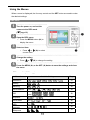
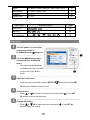
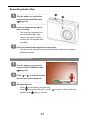
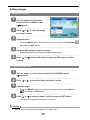
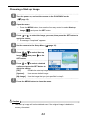
6 Press the MENU (n) button to close the menu. Setup menu list Menu Item Functions [Shutter]: Sets the shutter sound on and off. [Start-up]: Sets a type of the start-up sound. Sounds [Beep]: Sets the operation sound on and off. [Volume]: Adjusts the volume of the shutter sound, start-up sound, beep and playback sound. [Off]: The captured image will not automatically display after shooing. Auto Review [3 sec.]: The captured image will display for 3 seconds after shooting. [5 sec.]: The captured image will display for 5 seconds after shooting. [1 min.] / [3 min.] / [5 min.]: For power consumption, the camera is turned off automatically Power Save for a period of time. y The power save feature will not activate in some situation ( Date & Time page 12). Sets the date & time ( page 7). Select a language for display menus and other information from the following 21 languages: ( Language page 7) [English]: English [繁體中文]: T. Chinese [Deutsch]: German [Español]: Spanish [Italiano]: Italian [Français]: French [Nederlands]: Dutch [Português]: Portuguese [Magyar]: Hungarian [Čestina]: Czech [Türk]: Turkish [Polski]: Polish [Svenska]: Swedish [Русский]: Russian [Rumänisch]:Romanian [Ελληνικά]: Greek []يبرع: Arabic [日本語]: Japanese [ไทย ]:Thai [ 体中文]: S. Chinese [한국어]: Korean Use this function if the camera experiences a “Folder cannot be File No. created” error or if you want to restart numbering, for example, after erasing all files. [Series]: Store the latest used file number no matter deleting files or inserting a new memory card. 17