1
■ chapter 2 bios setup and security feature
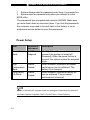
1. System always asks for password every time it is powered on.
2. System asks for password only when you attempt to enter
BIOS utility.
The passwords are encrypted and stored in NVRAM. Make sure
you write them down or memorize them. If you lost the passwords,
the computer may need to be sent back to the factory or to an
authorized service dealer to reset the passwords.
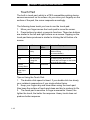
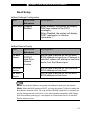
Power Setup
Item
Selections /
Sub-menu
Description
Power Button
Mode
On/Off
Suspend
[On/Off]: When the power button is
pressed, the system is turned off.
[Suspend]: When the power button is
pressed, the system enters the suspend
mode.
High
Performance
Mode
Enable
Disable
When Enabled, maximum processor
performance can be achieved. The
battery life is lowered.
Long Battery
Life Mode
Enable
Disable
When Enabled, maximum battery life
can be achieved. The processor
performance is lowered.
Note: In Windows XP, suspend mode and settings are determined by settings in
the Power Options Properties (Start > Control Panel > Power Options).
2-6