1
2. Controls
(cont’d)
2.2 Platinum Main Control (cont’d)
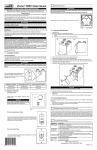
The Platinum main control is pre-programmed and ready to go. All you have to do
is to set day and time. Then check the settings below and change if needed.
SETTING PREFERENCES
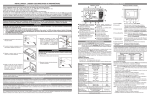
Press on MODE / PREF key (D) for 3 seconds.
NOTE: You can exit Preferences setting by pressing on MODE / PREF key (D) for
3 seconds any time in the process, or wait 60 seconds. The modified
values will be kept in memory.
WHAT WILL YOU SEE
If the control will be set for the very first time, the current day will be the first setting
to be made; MON (for Monday) will flash on screen.
If the control was previously set up, when setting preferences, the control returns
to the last preference chosen on previous setting. While setting Preferences, the
corresponding setting value flashes (e.g.: while setting current hour, hour is flashing).
HOW TO PROCEED
For every settings in table below:
• Use
to select value.
• Press SET key (B) to confirm the selected preference and go to next setting.
SETTING
CURRENT DAY
AVAILABLE VALUE
DEFAULT OPTIONS
MON/TUE/WED/THU/FRI/SAT/SUN
MON
AM
PM
HOUR DISPLAY
CURRENT HOUR
CURRENT MINUTE
TEMPERATURE UNIT
INSIDE TEMPERATURE
12:00 OR 24:00
FROM 0 TO 12 OR 24
FROM 00 TO 59
°C OR °F
ON
DISPLAY
MINIMUM
FOR AIR EXCHANGE*
OUTSIDE
FOR AIR EXCHANGE*
OR
SMART
AM
PM
ON
-25°C
OR
OR
-40°F TO 32°F
1°C TO 40°C
-13°F
27°C
TEMPERATURE
*IN PROG
OFF
-40°C TO 0°C
OUTSIDE
TEMPERATURE
MAXIMUM
OR
12:00
12
00
°C
OR
OR
33°F TO 104°F
81°F
MODE, THESE LIMIT VALUES ALLOW TO STOP AIR EXCHANGE
WITH THE OUTSIDE.
BACKLIGHT COLOR
BACKLIGHT DISPLAY
AUTO: BACKLIGHT
OFF MODE FOR
INTERMITTENT MODE
AFTER A VENTILATION
BLUE OR GREEN
BLUE
AUTO OR ON
AUTO
ACTIVATED 10 SECONDS WHEN ANY KEY IS PRESSED.
ON: BACKLIGHT ALWAYS ON.
VENTILATION/RECIRCULATION
VENT/RECIRC.
OR VENTILATION/OFF
PERIOD, DETERMINES THE SECOND PART OF THE CYCLE
(RECIRCULATION OR OFF).
8