1
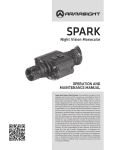
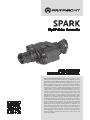
Spark
Night Vision Monocular
Operation and
Maintenance Manual
Important Export Restrictions! Commodities, products, technologies and services of this manual are controlled by the U.S.
Department of State Office of Defense Trade Controls, in accordance with International Traffic in Arms (ITAR), Title 22, Code of
Federal Regulations Part 120-130 and/or by the Export Administration Regulations (EAR) of U.S. Department of Commerce. At any
time when a license or a written approval of the U.S. Government
is applicable to it, it is illegal and strictly forbidden to export, intend to export, transfer in any other manner whatsoever, sell any
hardware or technical data, provide any associated service to any
non-U.S. resident, beyond or within the United States territory,
until the valid license or written approval has been issued by the
Departments of the U.S. Government having jurisdiction. Additionally U.S. law prohibits the sale, transfer, or export of items to
certain restricted parties, destinations, and embargoed countries,
as identified on lists maintained by the U.S. Department of State,
the U.S. Department of Commerce, and the U.S. Department of
Treasury. It is the responsibility of the Customer to be aware of
these lists. The sale, transfer, transportation, or shipment outside of the U.S. of any product prohibited or restricted for export
without complying with U.S. export control laws and regulations,
including proper export licensing, documentation or authorization, is unlawful and may result in civil and/or criminal penalties
and/or constitute a federal crime. Diversion contrary to U.S. law
is strictly prohibited.
SAFETY SUMMARY
Before operating this product, read and study this Operation and Maintenance Manual carefully.
The Spark is a precision electron-optical instrument, and requires careful handling. To avoid damage
to the equipment or physical harm to the user when operating the Spark, follow all WARNINGS, CAUTIONS and NOTES.
Below you will find definitions of the following alerts that appear throughout this Manual:
WARNING — Identifies a clear danger to the person operating the equipment.
CAUTION – Identifies risk of damage to the equipment.
NOTE – Serves to highlight essential procedures, conditions, and statements, or convey important instructional data to the user.
WARNING:
This product contains natural rubber latex which may cause allergic reactions! The FDA
has reported an increase in the number of deaths that are associated with an apparent sensitivity to natural latex proteins. If you are allergic to latex, it is a good idea to learn which products
contain it and strictly avoid exposure to those products.
WARNINGS:
• When installing the unit on a weapon, be sure the weapon is CLEAR and that the SAFETY is on
before proceeding.
• The light from the unit infrared (IR) illuminator is invisible to the unaided eye when used in
total darkness. However, the light can be detected by other Night Vision Devices (NVD).
• To reduce the risk of detection by another NVD, avoid prolonged activation of the IR illuminator.
• The IR light is more detectable by an NVD when used in smoke, fog and rain. Avoid prolonged
activation of the unit IR illuminator in these conditions.
• This product contains natural rubber latex, which may cause allergic reactions.
• The intensifier’s phosphor screen contains toxic materials. Please note the following:
— If the intensifier tube breaks, be extremely careful to avoid inhaling the phosphor screen
material. DO NOT allow the material to come in contact with your mouth, eyes, or any open
wounds on the skin.
— If the phosphor screen material comes in contact with your skin, wash it off immediately with
soap and water.
— If you inhale or swallow any phosphor screen material, drink a lot of water, induce vomiting,
and seek medical attention as soon as possible.
The information provided in this manual is for familiarization purposes only. The contents may undergo further
changes with no commitment by Armasight© to notify customers of any updates.
Armasight© assumes no responsibility for any misprints or other errors that this manual may contain.
©2012 by Armasight. All rights reserved.
2
CAUTION:
• The Spark is a precision electron-optical instrument, and must be handled carefully at all
times to prevent damage to the device and danger to the user.
• To protect the intensifier tube, do not remove the lens cap of the Spark when the monocular
is being operated in daylight conditions, or when the device is not in use.
• Use of the Spark in brightly lit conditions may damage the unit’s intensifier tube.
• Bright light sources such as firelight, headlights, searchlights, etc. can damage the Spark.
Avoid exposing the unit to these types of light sources.
• DO NOT attempt to force the controls past their stopping points, as this may cause damage
to the mechanisms.
• Before replacing the intensifier tube, confirm that it is no longer covered by warranty.
• Do not store the equipment with the battery still inserted.
• Clean and dry each component of the Spark thoroughly before placing them in the storage
case.
NOTES:
• The equipment requires some ambient light (moonlight, starlight, etc.) to operate.
• Performance of the device in nighttime conditions depends on the level of ambient light in
the environment. Please remember the following:
— The level of ambient light is reduced by the presence of clouds, shade, or objects that block
natural light (trees, buildings, etc.).
— The equipment is less effective when operated in shadows and other darkened areas.
— The equipment is less effective when operated in rain, fog, sleet, snow, dust or smoke.
— The equipment will not “see” through dense smoke.
• The IR illuminator is intended for increased illumination, as needed, when viewing at a close
distance of up to 3m.
• The Spark is not a weapon sight. However, it can be used in conjunction with a collimator dot
sight or laser aiming device.
• For the purpose of returning defective components, retain all packaging materials.
3
LIST OF CONTENTS
TITLE
Safety Summary
List of Contents
List of Figures
List of Tables
How to Use This Manual
PAGE
2
4
5
6
6
1. INTRODUCTION
1.1 General Information
1.1.1 Type of Manual
1.1.2 Model Number and Equipment Name
1.1.3 Purpose of Equipment
1.1.4 Reporting Equipment Improvement Recommendations
1.2 Warranty Information and Registration
1.2.1 Warranty Information
1.2.2 Limitation of Liability
1.2.3 Product Warranty Registration
1.2.4 Obtaining Warranty Service
1.3 Cross References
1.4 List of Abbreviations
7
7
7
7
7
7
8
8
8
8
9
9
10
2. DESCRIPTION AND DATA
2.1 System Description
2.2 Specifications
2.3 Standard Components
2.4 Optional Equipment
2.5 Key Features
11
11
12
14
14
16
3. OPERATING INSTRUCTIONS
3.1. Installation and Mounting
3.1.1 Battery Installation 3.1.2 Mounting the Spark to a Goggle Kit
3.1.3 Mounting the Spark to a Helmet
3.1.4 Mounting the Spark to a Weapon with a Picatinny Mount Adapter
3.1.5 Mounting the Spark to a Weapon with a Quick Release Picatinny Mount Adapter
3.1.6 Mounting the Spark to a Scope
3.1.7 Mounting the Spark to a Dual Bridge
3.1.8 Mounting an IR Illuminator to the Spark
3.1.9 Mounting the Spark to a Standard US Mil Helmet/Headgear Assembly
3.1.10 Mounting Accessory Lenses to the Spark
3.1.11 Mounting the Spark to a Weapon with an AIM Advance Aiming Mount
3.1.12 Mounting a Camera/Camcorder to the Spark
3.1.13 Universal Camera Adapter Application
3.2 Controls
3.2.1 Controls
3.3 Operating Procedures
3.3.1 Operating Procedures
17
17
17
17
18
19
20
20
21
21
22
22
23
23
24
24
24
25
25
4
3.3.2 IR Illuminator Operations
3.3.3 Spark Shut-Down
3.4 Storage 3.4.1 Preparation for Storage
25
26
26
26
4. PREVENTIVE MAINTENANCE AND TROUBLESHOOTING
4.1 Preventive Maintenance Checks and Services
4.1.1 Preventive Maintenance Checks and Services (PMCS)
4.2 Troubleshooting
4.2.1 Operator Troubleshooting
4.3 Identification of Operational Defects
4.3.1 Operational Defects
4.3.2 Cosmetic Blemishes
4.4 Maintenance
4.4.1 General
4.4.2 Cleaning Procedures
4.4.3 Battery Removal and Replacement
4.4.4 Goggle Kit Maintenance
4.5 Service/Packing and Unpacking
4.5.1 Return Instructions
27
27
27
28
28
29
29
30
31
31
31
32
32
33
33
APPENDIX
A. Spark List of Spare Parts
B. Product Warranty Registration Card
Alphabetical Index
35
35
36
39
LIST OF FigureS
FIGURE TITLE
2-1
2-2
3-1
3-2
3-3
3-4
3-5
3-6
3-7
3-8
3-9
3-10
3-11
3-12
3-13
3-14
3-15
4-1
Spark Night Vision Monocular
Spark Standard Components
Battery Installation
Mounting the Spark to a Goggle Kit
Mounting the Spark to a Helmet
Mounting the Spark to a Weapon with Picatinny Mount Adapter
Mounting the Spark to a Weapon with a Quick Release Picatinny Mount Adapter
Mounting the Spark to a Scope
Mounting the Spark to a Dual Bridge
Mounting an IR Illuminator to the Spark
Mounting the Spark to a Standard US Mil Helmet/Headgear Assembly
Mounting Accessory Lenses to the Spark Mounting the Spark to a Weapon with an AIM Advance Aiming Mount
Mounting a Camera/Camcorder to the Spark
Universal Camera Adapter Application
Spark Controls
IR Illuminator Operations Shading
PAGE
12
14
17
28
19
19
20
21
21
21
22
22
23
23
24
24
26
29
5
4-2
4-3
4-4
4-5
4-6
A-1
Edge Glow
Emission Points and Bright Spots
Browpad Replacement
Chin Strap Reinstallation
Chin Cup Replacement
Spark Spare Parts
30
31
32
32
33
35
LIST OF Tables
TABLE
TITLE
2-1
2-2
2-3
2-4
2-5
2-6
2-7
3-1
4-1
4-2
A-1
Spark System Description
Mechanical Data
Electrical Data
Optical Data
Environmental Data
Spark Standard Components
Spark Optional Equipment
Spark Controls
Preventive Maintenance Checks and Services
Operator Troubleshooting
Spark List of Spare Parts
PAGE
12
12
13
13
13
14
15
25
27
29
35
HOW TO USE THIS MANUAL
USAGE
You must familiarize yourself with the entire manual before operating the equipment. Before performing any kind of maintenance on your device, read the section on maintenance in its entirety. Follow all
WARNINGS, CAUTIONS, and NOTES.
MANUAL OVERVIEW
This manual contains sections on Operating and Maintaining the Spark Night Vision Monocular.
The list of Spare Parts can be found in Appendix A.
The Product Warranty Registration Card can be found in Appendix B.
6
1
INTRODUCTION
1.1 GENERAL INFORMATION
1.1.1 TYPE OF MANUAL
Operation and Maintenance (including a List of Spare Parts).
1.1.2 Model Number and Equipment Name
Spark Multi-Use Monocular
1.1.3 PURPOSE of Equipment
To provide the operator with the ability to observe at night under moonlight and starlight conditions.
The Spark can be used as a handheld, head-mounted, helmet-mounted or weapon-mounted device
to allow walking, weapon firing, short-range surveillance, map reading, vehicle maintenance, and administering of first aid.
The Spark allows for horizontal and vertical adjustments when mounted to the user’s head or helmet,
and is equipped with an infrared light-emitting source (IR illuminator).
1.1.4 Reporting Equipment Improvement Recommendations
Recommendations from the user for improvements to the device are encouraged.
Mail your comments to Armasight Inc., 815 Dubuque Avenue, South San Francisco, CA 94080, USA.
Or, send an email to [email protected].
7
1.2warranty INFORMATION and Registration
1.2.1 WARRANTY INFORMATION
This product is guaranteed to be free from manufacturing defects in material and workmanship under
normal use for a period of two (2) years from the date of purchase. In the event that a defect covered
by the below warranty occurs during the applicable period stated above, Armasight, at its discretion,
will either repair or replace the product; such action on the part of Armasight shall be the full extent of
Armasight’s liability, and the Customer’s sole and exclusive reparation. This warranty does not cover a
product if it has (a) been used in ways other than its normal and customary manner; (b) subjected to
misuse; (c) subjected to alterations, modifications or repairs by the Customer or by any party other than
Armasight without prior written consent of Armasight; (d) special order or “close-out” merchandise
or merchandise sold “as-is” by either Armasight or the Armasight dealer; or (e) merchandise that has
been discontinued by the manufacturer and either parts or replacement units are not available due to
reasons beyond the control of Armasight. Armasight shall not be responsible for any defects or damage that in Armasight’s view are a result from the mishandling, abuse, misuse, improper storage or
improper operation of the device, including use in conjunction with equipment that is electrically or
mechanically incompatible with, or of inferior quality to, the product, as well as failure to maintain the
environmental conditions specified by the manufacturer. CUSTOMER IS HEREBY NOTIFIED THAT OPERATION OF THE EQUIPMENT DURING DAYLIGHT HOURS OR UNDER ANY EXCESSIVE LIGHT CONDITIONS
MAY PERMANENTLY DAMAGE THE INTERNAL COMPONENTS OF THE UNIT AND SAID DAMAGE WILL
NOT BE COVERED UNDER THIS WARRANTY. This warranty is extended only to the original purchaser.
Any breach of this warranty shall be enforced unless the customer notifies Armasight at the address
noted below within the applicable warranty period.
The customer understands and agrees that except for the foregoing warranty, no other warranties
written or oral, statutory, expressed or implied, including any implied warranty of merchantability or
fitness for a particular purpose, shall apply to the product. All such implied warranties are hereby and
expressly disclaimed.
1.2.2 Limitation of Liability
Armasight will not be liable for any claims, actions, suits, proceedings, costs, expenses, damages or
liabilities arising out of the use of this product. Operation and use of the product are the sole responsibility of the Customer. Armasight’s sole undertaking is limited to providing the products and services
outlined herein in accordance with the terms and conditions of this Agreement. The provision of products sold and services performed by Armasight to the Customer shall not be interpreted, construed,
or regarded, either expressly or implied, as being for the benefit of or creating any obligation toward
any third party of legal entity outside Armasight and the Customer; Armasight’s obligations under this
Agreement extend solely to the Customer. Armasight’s liability hereunder for damages, regardless of
the form or action, shall not exceed the fees or other charges paid to Armasight by the customer or
customer’s dealer. Armasight shall not, in any event, be liable for special, indirect, incidental, or consequential damages, including, but not limited to, lost income, lost revenue, or lost profit, whether such
damages were foreseeable or not at the time of purchase, and whether or not such damages arise
out of a breach of warranty, a breach of agreement, negligence, strict liability or any other theory of
liability.
1.2.3 Product Warranty Registration
In order to validate the warranty on your product, Armasight must receive a completed Product Warranty Registration Card for each unit, or the Customer can complete a warranty registration on our
website, at www.armasight.com. Please complete the included form (Appendix B) and immediately
mail it to our Service Center:
Armasight Inc.
815 Dubuque Avenue
South San Francisco
CA 94080
United States of America.
8
1.2.4 Obtaining Warranty Service
To obtain warranty service on your unit, the End-user (Customer) must notify the Armasight service
department via email. Send any requests to [email protected] to receive a Return Merchandise
Authorization number (RMA). When returning any device, please take in the product to your retailer, or
send the product, postage paid and with a copy of your sales receipt, to Armasight Corporation’s service center at the address listed above. All merchandise must be fully insured with the correct postage;
Armasight will not be responsible for improper postage or merchandise that becomes lost or damaged
during shipment. When sending product back, please clearly write the RMA# on the outside of the
shipping box. Please include a letter that indicates your RMA#, the Customer’s Name, a Return Address,
reason for the return, contact information (valid telephone numbers and/or an e-mail address), and
proof of purchase that will help us to establish the valid start date of the warranty. Product merchandise returns that do not have an RMA# listed may be refused, or a significant delay in processing may
occur. Estimated Warranty service time is 10-20 business days. The End-user/ Customer is responsible
for postage to Armasight for warranty service. Armasight will cover return postage/ shipping after warranty repair to the End-user/ Customer only if the product is covered by the aforementioned warranty.
Armasight will return the product after warranty service by domestic UPS Ground service and/ or domestic mail. Should any other requested, required or international shipping methods be necessary, the
postage/ shipping fee will be the responsibility of the End-user/ Customer.
1.3 Cross References
Common Name Official Name
Allen Wrench
Socket Head Screw Key
Battery Compartment
Battery Box Cover
Shipping Case
Textile Bag
Cotton Swab
Disposable Applicator
Neoprene Jack Plug
Plug Assembly
O-Ring
Gasket
Safety Screw
Electrical Dial-Knob Lock
Pattern Generator
Optical Instrument Reticle
Lens Covers
Exit Port Covers
Paddle Switch
Remote Cable Switch
Technical Manual
Operator and Field Maintenance Manual
Tape Fastener Loop
Fastener, Loop Tape
Tape Fastener Hook
Fastener, Hook Tape
9
1.4 List of Abbreviations
C
CCW
Cont’d
CW
Dia
F
FOV
g
Gen
H
hr
IR
IT
L
LED
lx
m
mA
min
mm
mW
nm
No
NV
NVD
Para
PMCS
QRM
QTY
RMA#
s
seq
SR
VDC
V
W
10
Celsius (Centigrade)
counterclockwise
Continued
clockwise
diameter
Fahrenheit
Field of View
gram
Generation
Height
hour
infrared
Intensifier Tube
Length
Light Emitting Diode
lux
meter
milliampere
minute
millimeter
milliwatt
nanometer
Number
Night Vision
Night Vision Device
Paragraph
Preventive Maintenance Checks and Services
Quick Release Mount
Quantity
Return Merchandise Authorization number
second
sequence
Service Representative
Volts Direct Current
Volt
Width
2
DESCRIPTION AND DATA
2.1 System DESCRIPTION
The Spark is a hand-held, head-mounted, helmet-mounted, or weapon-mounted night vision system
that allows the user to operate it while walking, firing weapons, conducting short-range surveillance,
reading maps, conducting vehicle maintenance, or administering first aid in both moonlight and starlight conditions.
The Spark utilizes the principle of intensification of the residual light that is reflected from the surrounding objects. The optical system of the unit consists of an objective lens, an intensifier tube (IT),
and an eyepiece.
Armasight exclusive CORE (Ceramic Optical Ruggedized Engine) technology image intensifier tubes are
used in the Spark monoculars. While CORE does not contain a micro channel plate (and so by definition
lands in the Gen 1 category) that is where the parallels end. Instead of glass, CORE tubes use a specially
formulated ceramic compound fused with metal alloys similar to those used in production of Gen 2 and
Gen 3 image intensifier tubes. Further advances in CORE have almost removed edge distortion, dramatically increased photo-sensitivity and most importantly, almost doubled resolution up to 70 lp/mm.
A built-in IR illuminator makes it possible to use the unit in low light or total darkness.
The Spark allows for vertical and fore-and-aft adjustment when mounted to the user’s head or helmet,
when focusing the lens, and when focusing the eyepiece.
NOTE:
The equipment requires some light (moonlight, starlight, etc.) to operate. Performance of the
device depends upon the level of ambient light in the environment. Please remember the following:
— The level of ambient light in the environment is reduced by the presence of clouds, shade,
or objects that block natural light (trees, buildings, etc.
— The equipment is less effective when operated in shadows and other darkened areas.
— The equipment is less effective when operated in rain, fog, sleet, snow, or smoke.
— Under starlight conditions, particularly in low-contrast environments such as snow-covered territory, sandy deserts, large bodies of water or grassy hills, the visibility may degrade,
thereby disguising or masking changes in terrain.
— The equipment will not “see” through dense smoke.
11
2
4
1
3
10
11
5
9
12
7
8
6
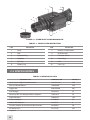
Figure 2-1. Spark night vision monocular
Table 2-1. Spark System Description
Item
Description
Item
Description
1
Body
7
Battery Compartment
2
Rail
8
IR Illuminator
3
Eyepiece Ring
9
Function Switch
4
Eyepiece
10
Focus Ring
5
Eye-cup
11
Lens
6
Battery Cap
12
Lens Cap
2.2 Specifications
Table 2-2. Mechanical Data
Dimensions, mm
Weight, g
Spark/ Spark Night Vision Monocular
Equipment Item
159 x 49 x 82
370
Flip-up Helmet Mount*
140х70х90
210
Goggle Kit*
280х180х80
295
Dual Bridge*
54x22x24
34
Picatinny/ Mil 1913 Weapon Mount Adapter*
110х59х13
58
Scope Adapter*
120х61х72
150
Camera Adapter*
Dia 60х22
52
Weaver Rail Adapter*
38х21х7.5
8
Transfer Adapter to Standard US Mil Headset*
49х46х64
50
3X Afocal Lens*
Dia 77х95
553
* Optional
12
Table 2-3. Electrical Data
ITEM
DATA
Battery
One CR123A Lithium 3V or CR123 type
rechargeable batteries with voltage 3.2V
Consumption Current*:
58 mA
Continuous Operation* at 20 oC (68 oF):
up to 40
* With IR illuminator off.
Table 2-4. Optical Data
ITEM
DATA
Magnification:
— with 1X Lens
— with 3X Lens*
— with 3X Afocal Lens*
(1±0.05) X
(3±0.2) X
(3±0.15) X
1X Lens:
— Focal Length
— Lens F/number
— Focus Range
35 mm
1:1.7
0.25 m to infinity
FOV:
— with 1X Lens
— with 3X Lens*
— with 3X Afocal Lens*
30°
12°
10°
Eyepiece Focal Length
15 mm
Exit Pupil Diameter
8 mm
Eye Relief
20 mm
Eyepiece Diopter Adjustment
-5 to +5 diopters
Built-in IR Illuminator
— Power
— Illumination Range
— Focus Distance
— Illumination Wavelength
50 mW
20 m
3m
810 nm
* Optional.
Table 2-5. Environmental Data
ITEM
DATA
Operating Temperature
-40 to +50 °C
Storage Temperature
-50 to +70 °C
Humidity
95 %, 25 °C to 40 °C for 48 hr
Illumination Required
Natural night illumination
(overcast starlight to moonlight)
Environmental Rating
Water Resistant
13
2.3 STANDARD COMPONENTS
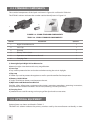
The standard components of the Spark are shown in Figure 2-2 and listed in Table 2-6.
The ITEM NO. column indicates the number used to identify items in Figure 2-2.
3
1
4
2
5
6
Figure 2-2. Spark standard components
Table 2-6. Spark standard components
ITEM no.
DESCRIPTION
QUANTITY
1
Night Vision Monocular
1
2
Lens Cap
1
3
Eye-cup
1
4
Battery 123A Lithium
1
5
Operation and Maintenance Manual
1
6
Carrying Case
1
1) Armasight Spark Night Vision Monocular
Monocular night vision device with unity magnification.
2) Lens Cap
A cap used to protect the lens and to be used when testing the unit in daylight.
3) Eye-cup
A rubber cup used to protect the eyepiece as well as provide comfort for the operator.
4) Battery 123A Lithium
A single, 123A lithium battery used to power the unit.
5) Operation and Maintenance Manual
Provides safety information, equipment description, mounting procedures, operating instructions,
and preventive maintenance checks and service (including a List of Spare Parts).
6) Carrying Case
A protective case used for storing and carrying of the Spark and its accessories.
2.4 Optional Equipment
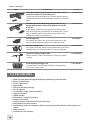
Optional items are shown and listed in Table 2-7.
The PART NO. column indicates the primary number used by the manufacturer to identify an item.
14
Table 2-7. Spark Optional Equipment
image
DESCRIPTION
Part no.
3X Afocal Lens #22 with adapter
Quickly converts the Spark into a long-range night vision
device. Ideal for long range observation.
ANAF3X0023
3X Lens #11
Quickly converts the Spark into a long-range night vision
device. Ideal for long range observation.
ANLE3X0001
Goggle Kit #1
Adjustable universal assembly that secures the Spark to
the operator’s head providing hands-free operation.
ANHG000001
Helmet Mount #3
Helps to mount the Spark on a range of ballistic helmets.
ANHM000002
MICH Helmet Mount Kit USA #105
Consists of MICH helmet mount and adapter that allows
the user to attach the Spark to this mount.
ANHM000003
PASGT Helmet Mount Kit USA #106
Consists of PASGT helmet mount and adapter that allows
the user to attach the Spark to this mount.
ANHM000004
Transfer Adapter/Swing Arm to PVS-7/PVS-14 Headset/
Helmet #37
Mounts NV Monocular to Standard US Mil Headset (PVS7/
PVS14 type) and/or helmet.
ANHG000002
Picatinny Mount Adapter #93
Small arms adapter that allows the Spark to be mounted
on a weapon using a Picatinny Mil 1913 rail.
ANAM000003
Double Lever-Lock Quick Release Picatinny Mount
Adapter #26
Small arms adapter that allows the Spark to be mounted
on a weapon using Picatinny Mil 1913 rail.
ANAM000004
AIM PRO Advanced Integrated Mount
Allows the user to quickly convert the Spark into a weapon
sight.
ANKI000032
AIM PRO-L Advanced Integrated Mount Long
Allows the user to quickly convert the Spark into a weapon
sight.
ANKI000049
Scope Adapter Mount #5
Allows the Spark to be attached to variety of daytime rifle
scopes or spotting scopes, offering the ultimate solution
for day/ night operation.
ANAM000002
15
table 2-7. continued
image
DESCRIPTION
Part no.
IR810 Detachable Long Range Infrared Illuminator w/
Dovetail to Weaver Transfer Piece #21
Long-range infrared illuminator. Provides greater viewing
capabilities when the environment has little or no ambient
light.
ANKI000016
IR810W Detachable Wide Angle Adjustable X-Long
Range IR Illuminator w/Dovetail to Weaver Transfer
Piece #21
A detachable LED extra long-range infrared illuminator
with wide-angle adjustable beam (2 to 30 degrees). Comes
fully assembled with a dedicated mount in order to be
installed on a Picatinny/Weaver rail.
ANKIW00016
Dual Bridge #39
An adapter that allows the Spark to be attached in a binocular configuration to a goggle kit or helmet mount.
ANKI000003
Camera Adapter #47
An adapter with step down ring that allows the Spark to be
attached to any 35 mm SLR camera or 8 mm camcorder.
ANAM000016
Universal Camera Adapter #45
Allows the NYX-14 to be attached to a variety of camera
systems.
ANAM000006
Hard Shipping/Storage Case
A protective case used for the shipping/ storage of the
Spark and its accessories.
ANHC000001
2.5 Key Features
16
–––
–––
–––
–––
––
––
CORE (Ceramic Optical Ruggedized Engine) technology intensifier tube
Built-in IR illuminator
Left or right eye use
Lightweight
Compact and robust design
Easy to operate
Serviceability under severe conditions
High-performance
Highly reliable
Powered by single CR123 battery
Weapon-mountable
Head or helmet-mountable for hands-free usage
Adaptable for use with cameras
Compatibility with most weapons, IR laser aiming/ illuminating devices, reflex sights, and
scopes
Water resistant
Limited two-year warranty
3
OPERATING INSTRUCTIONS
3.1 Installation and Mounting
CAUTION:
To protect the intensifier tube when the sight is not in use or when it is being operated in daylight, keep the protective lens cap securely fitted over the lens.
3.1.1 Battery Installation
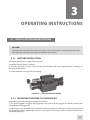
The Spark operates on a single CR123A battery.
Install the CR123A battery as follows:
1. Unscrew the battery cap (A) and insert the CR123A battery (B), observing the polarity markings on
the body of the device.
2. Screw the battery cap (A) back on securely.
Figure 3-1. Battery Installation
3.1.2 MOUNTING THE Spark TO A GOGGLE KIT
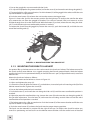
Mount the Spark to the optional goggle kit as follows:
1. Put on the goggle kit. Adjust the goggle kit strap pads until the goggles fit securely around your
head. Remove the goggle kit.
2. Loosen the screw (A). While pushing down on the button (B), insert the Spark rail into the guide (C) of
the goggle kit bracket. Tighten the screw (A). See Figure 3-2; the unit is shown in the correct positioning for the right eye.
17
3. Put on the goggle kit, now mounted with the Spark.
4. To adjust the equipment for greater comfort, loosen the screw (A) and move the unit along the guide (C).
5. The goggle kit has a flip-up mechanism. Push the button (D) of the goggle kit bracket and lift the unit
up until it reaches its top position.
6. Push the same button (D) to lower the unit into the correct viewing position.
Figure 3-2 shows the Spark in the correct position for the right eye. To readjust the unit for the other
eye, remove the unit from the goggle kit bracket. Turn the unit around (180º) and mount it on the
bracket through the rail on the second side. With the button (E) pushed, move the unit along the sliderail (F) until the desired, most comfortable position is reached.
To remove the Spark from the goggle kit, loosen the screw (A), push the button (B), and slide the unit
out of the bracket guide (C).
F
E
d
B
A
C
Figure 3-2. Mounting Spark to A Goggle Kit
3.1.3 MOUNTING THE Spark TO A HELMET
An optional flip-up helmet mount can be used to attach the Spark to a helmet. The helmet mount fits
the Spark securely onto helmet via a rugged strapping device and grooved hooks. With the helmet
mount, the Spark can be positioned directly in front of the user’s eyes, or flipped backwards, out of the
field of view.
Mount the Spark to a helmet as follows:
1. Attach the mount to the helmet as shown in Figure 3-3.
2. Adjust and tighten the straps (A).
3. Loosen the screw (B). With the button (C) pushed down, insert the Spark rail into the guide (D) of the
helmet mount bracket. Tighten the screw (B).
4. Put on the helmet with the Spark attached.
5. Push the button (F) and move the unit along the slide-rail (G) until the most comfortable position is
reached.
6. Adjust the mount for comfortable using. Loosen the screw (B) and move the unit along the guide (D)
for eye relief adjustment. Turn the lever (H) and move the unit along vertical slide-rail until the most
comfortable vertical position is reached.
7. The helmet mount has a flip-up mechanism. Push the button (E) of the mount bracket and lift the unit
up until it reaches its top position.
8. Push the same button (E) to lower the Spark into the proper viewing position.
The Spark can be mounted in position for the right or left eye. To readjust the Spark for other eye,
reverse its positioning and reinstall it on the helmet mount bracket. Use the second unit rail located
18
on the opposite side of the unit. Push the button (F) and move the unit along the slide-rail (G) until the
most comfortable position is reached.
To remove the Spark from the helmet mount, loosen the screw (B), push down on the button (C), and
slide the unit out of the guide (D). To remove the flip-up mechanism from the helmet mount, loosen the
lever (H), pull the knob out (I), and slide the flip-up mechanism out of the vertical rail.
A
H
I
G
E
C
F
B
d
Figure 3-3. MOUNTING THE Spark TO A HELMET
3.1.4 MOUNTING THE Spark TO A WEAPON WITH A PICATINNY MOUNT
ADAPTER
NOTE:
The Spark is not a weapon sight. However, it can be used in conjunction with a collimator dot
sight or laser aiming device.
To mount the Spark to a weapon using the optional Picatinny mount adapter, perform the following:
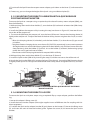
1. Loosen the clamping knobs (A) on the weapon mount adapter. Position the adapter on the weapon
rail. Adjust the adapter’s fore-and-aft positions by loosening the clamping knobs (A) and repositioning
the adapter on the weapon rail. Tighten the clamping knobs (A).
C
A
B
D
A
C
A
D
Figure 3-4. MOUNTING THE Spark TO A WEAPON WITH A PICATINNY MOUNT ADAPTER
2. Align the Spark and the weapon mount adapter. Slide the unit backwards until its alignment boss is
parallel with the alignment groove (B) on the adapter. Push backwards until you hear a clicking noise
indicating that the unit is locked into the weapon mount adapter.
19
3. To uninstall the Spark from the weapon mount adapter, push down on the lever (C) and remove the
unit.
4. If necessary, you can change the height of the Spark using an additional plate (D).
3.1.5 MOUNTING THE Spark TO A WEAPON WITH A QUICK-RELEASE
PICATINNY MOUNT Adapter
To mount the Spark to a weapon using an optional quick-release Picatinny mount adapter(QRM), perform the following:
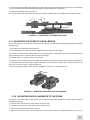
1. While pushing down on the lever holder (C), turn the lever (B) backwards to loosen the QRM clamping device (A).
2. Install the QRM on the weapon rail by inserting the stop (not shown in Figure 3-5) into one of transverse slots of the weapon rail.
3. To secure the QRM onto the weapon rail, turn the lever (B) forward. Secure the clamping device (A)
tightly to the weapon rail. To adjust the force of the lever clamp, loosen or tighten the nut (D) as necessary:
- When the clamping device (A) unlocked, push the lever holder (C) so that the nut (D) gets out of
its hollow.
- To tighten/loosen clamping device, turn the nut (D) CW/CCW, respectively, by one-two increments
(the eight-sided nuts of the AIM clamping devices fit their hollows only if turned in one of the discrete positions), when the holder (C) pushed. Just as the holder (C) released, backmoving springs
makes the nut (D) get back into its hollow.
- Check to ensure the clamping device holds weapon/NVM rail firmly.
4. While pushing down on the lever holder (F), turn the lever (E) forward.
5. Install the Spark on the QRM rail by inserting the stop (G) into the transverse slot of the unit rail.
6. Attach the Spark to the QRM rail by turning the lever (E) backwards. Secure the QRM clamping device
(H tightly to the Spark rail. To adjust the force of the lever clamp, loosen or tighten the nut (I) as necessary.
D
E
F
A
A
C
B
B
D
I
G
H
E
Figure 3-5. MOUNTING THE Spark TO A WEAPON WITH A QUICK-RELEASE PICATINNY
MOUNT adapter
3.1.6 MOUNTING THE Spark TO A SCOPE
To mount the Spark to a daytime scope using an optional flip-up scope adapter, perform the following:
1. Loosen the adapter’s fixing screw (A).
2. Install the insert into the adapter (Armasight supplies inserts of different sizes for coupling with 3843mm eyepieces).
3. To attach the Spark to the adapter bracket (B), push down on the button (C), loosen the fixing screw
(D), and insert the unit rail into the bracket guide. Tighten the screw (D) to secure the Spark to the
bracket.
20
4. Insert the daytime riflescope eyepiece into the adapter (now attached to the Spark). Be sure to leave
a small space between the riflescope eyepiece and the monocular’s front lens.
5. Tighten the adapter fixing screw (A).
6. To work solely with the daytime scope, push down on the button (E) and flip the Spark over (180º).
C
B
E
A
D
Figure 3-6. MOUNTING THE Spark TO A SCOPE
3.1.7 MOUNTING THE Spark TO A DUAL BRIDGE
To install two Spark units onto a single binocular device, use the optional dual bridge. Perform the following steps:
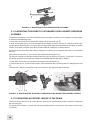
1. Align the Spark with the dual bridge (A).
2. Press down on the clamps (B) that are located on the front of the bridge.
3. Pull the unit back until the alignment boss is lined up against the groove (C) of the dual bridge. Push
the unit back until it is securely fixed to the dual bridge.
4. Perform steps 1-3 with the second Spark unit.
To remove the Spark from the dual bridge, press down on the front clamps and slide the unit forward.
To configure the Spark for long-range observation with binoculars, mount the 3x accessory lenses to
the units as seen in Part 3.1.10 of this Manual.
To mount the dual bridge to the optional goggle kit, see Part 3.1.2 of this Manual.
A
B
C
Figure 3-7. MOUNTING THE Spark TO A DUAL BRIDGE
3.1.8 MOUNTING AN IR ILLUMINATOR TO THE Spark
To mount an IR illuminator to the Spark, use the optional Dovetail to Weaver Transfer Piece. Perform
the following steps:
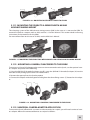
1. Install the transfer piece (A) onto one of the Spark rails.
2. Tighten the two fixing screws (B) on the transfer piece.
3. Loosen the IR illuminator fixing screw (C).
4. Mount the IR illuminator on the Weaver rail of transfer piece and tighten the fixing screw (C).
21
C
B
A
Figure 3-8. MOUNTING AN IR ILLUMINATOR TO THE Spark
3.1.9 MOUNTING THE Spark TO A STANDARD US MIL HELMET/ HEADGEAR
ASSEMBLY
To mount the Spark to a Standard US Mil helmet or headgear assembly, use an optional transfer adapter. Perform the following steps:
1. Push down on the lever (C). Mount the adapter (A) to the Spark rail (B).
2. Align the adapter prism (D) with the helmet/ headgear assembly mount (E). Slide the Spark backwards until its alignment boss is in line with the alignment groove on the helmet/ headgear assembly
mount. Push down until the Spark locks into the helmet/ headgear assembly mount.
To dismount the Spark from the helmet/ headgear assembly, push down on the lever (F) and remove
the unit.
Push down on the lever (C) and remove the adapter from the Spark rail.
The transfer adapter can be adjusted for either the right or left eye. In Figure 3-9, the Spark is shown in
the proper position for the left eye. Readjust the adapter for the right eye as follows:
1. Push down on the lever (C). Remove the adapter from the Spark rail.
2. Loosen the nut (G), and turn the adapter around between the two fixing devices. Retighten the nut
(G).
3. Mount the adapter to the other Spark rail located on the opposite side of the unit.
F
D
C
F
E
D
D
C
A
B
G
Figure 3-9. Mounting the Spark TO A Standard US Mil Helmet/Headgear Assembly
3.1.10 MOUNTING ACCESSORY LENSES TO THE Spark
To mount the 3X afocal lens (A) to the device, screw it into the threading of the standard 1X objective
lens on the Spark.
To mount the 3X (B) lens, unscrew the existing 1X objective lens of the Spark and screw in the 3X lens
in its place.
22
B
A
Figure 3-10. MountING Accessory LENSes TO Spark
3.1.11 MOUNTING THE Spark TO A WEAPON WITH AN AIM
ADVANCE AIMING MOUNT
The clamping system of the AIM advance aiming mount (AIM) is the same as is seen on the QRM. To
mount the Spark to a weapon with an AIM, see Part 3.1.5 of this Manual. This section details mounting
instructions and procedures for the QRM.
For more information on the use of an AIM, see the AIM User’s Manual.
Figure 3-11. MOUNTING THE Spark TO A WEAPON WITH AN AIM ADVANCE AIMING MOUNT
3.1.12 MOUNTING A CAMERA/ CAMCORDER TO THE Spark
To mount any 35mm SLR photographic camera or 8mm camcorder to the Spark, use the optional camera adapter and perform the following:
1. Using the (M37x0.75 threaded) adapter ring (B), screw the (M52x0.75 threaded) adapter (A) into the
front lens of the photographic camera or video camera.
2. Remove the eyecup from the Spark eyepiece.
3. Connect the adapter with the eyepiece and tighten the three fixing screws (C) located on the adapter.
A
C
B
Figure 3-12. MOUNTING A CAMERA/ CAMCORDER TO THE Spark
3.1.13 UNIVERSAL CAMERA ADAPTER APPLICATION
To mount the Spark (affixed with a camera or video recorder) to a tripod, you will need a universal camera adapter. Mount the connected devices to a tripod as follows:
23
1. Screw the adapter onto the tripod.
2. Remove the eyecup from the Spark eyepiece.
3. Install the Spark on the adapter rail (A) and tighten the fixing screw (B).
4. Install the camera on the adapter rail (C) and insert the fixing screw (D) into the tripod socket of the
camera. Tighten the fixing screw.
5. Loosen the screws one by one. Align the optical axis of the Spark with the camera objective. Tighten
the screws (E and F).
6. To focus the image, loosen the screw (G) and adjust the distance between the monocular and the
camera’s eyepiece. Tighten the screw (G).
C
D
A
F
B
G
E
Figure 3-13. Universal camera adapter Application
3.2 Controls
3.2.1 Controls
The Spark controls are defined in Table 3-1.
The Spark controls are shown in Figure 3-14.
CAUTION:
DO NOT over-adjust the controls by forcing them past their stopping points.
D
B
A
C
Figure 3-14. Spark controls
24
Table 3-1. Spark Controls
CONTROL/INDICATOR
Function Switch
(Figure 3-14, A)
FUNCTION
OFF position — the unit is off.
ON position — the unit is on (IT powered).
Turn the unit on by turning the switch CCW from OFF to ON.
IR position — the unit is on, and the IR illuminator is activated.
Activate the IR illuminator by turning the switch CW from ON to the IR
position.
Eyepiece Ring
(Figure 3-14, B)
Adjusts the unit diopter. The total dioptric range is covered in a 1/2 ring
revolution.
Focusing Ring
(Figure 3-14, C)
Focuses the lens. Adjusts for sharpest view of the scene. The total focus
range is covered in a 1/3 ring revolution.
Bi-color LED Indicator
(Figure 3-14, D)
A GREEN glow indicates that the unit is turned on and ready for operation.
A RED glow indicates that the IR illuminator is operating.
3.3 OPERATIng Procedures
3.3.1 Operating Procedures
These procedures should be performed under nighttime conditions only.
CAUTION:
Use of the Spark brightly lit conditions may damage the unit’s intensifier tube.
1. Verify that the battery is installed as indicated on the monocular body.
2. Make a visual estimation of the illumination level in the viewing area. The required level of illumination is less than 1 lx (late twilight sky conditions).
3. Remove the lens cap and place it over the housing of the lens.
4. Turn the function switch ON. The green indicator light (Fig. 3-14, D) indicates that the unit is ready
for operation. After a slight delay, a green glow will appear in the eyepiece of the monocular.
5. Adjust the unit diopter by rotating the ring of the eyepiece.
6. Observe the scene. Rotate the focus ring until the image is clear and sharp.
CAUTION:
Bright sources such as firelight, headlights, searchlights, etc. can damage the Spark. Avoid exposing the unit to these types of light sources.
3.3.2 IR Illuminator Operations
CAUTION:
When operating the device in extremely dark conditions, the light from the unit’s IR illuminator
will be invisible to the unaided eye. However, the light can be detected by other NVDs.
25
NOTE:
The IR illuminator is designed to provide additional illumination (when needed) while viewing
scenes or targets from a short distance (up to 3m).
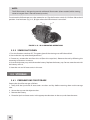
To activate the IR illuminator, turn the monocular on. Flip the function switch (A) CW from ON to the IR
position. A red indicator (Fig. 3-15, B) lights when the IR illuminator is turned on.
B
A
Figure 3-15. IR ILLUMINATOR OPERATIONs
3.3.3 Spark Shut-Down
1. Turn the function switch to OFF. The green glow of the viewing area will fade to black.
2. Secure the lens cap over the objective lens.
3. If necessary, remove the unit from the rail (from the scope lens). Remove the unit by following the
mounting instructions in reverse.
4. Unscrew the battery cap and take out the battery. Replace the battery cap. Do not store the unit with
the battery still in it.
5. Store the unit and all accessories in the case.
3.4 Storage
3.4.1 Preparations for storage
Prepare the Spark for storage as follows:
1. Verify that the Spark and all accessories are clean and dry before returning them to the storage
case.
2. Secure the cap over the objective lens.
3. Remove the battery.
4. Place the Spark and accessories in the appropriate locations in the case, and close the cover.
26
4
PREVENTIVE MAINTENANCE AND
TROUBLESHOOTING
4.1 Preventive Maintenance Checks and Services
4.1.1 PREVENTIVE MAINTENANCE CHECKS AND SERVICES (PMCS)
Table 4-1: Preventive Maintenance Checks and Services has been provided so that you can keep your
equipment operable and in good condition.
Perform all functional tests in the order listed in Table 4-1.
Operating Procedures are detailed in Chapter 3.
A. Cautions
Always observe any CAUTIONS that appear in the table.
B. Explanation of Table Entries
Seq No. column. Sequence numbers are for reference and appear in the order required to perform
checks and services.
Location/Item to Check/Service column. Indicates the location and the item to be checked or
serviced.
Procedure column. Details the checking/ servicing procedure.
Not Fully Mission Capable If column. Indicates what faults will prevent your equipment from
operating successfully.
TABLE 4-1. Preventive Maintenance Checks and Services
Seq
No.
Location Item to
Check/Service
PROCEDURE
Not Fully Mission
Capable If
BEFORE OPERATION CHECKS
1
Completeness
Open the carrying case and inventory items by means of
comparing with the data specified in this manual.
2
Soft Carrying
Case
Shake out loose dirt or foreign material. Inspect for tears,
cuts, excess wear or damage to the mounting clips.
3
External Surfaces
Inspect for cracks or damage.
Scratches and gouges are OK if operation is not affected.
Items are missing.
Cracked or damaged.
27
table 4-1. continued
Seq
No.
Location Item to
Check/Service
PROCEDURE
Not Fully Mission
Capable If
4
Lens Cap
Inspect for cracked, torn, or missing lens caps.
Cap is torn or cut.
Cup is not secured to the housing
of the lens.
5
Eyecup
Inspect for dirt, dust. Inspect for cracked or torn, bent, broken or improperly fitting eyecup.
If necessary, clean as per Para 4.4.2.
Cup torn or cut.
6
Battery
Compartment/
Cap
Verify that the battery cap is present. Inspect for corrosion,
moisture, corroded or defective contacts. Verify that the oring is present.
Cap is missing, contacts damaged
or corroded, or o-ring is missing.
7
Function Switch
Check the switch for operation (without a battery).
Switch has no definite stopping
points. Switch knob is broken or
missing.
8
Lenses
Inspect optical surfaces for dirt, fingerprint residue, scratches, chips, or cracks.
Scratches or chips hinder vision
with Spark turned on. Cracks are
present.
9
Focusing Ring
Rotate the focusing ring to ensure free movement (range is
approximately 1/3 turn).
Ring gets stuck or adversely affects
the user’s ability to properly focus
the unit.
10
Eyepiece Ring
Rotate the eyepiece ring to make sure the eyepiece is not
too tight or too loose. Range is approximately ½ turn.
Ring gets stuck, is too loose, or adversely affects the user’s ability to
properly adjust the diopter.
11
Optional
Equipment
Inspect optional items for dirt, or corrosion, damage, and
missing parts. Check for proper operation.
If necessary, clean as detailed in Part 4.4.2.
Equipment is damaged or parts are
missing.
OPERATIONAL CHECKS
CAUTION:
Do not activate the Spark in daylight unless the lens cap is on, or you are operating under dark conditions.
NOTE:
Daylight checks are described below.
12
Function Switch
Install the battery. Turn the switch from OFF to ON. Look for
the green glow in eyepiece (it should appear after a slight
delay), and wait about 10 s for image to disappear.
Image is present.
13
Viewed Image
Inspect for any operational defects (refer to Part 4.3.1: Identification of Operational Defects).
Shading, edge glow, flashing, flickering, and intermittent operation,
or excessive cosmetic defects are
found.
AFTER CHECKING PROCEDURES
14
Turn the unit OFF. Verify that the green glow fades from the
eyepieces.
Remove the battery.
Return the unit and all accessories to the soft carrying case.
4.2 TROUBLESHOOTING
4.2.1 OPERATOR TROUBLESHOOTING
The purpose of troubleshooting is to identify the most frequently occurring equipment malfunctions,
their probable causes, and the corrective actions required to fix them.
Table 4-2 lists common malfunctions that may occur during the operation or maintenance of the Spark.
Perform the tests, inspections, and corrective actions in the order listed in the table.
28
This table does not list all of the malfunctions that may occur with your device, or all of the
tests and corrective actions that may be necessary. If you experience an equipment malfunction
that is not listed, or is not fixed by the corrective actions listed in the table, please contact Armasight’s
Customer Service center.
TABLE 4-2. Operator Troubleshooting
Malfunction
PROBABLE CAUSE/ TEST/INSPECTION
Monocular fails to activate
Corrective Action
Battery is dead, missing or improperly
installed.
Replace the battery or install it correctly.
Battery contact surfaces or contact
springs are dirty or corroded.
Clean the contact surfaces with a pencil eraser
and/ or alcohol and cotton swabs.
Defective image intensifier.
Please contact Customer Support.
IR illuminator fails to activate
Turn the IR illuminator on in a dark
area. Visually estimate whether or not
the observed scene is illuminated.
If the IR illuminator fails to activate, please
contact Customer Support.
Poor image quality
Check objective lens or eyepiece focus.
Refocus the lens.
Check for fogging or dirt on the lens.
Clean the lens as detailed in Part 4.4.2. If image
quality is still poor, please contact Customer
Support.
Light is visible around the
eyecup
Damaged optical components.
Please contact Customer Support
Check the exit pupil distance value.
Readjust for proper eye-relief distance.
Check the eyecup resilience.
If the eyecup is defective, please contact Customer Support.
Focusing
moved
ring
cannot
be
Check to see if the focusing ring is bent
or broken.
If damaged, please contact Customer Support.
Eyepiece
moved
ring
cannot
be
Check to see if the eyepiece ring is
bent or broken.
If damaged, please contact Customer Support.
4.3 Identification of Operational Defects
4.3.1 Operational defects
Operational defects relate to the reliability of the intensifier, and are an indication of instability. If identified, the user will need to return the Spark immediately. Operational defects include shading, edge
glow, flashing, flickering, and intermittent operation.
A. Shading
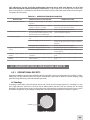
If shading is persistent, you will not be able to see a fully circular image (Figure 4-1). Shading is a very
dark, high-contrast area with a distinct line of demarcation present, and you cannot see an image
through it. Shading always begins on the edge, and will eventually migrate inward until it spans across
the entire image area. If you notice shading with your device, please contact Customer Support.
SHADING
Figure 4-1. shading
29
NOTE:
Verify that any shading is not the result of improper eye-relief adjustment.
B. Edge Glow
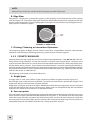
Edge glow is a bright area (it sometimes appears to be sparkling) in the outer portion of the viewing
area (see Figure 4-2). To check for edge glow, block out all light from the device by cupping a hand over
the lens. If the image tube is displaying edge glow, the bright area will still show up; if edge glow occurs,
please contact Customer Support.
EDGE
GLOW
Figure 4-2. EDGE GLOW
C. Flashing, Flickering, or Intermittent Operation
The image may appear to flicker or flash. If there is more than a single flicker, check for a loose battery
adapter or a weak battery. If flickering continues, please contact Customer Support.
4.3.2 Cosmetic Blemishes
Cosmetic blemishes are usually the result of manufacturing imperfections. They do not affect the reliability of the image intensifier, and are not normally a cause for returning the Spark. However, some
types of cosmetic blemishes can worsen over time and interfere with the user’s ability to properly operate the device during missions. If you believe a cosmetic blemish is cause for returning the device, record the specific nature of the problem on the maintenance forms and use the clock method to identify
the position of the blemish and its approximate distance from the center (e.g., 5:00 toward the outside,
2:30 near the center, or 1:00 midway).
The following are examples of cosmetic blemishes:
A. Bright Spots
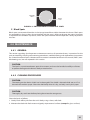
A bright spot is a small, non-uniform bright area that may flicker or appear constant (Figure 4-3).
Not all bright spots make the Spark rejectable. Cup your hand over the lens to block out all light. If the
bright spot remains please contact Customer Support.
Bright spots usually go away when all light is blocked out. Verify that any bright spots are not simply the
result of bright light in the area you are observing. Bright spots are acceptable if they do not interfere
with the user’s ability to view the scene or perform missions. B. Emission points
Emission points are steady or fluctuating pinpoints of bright light in the image area that do not go away
when all external light is blocked from the objective lens (Figure 4-3). The position of an emission point
within the image area does not move. Not all emission points are cause to return the Spark. Verify that
emission points are not simply light sources present in the scene you are observing. Emission points are
acceptable if they do not interfere with the user’s ability to perform missions.
30
EMISSION
POINT
BRIGHT
SPOT
Figure 4-3. EMISSION POINTS AND BRIGHT SPOTS
C. Black Spots
Black spots are cosmetic blemishes in the image intensifier or debris between the lenses. Black spots
are acceptable as long as they do not interfere with the user’s ability to observe the scene. No action
is required if this condition is present, unless the spots interfere with the operator’s ability to perform
missions.
4.4 Maintenance
4.4.1 General
The section regarding Spark operator maintenance consists of operational tests, inspections for the
unit serviceability, cleaning and mounting procedures, troubleshooting, and replacement instructions
for a limited number of parts. Maintenance instructions covered elsewhere in this manual (PMCS, troubleshooting, etc.) are not repeated in this section.
CAUTION:
The Spark is a precision electron-optical instrument, and must be handled carefully at all times
to prevent damage to the device’s body or mechanisms.
4.4.2 CLEANING PROCEDURES
CAUTION:
The coating on the demist shield can be damaged if the shield is cleaned while wet, or if it is
cleaned with wet lens paper. Clean the shield only when it is dry, and only use dry lens paper.
CAUTION:
Thoroughly dry each item before placing them into the storage case.
Clean the Spark as follows:
1. Gently brush off any dirt from the unit’s body using a clean, soft cloth.
2. Moisten the cloth with fresh water and gently wipe external surfaces (except for glass surfaces).
31
3. Dry any wet surfaces (except for glass surfaces) with another clean, soft, dry cloth.
4. Using a lens brush, carefully remove all loose dirt from the glass surfaces.
5. Slightly dampen a cotton swab with ethanol. Gently and slowly wipe the lenses. Without touching
the lens holders, clean the glass surfaces in circular movements, beginning in the center and moving
out towards the edge. Change the cotton swab after each circular stroke. Repeat until the glass surfaces
are clean.
6. Clean the battery contact surfaces and contact springs with a pencil eraser and/ or alcohol-dampened cotton swabs.
Clean optional mounting devices with a soft brush (cloth), soap, and water as required.
Clean optional lenses as detailed in items 4 and 5 above (except for the demist shield).
4.4.3 Battery Removal and Replacement
Refer to Part 3.1.1 for battery installation procedures. No special tools are required to replace the battery.
4.4.4 GOGGLE KIT MAINTENANCE
A. Browpad Replacement
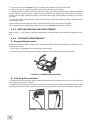
Replace the browpad when cracked, torn, or contaminated. Perform the following to remove and replace the browpads:
1. Firmly grasp the goggle kit and remove the old browpad.
2. Gently press on the new browpad. Gently smooth out any wrinkles in the new browpad.
Figure 4-4. BROWPAD REPLACEMENT
B. Chin Strap Reinstallation
1. Detach the Velcro tape from the left side of the head-band and remove the chin strap. Unfasten the
chin strap from the strap assembly.
2. Replace the chin strap by joining the sides of the Velcro tape on the left side of the head-band and
threading the end of another strap into the corresponding buckle on the right side of the head-band.
Figure 4-5. CHIN STRAP REinstallation
32
C. Chin Cup Replacement
1. Detach the Velcro tape from the left side of the head-band and remove the chin strap.
2. Slide the chin cup out from the chin strap and replace it with a new one. After replacing the chin cup,
attach the Velcro on the left side of the head-band.
Figure 4-6. CHIN CUP REPLACEMENT
4.5 Service/Packing and Unpacking
4.5.1 Return Instructions
For service, repair or replacements, please email [email protected].
To assist the Service Representative (SR) with determining if the item is repairable, please provide the
following information:
1. Serial Number of the defective item.
2. Thorough description of the malfunction, defect or damage.
3. An explanation of how the malfunction, defect or damage occurred, if known.
If the SR determines that the item is under warranty or should be returned for repair, a Return
Material Authorization number (RMA#) will be provided. RMA can be obtained via e-mail to
[email protected] or via phone by calling Armasight Customer Service at (888)959-2259 Ext. 2 or
via fax (888)959-2260.
When returning the Spark for service or repair, the following procedures should be followed to prevent
any additional damage:
1. Verify that the Spark is free of all contaminants such as dirt or any other foreign material.
2. Remove the battery.
3. Place the cap over the lens.
4. Place the Spark in the hard shipping/ storage case or soft carrying case (if available). If the hard shipping/ storage case is not available, individually package each Spark unit being returned in a suitable
container.
Place the Spark and a copy of the test report or detailed description of the failure in a suitable packing/ shipping container. Mark the package with the RMA#. Ship the items using the fastest, most easily
traceable, prepaid method to Armasight Inc., 815 Dubuque Avenue, South San Francisco, CA 94080,
USA.
33
34
Appendix
A. Spark LIST OF SPARE PARTS
The parts authorized in this list of spare parts are required for operator maintenance. This list includes
parts that must be removed in order to replace authorized parts.
ITEM NO. Column indicates the number used to identify items in Figure A-1.
PART NO. Column indicates the primary number used by the manufacturer to identify an item; this
number controls the design and characteristics of the item by means of its engineering, specifications,
standards, and inspection requirements.
9
6
7
5
8
4
1
3
14
10
2
11
Figure A-1. Spark Spare Parts
TABLE A-1. Spark LIST OF SPARE PARTS
ITEM NO.
1.
2.
3.
4.
5.
6.
7.
8.
9.
10.
11.
12.
DESCRIPTION
Battery Cap
CR123A Lithium Battery
Battery Cap Retainer
Lens Cap
Objective Lens Assembly
Eyepiece Assembly
Eyecup Assembly
Function Switch
Rail
Operation and Maintenance Manual
Soft Carry Case
Shipping/Storage Case
PART NO.
SparkBC
CR123A
SparkBCR
SparkLC
SparkOLA
SparkEPA
SparkECA
SparkFS
SparkPR
SparkOUMM
SparkSCC
SparkSSC
35
B. Product Warranty Registration Card
In order to validate the warranty on your product, Armasight must receive a completed Product Warranty Registration Card for each unit, or the user must complete warranty registration on our website
(www.armasight.com). Please complete the included form and immediately mail it to our Service Center:
Armasight Inc.,
815 Dubuque Avenue,
South San Francisco,
CA 94080,
USA.
36
ARMASIGHT PRODUCT WARRANTY REGISTRATION CARD
PRODUCT INFORMATION
Product Name
Purchased From
Purchase Date
Product Serial #
CUSTOMER INFORMATION
Name
Address
City
Day Phone #
Country
Zip
Home Phone #
E-mail address
Customer Signature Required
37
38
ALPHABETICAL INDEX
A
L
Abbreviations 10
Length 13
B
M
Battery Installation 17
Magnification 13
Black Spots 31
Maintenance 27, 31
Bright Spots 30
C
- Goggle Kit 32
- Preventive 27
Cautions 2
Mounting 17
Cleaning 31
O
Continuous Operation 13
Objective Lens Focus 25
Cosmetic Blemishes 30
Operating Instructions 17
D
Operational Defects 29
Diopter Adjustment 13, 25
Operator Troubleshooting 28
E
P
Edge Glow 30
PMCS 27
Emission Points 30
Preparations for Storage 26
Eye Relief 13, 18
S
F
Safety Summary 2
Flashing, Flickering, or Intermittent Operation 30
Shading 29
F-number 13
Spare Parts 35
Function Switch 12, 24
System Description 11
G
W
General Information 7
Warranty Information 8
H
Weight 12
Height 19
Width 12
I
IR Illumination Range 14
IR Illuminator 2, 12, 25
39
Armasight Inc.
815 Dubuque Avenue
South San Francisco
CA 94080, USA
Phone: (888)959-2259
Fax: (888)959-2260
Intl Phone/Fax: (650)492-7755
[email protected]
CAUTION:
This product contains natural rubber latex
which may cause allergic reactions! The FDA
has noted an increase in the number of reported
deaths that are associated with an apparent sensitivity to natural latex proteins. If you are allergic
to latex, it is a good idea to learn which products
contain it and strictly avoid exposure to those
products.
www.armasight.com