1
( ISC May, 2012 No.1)
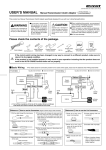
USER’S MANUAL
ISC
Thank you for purchasing this PIVOT product. Please
read this manual carefully before installation and use.
Please keep this manual for future reference.
If this product is given to
another user, make sure to
include this User’s Manual.
Product
Contents
IDLING
STOP CANCELLER
For CR-Z (Manual Trans.)
+
Please check the contents of the package
Contents / CAUTION / NOTE ……… 1
Function / Features …………………… 2
Part Names …………………………… 2
Connecting The Wires ………… 2 ~ 3
Fastening The Product ……………… 3
How To Operate ……………………… 4
Troubleshooting ……………………… 4
Controller
[41× 22 × 9 (D) mm]
Male Connector,
Male Sleeve
Unit
[ 51× 35 × 20 (D) mm]
5-pin
Power Cable
Double-sided
Tapes
Cut Connectors
Large ×1, Small ×1
×2
Female Connector,
Female sleeve
Zip Tie
User’s Manual
(This Book)
In the following circumstances the unit cannot be installed; doing so may cause damage.
• The ECU is different from the standard for that model • If a sub-computer is being used.
WARNING
Improper use or disregard of these
warnings may result in the injury or
death of people.
• Do not work in areas where there is excessive exhaust.
Due to vehicle exhaust emission poisoning or fire may result in a
damage to humans.
• Please securely fasten the product to a stable place.
It is very dangerous if, while in use, the product falls off and interferes with braking.
• Do not crush the cable.
Please be careful that the cable does not get crushed by the seat rail
or car door steel plate, nor cut by any sharp steel plate as this may
cause a poor connection or an electric short leading to fire or other
danger.
• Do not operate while driving.
CAUTION
Im pro per use or d isreg ar d of these
warnings may cause injury to persons,
damage the product and/or other things.
• Just after installation do not exert any strong force on the
product.
When double-sided tape is used for an installation be warned that
when hot the tape temporarily losses adhesiveness.
• Do Not Use Chemical Cleansers.
If the unit gets dirty please wipe with a soft cloth to remove any dirt.
Do not use chemical cleansers such as thinner, benzene, or alcohol.
• Do not install the product in any place subject to high temperature or any place where water may be splashed.
• Make sure to replace all screws and parts to their original
place.
Operating or checking the display during driving may cause an accident; please use with the utmost consideration for safety.
• Do not install the product in a place where it will cause distraction.
• Please be sure to store bundle away all wires with tape,
etc...
• D o n o t , in a ny m a n n e r, p r o c e s s , t a ke a p a r t , o r m a ke
changes to this product.
It is very dangerous to pull tangled wires by force or allow tangled
wires to interfere with driving.
• Do not use electrotap.
1
Functions and Features
Part Names
The ISC allows the user to switch on and off the idling stop
mechanism in CR-Z cars in the same manner as other
cars (Vitz, March, Wagon R, Axela and others).
Slow Response
at Take-off
Prevents slow take-off when restarting
Air Conditioner
Performance
Prevents loss of humidity and cooling
deficiency when compressor stops
Restart Discomfort
Prevents discomforting vibration upon
restart
Control without
causing error codes
Independent control system means no
errors such as “IMA System Error”
LED (Red)
LED
Settings
CANCEL
Light on
Cancels idling stop
mechanism
Light off
Normal
Switch
Switch between Cancel and Normal
About the LED Lamp
*This product is interlocked with the ECU (engine computer)
power. Because of this, it may take up to 5 minutes for the LED
to go off after turning off the engine; it is not a malfunction. (Only
when the idling stop mechanism has been set to be canceled)
Connecting The Wires
Basic Wiring
ECU
Engine Computer
Controller
Red
White
Brown
Unit
4-pin
Connector
Power
Source
Purple
5-pin
Connector
Black
Idling Stop
Signal
Earth
: Use Connector
1
: Use Cut Connector
Connect the power, speed signal and idling
stop signal.
*The ECU is located in the engine room at the rear of the battery.
Figure 1
Power
Source
44P (White)
44P (Gray)
44P (Green)
2
Connect the Earth.
1 Near the hood arm, fasten down the spade terminal of
the Black wire to the earthing point.
Hood arm
Earthing point
Idling Stop
Signal
Car Speed
Signal
*The connector diagram is shown
as from the wiring side.
1 Remove the battery cables from the minus terminals.
2 Using one of the supplied cut connectors, connect the Red
wire to the power position as shown in Figure 1.
3 Using the same procedure as in 2 , connect the White wire
to the car speed signal position.
4 Cut the idling stop signal wiring as shown in Figure 1.
5 Using one of the supplied connectors, connect the Purple
wire and the Brown wire. (See Figure 2)
Figure 2
ECU
Brown
Cut
5-pin Connector
: Use Connector
2
Purple
Car side
Car Speed
Signal
3
Pull the cable to the inside of the car.
1 Remove the right front inner fender.
2 As shown in the figure below, pull the 5-pin connector
from the grommet into the inside of the car.
Grommet
3 After fastening down the 5-pin power cable and the seal
of the grommet, replace the inner fender.
*For waterproofing, place a seal around the grommet. Also, to
prevent tucking, fasten down the 5-pin power cable.
4
Connect Each Connector to the Unit.
1 Connect both the 4-pin connector from the controller and
the 5-pin power connector pulled from the engine room to
the appropriate slot on the unit.
5-pin power cable
Fastening The Product
Please be sure to bundle away
all wires with tape, etc…
While in use if wires become free they may interfere with driving and cause
accidents. Also, wires which are smashed or crushed may result in a short
and can be extremely dangerous.
• Installing The Unit As shown in the diagram below, fasten the unit into positions not usually affected by water.
(Example of Installation)
Under the steering
column cover
(How to Install)
On the back side
of the under cover
Unit
On the inside of
the driver’s door
Double-sided
tape (Included)
Clean to remove
oil and dust.
Do not install into low positions
• Installing The Controller Affix with double-sided tape to a position which is easy to see and which allows for easy operation.
(How to Install)
(Example of Installation)
Clean to remove
oil and dust.
Double-sided
tape (Included)
Instrument panel
Center console
1 Using the supplied double-sided tape, fasten down both the unit and the controller.
2 So as not to obstruct driving make sure to bundle all loose wires and cables.
3 Make sure to replace everything that was removed or disconnected during installation
and reconnect the battery’s minus terminal.
3
[Reference 1] How to use the Male Connectors
1
Male sleeve
Wire
2
[Reference 2] How to use the Cut Connectors
1
3
10 mm
Pull the cable through the
male sleeve.
Remove about 10 mm of the cable
casing.
Turn back the tip of the
wires.
4
5
6
Male Connector
Connect the male connector to the end of the cable.
Crimp these places
Crimp down with crimpers to make sure
that the inner wires are firmly connected to the inner part of the connector
and that the cable section is connected
to the outer part of the connector.
Affix the male sleeve to
the places as mentioned
above.
*After connecting the male and female connectors, make
sure to firmly twist the male sleeve inside the female sleeve.
How to Operate
1
Engine Start
2
2
10 mm
10 mm
Peel of f of the vinyl
cover at connection.
Peel of f of the vinyl
cover at the end of the
product’s wire.
3
4
Wrap around both wire
coils.
Close tightly with cut
connector.
5
*When crimping, please
use crimpers or use
pliers to bend and then
solder together.
Insulate with vinyl tape.
After having completed Steps 2 to 4 below the settings will be activated.
Press while car is not in motion.
START
3
Start Running
(30km/h or above)
4
Press
Stop the car ⇒
The setting made
in Step 2 will be
activated.
3 Running
30 km/h
2 Stop the car
4 Stop the car
Stop the car (0 km/h)
LED
Settings
Light up
Cancels idling stop mechanism
Light off
Normal
When in “normal”, the conditions necessary for the idling
stop mechanism to be activated will be the same as for
that car model’s conditions.
Troubleshooting
Trouble
Possible Causes
Possible Solutions
I press the switch but the LED does
not come on.
Poor connection of Red wire or Black wire.
Please reconfirm whether wiring and connections are correct or not.
Even though the setting has been
made to cancel the idling stop
mechanism, idling stop still occurs.
Poor connection of White wire.
Please reconfirm whether wiring and connections are correct or not.
Poor connection of Purple wire or Brown wire.
A speed of 30 km/h or more was not reached.
Even though the set ting is at
“Normal”(idling stop has not been
cancelled), the idling stop mechanism does not work.
Switch operation was carried out while the car
was in motion.
Completely stop the car and check the operation again after having made sure that a speed
of at least 30 km/h was achieved.
The necessary conditions for the idling stop mechanism to become activated have not been met.
Check the User’s Manual for your car model and
read the conditions necessary for Idling Stop.
A speed of 30 km/h or more was not reached.
Completely stop the car and check the operation again after having made sure that a speed
of at least 30 km/h was achieved.
Switch operation was carried out while the car
was in motion.
*Our products have already been recognized as our Industrial Property or are in the process of receiving Industrial Property status.
*We plan in the near future to take all possible legal measures to protect against unfair competition from look-alike products using similar
designs, regulating characteristics, circuitry and circuitry layout.
*We strictly prohibit the unlicensed use of the PIVOT trademark and the unauthorized use of PIVOT User’s Manual.
4
PIVOT CORPORATION
87-3, Shimookada Okada, Matsumoto-shi, Nagano, 390-0313 Japan TEL0263-46-5901
http://pi votj p.c om /