1
Visual Control
II First steps
II First steps
First steps
This chapter introduce the basics to simply use the 3D visualizer. It includes a description of the files
used to save the projects and the first steps to create a 3D stage.
1. 3D stage
3D stage
3D stages are saved with the "evs" format and can be open/saved indefinitely. Stage
dimensions, inserted objects and fixtures are also saved in these files.
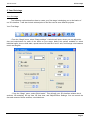
It is also possible to import or export 3D stages to or from zipped files with the "Import / Export"
buttons of the "Stage" menu. Saving a 3D stage including all required files (X files, BMP or JPG files for
the textures...) and the re-open it on another computer which does not contain the same objects.
Page 2