1
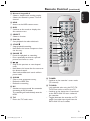
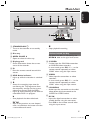
Remote Control (continued) English n Numeric keypad 0-9 – Selects a chapter/track number to play. – Selects the recorder’s preset TV tuner channel. o HDD – Access to the HDD content menu. p DVD – Switches to disc mode or displays the disc content menu. q SELECT – Selects a function. r PLAY – Start playback the select title/track. s STOP – Stops playback/recording. – Hold down this button to open or close the disc tray. t PAUSE Å – Pauses the playback or recording. – Press repeatedly to advance a paused picture one frame at a time. u – Skips to the previous or next chapter/ track. – Hold down this button for fast reverse or fast forward search. – Slow backward/forward search while in pause mode. v – – – CLEAR Clear a timer programme entry. Delete the HDD title. Delete the recording. w DV – Switches to ‘camera mode’ for camcorder connecting to DV IN socket. The recording will make directly onto the HDD. x T/C – Enters the T/C tools menu. 14 15 16 17 18 19 20 21 22 23 24 25 26 y TUNER – Switches to the recorder’s tuner mode (TV channel). z TV/HDD (only applicable when using the EXT1 TO TV-I/O scart socket to connect your TV) – Switches to the device that is connected to the EXT2 AUX-I/O scart socket of this recorder. – Toggles between the recorder and TV mode if no video input signal from the EXT2 AUX-I/O scart socket. 13 1_dvdr3300H_Eng17.indd 13 2005-07-01 9:56:49 AM