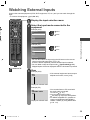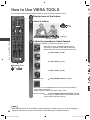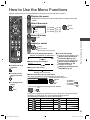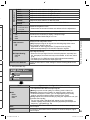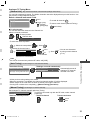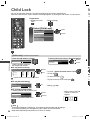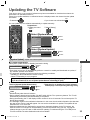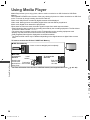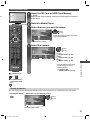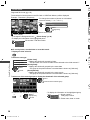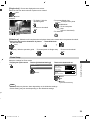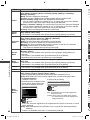
1
Model No. TH-L42E3A Operating Instructions LCD TV Thank you for purchasing this Panasonic product. Please read these instructions before operating your set and retain them for future reference. The images shown in this manual are for illustrative purposes only. English BJN TQB4GC0641 TH-L42E3A-EN.indd 1 3/11/2011 9:37:01 AM Experience an amazing level of multimedia excitement Receive digital terrestrial services using an integrated Digital TV tuner Sharp pictures with HDMI terminal Create home theatre and DVD recorder link-ups with “VIERA Link” without complicated settings! Enjoy rich multimedia SD Card Camcorder VCR Personal computer Amplifier with Speaker system Set top box DVD Recorder DVD Player Blu-ray Disc Player This product is licensed under the AVC patent portfolio license for the personal and non-commercial use of a consumer to (i) encode video in compliance with the AVC Standard (“AVC Video”) and/or (ii) decode AVC Video that was encoded by a consumer engaged in a personal and non-commercial activity and/or was obtained from a video provider licensed to provide AVC Video. No license is granted or shall be implied for any other use. Additional information may be obtained from MPEG LA, LLC. See http://www.mpegla.com. 2 TH-L42E3A-EN.indd 2 3/11/2011 9:37:02 AM Licence Contents DLNA®, the DLNA Logo and DLNA CERTIFIED™ are trademarks, service marks, or certification marks of the Digital Living Network Alliance. HDMI, the HDMI Logo and High-Definition Multimedia Interface are trademarks or registered trademarks of HDMI Licensing LLC in the United States and other countries. “AVCHD” and the “AVCHD” logo are trademarks of Panasonic Corporation and Sony Corporation. Manufactured under license from Dolby Laboratories. Dolby and the double-D symbol are trademarks of Dolby Laboratories. DivX®, DivX Certified® and associated logos are trademarks of DivX, Inc. and are used under license. QuickTime and the QuickTime logo are trademarks or registered trademarks of Apple Inc., used under license therefrom. SDXC Logo is a trademark of SD-3C, LLC. VGA is a trademark of International Business Machines Corporation. Be Sure to Read Safety Precautions ······························ 4 (Warning / Important Installation Notices) Notes ················································ 5 Quick Start Guide Accessories / Options ·························· 6 Basic Connection ································ 9 Identifying Controls ·····························10 Auto Tuning·······································12 Basic Features Watching TV······································14 Using TV Guide (Digital TV mode) ·········18 Watching External Inputs ·····················19 How to Use VIERA TOOLS ··················20 How to Use the Menu Functions ············21 Advanced Features Tuning and Editing Channels ················28 Child Lock·········································32 Input Labels ······································33 Shipping Condition (Reset settings) ·······34 Updating the TV Software ····················35 Using Media Player·····························36 Using Network Services ·······················45 VIERA Link Functions ·························54 External Equipment ····························59 S-VGA is a registered trademark of the Video Electronics Standard Association. HDAVI Control™ is a trademark of Panasonic Corporation. Macintosh is a trademark of Apple Inc. Technical Windows is a registered trademark of Microsoft Corporation in the United States and/or other countries. Technical Information ························· 62 Maintenance ···································· 69 FAQs ·············································· 70 Specifications ··································· 73 WARRANTY····································· 75 Even if no special notation has been made of company or product trademarks, these trademarks have been fully respected. 3 TH-L42E3A-EN.indd 3 3/11/2011 9:37:02 AM Safety Precautions I Ins Safety Precautions Warning Handling the mains plug and lead ● Insert the mains plug fully into the socket outlet. (If the mains plug is loose, it could generate heat and cause fire.) ● Ensure that the mains plug is easily accessible. ● Do not touch the mains plug with a wet hand. (This may cause electrical shock.) ● Do not damage the mains lead. (A damaged lead may cause fire or electrical shock.) Do not move the TV with the lead plugged in the socket outlet. Do not place a heavy object on the lead or place the lead near a high-temperature object. ● Do not twist the lead, bend it excessively, or stretch it. ● Do not pull on the lead. Hold onto the mains plug body when disconnecting the lead. ● Do not use a damaged mains plug or socket outlet. ● ● If a fal ●U ●O ●E ●N b ●N ●E W ●C W ●T c If you find any abnormality, remove the mains plug immediately! AC 220 - 240 V, 50 / 60 Hz Power source / Installation Do not insert foreign objects into the TV Tr Al Mi 10 ● This TV is designed for: AC 220 - 240 V, 50 / 60 Hz ● Indoor use ● Table top use ● Do not remove covers and NEVER modify the TV yourself ● Do not remove the rear cover as live parts are accessible when it is removed. There are no user serviceable parts inside. (High-voltage components may cause serious electrical shock.) ● Have the TV checked, adjusted, or repaired at your local Panasonic dealer. Do not expose to rain or excessive moisture ● To prevent damage which might result in electric shock or fire, do not expose this TV to rain or excessive moisture. This TV must not be exposed to dripping or splashing water and objects filled with liquid, such as vases, must not be placed on top of or above the TV. Do not expose to direct sunlight and other sources of heat ● Avoid exposing the TV to direct sunlight and other sources of heat. To prevent the spread of fire, keep candles or other open flames away from this product at all times ● Do not allow any objects to drop into the TV through the air vents. (Fire or electrical shock may result.) ●B Do not place the TV on sloped or unstable surfaces ● The TV may fall off or tip over. s Do ●T Do ● Ir Use only the dedicated pedestals / mounting equipment ● Using an unapproved pedestal or other fixtures may make the TV unstable, risking injury. Be sure to ask your local Panasonic dealer to perform setup. ● Use approved pedestals (p. 6) / wall-hanging brackets (p. 8). Do not allow children to handle SD Card ● As with any small object, SD Cards can be swallowed by young children. Please remove SD Card immediately after use and store out of reach of children. 4 TH-L42E3A-EN.indd 4 Do 3/11/2011 9:37:03 AM N Au ●T ● ● ● Ke ●E In im ●E T Important Installation Notices If a television is not positioned in a sufficiently stable location, it can be potentially hazardous due to falling. Many injuries, particularly to children, can be avoided by taking simple precautions such as: ● Using cabinets or stands recommended by the manufacturer of the television. ● Only using furniture that can safely support the television. ● Ensuring the television is not overhanging the edge of the supporting furniture. ● Not placing the television on tall furniture (for example, cupboards or bookcases) without anchoring both the furniture and the television to a suitable support. ● Not standing the television on cloth or other materials placed between the television and supporting furniture. ● Educating children about the dangers of climbing on furniture to reach the television or its controls. When cleaning the TV, remove the mains plug ● Cleaning an energised TV may cause electrical shock. When the TV is not going to be used for a long period of time, remove the mains plug ● This TV will still consume some power even in the Off mode, as long as the mains plug is still connected to a live socket outlet. Transport only in upright position Allow sufficient space around the TV for radiated heat Minimum distance 10 10 10 V f Safety Precautions | Notes Install the TV on a stable surface ● When using the pedestal, keep the space between the bottom of the TV and the surface where the TV is set. 10 ● If using a Wall-hanging bracket, refer to its manual. (cm) Do not block the rear air vents ● Blocked ventilation by newspapers, table cloths, curtains, etc. may cause overheating, fire or electrical shock. Do not apply strong force or impact to the display panel ● This may cause damage resulting in injury. Do not expose your ears to excessive volume from the headphones ● Irreversible damage can be caused. Notes Auto power standby function ● The TV will automatically go into Standby mode in the following conditions: no signal is received and no operation is performed for 30 minutes in Analogue TV mode [Off Timer] is active in the Setup Menu (p. 14) ● no operation is performed for the period selected in [Auto Standby] (p. 27) ● ● Keep the TV away from these types of equipment ● Electronic equipment In particular, do not place video equipment near the TV. Electromagnetic interference may distort images / sound. ● Equipment with an infrared sensor This TV also emits infrared rays. This may affect operation of other equipment. 5 TH-L42E3A-EN.indd 5 3/11/2011 9:37:03 AM Accessories / Options Standard accessories Remote Control ● N2QAYB000604 POWER SD CARD Batteries for the Remote Control (2) ● R6 (AA) Pedestal (p. 7) Fall-prevention parts (p. 7) INPUT TV AV MENU SURROUND ASPECT EXIT RETURN R G TEXT STTL Y B INDEX HOLD abc Accessories / Options Operating Instructions with Warranty statement IDE GU VIERA Lin k INFO OPTION def ghi jk l mno pqrs tuv wxyz MUTE LAST VIEW CH VOL TV ● This product contains possibly dangerous parts (such as plastic bags), which can be breathed in or swallowed by young children accidentally. Keep these parts out of reach of young children. As Us to ba ●M a Inserting and removing remote’s batteries 1 Open Hook 2 Close Caution ● Incorrect installation may cause battery leakage and corrosion, resulting in damage to the remote control. ● Do not mix old and new batteries. ● Do not mix different battery types (such as alkaline and manganese batteries). ● Do not use rechargeable (Ni-Cd) batteries. ● Do not burn or breakup batteries. Batteries must not be exposed to excessive heat such as sunshine, fire or the like. ● Do not disassemble or modify the remote control. ● P Th We ●T p Note the correct polarity (+ or -) Fa Attaching the pedestal Warning Do not disassemble or modify the pedestal. ● Otherwise the TV may fall over and become damaged, and personal injury may result. Caution Do not use any pedestal other than that provided with this TV. ● Otherwise the TV or the display may fall over and become damaged, and personal injury may result. Do not use the pedestal if it becomes warped or physically damaged. ● If you use the pedestal while it is physically damaged, personal injury may result. Contact your nearest Panasonic dealer immediately. During set-up, make sure that all screws are securely tightened. ● If insufficient care is taken to ensure screws are properly tightened during assembly, the pedestal will not be strong enough to support the TV, and it might fall over and become damaged, and personal injury may result. Ensure that the TV does not fall over. ● If the TV is knocked or children climb onto the pedestal with the TV installed, the TV may fall over and personal injury may result. Two or more people are required to install and remove the TV. ● If two or more people are not present, the TV may be dropped, and personal injury may result. 6 TH-L42E3A-EN.indd 6 3/11/2011 9:37:03 AM Assembly screw (4) (black) Assembling the pedestal Use the assembly screws to fasten the bracket to the securely. base ● Make sure that the screws are securely tightened. Base Securing the TV Insert the bracket into the TV, and then fasten securely with the assembly screws . ● Tighten the four assembly screws loosely at first, then tighten them firmly to fix securely. B A C Bracket B Hold the bracket not to fall over Accessories / Options s nt Assembly screw (4) (black) Front ne Foam mat or thick soft cloth D ● Preventing the TV from falling over This TV could fall over if it is pushed, pulled or knocked down. We therefore recommend the TV is secured to the furniture as illustrated. ● This measure is designed to reduce the risk of injury from a falling TV. However, it cannot guarantee protection in all cases. Fall-prevention parts Band Securing to a furniture Fix pedestal and furniture together with band. Screw Screw Band Wood screw Wood screw est ● This image is for illustrative purposes only. l d 7 TH-L42E3A-EN.indd 7 3/11/2011 9:37:04 AM Optional accessories Please contact your nearest Panasonic dealer to purchase the recommended optional accessories. For additional details, please refer to the manual of the optional accessories. Accessories / Options Wireless LAN Adaptor ● DY-WL10E-K B Ex Ple lea Caution ● To use the Wireless LAN Adaptor, your network needs to have a Wireless Access Point. ● It is recommended to use the Wireless LAN Adaptor with the extension cable. ● To avoid radio wave interference, keep the TV away from the devices such as other wireless LAN devices, microwaves and the devices that use 2.4 GHz and 5 GHz signals when using the Wireless LAN Adaptor. Otherwise malfunction may occur. ● This optional accessory may not be available in your market region. ● Additional information for Wireless LAN Adaptor and Wireless Access Point may be found at the following web site. (English only) http://panasonic.jp/support/global/cs/tv/ Rear of the TV 400 mm AC 50 Screw for fixing the TV onto the wall-hanging bracket (not supplied with the TV) Depth of screw: minimum 6 mm 400 mm maximum 18 mm Screw Thread Type: M6 Holes for wall-hanging bracket installation (View from the side) Warning ● Installing a wall-hanging bracket by yourself have the risk of personal injury and product damage. In order to maintain the unit’s performance and safety, be absolutely sure to ask your dealer or a licensed contractor to secure the wallhanging brackets. Any damage caused by installing without a qualified installer will void your warranty. ● Do not mount the unit directly below ceiling lights (such as spotlights, floodlights or halogen lights) which typically give off high heat. Doing so may warp or damage plastic cabinet parts. ● Take care when fixing wall brackets to the wall. Always ensure that there are no electrical cables or pipes in the wall before hanging bracket. ● To prevent fall and injury, remove the TV from its fixed wall position when it is no longer in use. ●K ●D ●T c ● If th ●Y s ●A th ●V ●O ●R 8 TH-L42E3A-EN.indd 8 3/11/2011 9:37:05 AM Basic Connection External equipment and cables shown are not supplied with this TV. Please ensure that the unit is disconnected from the mains socket before attaching or disconnecting any leads. s Satellite dish AC 220-240 V, 50 / 60 Hz Aerial Basic Connection y Rear of the TV Satellite cable Set top box Mains lead Fully wired HDMI compliant cable will ge RF cable Note ● Keep RF (antenna) cable away from the mains lead to avoid and minimise mains interference pickup. ● Do not place the RF cable under the TV. ● To obtain optimum quality picture and sound, an aerial, the correct cable (75 coaxial), and the correct terminating plug are required. ● If a communal aerial system is used, you may require the correct connection cable and plug between the wall aerial socket and the TV. ● Your local Television Service Centre or dealer may be able to assist you in obtaining the correct aerial system for your particular area and the accessories required. ● Any matters regarding aerial installation, upgrading of existing systems or accessories required, and the costs incurred, are the responsibility of you, the Customer. ● VIERA Link connection (p. 54) ● Other equipment connection (p. 59 - 61, 71) ● Read the manual of the external equipment, too. 9 TH-L42E3A-EN.indd 9 3/11/2011 9:37:06 AM Identifying Controls TV R 1 2 Identifying Controls 9 4 10 2 11 3 6 7 8 12 1 1 4 5 9 Function select USB port ● [Volume] / [Contrast] / [Brightness] / SD Card slot [Colour] / [Sharpness] / [Tint] (NTSC HDMI3 terminal signal) / [Bass] ([Music] or [Speech] mode in the Sound Menu) / [Treble] AV3 terminals ([Music] or [Speech] mode in the Headphones jack Sound Menu) / [Balance] / [Digital Remote control signal receiver TV Auto Tuning] or [Analogue TV ● Do not place any objects between Auto Tuning] the TV remote control signal receiver 10 Channel Up / Down, Value change and remote control. (when using the F button), Switching 7 C.A.T.S. (Contrast Automatic the TV On (press either button for Tracking System) sensor about 1 second when in Standby ● Senses brightness to adjust picture mode) quality when [Eco Mode] in the 11 Changes the input mode Picture Menu is set to [On] (p. 22) 12 Mains power On / Off switch 8 Power LED ● Use to switch the mains power. ● Red : Standby If you turned the TV Off during Green : On Standby mode by the remote control ● When using the remote control, last time, the TV will be in Standby indicates the TV has received a mode when you turn the TV On with command. Mains power On / Off switch. 1 2 3 4 5 6 12 1 14 About the Operation Guide - On Screen Displays The Operation Guide is displayed at the bottom of the on Screen Displays. The button used on this screen and manner of operation is displayed. Example: [TV Guide] TV Guide: Landscape Wed 27 Oct 2010 TH-L42E3A-EN.indd 10 11 Home 11:30 am - 12:00 pm DIY SOS : We open in the Battersbys Time: 11:00am 11:30am 12:00pm 12:30 pm D 11 Home East ender DIY SOS The Bill Red Cap D 16 World Hot Wars Holiday Program Coronation Street D 81 Jade Emerald The Bill Pepsi Char. D 84 Pearl 10 O’ clock News BBC Good bye D 100 Sapphire Market News Business News Drama 2 Drama 1 D 101 Ruby D 102 Gold News Shopping Topics Select channel EXIT Info Select programme GUIDE Portrait/Landscape View RETURN -24 hours +24 hours Prog.Type 4 INFO EXIT IDE GU 10 Operation Guide All Types Wed 27 Oct 2010 10:27 am All Channels 1 :00 pm Sports Live junction Drama NEWS RETURN R G Y B Live CH Page up Page down Favourites TV 3/11/2011 9:37:06 AM INFO EXIT TO VIERA OLS k 8 OPTION RETURN 10 11 12 R G Y TEXT STTL B INDEX HOLD abc def ghi jk l mno pqrs tuv wxyz 13 16 17 18 19 20 22 23 24 25 MUTE 14 15 21 9 2 / C h] e] MENU SURROUND ASPECT IDE GU 7 INPUT TV AV LAST VIEW CH VOL 26 g ol th TV 1 Standby On / Off switch ● Switches TV On or Off standby 2 [Media Player] (p. 36) ● Switches to SD Card and USB device viewing / listening mode 3 Sound Selection ● Changes the sound track in Digital TV mode (if available) ● Changes multiplex sound mode in Analogue TV mode (if available) (p. 62) 4 [Main Menu] (p. 21) ● Press to access Picture, Sound and Setup Menus 5 Information (p. 15) ● Displays channel and programme information 6 VIERA TOOLS (p. 20) ● Displays some special feature icons and accesses easily 7 [VIERA Link Menu] (p. 56) ● Accesses VIERA Link Menu 8 OK ● Confirms selections and choices ● Press after selecting channel positions to quickly change programme 9 [Option Menu] (p. 16) ● Easy optional setting for viewing, sound, etc. 10 Teletext ● This button is not used for this model. 11 Subtitles (p. 14) ● Displays subtitles 12 Numeric buttons ● Changes channel ● When in Standby mode, switches TV On 13 Sound Mute ● Switches sound mute On or Off 14 Volume Up / Down 15 Input mode selection ● TV - switches Digital TV / Analogue TV mode (p. 14) ● AV - switches to AV input mode from Input Selection list (p. 19) 16 Aspect (p. 17) ● Changes aspect ratio 17 Surround (p. 24) ● Switches surround sound setting 18 Exit ● Returns to the normal viewing screen 19 Guide (p. 18) ● Displays TV Guide 20 Cursor buttons ● Makes selections and adjustments 21 Return ● Returns to the previous menu / page 22 Coloured buttons ● Used for the selection, navigation and operation of various functions 23 Hold ● Freeze / unfreeze picture (p. 14) 24 Index ● This button is not used for this model. 25 Last View (p. 16) ● Switches to previously viewed channel or input modes 26 Channel Up / Down ● Selects channel in sequence Identifying Controls 1 2 3 4 5 6 POWER SD CARD VIERA Lin 0 Remote Control 11 TH-L42E3A-EN.indd 11 3/11/2011 9:37:06 AM Auto Tuning S Search and store TV channels automatically. ● These steps are not necessary if the setup has been completed by your local dealer. 1 Plug the TV into mains socket and switch On ● You can now use the remote control to turn On the TV or Auto Tuning switch the TV to Standby mode. (Power LED: On) 2 INFO 3 select Select State / Territory confirm 2 3 Start Auto Tuning select TV Signal Selection RETURN D Digital TV A Analogue TV tune / skip / start 1 Select the TV Signal Start Auto Tuning Y : tune : skip Auto Tuning abc def ghi jk l mno pqrs tuv wxyz Digital TVScan Scan Analogue Analogue TV Scan Analogue Scan RF Ch 62 62 62 62 29 33 Digital TV: 4 69 68 75 68 CH21 6 CH 0 This will take about 6 minutes. Channel Name CBBC Channel BBC Radio Wales E4 Cartoon Nwk Type Digital TV Digital TV Digital TV Digital TV Analogue TV Analogue TV Quality 10 10 10 10 - Analogue TV: 2 Searching 4 2 Select [Start Auto Tuning] ● Auto Tuning will start to search for TV channels and store them. The sorted channel order depends upon the TV signal, the broadcasting system and reception conditions. Set up the wireless LAN connection Start wireless LAN connection setup? Yes select confirm No ● You can setup the wireless LAN connection later. (p. 49) ● If you want to select [Yes] in this position. (p. 13) TV 5 Select [Home] Please select your viewing environment. Home Shop select confirm Auto Tuning is completed Viewing environment mode Home : Recommended mode for viewing at home. Select [Home] for optimal picture / power consumption. [Viewing Mode] is set as [Normal] (p. 22). Shop : Demonstration mode to explain main features of this TV (for in-store display). [Viewing Mode] is set as [Dynamic] (p. 22). To return to viewing environment selection mode if you selected [Shop] RETURN Please select your viewing environment. Home Shop Shop You have selected shop mode Automatic Demo Off RETURN On ● To change viewing environment mode later on, reset all settings by accessing Shipping Condition. [Shipping Condition] (p. 34) 12 TH-L42E3A-EN.indd 12 1 Select your area New South Wales / Australian Capital Territory Victoria Queensland South Australia Western Australia Northern Territory Tasmania POWER Se ●T F ●C F ●P 3/11/2011 9:37:07 AM Setup the wireless LAN connection 1 2 Internet environment Wireless LAN Adaptor (optional accessory) Access point Select [Yes] Start wireless LAN connection setup? Yes select confirm No Please connect the wireless LAN adaptor to a USB terminal. 3 Auto Tuning or Setup the wireless LAN connection to enable the network service functions. ● To setup the wireless LAN connection, the wireless LAN Adaptor (optional accessory) is required. For the information about the Wireless LAN adaptor “Optional accessories” (p. 8) ● Confirm the encryption key, settings and positions of your access point before starting setup. For details, read the manual of the access point. ● Please note that this TV does not support wireless public access points. Connect the Wireless LAN Adaptor to the USB 1 or 2 port Select the connection type select Connection Type Please select network connection type. confirm WPS(Push button) Search for access point ■ [WPS(Push button)] ● If your access point supports WPS (Push button), then select this option. If not, select [Search for access point]. Press the WPS button on the access point until the light flashes. And then, press the OK button to connect the Wireless LAN Adaptor and the access point. WPS(Push button) Pleasepress press ‘WPS’ button on the access 1) Please thethe ‘WPS’ button on the access light flashes. flashes. point until its light 2) When select ‘Connect’ on on Whenthe thelight lightisisflashing flashing select ‘Connect’ TV. TV. If you check thethe instruction you are areunsure, unsure,please please check instruction manual point. manual of ofthe theaccess access point. Connect . ● Ensure that your access point supports WPS for this method. ● WPS: Wi-Fi Protected Setup™ ■ [Search for access point] Access points found automatically are listed. Available Access Points 1 Select your desired access point select ● To search access points again No. 1 2 SSID Access Point A Access Point B Wireless type Encrypt 11n(2.4GHz) 11n(5GHz) 3 Access Point C 11n(5GHz) Reception access Encryption Key Setting Connection will be made with the following settings:SSID : Access Point A Authentication type : WPA-PSK Encryption type : TKIP Please input the encryption key. Access Point Settings Encryption key B V b v C W c w D X d x E F G Y Z e f g y z ( ● For the information of the INFO highlighted access point 2 Access the encryption key input mode ● If the selected access point is not encrypted, the confirmation Encryption key A U a u Y H I J K L M N O P Q R S T 0 1 2 3 4 5 6 7 8 9 ! : # h i j k l m n o p q r s t ) + - . * _ screen will be displayed. It is recommended to select the encrypted access point. 3 Enter the encryption key of the access point (Set characters one by one) select Store RETURN set ● You can set characters by using numeric buttons. 4 Select [Yes] Access Point Settings s Encryption key is set to:XXXXXXXX select set Select ‘Yes’ to confirm. Select ‘No’ to change. ● To re-enter the encryption key, select [No]. Yes No Wireless LAN connection setup is completed ● If failed, check the encryption key, settings or positions of your access point. Read the manual of the access point. ● If connection to the access point is successful, we recommend you perform the [Connection Test] (p. 49). TH-L42E3A-EN.indd 13 13 3/11/2011 9:37:08 AM Watching TV POWER INPUT TV MENU ASPECT INFO EXIT D 1 Turn power on 2 Select Digital TV or Analogue TV mode ● Mains power On / Off switch should be On. (p. 10) The selected mode is displayed. Digital TV Dis INF Dig ● It is also possible to select the OPTION 1 BBC ONE WALES Coronation Street 11:00 pm - 11:55 pm 11:35 pm mode pressing the TV button repeatedly on the side panel of the TV. (p. 10) All Digital Channels Select favourites Now Rating: PG R B Watching TV STTL ghi Information banner appears whenever you select a channel ● For details (p. 15) HOLD abc def jk l mno 3 Select a channel up CH pqrs tuv wxyz down or abc def ghi jkl mno pqrs tuv wxyz ● To select the two or three-digit Fe channel number, e.g. 112 abc LAST VIEW An (in a short time) [ ● If one or two-digit channel number, e.g. 39 CH def [ wxyz (quickly changes the channel) ■ To select from the Channel List TV [ [ ● When the TV is switched to standby, there will be a clicking sound after a short delay. This is normal. select channel All Digital Channels 6 Cartoon Nwk 7 BBC Radio Wales 8 BBC Radio Cymru 1 BBC ONE Wales 2 BBC THREE 3 BBCi 4 CBBC Channel watch ●T Other useful functions Hold ●T Display subtitles Freeze / unfreeze picture Display / hide subtitles (if available) HOLD STTL ● In (D Off Timer Turn the TV off automatically after a fixed period of time [Off / 15 / 30 / 45 / 60 / 75 / 90 minutes] 1 Display the 2 Select [Setup] 3 Select [Off Timer] and set the time menu Setup Menu 1/2 Main Menu MENU Picture Sound Setup 14 TH-L42E3A-EN.indd 14 Off Timer Eco Navigation Child Lock Digital TV Tuning Menu Display Settings VIERA Link Settings Network Setup DivX® VOD System Menu Off change ● To cancel Set to off or turn the TV off. ● To display the remaining time “Display Information banner” (p. 15) ● When the remaining time is within 3 minutes, the remaining time will flash on screen. 3/11/2011 9:37:08 AM ●T ( Display Information banner d Display Information banner INFO ● Also appears when changing a channel Digital TV mode Current time Channel position and name Programme 1 BBC ONE WALES Coronation Street 11:00 pm - 11:55 pm Rating: PG 11:35 pm Now All Digital Channels Select favourites Software update 45 AD Programme Start / Finish time Analogue TV mode 1 BBC CH 02 9:35 pm All Analogue Channels Prompt Street 45 Channel Status Sound mute On [Rating] [Bad signal] [Encrypted] [AD] Rating information (p. 62) (Digital TV mode) Poor TV signal quality (Digital TV mode) Scrambled programme (Digital TV mode) Audio Description service available ● This function can aid visuallyimpaired viewers by adding an additional audio track to describe events on-screen. ● For settings (p. 25) ● To confirm another tuned channel name , , II , 1 - 90 Subtitle service available (Digital TV mode) Multiple image or audio available (Digital TV mode) Audio mode (p. 62) (Analogue TV mode) Off Timer remaining time ● For settings (p. 14) Watching TV Features available / Message meanings ● To update the TV software (if available) R ● To watch the programme listed in the banner ● Information on the next programme (Digital TV mode) ● To hide EXIT ● Extra information (press again to hide the banner) (Digital TV mode) INFO ● To select a favourite list (Digital TV mode) favourite list is created (ifinthe [Favourites Edit] p. 29 ) ● To set display timeout [Banner Display Timeout] (p. 27) B r” g 15 TH-L42E3A-EN.indd 15 3/11/2011 9:37:09 AM Display the selectable settings for the current programme 1 Check or change the current programme status instantly OPTION C 2 Change En Pr select change ASP ■ [Audio Selection] (Digital TV mode) Allows you to select between alternative languages for sound tracks (if available) 1D ASP [Dual Audio] (Digital TV mode) Selects multiplex sound (if available) [Audio Description] (Digital TV mode) Set to [Auto] if the programme has Audio Description service, then you will hear an additional audio track to describe events on screen ● To adjust the volume for Audio Description [Audio Description Menu] (p. 25) Watching TV [MPX] (Analogue TV mode) Selects multiplex sound (if available) [Sound Menu] (p. 25) [Volume Correction] Adjusts the volume of an individual channel or input mode [Sound Menu] (p. 24) Last view Switch to previously viewed channel or input mode easily ● Press again to return to the present view. LAST VIEW Note ● Switching channel is not available while Direct TV Recording is in progress. ● Watching less than 10 seconds is not regarded as the previously viewed channel or input mode. [ ●O ●O ●A ●A s [ S s ● NS Vi Qu So W No Ta ●T 16 TH-L42E3A-EN.indd 16 3/11/2011 9:37:10 AM Change aspect ratio Enjoy viewing the image at its optimum size and aspect. Press repeatedly until you reach the desired mode ASPECT ■ If Aspect Selection list is displayed 1 Display Aspect Selection list Aspect Selection 16:9 14:9 Just 4:3 4:3 Full Zoom1 Zoom2 Zoom3 Change Select EXIT RETURN [16:9] [4:3] [Zoom2] 2 While the list is displayed, select the mode select Aspect Selection 16:9 14:9 Just 4:3 4:3 Full Zoom1 Zoom2 Zoom3 [14:9] Directly displays the image at 16:9 without distortion (anamorphic). Displays the image at the standard 4:3 without distortion. Displays a 16:9 letterbox (anamorphic) image full-screen without distortion. [4:3 Full] [Zoom3] change Displays the image at the standard 14:9 without distortion. Displays a 4:3 image enlarged horizontally to fit the screen. ● Digital TV mode or HD signal [Just] [Zoom1] Displays a 4:3 image full-screen. Stretching is only noticeable at the left and right edges. Displays a 16:9 letterbox or 4:3 image without distortion. Watching TV ASPECT Displays a 2.35:1 letterbox (anamorphic) image full-screen without distortion. At 16:9, displays the image at its maximum (with slight enlargement). Note ● Only [16:9] and [4:3 Full] are available in Digital TV mode. ● Only [16:9] and [4:3] are available in PC input mode. ● Aspect is fixed to [16:9] when [Viewing Mode] is set to [Game] in the Picture Menu. ● Aspect mode can be memorised separately for each SD (Standard definition) and HD (High definition) signals except in Digital TV mode. [Region Select] - Adjust the standard time [Daylight Saving Time] - Adjust for Summer Time Select the region where you live to adjust the standard time. ● The time contained in the broadcast signal is UTC (Universal Time coordinated) formally known as GMT (Greenwich Mean Time). Select time offset from the standard time for Summer Time. ● Normally select [Auto]. ● If there is a gap between displayed time and actual time, set this function. Region NSW / ACT Victoria Queensland South Australia Western Australia Northern Territory Tasmania Standard time Daylight Saving Time: Auto (During Summer Time) +10:00 +11:00 +10:00 +9:30 +10:30 +8:00 +9:30 +10:00 +11:00 (Based on GMT) ● These items can be set from [Other settings] in the Setup Menu. (p. 27) 17 TH-L42E3A-EN.indd 17 3/11/2011 9:37:10 AM Using TV Guide (Digital TV mode) W Using TV Guide enables you to select a programme easily, view programme information, etc. TV Guide - Electronic Programme Guide (EPG) provides an on screen listing of the current and future programmes over the next seven days depending on broadcasters. Co inp ●T View TV Guide INFO EXIT Each time pressed, the layout will be changed. (Landscape / Portrait) TV Guide time Current date and time TV Guide date Programme TV Guide: Landscape Wed 27 Oct 2010 IDE GU R G Y All Types Wed 27 Oct 2010 10:27 am All Channels 11 Home 11:30 am - 12:00 pm DIY SOS : We open in the Battersbys Time: D 11 Home D 16 World D 81 Jade D 84 Pearl D 100 Sapphire D 101 Ruby D 102 Gold 11:30am 11:00am 12:00pm 12:30 pm East ender DIY SOS The Bill Red Cap Hot Wars Holiday Program Emerald The Bill Coronation Street 10 O’ clock News BBC Good bye Pepsi Char. Market News Business News Drama 2 Drama 1 Shopping Topics News Select channel EXIT Select programme View RETURN -24 hours +24 hours B 1 :00 pm Sports Live junction Drama NEWS Live Page up Info GUIDE Portrait/Landscape Page down Prog.Type Favourites TV Guide: Portrait All Types Wed 27 Oct 2010 D 11 Home 11:00 am - 12:30 pm D 16 World Das Erste 12:30 pm - 02:00 pm DIY SOS 02:00 pm - 02:30 pm The Bill 02:30 pm - 03:00 pm Red Cap 03:00 pm - 03:30 pm 03:30 pm - 04:30 pm Wed 27 Oct 2010 10:27 am All Channels D 84 Pearl D 100 Sapphire Live junction POP 100 04:30 pm - 05:00 pm Rugby 05:00 pm - 05:30 pm News Select programme EXIT Select channel View RETURN -24 hours +24 hours Landscape (Displays by channel) Channel position and name Using TV Guide (Digital TV mode) D 81 Jade GUIDE Info Portrait/Landscape Prog.Type Page up Page down Favourites Portrait (Displays by time) ■ To watch the programme Select the current programme or channel select watch ■ To view a channel list of the selected favourite list (Favourite list) select a favourite list Favourites All Channels TV All Channels view All Digital Channels All Analogue Channels Favourites1 Favourites2 ■ To return to TV B Only Analogue TV channels are listed Favourites3 Favourites4 EXIT To list favourites channels ■ (p. 29) TV ■ To view details of the programme Select the programme select INFO ● Press again to return to TV Guide. ■ To view a channel list of the selected type (Type list) Y select type Prog.Type All Types view All Types Movie News Entertainment Sport Children’s Music . . ■ To the previous day ■ To the next day R G Note ● When this TV is turned on for the first time, or the TV is switched off for more than a week, it may take some time before the TV Guide is completely shown. 18 TH-L42E3A-EN.indd 18 3/11/2011 9:37:11 AM Watching External Inputs Connect the external equipment (VCRs, DVD equipment, PC, etc.) and you can watch through the input. ● To connect the equipment (p. 9, 59 - 61) INPUT TV AV 7 am 1 Display the input selection menu 2 Select the input mode connected to the equipment e Example (AV2) AV1 AV2 AV3 PC HDMI1 HDMI2 HDMI3 TV SD Card/USB up wn me) select watch Watching External Inputs Input Selection Example (PC) Input Selection AV1 AV2 AV3 PC HDMI1 HDMI2 HDMI3 TV SD Card/USB select watch ● You can also select the input using the AV button on the remote control or the side panel of the TV (p. 10). Press the button repeatedly until the desired input is selected. ● You can label or skip each input mode [Input Labels] (p. 33) Skipped inputs will not be displayed when the AV button is pressed. TV ■ To return to TV TV 3 View Example (AV2) AV2 16:9 ● If the external equipment has an aspect adjustment function, set to [16:9]. Displays the selected mode Example (PC) PC 640X480 / 60Hz 16:9 Displays the selected mode ● You can also listen to PC sound with the audio cable connected. To connect (p. 61) ● You can setup some functions PC Setup (p. 25) in the Setup Menu. ● For HDMI-compatible PC, possible to connect to HDMI terminals (HDMI1 / HDMI2 / HDMI3) by using HDMI cable (p. 63 - 64). e 19 TH-L42E3A-EN.indd 19 3/11/2011 9:37:12 AM How to Use VIERA TOOLS H You can access some special features easily by using the VIERA TOOLS function. Va EXIT 1 Display icons of the feature 2 Select a feature select access TO VIERA OLS (example) VIERA Link Control Internet contents How to Use VIERA TOOLS 3 Follow the operations of each feature [VIERA Link Control] “VIERA Link Control” (p. 57) When two or more compatible equipment are connected, a selection screen will be displayed. Please select the correct description and access. TV [Photo] “Photo mode” (p. 38) [Video] “Video mode” (p. 41) ■ ■ To return to TV EXIT or TO VIERA OLS [Music] EXI “Music mode” (p. 44) ■ RET [Media Server] “Using DLNA® features” (p. 50) ■ *When two or more available devices are connected, a selection screen will be displayed. Please select the correct description and access. “Accessing the Internet contents” (p. 53) Internet contents Part of Icons on VIERA TOOLS screen above provide you the usable Internet contents. Note ● If the selected feature is not available, the demonstration to explain how to use it can be displayed. 20 Press the OK button to view the demonstration after selecting the unavailable feature. TH-L42E3A-EN.indd 20 3/11/2011 9:37:12 AM CH How to Use the Menu Functions Various menus allow you to make settings for the picture, sound, and other functions. Display the menu 1 ● Displays the functions that can be set (varies according to the input signal) MENU Select the menu 2 For details For details For details Sound Setup RETURN R B abc def ghi jk l mno pqrs tuv wxyz CH TV ■ To return to TV at any time EXIT 3 Select the item 4 Adjust or select previous screen RETURN ■ Choose from among alternatives ■ To reset the settings Number and positions of alternatives ● To reset the picture settings only [Reset Picture Defaults] in Colour Balance Normal the Picture Menu (p. 23) Changed ● To reset the sound settings only [Reset Sound Defaults] in ■ Adjust using the slide bar the Sound Menu (p. 25) Sharpness 56 ● To initialise all settings Moved [Shipping Condition] in the ■ Go to the next screen Setup Menu (p. 34) Access Displays the next screen ■ Enter characters by free input menu You can enter names or numbers freely for some items. User input Set characters one by one A U a u B V b v C W c w D X d x E F G Y Z e f g y z ( H I J K L M N O P Q R S T 0 1 2 3 4 5 6 7 8 9 ! : # h i j k l m n o p q r s t ) + - . * _ select ● To delete a set ● To delete all pages up character characters R B ● You can set characters by using numeric buttons. CH down access change store or access (Required by some functions) Name ■ To change menu (p. 22) (p. 24) (p. 25) select Child Lock ■ To return to the select Main Menu Picture How to Use the Menu Functions EXIT abc def ghi jkl mno pqrs tuv wxyz RETURN Store Every press changes the character by one. Leave it for a second to set the character, or press OK or any numeric button within a second. (Corresponding characters for each numeric button) Numeric buttons Characters Numeric buttons Characters mno .1!:#+-*_() mno6MNO pqrs abc abc2ABC pqrs7PQRS tuv def def3DEF tuv8TUV ghi wxyz ghi4GHI wxyz9WXYZ jkl jkl5JKL Space 0 e 21 TH-L42E3A-EN.indd 21 3/11/2011 9:37:13 AM Main Menu Picture Sound Setup How to Use the Menu Functions Item Viewing Mode • Dynamic • Normal • Cinema • True Cinema • Game Note ● In each Viewing Mode and input, [Backlight], [Contrast], [Brightness], [Colour], [Sharpness], [Tint], [Colour Balance], [Vivid Colour], [Eco Mode], [P-NR] and [3D-COMB] can be adjusted and stored to suit your particular viewing requirement. ● Set for each input signal. Adjustments / Configurations (alternatives) Basic picture mode [Dynamic]: Provides enhanced picture contrast and sharpness when viewing in a bright room. [Normal]: Recommended for viewing under normal ambient room lighting conditions. [Cinema]: For watching movies in a darkened room with improving the performance of contrast, black and colour reproduction [True Cinema]: Precisely reproduces the original quality of the image without any revision. [Game]: Fast response signal specifically to provide suitable images for playing games ● Not valid on TV mode ● A continuous record of time spent using Game mode can be displayed in the top right of the screen. [Playing Time Display] (p. 26) Backlight Contrast Brightness Colour Sharpness Increases or decreases the levels of these options according to your personal preference Tint The picture hue can be adjusted to suit your taste ● For NTSC signal, Component or HDMI input Colour Balance • Cool • Normal • Warm Vivid Colour • Off • On Eco Mode • Off • On P-NR • Off • Min • Mid • Max 3D-COMB • Off • On Screen Display • Off • On R 1 Allows you to set the overall colour tone of the picture ● Not valid when [Viewing Mode] is set to [True Cinema]. Automatically adjusts colours to vivid ones ● Not valid on PC signal. Automatically adjusts the screen brightness appropriately as the surrounding light level lowers to reduce the power consumption ● Not available in Shop mode (Dynamic picture mode) Picture Noise Reduction Automatically reduces unwanted picture noise and flicker noise in the contoured parts of a picture ● Not valid on PC signal. Makes still or slow moving pictures look more vivid ● Occasionally, while viewing still or slow moving pictures, colour patterning may be seen. Set to [On] to display sharper and more accurate colours. ● For PAL or NTSC signal reception only ● Not valid on Component, PC, HDMI and Media Player Turns the screen off when you select [Off] ● The sound is active even if the screen turns off. ● Press any buttons (except Standby) to turn the screen on. ● This function is effective in reducing power consumption when listening to the sound without watching the TV screen. B T 22 TH-L42E3A-EN.indd 22 M 3/11/2011 9:37:14 AM White Balance1 Gamma1 16:9 Overscan • Off • On DVI Input Setting • Normal • Full Reset Picture Defaults Adjusts the white balance of bright red area Adjusts the white balance of bright green area Adjusts the white balance of bright blue area Adjusts the white balance of dark red area Adjusts the white balance of dark green area Adjusts the white balance of dark blue area Press the OK button to reset to the default White Balance Switches the gamma curve ● Please note the numerical values are reference for the adjustment. Press the OK button to reset to the default Gamma Enhances the resolution to display a sharper image ● Not valid when Media Player is in use. [On] : Default - Image is overscanned by ~5% beyond the edge of the screen to hide edge video noise [Off]: Displays image in its original size including edge video noise such as lines, dashes, dots etc. ● Applicable for video signals when TV aspect is set to [16:9] ● Memorised separately for SD and HD channels / signals Changes the black level in the image for HDMI input mode with DVI input signal manually ● When the DVI input signal from the external equipment, especially from PC, is displayed, the black level may not be suitable. In this case, select [Full]. ● The black level for HDMI input signal will be adjusted automatically. ● For HDMI input mode with DVI input signal only. Press the OK button to reset settings of Picture Viewing Mode to the default. How to Use the Menu Functions ed Advanced Settings t. e R-Gain G-Gain B-Gain R-Cutoff G-Cutoff B-Cutoff Reset White Balance Gamma • 1.8 / 2.0 / 2.2 / 2.4 / 2.6 Reset Gamma Resolution Enhancer • Off • Mid • Max 1 : PC input mode only Main Menu Picture Sound Setup Item Mode • Music • Speech • User Bass Treble TH-L42E3A-EN.indd 23 Adjustments / Configurations (alternatives) Selects basic sound mode ● The selected mode affects all input signals. [Music]: Improves sound quality for watching music videos, etc. [Speech]: Improves sound quality for watching news, drama, etc. ● In Music and Speech modes, you can adjust [Bass] and [Treble] settings, and those settings will be stored for each mode. [User]: Adjusts the sounds manually by using the equaliser to suit your favourite sound quality. ● For the User mode, [Equaliser] will appear on the Sound Menu instead of [Bass] and [Treble]. Select the [Equaliser] and adjust the frequency. [Equaliser] (p. 24) Increases or decreases level to enhance or minimise lower, deeper sound output Increases or decreases level to enhance or minimise sharper, higher sound output 23 3/11/2011 9:37:14 AM Balance Headphone Volume How to Use the Menu Functions Surround • Off • V-Audio • V-Audio Surround Auto Gain Control • Off • On Volume Correction Speaker Distance to Wall • Over 30cm • Up to 30cm MPX • Stereo • Mono • M1 • M2 Digital Audio Preference • Dolby D • MPEG SPDIF Selection • Auto • PCM PCM Optical Level • -12 / -10 / -8 / -6 / -4 / -2 / 0 (dB) HDMI1 / 2 / 3 Input • Digital • Analogue Adjusts the current volume level if it is extremely different from the previous viewed channel or input mode Adjusts the volume of an individual channel or input mode Adjusts the low frequency sound ● If the back space between the TV and wall is over 30 cm, [Over 30cm] is recommended. ● If the back space between the TV and wall is within 30 cm, [Up to 30cm] is recommended. Selects multiplex sound mode (if available) [Stereo]: Use this normally [Mono]: When stereo signal cannot be received [M1] / [M2]: Available while mono signal is transmitted ● Analogue TV mode only Selects the initial setting for audio tracks If programme has both Dolby Digital and MPEG audio tracks, priority is given to what you select [Dolby D]: A method of coding digital signals developed by Dolby Laboratories. Apart from stereo (2ch) audio, these signals can also be multi-channel audio. [MPEG]: An audio compression method that compresses audio to small size without any considerable loss of audio quality. ● Digital TV mode only SPDIF: A standard audio transfer file format Selects the initial setting for digital audio output signal from DIGITAL AUDIO OUT terminal [Auto]: Dolby Digital is output as Dolby Digital Bitstream. HE-AAC and MPEG are output as PCM. [PCM]: Digital output signal is fixed to PCM. ● For Digital TV mode, Video mode (p. 41) or Network video contents (p. 52) Adjusts the audio level of PCM output from DIGITAL AUDIO OUT terminal as the initial setting ● Normally, PCM sound is larger comparing with the other types of audio track. ● Digital TV mode only Selects to fit the input signal (p. 63) [Digital]: HDMI cable connection [Analogue]: HDMI-DVI adaptor cable connection ● HDMI input mode only 24 TH-L42E3A-EN.indd 24 R 3/11/2011 9:37:14 AM DVI Position Equaliser Adjusts the frequency level to suit your favourite sound quality ● This function is available when [Mode] is set to [User]. ● Select the frequency and change the frequency level by using the cursor button. ● If you want to enhance the bass sound, raise the level of the lower frequency. If you want to enhance the treble sound, raise the level of the higher frequency. ● To reset the levels of each frequency to the default settings, select the [Reset Equaliser Settings] by using the cursor button, and then press the OK button. Adjusts the volume level of right and left speakers Adjusts the volume of the headphones Surround sound settings [V-Audio]: Provides a dynamic enhancer of width to simulate improved spatial effects [V-Audio Surround]: Provides a dynamic enhancer of width and depth to simulate improved spatial effects ● Switching is also possible by the Surround button on the remote control (p. 11). O Volume Speakers • Off • On Headphones • Off • On Reset Sound Defaults h Useful for visually-impaired viewers Sets to [Auto] to activate the description sound track if available ● The availability of audio description sound track is indicated by [AD] in the information banner (p. 15). ● Digital TV mode only Adjusts the volume for Audio Description ● Digital TV mode only Sets to [On] to activate the description sound track from TV speakers ● Digital TV mode only Sets to [On] to activate the description sound track from headphones ● Digital TV mode only Press the OK button to reset settings of the present [Mode], [Balance], [Headphone Volume] and [Surround] in the Sound Menu to the default Main Menu Picture Sound Setup m] Item Adjustments / Configurations (alternatives) Input Resolution Switches to a wide view ● VGA (640 × 480 pixels), WVGA (852 × 480 pixels), XGA (1,024 × 768 pixels), WXGA (1,280 × 768 pixels, 1,366 × 768 pixels) ● Options change depending on signals Clock Sets to the minimum level if noise occurs. s Adjusts horizontal position H-pos PC Setup all How to Use the Menu Functions d Audio Description Menu e s Audio Description • Off • Auto Adjusts vertical position V-pos Clock Phase Eliminates flicker and distortion ● Adjust after Clock adjustment ● Set to the minimum level if noise occurs Sync •H & V • SOG PC sync signal type [H & V]: by the horizontal and vertical signals from your PC [SOG]: Sync on Green sync from your PC Reset PC Settings Press the OK button to reset the PC Setup settings to the default. H-pos Adjusts horizontal position settings of DVI V-pos Adjusts vertical position settings of DVI Reset DVI Position Settings Press the OK button to reset the DVI Position Settings to the default. DVI Position Settings d Off Timer • Off • 15 / 30 / 45 / 60 / 75 / 90 minutes TH-L42E3A-EN.indd 25 Sets the time until the TV automatically goes to Standby mode 25 3/11/2011 9:37:15 AM Automatically sets the TV to the most suitable energy-saving mode ● If you press the OK button, the following items are set as below: Eco Navigation Locks a channel / AV input to prevent access to it (p. 32) Favourites Edit Creates lists of favourite channels (Digital TV mode) (p. 29) Channel List Skips the unwanted channels or edits channels (p. 29, 31) Auto Tuning Sets all Digital TV or Analogue TV channels automatically (p. 30, 31) Manual Tuning Sets the TV channels manually (p. 30, 31) Update Channel List Updates the channel list while keeping your settings (Digital TV mode) (p. 30) New Channel Message Selects whether to give a notification message when a new channel is • Off found (Digital TV mode) (p. 30) • On Signal Condition Checks the Digital TV signal condition (p. 30) Adds the TV mode Add TV Signal ● This function is available if you skip any modes to tune in [Auto Tuning] for first using the TV. ● To operate, refer to the [Auto Tuning] operations for first using the TV Display Settings (p. 12). VIERA Link Settings How to Use the Menu Functions Tuning Menu Child Lock [Eco Mode], [VIERA Link], [Power off Link], [Standby Power Save], [Power Save] [On] [Intelligent Auto Standby] [On (No reminder)] [Auto Standby] [2 hours] Teletext This item is not used for this model. Input Labels Labels or skips each input terminal (p. 33) Banner Display Timeout • 0 (No display) •1/2/3/4/5/6/ 7 / 8 / 9 / 10 seconds Sets how long the information banner stays on screen (p. 15) Playing Time Display • Off • On Sets to [On] to display a continuous record of time spent using Game mode every 30 minutes ● This function is available when [Game] is selected in [Viewing Mode] (p. 22). VIERA Link • Off • On ● VIERA Link functions become available when [VIERA Link] is set to Power on Link • Off • On Power off Link • Off • On ●A Sets to use VIERA Link functions [On] (p. 54). Sets to use Power on Link functions (p. 55) Sets to use Power off Link functions (p. 55) Standby Power Save • Off • On Controls the power consumption in Standby mode of the connected equipment to reduce the power consumption (p. 55) ● This function is available when [VIERA Link] is set to [On] and [Power off Link] is set to [On]. Intelligent Auto Standby • Off • On (With reminder) • On (No reminder) Makes non-watched or non-used connected equipment go into Standby mode to reduce the power consumption (p. 55) ● This function is available when [VIERA Link] is set to [On]. Network Setup Sets the network setting to use in your network environment (p. 47) DivX® VOD Displays DivX VOD registration code (p. 67) 26 TH-L42E3A-EN.indd 26 3/11/2011 9:37:15 AM (p ●O System Menu Resets all settings to the original condition (p. 34) System Update Downloads new software to this TV (p. 35) Software Licence Displays the software licence information System Information Displays the system information of this TV Auto Standby • Off • 2 / 4 hours Sets the time the TV automatically goes into Standby mode when no operation is performed for the selected times ● Automatic input switching with the connected equipment affects this function and time-count will be reset. ● The notification message will appear 3 minutes before going into Standby mode. Power Save • Off • On Reduces brightness of the picture to economise on power consumption Region Select • NSW/ACT • Victoria • Queensland • South Australia • Western Australia • Northern Territory • Tasmania Selects the region where you live to adjust the standard time (p. 17) Daylight Saving Time • Auto • Off • +1/2 hour • +1 hour Selects time offset from the standard time for Summer Time (p. 17) ● Set to [Auto] normally. ● A different menu will be displayed in the mode of Media Player / Network service operations. How to Use the Menu Functions ] Other Settings 0) Shipping Condition (p. 36 - 53) ● Only available items can be selected. 27 TH-L42E3A-EN.indd 27 3/11/2011 9:37:15 AM Tuning and Editing Channels You can make Auto Tuning, listing your favourite channels, skipping unwanted channels, etc. INPUT TV MENU RETURN G Y abc 3 Select [Setup] MENU ■ When you select Digital TV 1 Select [Digital TV Tuning Menu] Setup Menu Off Timer Eco Navigation Child Lock Digital TV Tuning Menu Display Settings VIERA Link Settings Network Setup DivX® VOD System Menu B def ghi jk l mno pqrs tuv wxyz 2 TV ■ ●T Select a function Digital TV Tuning Menu Favourites Edit Channel List Auto Tuning Manual Tuning Update Channel List New Channel Message Signal Condition select Access Access Access Access Access On Access Setup Menu Off Timer Off Eco Navigation Child Lock Analogue TV Tuning Menu Access Display Settings VIERA Link Settings Network Setup DivX® VOD System Menu EXIT 2 Digi access Access ●T access or set ● For details (p. 29 - 30) ■ When you select Analogue TV 1 Select [Analogue TV Tuning Menu] ■ To return to TV 1S ●T select 1/2 Off Cr Th 1 2 3 4 7 9 70 77 ● The selected mode is displayed on the screen (p. 14). CH Tuning and Editing Channels 2 Display the menu TV EXIT R Preparations: 1 Select Digital TV or Analogue TV Di [ ●T ●T select 1/2 access ●C ●H [ Yo Us Select a function Se select Analogue TV Tuning Menu Channel List Access Auto Tuning Access Manual Tuning Access Digi access ● For details (p. 31) For Auto Tuning, using the buttons on the side panel of the TV (p. 10) 1 Press repeatedly until [Auto Tuning] appears F 2 Access [Auto Tuning] TV 3 Start [Auto Tuning] TV ■ Yo 1S ● To return to TV 2S F 28 TH-L42E3A-EN.indd 28 3/11/2011 9:37:15 AM Digital TV Tuning Menu [Favourites Edit] - List favourite channels Create your favourite channel lists (Favourites) from various broadcasters (up to 4: [Favourites]1 to 4). The Favourites lists are available from the Information banner (p. 15) and the TV Guide (p. 18). 1 Select a channel to list 2 Add it to the Favourites list select Digital TV Favourites Editor 1 2 3 4 7 9 70 77 All Digital Channels TEN Digital ABC TV Sydney SBS DIGITAL1 FTV guide 7 Digital NINE DIGITAL 7 HD Digital 7 Guide 3 Store Digital TV Favourites Editor Favourites1 1 2 3 4 7 9 70 77 All Digital Channels TEN Digital ABC TV Sydney SBS DIGITAL1 FTV guide 7 Digital NINE DIGITAL 7 HD Digital 7 Guide RETURN Favourites1 1 TEN Digital A channel is added G ● To display other Favourites ● To add all channels to the list Y ■ To edit list Select the field of Favourites to edit and: ● To name the Favourites select User input Name R A U a u B V b v C W c w D X d x E F G Y Z e f g y z ( H I J K L M N O P Q R S T 0 1 2 3 4 5 6 7 8 9 ! : # h i j k l m n o p q r s t ) + - . * _ (maximum: ten characters) Store set RETURN You can set characters by using numeric buttons (p. 21). ● To move the channel abc G Select the new position or def ghi jkl mno pqrs tuv wxyz Confirm G ● To delete the channel Y Note ● Channel numbers are defined by the broadcaster and cannot be changed. ● Hidden channels (see below) can be selected but not viewed. [Channel List] - Skip unwanted channels, Edit Channels You can hide unwanted channels. The hidden channels cannot be displayed except in this function. Use this function to skip unwanted channels. Select a channel and reveal / hide select Digital TV Channel List 70 CBBC Channel 72 Cartoon Nwk 105 BBCi 719 BBC Radio Wales 720 BBC Radio Cymru 1 BBC ONE Wales 7 BBC THREE [reveal] / [hide] : [reveal] : [hide] (skip) ● To reveal all channels Y Tuning and Editing Channels ● To delete all channels ● To retune each channel (Manual Tuning) R (p. 30) ■ To swap the channel position You can also edit each channel in the Channel List. 1 Select a channel to edit or Channel position CH 1 BBC ONE WALES Coronation Street 11:00 pm - 11:55 pm Rating: PG 11:35 pm All Digital Channels Select favourites Now 2 Swap the channel position G abc Enter the new position number def ghi jkl mno pqrs tuv wxyz Store G 29 TH-L42E3A-EN.indd 29 3/11/2011 9:37:16 AM An [ [Auto Tuning] - Set all Digital TV channels automatically 1 Start Auto Tuning 2 Settings are made automatically Digital TV Auto Tuning Digital TV Auto Tuning Scan All digital TV tuning data will be erased CH6 This will take about 3 minutes. RF Ch Channel Name 62 CBBC Channel 62 BBC Radio Wales 62 E4 62 Cartoon Nwk 69 Type Free TV Free TV Free TV Free TV Quality 10 10 10 10 Automatically retune all Digital TV channels received in the area. Yo thi Se Ana Digital TV: 4 Searching ● All the previous tuning settings are erased. ● When the operation is completed, the channel at channel position [1] will be displayed. ● Search begins in the order from the lower channels to the higher channels. ● If tuning has not been done completely [Manual Tuning] (see below) ■ [Manual Tuning] - Set Digital TV channel manually Normally use [Auto Tuning] or [Update Channel List] to update Digital TV channels on your channel list. If tuning has not been done completely or for adjusting the direction of the aerial, use this function. select physical channel Digital TV Manual Tuning Physical Channel Signal Quality Signal Strength No. Channel Name 0 0 522,50 MHz [CH27] Type New 10 10 select offset start tuning ● All channels found will be added to the Digital TV Channel List. Digital TV: 0 Yo Se ●T Stopped ●T [Update Channel List] - Update channels automatically Tuning and Editing Channels You can add new channels, delete duplicated channels, update channel name and position automatically to Channel List. Digital TV Update Channel List ● Channel List is updated while keeping your settings in Scan CH 6 69 [Favourites Edit], [Channel List], [Child Lock], etc. This will take about 3 minutes. RF Ch Channel Name Type Quality ● Depending on the signal condition, the update may not work properly. Digital TV: 0 [ Searching 1S [New Channel Message] - Display a notification message An Selects whether to give a notification message when a new Digital TV channel is found. [Off] / [On] ● Selecting OK will perform [Update Channel List]. New channels found! ● Sometimes, mainly during summer months at night, the Press OK to update channel list. Press EXIT to ignore. TV may pickup distant TV stations outside your broadcast due to favourable short term ionosphere conditions. In such circumstances when you press OK button, the TV did not add any new channels. This is normal. [Signal Condition] - Check Digital TV signal Selects a channel and checks the Digital TV signal condition. ● To change the channel ● If A ●A ●W ●S ● If [ Se CH Ana 0 Ma Digital TV Signal Condition Channel Name Signal Quality Signal Strength 101 DZFinfokanal 0 Network Name RF Parameter 2 4 6 8 10 RiksTV [CH32] 562.00 MHz6940 kS/s 1S These bars show the maximum signal value of the selected channel. A good Signal Strength is not an indication of suitable signal for Digital TV reception. Please use the Signal Quality indicator as follows: [Signal Quality]: ● Green bar Good ● Yellow bar Poor ● Red bar Bad (Check the aerial) 30 TH-L42E3A-EN.indd 30 3/11/2011 9:37:17 AM . ny You can hide unwanted channels. The hidden channels cannot be displayed except in this function. Use this function to skip unwanted channels. Select a channel and reveal / hide select Analogue TV Channel List 1 BBC1 2 ***** 3 ***** 4 ***** 5 ***** 6 ***** 7 ***** ● To reveal all channels [reveal] / [hide] : [reveal] : [hide] (skip) Y ● To retune each channel (Manual Tuning) R (see below) ■ To edit channels You can also edit each channel in the Channel List. Select a channel to edit and: Channel position or CH Channel name 1 BBC 9:35 pm Prompt Street CH 02 All Analogue Channels ● To move the channel position G Select the new position Store G ● To rename the channel name B select Edit channel name Name A U a u B V b v C W c w D X d x E F G Y Z e f g y z ( H I J K L M N O P Q R S T 0 1 2 3 4 5 6 7 8 9 ! : # h i j k l m n o p q r s t ) + - . * _ set Store RETURN ● You can set characters by using numeric buttons (p. 21). Set characters (maximum: five characters) Note ● If a VCR is connected only with the RF cable, edit [VCR]. [Auto Tuning] - Set all Analogue TV channels automatically 1 Start Auto Tuning Analogue TV Auto Tuning All analogue TV tuning data will be erased 2 Settings are made automatically Analogue TV Auto Tuning Scan This will take about 3 minutes. RF Ch Channel Name Analogue TV: 0 CH0 75 Automatically retune all Analogue TV channels received in the area. Searching ● All the previous tuning settings are erased. ● When the operation is completed, the channel at channel position [1] will be displayed. ● Search begins in the order from the lower channels to the higher channels. ● If tuning has not been done completely [Manual Tuning] (see below) Tuning and Editing Channels e els . Analogue TV Tuning Menu [Channel List] - Skip unwanted channels / Edit Channels (Change name, Move) [Manual Tuning] - Set Analogue TV channel manually Set Analogue TV channel manually after Auto Tuning. Analogue TV Manual Tuning ● If a VCR is connected only with the RF cable, select channel 0 CH1 75 Manual Tuning 0 position [0]. 1 Select a channel position 2 Select a channel 3 Search and store abc def ghi jkl mno pqrs tuv wxyz CH search store 31 TH-L42E3A-EN.indd 31 3/11/2011 9:37:18 AM Child Lock In You can lock specific channels / AV input terminals and control who watches them. When the locked channel / input is selected, a message appears; by entering the PIN number, you can watch it. Fo ter ●T MENU Preparations: 1 Display the menu EXIT 2 Select [Setup] MENU 1 G Y Select [Child Lock] Setup Menu Off Timer Eco Navigation Child Lock Digital TV Tuning Menu Display Settings VIERA Link Settings Network Setup DivX® VOD System Menu B abc def ghi jk l mno pqrs tuv wxyz select 1/2 Off access Access ■ To return to TV EXIT [Child Lock] - Control channel audience 1 Enter the PIN number (4 digits) Child Lock Child Lock-PIN Entry Please enter new PIN PIN **** 2 Select [Child Lock List] or [Parental Rating] abc def ghi jkl mno pqrs tuv wxyz select Child Lock Change PIN Child Lock List Parental Rating ● “0000” has been stored as Access No Block access the default PIN number. ■ ■ To set [Child Lock List] Name 1 2 7 14 101 BBC1 ***** BBC THREE E4 BBC 1 Wales AV1 AV2 EXI select Child Lock List - TV and AV Input Digital TV Digital TV Digital TV Digital TV Digital TV External External Type Digital TV Digital TV Digital TV Digital TV Digital TV Lock lock ● To cancel Select the locked channel / input ● To lock all G AV AV ● To cancel all locks : Appears when the channel / input is locked ■ Y ● To jump to the top of the next input B ■ To set [Parental Rating] Child Lock Change PIN Child Lock List Parental Rating set ■ To change the PIN number 1. Select [Change PIN] in [Child Lock] Child Lock Change PIN Child Lock List Parental Rating ● Rating (p. 62) No Block Access No Block select access ● Make a note of the PIN number in case you forget it. 2. Enter a new PIN number twice. abc def ghi jkl mno pqrs tuv wxyz Note 32 ● Performing [Shipping Condition] (p. 34) erases the PIN number and all settings. ● If you have forgotten your changed PIN, input “6969” as the PIN number. ● Keep these Operating Instructions out of reach of children. TH-L42E3A-EN.indd 32 3/11/2011 9:37:18 AM Yo 1S Input Labels it. For easier identification and selection of the input mode, you can label each input mode or skip terminals that are not connected to any equipment. ● To select the input mode (p. 19) Preparations: 1 Display the menu 2 Select [Setup] MENU MENU EXIT Select [Display Settings] Setup Menu Off Timer Eco Navigation Child Lock Digital TV Tuning Menu Display Settings VIERA Link Settings Network Setup DivX® VOD System Menu RETURN abc def ghi jk l mno pqrs tuv wxyz 2 3 select access Access Select [Input Labels] Display Settings Teletext Input Labels Banner Display Timeout TOP Access 3 seconds select access Select an input terminal and set Display Settings Input Labels AV1 AV2 AV3 PC g] t ss 1/2 Off HDMI1 HDMI2 HDMI3 Digital TV Analogue TV TV ■ To return to TV DVD AV2 AV3 PC HDMI1 HDMI2 HDMI3 Digital TV Analogue TV EXIT select set The labels you set will be displayed in [Input Selection] menu (p. 19) or banner. ● If [Skip] is selected, you cannot select the mode. Input Labels 1 ■ User input You can name each input mode freely. 1 Select [User input] select access 2 Set characters one by one A U a u B V b v C W c w D X d x 3 Store select User input Name E F G Y Z e f g y z ( H I J K L M N O P Q R S T 0 1 2 3 4 5 6 7 8 9 ! : # h i j k l m n o p q r s t ) + - . * _ RETURN set (maximum: ten characters) ● You can set characters by using numeric buttons. (p. 21) N 33 TH-L42E3A-EN.indd 33 3/11/2011 9:37:19 AM Shipping Condition (Reset settings) U Resets the TV to its original condition, i.e. no channels tuned in. All settings are reset (channels, picture, sound settings, etc.). Fro pe If t inf Preparations: 1 Display the menu 2 Select [Setup] ●T MENU MENU Yo EXIT 1 2 Select [System Menu] Setup Menu Off Timer Eco Navigation Child Lock Digital TV Tuning Menu Display Settings VIERA Link Settings Network Setup DivX® VOD System Menu 1/2 Off select access Access Select [Shipping Condition] System Menu Shipping Condition System Update Software Licence System Information select Access access ■ EXI [ ■ Shipping Condition (Reset settings) TV Se ■ To return to TV Sys Au Sy EXIT ●E a ●T [Shipping Condition] - Restore Settings 1 Check the message and reset ● 2 Follow the on screen instructions Shipping Condition All tuning data will be erased Are you sure? Are you sure? Confirm EXIT RETURN Reset to Factory Shipping Condition Completed. Please switch off TV. (confirm) ● [Auto Tuning] will automatically start when (confirm) Mains power On/Off switch is next turned on (p. 12). (start [Shipping Condition]) ■ 1S Sys Au Sy ●D ●D a ■ To retune TV channels only, e.g. after moving house ●D d [Auto Tuning] in “Tuning and Editing Channels” (p. 30, 31) ●T th s ●S in s T 34 TH-L42E3A-EN.indd 34 ● 3/11/2011 9:37:20 AM n Updating the TV Software From time to time, a new version of software may become available for download to enhance the performance or operations of the TV. If there is an update available, a notification banner is displayed when the channel has the update information. EXIT ● If you choose not to download ● To download You can update any new software automatically or update manually. Preparations: 1 Display the menu 2 Select [Setup] MENU MENU EXIT 1 2 ■ To return to TV EXIT Select [System Menu] Setup Menu Off Timer Eco Navigation Child Lock Digital TV Tuning Menu Display Settings VIERA Link Settings Network Setup DivX® VOD System Menu 1/2 select Off access Access Select [System Update] System Menu Shipping Condition System Update Software Licence System Information select Access access [System Update] - Update TV’s software system Select [Auto Update Search in Standby] and set the timing System Update Auto Update Search in Standby System Update Search Now 1 hour after select set ● Every time you set, the TV automatically performs a search in standby and downloads an update, if any software updates are available. ● The automatic updating is performed under the following conditions: ● ● Standby (TV turned Off with the remote control) Direct TV Recording is not in progress. If System Update is performed, the software will be updated (it may change TV functions). If you do not wish to do so, set [Auto Update Search in Standby] to [Off]. ■ To search for new software version 2 Searches for an update (for several minutes) 1 Select [System Update Search Now] System Update Auto Update Search in Standby System Update Search Now 1 hour after Access Updating the TV Software ■ To update automatically select and displays a corresponding message if any start Note ● Download may take about 60 minutes. ● During software download and update, DO NOT switch Off the TV or press any buttons. The TV will automatically be activated after downloading is completed. ● During downloading, the TV will display a blank screen for 40 to 50 seconds. Do not interrupt the TV during this procedure. ● The message might be the notification beforehand. In this case, the schedule information (the date that the new version can be used) will appear. You can set the reservation for update. The update will not start when the TV is set to Off. ● Software updates may be distributed in several ways; Automatic Update via the TV antenna, the internet via the TV’s LAN port or downloaded by you from the internet using your PC, copying the software image to your SD card or USB stick then updating TV software using the TV’s USB port or TV’s SD card slot. No other distribution method is available. TH-L42E3A-EN.indd 35 35 3/11/2011 9:37:21 AM Using Media Player S Media Player allows you to enjoy photo, video or music recorded on an SD Card and a USB Flash Memory. VIERA IMAGE VIEWER is the function of the easy viewing for photos or videos recorded on an SD Card on the TV screen by simply inserting into the SD Card slot. Photo mode: Still pictures recorded by digital cameras will be displayed. Video mode: Moving pictures recorded by digital video cameras will be played back. Music mode: Digital music data will be played back. When these functions are used, the audio signal is output from audio output terminals. ● [Date] shows the date on which the recording was made by the recording equipment. The file without record of the date is shown “**/**/****”. ● The picture may not appear correctly on this TV depending on the recording equipment used. ● Display may take some time when there are many files and folders. ● Partly degraded files might be displayed at a reduced resolution. ● The folder and file names may be different depending on the digital camera or digital video camera used. To insert or remove the SD Card / USB Flash Memory I OPT ■ USB Flash Memory ● Insert or remove straightly and completely. Using Media Player ■ SD Card To insert the SD Card To remove the SD Card Label surface Gently insert the SD Card Push until a label surface click is heard facing front. Cutout Push the centre of the card ● For more information of the SD Card, USB Flash memory and supported file format (p. 65 - 66) ■ EXI ■ RET C Yo 1D 36 TH-L42E3A-EN.indd 36 3/11/2011 9:37:21 AM Starting Media Player 1 Insert the SD Card or USB Flash Memory 2 Switch to Media Player 3 Select the icon you want to access ard SD CARD t MENU ASPECT (p. 36) When the SD Card is inserted, switching to Media Player will be done automatically. Media Player select access EXIT INFO ● If only one device is connected, this step will be skipped. Drive Select EXIT Select RETURN Access SD Card RETURN R G Y selected device name B 4 Select the content Media Player select access Contents Select EXIT Select RETURN Access SD Card Photo Video Music [Photo] “Photo mode” (p. 38) [Video] “Video mode” (p. 41) [Music] “Music mode” (p. 44) ● You can also access each mode directly by using VIERA TOOLS. “How to Use VIERA TOOLS” (p. 20) TV ■ To return to TV EXIT or SD CARD Using Media Player OPTION ■ To return to the previous screen RETURN Change the device You can change to the other device directly in the same mode if two or more devices are connected. 1 Display the menu 2 Select the icon you want to access Y Media Player select access Drive Select EXIT Select RETURN Access SD Card selected device name 37 TH-L42E3A-EN.indd 37 3/11/2011 9:37:22 AM [S Photo mode Supported file format Se (p. 65) The thumbnail of all the photos in the SD Card or USB Flash Memory will be displayed. Example : Thumbnail - [All photos] ● To change the number of photos on a thumbnail All photos Media Player Photo screen at a time ( 7 × 4 ↔ 10 × 6 ) OPTION Ex Option Menu Slideshow Settings Change Size View Select Slideshow EXIT RETURN View Select OPTION select [Change size] Set SD Card Info Option Menu Drive Select Contents Select : Error display Si S Selected Device Name Op ● To change the background music “Photo Setup” (p. 39) ● To display the information of the highlighted photo INFO 1/48 File name p1010001.JPG Date 23/10/2010 Pixel 1600X1200 [S 1S File number / Total file number f ■ To sort by folder, recorded date or recorded month ●T 1 Display the view selection IN G 2 Select the sort type Folder view Sort by Date Using Media Player P [Folder view]: Displays the thumbnail grouped by folder ● The files which are not into a folder will be collected to the folder named “/”. [Sort by Date]: Displays the thumbnail grouped by the same date ● The group of the photos without a recorded date is shown as [Unknown]. [Sort by Month]: Displays the thumbnail grouped by the same month ● The group of the photos without a recorded date is shown as [Unknown]. Sort by Month select access Se 1D OPT 3 Select one of the sorted groups to display the thumbnail of the selected group Media Player Sort by Date Photo 23/10/2010 25/10/2010 01/11/2010 05/11/2010 10/11/2010 24/11/2010 01/12/2010 03/12/2010 20/12/2010 22/12/2010 Access Select Slideshow EXIT RETURN View Select OPTION 22/11/2010 Info Option Menu Drive Select 23/11/2010 select thumbnail of the selected group ●P ●P SD Card Contents Select ● To return to the thumbnail of all photos select G [All photos] access ● To display the information of the highlighted group INFO 1/12 Folder name 23/10/2010 Number of files 3 Group number / Total group number Folder name, date or month 38 TH-L42E3A-EN.indd 38 3/11/2011 9:37:23 AM Select the file from the thumbnail of photos to be viewed select access Example : Single view ● To display / hide the operation guide To the previous photo INFO ● To return to thumbnail Single view Stop RETURN EXIT Select RETURN ● To operate Single view Rotate Slideshow To the next photo Stop (return to thumbnail) ● To rotate 90° B Operation guide [Slideshow] - Slideshow will complete when all photos have been viewed within the present thumbnail. 1 Select the file from the thumbnail of photos 2 Start Slideshow for the first view R select ● To display / hide the operation guide ● To pause (return to Single view) ● To return to thumbnail RETURN INFO Photo Setup Setup the settings for Photo mode. 1 Display the option menu OPTION 2 Select [Slideshow Settings] Option Menu Slideshow Settings Change Size access 3 Select the items and set Using Media Player ”. [Single view] - Photos are displayed one at a time. Slideshow Settings Frame Colour Effect Transition Effect Screen Mode Burst Playback Interval Repeat Back Ground Music Off Off Fade Normal Off 5 seconds On select set or access [Back Ground Music] Note ● Picture quality may become lower depending on the slideshow settings. ● Picture setting may not work depending on the slideshow settings. up h 39 TH-L42E3A-EN.indd 39 3/11/2011 9:37:25 AM Using Media Player Item C Adjustments / Configurations (alternatives) Selects the indication frame of the slideshow [Off] / [Multi] / [Collage] / [Drift (+ calendar)] / [Drift] / [Gallery (+ calendar)] / [Gallery] / [Cinema] [Multi]: 9 division display like tiled design [Collage]: A photo is displayed at a random position and at a random scale. [Drift (+ calendar) / Drift]: Photos are displayed like flow images. Frame ● You can select to display the calendar or not. To change the month of the calendar, press the left or right cursor button while viewing the slideshow. [Gallery (+ calendar) / Gallery]: The various sizes of photos in the frame are displayed. ● You can select to display the calendar or not. To change the month of the calendar, press the left or right cursor button while viewing the slideshow. [Cinema]: Photos are displayed like old films (sepia tone) Selects the colour effect of photos on Single view and Slideshow Colour [Off] / [Sepia] / [Gray scale] Effect ● This function is not available when [Frame] is set to [Drift], [Gallery] or [Cinema]. Selects the transition effect for switching the photo during the slideshow [Off] / [Fade] / [Slide] / [Dissolve] / [Motion] / [Random] [Fade]: The next photo fades in gradually. Transition [Slide]: The next photo slides and appears from the left side. Effect [Dissolve]: The photo is replaced by an indefinite block unit. [Motion]: The photo is replaced with enlarged, reduced, moved up or moved down. [Random]: Each transition is selected at random. ● This function is available when [Frame] is set to [Off]. Selects enlarged or normal viewing on Single view and Slideshow [Normal] / [Zoom] ● This function is not available when [Frame] is set to [Collage], [Drift], [Gallery] or Screen Mode [Cinema]. ● This function is not available when [Transition Effect] is set to [Motion]. ● Depending on the photo size, the photo may not be enlarged. Selects whether the continuous shots are displayed in rapid interval during the slideshow Burst [Off] / [On] Playback ● This function is not available when [Frame] is set to [Drift], [Gallery] or [Cinema]. ● This function is not available when [Transition Effect] is set to [Motion]. Selects slideshow interval [5] / [10] / [15] / [30] / [60] / [90] / [120] (seconds) Interval ● This function is not available when [Transition Effect] is set to [Motion]. Repeat Slideshow repeat [Off] / [On] Selects the background music during Photo mode [Off] / [Type1] / [Type2] / [Type3] / [User] / [Auto] ● [Type1], [Type2] and [Type3] are the fixed music each installed in this TV. [User]: Music data in the current device registered by yourself will be played back. To register the music 1 Select the music file 2 Select [File] or [Folder] Register Slideshow BGM? Depending on the conditions of the File current device, select folders until Folder you reach the desired music file. Back Ground Music Back Ground Music PRIVATE DCIM MISC 001photo 002photo 003music 01 song.mp3 Type1 select select TH-L42E3A-EN.indd 40 1W d c V Su Th Ex Me Trip1 Natu 2010 ●T S E M T T ■ Pla ●T 1S set [File]: The selected music file will be registered as background music. [Folder]: All the music in the folder which contains the selected music file will be registered as background music. access ● If no music has been registered or the registered music device is removed, no sound 40 Yo will be produced. [Auto]: Music data stored in the root folder of the current device will be played back randomly. ● If there is no available music data, no sound will be produced. 3/11/2011 9:37:26 AM ■ Pla ●T 1S ●T Change the contents You can switch to the other mode of Media Player from the thumbnail view. 1 While the thumbnail is 2 Select the contents displayed, display the contents selection Media Player All photos Photo select access B . EXIT Select RETURN View EXIT Photo Access Select RETURN SD Card Slideshow View Select OPTION Video Info SD Card Music [Photo] [Video] [Music] “Photo mode” (p. 38) “Video mode” (below) “Music mode” (p. 44) Contents Select Video mode Supported file format (p. 66) The thumbnail of video titles in the SD Card or USB Flash Memory will be displayed. Example : Thumbnail - [Title view] Title view Media Player Video The preview will start when the title is highlighted if it supports a preview. ● To turn off the preview “Video Setup” (p. 42) ● To display the information of the highlighted title Trip1 Trip2 Trip3 Trip4 Trip5 Room Nature1 Nature2 Nature3 Nature4 Nature5 Nature6 2010_4 2010_7 INFO 1/15 Title Trip1 2010_9 Access Select EXIT RETURN Play OPTION Date & Time 19/02/2010 11:21 Number of scenes 8 Duration 00h15m39s SD Card Info Option Menu Drive Select Contents Select : Error display : The file does not support thumbnail view. File format Title number / Total title number ● To view the scenes of the title Select the title Example : Thumbnail - [Scene view] Media Player Trip1_1 Trip1_2 Title view > Trip1 Video Trip1_3 Trip1_4 Trip1_5 Trip1_6 Trip1_7 Trip1_8 Play Play Select EXIT RETURN OPTION Info Option Menu Drive Select The preview will start when the scene is highlighted if it supports a preview. ● To turn off the preview “Video Setup” (p. 42) ● To display the information of the highlighted scene INFO File format 1/8 SD Card Contents Select select Scene Trip1_1 Date & Time 19/02/2010 11:21 Duration 00h04m12s Scene number / Total scene number Using Media Player w Contents Select access ■ Playback from Title view Playback of the selected title will start. ● To repeat playback “Video Setup” (p. 42) 1 Select the title 2 Start playback select R ■ Playback from the selected scene in the title Playback will start from the selected scene to the end of the title. ● To repeat playback “Video Setup” (p. 42) 1 Select the title 2 Select the scene 3 Start playback select select R access Note ● The structure of titles and scenes may vary depending on the digital video camera used. TH-L42E3A-EN.indd 41 41 3/11/2011 9:37:28 AM ■ How to operate playback Example : Playback SD 02/10/2010 11:21 00:15:39 00:02:05 ● To display / hide the operation guide ● To change aspect and information banner ASPECT M INFO ● To the previous title / RETURN Operation guide R Rewind EXIT S Pause / Playback Fast forward Stop Information banner ● To the next title / scene G ● To return to thumbnail RETURN ■ To change the content A “Change the contents” (p. 41) A Video Setup Setup the settings for Video mode. 1 Display the option menu 2 Select [Video Setup] in the thumbnail view OPTION S scene ● To operate playback 3 Select the items and set Option Menu Video Setup 1D ME Video Setup Menu Video Preview Repeat Yo ●T On Off select set access Using Media Player Item Adjustments / Configurations (alternatives) Sets to start the preview of the title or scene in the thumbnail view [Off] / [On] Video Preview ● Image may not be displayed for an instant in the thumbnail view. Set the Repeat Playback repeat within the title [Off] / [On] Only the selected file will be repeated. preview [Off] to resolve this. S Confirm or change the current status You can confirm or change the current status of the content. ● Menu items and selectable options vary depending on the content. 1 Display the option menu 2 Select [Video Setup] 3 Select the items and set during playback OPTION Option Menu Video Setup Video Setup Menu Multi Audio Subtitle Subtitle text Aspect Change Repeat Stereo Off Latin1 Aspect1 Off select set access 42 TH-L42E3A-EN.indd 42 3/11/2011 9:37:31 AM Item Adjustments / Configurations (alternatives) Multi Audio Allows you to select between selectable sound tracks (if available) ● It may take several seconds to change the sound. Subtitle Turn the subtitle on/off and select the subtitle file (if available) [Off] / [Subtitle1] (/ [Subtitle2] ...) Subtitle text Selects the font type, if the subtitles text are not displayed correctly. [Latin1] / [Latin2] / [Cyrillic] / [Turkish] / [Unicode] / [Chinese1] / [Chinese2] ● Some subtitles text may not be displayed correctly. Aspect Change [Aspect1]: Displays the content full-screen [Aspect2]: Displays the content square [Original]: Displays the content original size ● You can also change the aspect using the ASPECT button. ● Aspect change may not work depending on the content. ne Audio output Settings You can enjoy the multi-channel sound via an amplifier connected to the DIGITAL AUDIO OUT terminal. ● To confirm or change the current sound status “Confirm or change the current status” (p. 42) 1 Display the menu MENU 2 Select [Sound] Main Menu Picture 3 Select [SPDIF Selection] and set Sound Menu SPDIF Selection Reset Sound Defaults 2/2 Auto Reset Sound Setup select select set access n] Item SPDIF Selection Adjustments / Configurations (alternatives) SPDIF: A standard audio transfer file format Selects the initial setting for digital audio output signal from the DIGITAL AUDIO OUT terminal [Auto] / [PCM] [Auto]: Dolby Digital is output as Dolby Digital Bitstream. MPEG is output as PCM. [PCM]: Digital output signal is fixed to PCM. Using Media Player il 43 TH-L42E3A-EN.indd 43 3/11/2011 9:37:32 AM U Music mode Supported file format (p. 66) The thumbnail of music folders in the SD Card or USB Flash Memory will be displayed. Example : Thumbnail - [Folder view] Folder view Media Player Music ● To display the information of the highlighted folder INFO 1/3 Folder number / Total folder number Folder name My Music_1 My Music_2 D Th DL an It a PC yo My Music_1 Number of files 11 My Music_3 Su Access Select Play Folder EXIT RETURN OPTION SD Card Info Option Menu Drive Select Me En To Sto “Tw se Fo ●T ●W a c By as ●F Contents Select ■ Playback from Folder view All the files in the selected folder will be played back. 1 Select the folder 2 Start playback select R ■ Playback from File view Selected file will be played back. 1 Select the folder 2 Select the file select Media Player access My Song_1 My Song_2 My Song_3 My Song_4 My Song_8 My Song_9 My Song_10 My Song_11 3 Start playback Folder view > My Music_1 Music My Song_5 My Song_6 R Ne My Song_7 Ne Play Select EXIT RETURN SD Card Info Using Media Player Drive Select Contents Select To display the information INFO of the highlighted title 1/11 File number / Title My Song_1 Total file number Album select DL I My Music_1 Yo Artist My Favorite Track No. Duration ■ How to operate playback ● To display / hide the operation guide My Song_9 My Favourite My Music_1 00:02.43 / 00:05.44 1 Ne 00h03m29s INFO Ne ● To operate playback EXIT RETURN Operation guide Rewind Pause / Playback Fast forward Stop R ● To the previous track G ● To the next track ● To return to thumbnail RETURN Music Setup Setup the setting for Music mode. 1 Display 2 Select [Music Setup] the option Option Menu Music Setup menu OPTION 3 Set select Music Setup Menu Repeat One set access [Folder]: Playback repeat within the selected folder [One]: Playback repeat of the selected one file 44 TH-L42E3A-EN.indd 44 3/11/2011 9:37:32 AM Ac Using Network Services DLNA® This TV is a DLNA Certified™ product. DLNA (Digital Living Network Alliance) is a standard that makes DLNA Certified digital electronics easier and more convenient to use on a home network. To learn more, visit www.dlna.org. It allows you to share photos, videos and music stored in a DLNA Certified media server (for example, PC with Windows 7 installed (with suitable CODEC pack plug-in), DIGA Recorder, etc.) connected to your home network, and enjoy them on the TV. Supported file format (p. 65 - 66) Media server Ensure a connected equipment is a DLNA Certified media server. To use a PC, install the server software on the PC for obtaining a media server. Store photos, videos or music into the media server, and then you can enjoy them on the TV. “TwonkyMedia Server 6”, “Mezzmo” and “Windows 7” (with Shark007 CODEC plug-in) are the media server software used for TV playback testing (current as of January, 2011). For installing, read the manual of the server software. ● The DLNA control function of Windows 7 is not supported with this TV. ● When a server software for the media server is installed on the PC, the data may be at risk of being accessed by other people. Please take care of the settings and connections under the network circumstances at the office, hotel or even at home when not using a router. By connecting a DLNA compatible DIGA Recorder to your home network, you can enjoy and control it as one of the media servers. ● For details, read the manual of the DIGA Recorder. Network connection “Example 1” or “Example 2” in “Network connections” (p. 46) DLNA operations (p. 50 - 52) Internet contents You can access the Internet contents. Network connection “Example 1” or “Example 3” in “Network connections” (p. 46) Network setup (p. 47 - 49) Using Network Services Network setup (p. 47 - 49) Accessing the Internet contents (p. 53) URN e 45 TH-L42E3A-EN.indd 45 3/11/2011 9:37:34 AM Network connections [ To use only DLNA features, you can operate the features without a Broadband network environment. To enjoy the Internet contents, you need a Broadband network environment. ● If you do not have any Broadband network services, please consult your retailer for assistance. ● Confirm the terms and conditions of the contracts with your Internet Service Provider (ISP) or telecommunications company. ● Set up and connect any equipment required for the network environment. ● Required speed (effective): at least 1.5 Mbps for SD and 6 Mbps for HD picture quality, respectively. If the transfer speed is not enough, contents may not be played back properly. ● Read the manual of the network equipment, too. ●E Example 1 Internet LAN cable (Shielded) Modem Wireless LAN connection You can connect to the network by using a Wireless LAN Adaptor (optional accessory) and an access point. Hub, Router or Access point DLNA Certified media server (for example, PC, DIGA Recorder, etc.) ● Ensure to use a LAN straight cable for this connection. ● If your modem has no broadband router functions, use a broadband router. ● If your modem has broadband router functions but there are no vacant ports, use a hub. ● Ensure that the Broadband routers and hubs are compatible with 10BASE-T / 100BASE-TX. ● If you use the equipment compatible only with 100BASE-TX, category 5 LAN cables are required. Example 2 Using Network Services EXI N You can connect the TV and the equipment directly to use DLNA features. Th 1 DLNA Certified media server (for example, PC, DIGA Recorder, etc.) LAN cable (Shielded) ■ ● Ensure to use a LAN cross cable for this connection. Example 3 You can connect the TV and the telecommunication equipment directly to enjoy the Internet contents. Internet LAN cable (Shielded) Modem If you cannot access the Internet contents, use Example 1 connection. Note ● Depending on the ISP or telecommunications company, the required equipment and the internet connection procedure are different. Ensure that you use network equipment that is authorised by your ISP and telecommunications company. ● You cannot make settings for the network equipment on this TV. You may be required to make settings on your computer. ● Depending on the terms and conditions of the contracts with your ISP or telecommunications company, additional fees may be charged or multiple connections to the internet may be impossible. ● Please contact your ISP or telecommunications company if you require further assistance regarding the network equipment. 46 TH-L42E3A-EN.indd 46 3/11/2011 9:37:34 AM 2 [Network Setup] ● Ensure the connections are completed before starting Network Setup. “Network connections” (p. 46) Preparations: 1 Display the menu If 2 Select [Setup] MENU MENU EXIT 1 RETURN ) ur abc def ghi jk l mno pqrs tuv wxyz Select [Network Setup] Setup Menu Off Timer Eco Navigation Child Lock Digital TV Tuning Menu Display Settings VIERA Link Settings Network Setup DivX® VOD System Menu 1/2 Off select access Access ■ To return to TV EXIT Access Network settings for the LAN Cable connection [Network Type] and set to [Wired] 1 Select Network Setup Connection Test Network Type Access Point Settings IP/DNS Settings Software Update MAC Address select set Wired 12-34-56-78-9a-bc If you make the network connection like [Example2] (p. 46), you do not have to set [DNS Address], [Proxy] and [Proxy Port]. [IP/DNS Settings] and set the items 2 Select Network Setup select Connection Test Network Type Access Point Settings IP/DNS Settings Software Update MAC Address Wired Access 12-34-56-78-9a-bc access Using Network Services This setting is for the network connection by using the LAN cable. After settings, return to [Network Setup] screen RETURN ■ [Acquire IP Address] ■ [Acquire DNS Address] Sets [IP Address], [Subnet Mask], [Gateway], [DNS Address] and [Proxy Settings]. For most users, the recommended method of connection to your network is by using [Auto] feature. Select [Acquire IP Address] and then set to [Auto] Select [Acquire DNS Address] and then set to [Auto] IP/DNS Settings Acquire IP Address IP Address Subnet Mask Gateway Acquire DNS Address DNS Address Proxy Settings Auto 192.168.11.5 255.255.255.0 192.168.11.1 Auto 192.168.11.1 select set ● The available settings are displayed automatically. 47 TH-L42E3A-EN.indd 47 3/11/2011 9:37:35 AM 2 ■ [Proxy Settings] Select [Proxy Settings] and set the items IP/DNS Settings Acquire IP Address IP Address Subnet Mask Gateway Acquire DNS Address DNS Address Proxy Settings Auto 192.168.11.5 255.255.255.0 192.168.11.1 Auto 192.168.11.1 Access N Th ●C d select access 1 After settings, return to [Network Setup] screen RETURN [Proxy] Sets Proxy address. ● This is the address of the relay server that is connected to the target server instead of the browser and sends data to the browser. Setting is required if specified by the provider. 1. Select [Proxy] select Proxy Settings Proxy Proxy Port 0 access 2. Enter the address Set characters one by one B V b v 3 select Proxy Host A U a u 2 C W c w D X d x E F G Y Z e f g y z ( H I J K L M N O P Q R S T 0 1 2 3 4 5 6 7 8 9 ! : # h i j k l m n o p q r s t ) + - . * _ 3. Store set ● You can set characters by using numeric buttons. RETURN [Proxy Port] Sets Proxy port number. ● This number is also specified by the provider with the Proxy address. 1. Select [Proxy Port] Using Network Services Proxy Settings Proxy Proxy Port 4 select 0 2. Move the cursor and enter the number abc move def ghi jkl mno pqrs tuv wxyz [Connection Test] and access to test 3 Select Network Setup Connection Test Network Type Access Point Settings IP/DNS Settings Software Update MAC Address Access Wired select access ● Performs automatic testing of the network connection for the TV. 12-34-56-78-9a-bc Connection Test Check network cable connection. Check acquired IP address. Check for devices using same IP address. Check gateway connection. Check server connection. (It takes a while to test.) : succeeded The test is successful and the TV is connected to the network. : failed Check the settings and connections, and then perform this function again. U Ac Netw Co Ne Ac IP/ So MA Ne C N A IP S M 48 TH-L42E3A-EN.indd 48 3/11/2011 9:37:35 AM k. [Network Type] and set to [Wireless] 1 Select Network Setup Connection Test Network Type Access Point Settings IP/DNS Settings Software Update MAC Address select set Wireless 12-34-56-78-9a-bc [Access Point Settings] 2 Select Network Setup Connection Test Network Type Access Point Settings IP/DNS Settings Software Update MAC Address select Wireless Access access 12-34-56-78-9a-bc the connection type and set 3 Select Connection Type Please select network connection type. WPS(Push button) WPS(PIN) Search for access point Manual 4 select access WPS(Push button) (p. 13) WPS(PIN) : Sets by entering the PIN code to the access point Search for access point (p. 13) Manual : Sets manually by entering the SSID of access point Follow the on screen instructions Select [Connection Test] and access to test Network Setup Connection Test Network Type Access Point Settings IP/DNS Settings Software Update MAC Address Access Wireless select access 12-34-56-78-9a-bc Connection Test Check access point connection. Check acquired IP address. Check for devices using same IP address. Check gateway connection. Check server connection. Performs automatic testing of the network connection for the TV. (It takes a while to test.) : succeeded The test is successful and the TV is connected to the network. : failed Check the settings and connections, and then perform this function again. If you continue to have difficulty, please contact your internet service provider. Update TV’s software Accesses the specific web site to update TV’s software and search if any software updates are available. Network Setup Connection Test Network Type Access Point Settings IP/DNS Settings Software Update MAC Address Using Network Services V. Network settings for the Wireless LAN connection This setting is for the network connection by using a Wireless LAN Adaptor. ● Confirm the encryption key, settings and positions of your access point before starting setup. For details, read the manual of the access point. select [Software Update] Wired access Access 12-34-56-78-9a-bc ● Follow the on screen instructions Note Network Setup Connection Test Network Type Access Point Settings IP/DNS Settings Software Update MAC Address Wired [MAC Address] ● MAC address is a unique address that identifies hardware in the network. (for information only) 12-34-56-78-9a-bc 49 TH-L42E3A-EN.indd 49 3/11/2011 9:37:36 AM Using DLNA® features F ● Ensure the preparation of the media server, network connections and network settings are completed. “Media server” (p. 45), “Network connections” (p. 46), “Network Setup” (p. 47 - 49) MENU INFO ASPECT EXIT 1 Display icons of the feature 2 Select [Media Server] [S Single S select TO VIERA OLS access Op OPTION R RETURN G [S B Media Server 3 Sta Select one of the media servers you want to access Media server list A 5 g F select Media Server SERVER1 SERVER2 SERVER3 ●T Pl access MEDIA Select ● To display the information of the EXIT RETURN Access OPTION Option Menu 4 Info highlighted media server INFO Available media servers Using Network Services TV ■ To return to TV EXIT Total listed number 4 Op Select the file (photo or video) to be viewed File list select Media Server SERVER1 ■ To return to the previous screen RETURN P000102 P000135 P000180 P000214 P000251 P000276 P000293 M10025 M10042 M10054 M10078 Pixel 3648x2736 Format JPEG Select EXIT RETURN View OPTION Option Menu 2009-10-05 2009-11-20 2009-12-07 2009-12-10 2009-12-19 2009-12-25 2010-01-06 2010-01-12 2010-01-20 2010-01-28 2010-02-09 09:54 13:18 11:31 15:20 12:39 14:06 13:52 15:56 10:08 14:48 19:58 Info Slideshow 28 ●T access ● Depending on the conditions of the media server, you may need to select the folder before selecting the file. ● Slideshow (p. 51) ● To display the information of the highlighted file ●T F Pl INFO Note ● You may select and play back the music file. ● Non-playable files are also listed but cannot be selected. ● Turn the TV off, and then on again when changing or reconnecting the network connection. Op ●T 50 TH-L42E3A-EN.indd 50 3/11/2011 9:37:37 AM For photo file [Single view] - Displayed one at a time Single view ● To display / hide the operation guide INFO ● To operate Single view To the previous photo To the next photo Slideshow Stop (return to list) Single view Stop EXIT Select RETURN Rotate ● To rotate 90° Operation guide B ● To return to the list RETURN [Slideshow] - Slideshow will be started from the selected photo file and completed within the list. R Start Slideshow ● To return to the list ● To display / hide the operation guide INFO RETURN ● To pause (return to Single view) For video file Playback - Playback will start. MEDIA SERVER 19/02/2010 ● To display / hide the operation guide and information banner 00:15:39 00:02:05 INFO ● To operate the playback Rewind [Manual skip] (Skip to a fixed period forward manually for MPEG-2 (PS format and TS format) only) Pause / Playback Fast forward Stop Manual Skip EXIT RETURN Operation guide ● To the previous content ● To the next content R G ● To change aspect ASPECT ● To return to the list RETURN For music file Playback - Playback will start. ● To display / hide the operation guide INFO ● To operate playback My Song_9 My Favourite My Music_1 00:02.43 / 00:05.44 Rewind Pause / Playback Fast forward Stop EXIT RETURN Operation guide R ● To the previous track Using Network Services d. ● To return to thumbnail RETURN G ● To the next track 51 TH-L42E3A-EN.indd 51 3/11/2011 9:37:40 AM Photo Setup (for photo contents) A Setup the settings for Photo. 1 Display 2 Select [Slideshow Settings] Menu the option Option select Slideshow Settings menu 3 Select the items and set Slideshow Settings Transition Effect Interval Repeat Back Ground Music access OPTION Item Fade 5 seconds On or select change Th ●U u ●E access [Back Ground Music] Adjustments / Configurations (alternatives) Selects the transition effect for switching the photo during the slideshow [Off] / [Fade] / [Slide] / [Dissolve] / [Motion] / [Random] [Fade]: The next photo fades in gradually. [Slide]: The next photo slides and appears from the left side. [Dissolve]: The photo is replaced by an indefinite block unit. [Motion]: The photo is replaced with enlarged, reduced, moved up or moved down. [Random]: Each transition is selected at random. Transition Effect Interval Selects slideshow interval [5] / [10] / [15] / [30] / [60] / [90] / [120] (seconds) Repeat Slideshow repeat [Off] / [On] Back Ground Music Selects the background music while photo [Off] / [Type1] / [Type2] / [Type3] ● [Type1], [Type2] and [Type3] are the fixed music each installed in this TV. Audio output settings (for video contents) You can enjoy the multi-channel sound via an amplifier connected to DIGITAL AUDIO OUT terminal. 1 Display the menu 2 Select [Sound] 3 Select [SPDIF Selection] and set select Main Menu MENU Picture access Using Network Services Sound Sound Menu SPDIF Selection Reset Sound Defaults select 2/2 Auto Reset set ● For details Setup (p. 43) Video Setup (for video contents) 1 Display the option menu 2 Select [Video Setup] Video Setup Menu Multi Audio Dual Audio Subtitle Language Aspect Change Video Preview Repeat Option Menu Video Setup OPTION Item US Yo ●Y ●A ●C 3 Select the items and set Dolby D 5.1 ch Stereo eng Aspect1 On Off select set ● For details (p. 42, 43) ●B Adjustments / Configurations (alternatives) Dual Audio Selects multiplex sound (if available) Subtitle Language Allows you to select the language in which subtitles should appear (if available) Music Setup Setup the setting for Music mode. 1 Display 2 Select [Music Setup] the option Option Menu Music Setup menu OPTION 3 Set select Music Setup Menu Repeat One set access [Folder]: Playback repeat within the selected folder [One]: Playback repeat of the selected one file 52 TH-L42E3A-EN.indd 52 3/11/2011 9:37:41 AM s Y ●T d w ●A ●A ●S ●S ●D ●T ●R s ss k nd c] EXIT 1 Display icons of the feature 2 Select the icon select access TO VIERA OLS Facebook (example) ■ To return to TV EXIT TV USB Keyboard You can input characters by using a USB Keyboard connected to the USB port. ● You cannot use two or more keyboards simultaneously. ● A USB Keyboard which requires a driver is not supported. ● Characters may not be displayed correctly on the TV screen depending on the connected keyboard. Note ● Be sure to update the software when a software update notice is displayed on the TV screen. If the Using Network Services t ge Accessing the Internet contents This function allows you to access the internet contents. ● Using this function requires a broadband internet connection. Dial-up internet connections cannot be used. ● Ensure the network connections and network settings are completed. “Network connections” (p. 46), “Network Setup” (p. 47 - 49) software is not updated, you will not be able to enjoy this function. You can update the software later manually [Software Update] in the Network Setup Menu (p. 49) ● The internet contents are operated by their respective service providers, and service may be discontinued either temporarily or permanently without notice. Therefore, Panasonic will make no warranty for the content or the continuity of the services. ● All features of websites or content of the service may not be available. ● Available contents are subject to change without notice. ● Some content may be inappropriate for some viewers. ● Some content may only be available for specific countries and may be presented in specific languages. ● Depending on the connection environment, the internet connection may be slow or may not be successful. ● Turn the TV off, and then on again when changing or reconnecting the network connection. ● Registration is required to access certain Internet contents. Refer registration steps shown on the screen when accessing Internet contents feature. e 53 TH-L42E3A-EN.indd 53 3/11/2011 9:37:42 AM VIERA Link Functions ●F V VIERA Link “ HDAVI Control™” ●F Enjoy additional HDMI interoperability with Panasonic products which have “HDAVI Control” function. This TV supports “HDAVI Control 5” function. Connections to equipment with HDMI cable such as a DIGA Recorder, HD Video Camera, Player theatre, Amplifier, etc., allow you to interface them automatically. These features are limited to models incorporating “HDAVI Control” and “VIERA Link”. ● Some functions are not available depending on the equipment’s version of HDAVI Control. Please confirm the connected equipment’s version of HDAVI Control. ● VIERA Link “HDAVI Control”, based on the control functions provided by HDMI which is an industry standard known as HDMI CEC (Consumer Electronics Control), is a unique function that we have developed and added. As such, its operation with other manufacturers’ equipment that supports HDMI CEC cannot be guaranteed. ● Please refer to individual manuals for the external equipment. About applicable Panasonic equipment, consult your local Panasonic dealer. a fr ●U T ● Pr ●C ●S ●F m ●S ●S Summary of features VIERA Link Functions Connected equipment with VIERA Link function Features Channel download Easy playback Power on link Power off link Reduce unnecessary power consumption in standby Auto standby for unnecessary equipment Pause Live TV programme Direct TV Recording Control the menu of the connected equipment by VIERA remote control Speaker control DIGA Recorder1 4 DVD Player / Blu-ray Disc Player1 – – 5 5 – 3 3 – 46 4 – – 3 – HD Video Camera / LUMIX Camera1 – – – Amplifier2 – 7 – – – 5 – 7 38 38 – – 3 1: HDMI Connection only 2: HDMI and Audio out connections 3: available with equipment which has “HDAVI Control 2 or later” function 4: available with equipment which has “HDAVI Control 3 or later” function Blu-ray Disc theatre2 – – – 3 Player theatre2 – – 3 3 ● Fe C Ch 3 – – – [ 5: available with the equipment which has “HDAVI Control 4 or later” function 6: available with DIGA Recorder which has HDD 7: while playing a disc 8: except for watching a disc DIGA Recorder / DVD Player / Blu-ray Disc Player / HD Video Camera / LUMIX Camera with VIERA Link function ● To use Player theatre / Blu-ray Disc theatre: Speaker system HDMI cable Player theatre / Blu-ray Disc theatre with VIERA Link function Optical digital audio cable or HDMI cable RCA cable ● To use Amplifier: Speaker system 9 Amplifier with VIERA Link function HD Video Camera / LUMIX Camera with VIERA Link function 54 HDMI cable DIGA Recorder with VIERA Link function 9: If the connected equipment has “HDAVI Control 5” function, you do not have to use this audio cable (Optical digital audio cable or RCA cable). In this case, connect the equipment to the TV’s HDMI2 terminal via an HDMI cable. TH-L42E3A-EN.indd 54 E Au au Connection ● To use DIGA Recorder / DVD Player / Blu-ray Disc Player / HD Video Camera / LUMIX Camera: HDMI cable T 3/11/2011 9:37:43 AM Se Wh are [ Se Wh ●T [ Se Th sy Wh po Wh co ●T m ●T [ Se thi Wh au HD ● If w ●T Note ● For a DIGA Recorder / DVD Player / Blu-ray Disc Player / HD Video Camera / LUMIX Camera with VIERA Link function, connect to HDMI1, HDMI2 or HDMI3 terminal via an HDMI cable. ● For a Player theatre / Blu-ray Disc theatre / Amplifier, connect to HDMI1, HDMI2 or HDMI3 terminal via an HDMI cable, and also connect either the optical digital audio cable or RCA cable for audio output from the TV. ● Use fully wired HDMI compliant cable. Non-HDMI-compliant cables cannot be utilised. The recommended Panasonic’s HDMI cable part number: ● RP-CDHS15 (1.5 m) ● RP-CDHS30 (3.0 m) ● RP-CDHS50 (5.0 m) Preparations t, 2 s h n al manual of the recorder. ● Set [VIERA Link] [On] in the Setup Menu ● Set up the TV [VIERA Link] (p. 26) After connection, turn the equipment on and then switch the TV on. Select the input mode to HDMI1, HDMI2 or HDMI3 (p. 19), and make sure that an image is displayed correctly. This setup should be done each time when the following conditions occur: ● for the first time ● when adding or reconnecting equipment ● when changing setup Features available Channel download Channel settings can be downloaded to the recorder. Easy playback Automatic input switching - When connected equipment is operated, the input mode is switched automatically. [Power on link] Set Power on Link [On] in the Setup Menu to use this function [Power on Link] (p. 26) When the connected equipment starts playback or direct navigator / function menu for the equipment are activated, the TV is automatically turned on. (Only when the TV is in Standby mode.) [Power off link] Set Power off Link [On] in the Setup Menu to use this function [Power off Link] (p. 26) When the TV is set to Standby mode, the connected equipment is also automatically set to Standby. ● This function will work even if the TV enters Standby mode automatically by auto power standby function. [Standby Power Save] - Reduce unnecessary power consumption in standby VIERA Link Functions MI ● Connect the equipment supporting VIERA Link. ● Set up the connected equipment. Read the manual of the equipment. ● For optimal recording, the settings of the recorder may need to be changed. For details, read the Set Standby Power Save [On] in the Setup Menu to use this function [Standby Power Save] (p. 26) The power consumption in Standby mode of the connected equipment is controlled higher or lower in synchronisation with the TV On / Off state to reduce the consumption. When the TV is set to Standby mode, the connected equipment is automatically set to Standby and the power consumption in Standby mode of the connected equipment is automatically minimised. When the TV is turned on, the connected equipment is still in Standby mode, but the power consumption is increased to make startup time early. ● This function is effective if the connected equipment can change the power consumption in Standby mode and is set to higher consumption. ● This function will work when [Power off Link] is set to [On]. [Intelligent Auto Standby] - Auto standby for unnecessary equipment Set Intelligent Auto Standby [On (With reminder)] or [On (No reminder)] in the Setup Menu to use this function [Intelligent Auto Standby] (p. 26) When the TV is On, non-watched or non-used connected equipment goes into Standby mode automatically to reduce the power consumption. For example, when the input mode is switched from HDMI, when Speaker Selection is changed to [TV] (except for watching a disc). ● If you select [On (With reminder)], the on screen message will be displayed to be noticed before working this function. ● This function may not work properly depending on the connected equipment. If required, set to [Off]. TH-L42E3A-EN.indd 55 55 3/11/2011 9:37:44 AM Features available (Using VIERA Link Menu) [ [Pause Live TV] You can pause the live TV programme and resume later. Live TV programmes will be recorded on HDD of the connected DIGA Recorder. ● This function is available with a DIGA Recorder which has HDD. ● If you connect a variety of recorders including other manufacturers’ recorders at the same time, please connect the DIGA Recorder which has a HDD to the TV’s lower HDMI terminal number. For example, if you use HDMI1 and HDMI2 for two recorders, in this case connect DIGA Recorder which has HDD to HDMI1. ● If you cannot operate, check the settings and the equipment “Summary of features”, “Connection”, “Preparations” (p. 54 - 55) Yo the ● If ●F Ac Access and pause the live TV programme 1 Display [VIERA Link Menu] INPUT TV 2 Select [Pause Live TV] and pause The TV picture will be paused. VIERA Link Menu Pause Live TV Direct TV Rec VIERA Link Control Speaker Selection OPT select Start Start Recorder Home Cinema pause ● The live TV programme is recorded on HDD from where it was paused. ● If the paused TV picture disappears after a few minutes, OPTION OPTION (the paused picture will be restored) ■ To operate Pause Live TV VIERA Link Functions search backward pause search forward playback stop ● Operations may be different depending on the recorder. In this case, follow the operation guide or read the manual of the recorder. 4 ■ To return to Live TV (stop playback of Pause Live TV / cancel pause) Pause Live TV TV select [Yes] stop Stop Pause Live TV? Yes No ● If you stop playback or cancel pause, the recorded programme will be deleted from HDD. [Direct TV Rec] - What you see is What you record Recording the current programme in DIGA Recorder immediately. ● If you connect a variety of recorders including other manufacturers’ recorders at the same time, please connect DIGA Recorder to the TV’s lower HDMI terminal number. For example, if you use HDMI1 and HDMI2 for two recorders, in this case connect DIGA Recorder to HDMI1. ● If you cannot operate, check the settings and the equipment “Summary of features”, “Connection”, “Preparations” (p. 54 - 55) 1 Display [VIERA Link Menu] VIE Pa Dir VI Sp 2 Select [Direct TV Rec] and start recording VIERA Link Menu Pause Live TV Direct TV Rec VIERA Link Control Speaker Selection Start Start Recorder Home Cinema select Th ter eq an to rec [Re start ■ To stop recording Select [Stop] in [Direct TV Rec] and stop recording VIERA Link Menu Pause Live TV Direct TV Rec VIERA Link Control Speaker Selection Start Stop Recorder Home Cinema select stop 56 TH-L42E3A-EN.indd 56 ■ 3/11/2011 9:37:44 AM Access and operate the menu of the equipment 1 Display [VIERA Link Menu] 2 Select [VIERA Link Control] EXIT select Start Start Recorder Home Cinema 3 Select the equipment you want to access OPTION R RETURN G Y B . The type of the connected equipment is displayed. Select the type of the equipment and access. VIERA Link Menu Pause Live TV Direct TV Rec VIERA Link Control Speaker Selection select access Start Start Recorder Home Cinema [Recorder] / [Player] / [Home Cinema] / [Video Camera] / [LUMIX] / [Digital Camera] / [Other] ● You can also access directly by using VIERA TOOLS (p. 20) ● The displayed item may vary depending on the connected equipment. ● [Home Cinema] means Player theatre, Blu-ray Disc theatre or Recorder theatre. ● [Other] means Tuner set top box. on se d VIERA Link Menu Pause Live TV Direct TV Rec VIERA Link Control Speaker Selection The menu of the accessed equipment (Input mode will be changed automatically) 4 Operate the connected equipment ● To display the operation guide OPTION ● Store / set / access ● Move the cursor / select the menu ● Return to the previous menu ● Move the cursor / access / adjust ● Exit the menu When the key words are displayed on colour bar R G Y RETURN EXIT B VIERA Link Functions u [VIERA Link Control] - Operate the connected equipment with VIERA remote control You can control some functions of the connected equipment with this TV remote control by pointing at the TV’s signal receiver. ● If you cannot operate, check the settings and the equipment “Summary of features”, “Connection”, “Preparations” (p. 54 - 55) ● For details of the operations for the connected equipment, read the manual of the equipment. Note ● Some operations may not be available depending on the equipment. If so, use its own remote control. ■ If multiple recorders or players are connected ■ If you access non-VIERA Link equipment VIERA Link Menu Pause Live TV Direct TV Rec VIERA Link Control Speaker Selection Start Start Recorder2 Home Cinema [Recorder1-3 / Player1-3] The number is given from the TV’s lower HDMI terminal number connected to the same type equipment. For example, two recorders to HDMI2 and HDMI3, in this case the recorder connected to HDMI2 is displayed as [Recorder1], and the recorder connected to HDMI3 is displayed as [Recorder2]. VIERA Link Menu Pause Live TV Direct TV Rec VIERA Link Control Speaker Selection Start Start Recorder Home Cinema Type of the connected equipment is displayed. You can access the menu of the equipment, but you cannot operate it. Use its own remote control to operate the equipment. 57 TH-L42E3A-EN.indd 57 3/11/2011 9:37:45 AM [Speaker Selection] - Speaker control You can control the theatre speaker with this TV remote control by pointing at the TV’s signal receiver. ● If you cannot operate, check the settings and the equipment “Summary of features”, “Connection”, “Preparations” (p. 54 - 55) Access and control the speaker volume 1 Display [VIERA Link Menu] E Th Fo sp Ty 2 Select [Speaker Selection] VIERA Link Menu Pause Live TV Direct TV Rec VIERA Link Control Speaker Selection select Start Start Recorder Home Cinema 3 Set to [Home Cinema] or [TV] set To DV [Home Cinema] Player theatre, Blu-ray Disc theatre or Amplifier will be automatically turned on if it is in Standby mode and the sound is from theatre speakers connected to the equipment. ● Volume up / down MUTE VOL ● The sound of TV speakers is mute. ● When the equipment is turned off, TV speakers will be active. VIERA Link Functions TV To (S To (V To ● Mute VOL To To sp VI [TV] TV speakers are active. Multi-channel sound ● If you wish to enjoy the multi-channel sound (e.g. Dolby Digital 5.1ch) via an Amplifier, connect with HDMI cable and Optical digital audio cable (p. 54), and then select [Home Cinema]. If your Amplifier has “HDAVI Control 5” function, you can connect only with HDMI cable. In this case, connect your Amplifier to the TV’s HDMI2 terminal. To enjoy the sound from the DIGA Recorder in multi-channel sound, connect an HDMI cable from the DIGA Recorder to the Amplifier (p. 54). Note ● These functions may not work properly depending on the connected equipment. ● Image or sound may not be available for the first few seconds when the Input mode is switched. ● Easy playback may be available by using the remote control for Player theatre, Blu-ray Disc theatre or Amplifier. Read the manual of the equipment. ● “HDAVI Control 5” is the newest standard (current as of December, 2010) for HDAVI Control compatible equipment. This standard is compatible with conventional HDAVI equipment. [System Information] (p. 27) ● To confirm this TV’s version of HDAVI Control 58 TH-L42E3A-EN.indd 58 3/11/2011 9:37:46 AM To H D S C T T T T T T These diagrams show our recommendations for connection of your TV to various pieces of equipment. For other connections, consult the instructions for each piece of equipment, the table below, and the specifications (p. 73). Types of connectable equipment to each terminal AV1 IN AV2 IN Terminal AUDIO ( Side panel) OUT AV3 IN of the TV DIGITAL AUDIO OUT HDMI 1-3 Equipment 1 To play back videocassettes / DVDs (VCR / DVD Recorder) To watch DVDs (DVD Player) To watch satellite broadcasts (Set top box) To watch camcorder images (Video camera) To play games (Game equipment) 2 To use amplifier with speaker system VIERA Link Terminal Equipment ETHERNET USB 1-2 To use Network services s HDMI terminal Hot Plug Detect 19 DDC/CEC Ground 17 SCL 15 CEC 13 TMDS Clock Shield 11 TMDS Data0− 9 TMDS Data0+ 7 TMDS Data1 Shield 5 TMDS Data2− 3 TMDS Data2+ 1 18 +5V Power 16 SDA 14 HDMI 1 /3 : Reserved HDMI 2 : ARC 12 TMDS Clock− 10 TMDS Clock+ 8 TMDS Data0 Shield 6 TMDS Data1− 4 TMDS Data1+ 2 TMDS Data2 Shield : Recommended Connection 1 : Only for DVD Recorder 2 : Use HDMI2 for connecting an amplifier. This connection is applicable when using an amplifier that has ARC (Audio Return Channel) function. External Equipment s External Equipment or 59 TH-L42E3A-EN.indd 59 3/11/2011 9:37:46 AM To play back Aerial Fully wired HDMI compliant cable1 RF cable or DVD Recorder or VCR 1 : Only for DVD Recorder HDMI equipment Rear of the TV Recorder / Player Fully wired HDMI compliant cable ● HDMI connection (p. 54, 63) External Equipment To watch DVDs (Listening) DVD Player (Viewing) To listen with Home Theatre Fully wired HDMI compliant cable RCA cable or or Amplifier with speaker system 2 Optical digital audio cable 2 : If the connected equipment has “HDAVI Control 5” function, you do not have to use this audio cable (Optical digital audio cable or RCA cable). In this case, connect the equipment to the TV’s HDMI2 terminal via an HDMI cable. 60 TH-L42E3A-EN.indd 60 3/11/2011 9:37:47 AM Re USB devices al USB cable Side panel of the TV Camcorder / HDMI equipment Fully wired HDMI compliant cable Camcorder etc. Rear of the TV Camcorder / Game equipment (Viewing) (Listening) Camcorder etc. er Headphones (M3 stereo mini plug) Network Internet LAN cable (Shielded) Modem Hub or Router External Equipment To adjust volume [Headphone Volume] in the Sound Menu (p. 24) PC (Listening) (Viewing) Computer Conversion adaptor (if necessary) m 5” 61 TH-L42E3A-EN.indd 61 3/11/2011 9:37:48 AM Technical Information H Channel Allocation (Analogue TV mode) CH Display / Receive Channel S 2 - S 10 CH 5A CH 10 - CH 12 S 11 - S 44 CH 0 - CH 5 CH 9A CH 6 - CH 9 CH 20 - CH 75 Ap Rating (Digital TV mode) Rating No Block P C G PG HD co HD an HD ga Ab Meaning Not classified Pre school Children General Parental Guidance recommended Rating M MA 15+ AV 15+ R Meaning Mature Mature Adult 15+ Adult strong Violence 15+ Restricted 18+ ● In ● In ● In ●V ●A DV Stereo / Bilingual Sound Selection (Analogue TV mode) When you receive the stereo / bilingual sound system, sound output modes can be selected by pressing the Sound Selection button. Audio Signal Mode Indicator STEREO MAIN I NICAM .......Used in New Zealand, Singapore, Hong Kong etc. Regular broadcast Regular + NICAM MONO I Type of (Standard Audio) (MAIN I ) broadcast SUB II MONO NICAM STEREO NICAM DUAL MONO (MAIN I / SUB II ) I Mode Indicator No Indicator A2 (German) .......Used in Australia, Malaysia etc. Regular broadcast BILINGUAL or DUAL MONO: Type of (Standard Audio) MAIN I / SUB II broadcast Mode Indicator No Indicator II ●A ● If ●T ●T c ●E o ●T STEREO 1 2 3 ● If the stereo signal is poor or the receiving conditions are not optimum or if STEREO:MONO automatic switching occurs, it is recommended you switch from STEREO to MONO. Technical Information If t ad inp If t Po inp ● Even when the contents of the receiving signal undergo changes, selection mode is kept intact. ● When the receiving conditions deteriorate, listening will be easier if the mode is set to the MONO position, using the Sound Selection button. ● DUAL, also known as DUAL MONO or as BILINGUAL is not currently transmitted in some countries. P AP ●P fr ●A ●S ●W ●F ●M ●D 62 TH-L42E3A-EN.indd 62 3/11/2011 9:37:49 AM HDMI connection HDMI (high-definition multimedia interface) is the world’s first complete digital consumer AV interface complying with a non-compression standard. HDMI allows you to enjoy high-definition digital images and high-quality sound by connecting the TV and the equipment. HDMI-compatible equipment1 with an HDMI or DVI output terminal, such as a DVD player, a set top box or game equipment, can be connected to the HDMI terminal using an HDMI compliant (fully wired) cable. About connections, see “External Equipment” (p. 59 - 61). Applicable HDMI features ● Input audio signal : 2ch Linear PCM (sampling frequencies - 48 kHz, 44.1 kHz, 32 kHz) ● Input video signal : 480i, 480p, 576i, 576p, 720p, 1080i and 1080p “Input signal that can be displayed” (p. 64) Match the output setting of the digital equipment. ● Input PC signal : “Input signal that can be displayed” (p. 64) Match the output setting of the PC. ● VIERA Link (HDAVI Control 5) : [VIERA Link] (p. 54) ● Audio Return Channel2 (HDMI2 terminal only) DVI connection If the external equipment has only a DVI output, connect to the HDMI terminal via a DVI to HDMI adaptor cable3. When the DVI to HDMI adaptor cable is used, connect the audio cable to the audio input terminal (HDMI1 / 2: use AV2 audio terminals / HDMI3: use AV3 audio terminals). If the picture position is not fit to the screen during the DVI connection, adjust the position on [DVI Position Settings] in the Setup Menu (p. 25). The settings are memorised for each HDMI terminals and input signals. Note tic copyright protection. ● Equipment having no digital output terminal may be connected to the input terminal of “COMPONENT” or “VIDEO” to receive analogue signals. ● This TV incorporates HDMI™ technology. 1: The HDMI logo is displayed on HDMI-compliant equipment. 2: Audio Return Channel (ARC) is a function to be able to send digital sound signals via an HDMI cable. 3: Enquire at your local digital equipment retailer shop. PC connection A PC may be connected to this TV so that the PC screen is displayed and sound is heard from the TV. ● PC signals that can be inputted: Horizontal scanning frequency 31 to 69 kHz; vertical scanning frequency 59 to 86 Hz (more than 1,024 signal lines could result in incorrect display of the image). ● A PC adaptor is not necessary for the DOS/V-compliant D-sub 15-pin connector. Note ● Some PC models cannot be connected to this TV. ● When using PC, set the colour display quality of PC to the highest position. ● For details of the applicable PC signals, see p. 64. ● Max. display resolution 4:3 16:9 ● D-sub 15-pin connector signal Aspect Technical Information O ● Audio settings can be made on the [HDMI1 / 2 / 3 Input] in the Sound Menu. (p. 24) ● If the connected equipment has an aspect adjustment function, set the aspect ratio to [16:9]. ● These HDMI connectors are “type A”. ● These HDMI connectors are compatible with HDCP (High-Bandwidth Digital Content Protection) 1,024 × 768 pixels 1,366 × 768 pixels Pin No. Signal Name Pin No. Signal Name Pin No. Signal Name R GND (Ground) NC (not connected) G GND (Ground) NC (not connected) B GND (Ground) HD NC (not connected) NC (not connected) VD GND (Ground) GND (Ground) NC (not connected) 63 TH-L42E3A-EN.indd 63 3/11/2011 9:37:49 AM Input signal that can be displayed M SD Ca COMPONENT (Y, PB/CB, PR/CR), HDMI Mark: Applicable input signal Technical Information Signal name 525 (480) / 60i 525 (480) / 60p 625 (576) / 50i 625 (576) / 50p 750 (720) / 60p 750 (720) / 50p 1,125 (1,080) / 60i 1,125 (1,080) / 50i 1,125 (1,080) / 60p 1,125 (1,080) / 50p 1,125 (1,080) / 24p COMPONENT Co HDMI ● If ●C PC (from D-sub 15P) Applicable input signal for PC is basically compatible to VESA standard timing. Signal name Horizontal frequency (kHz) Vertical frequency (Hz) 640 × 400 @70 Hz 31.47 70.07 640 × 480 @60 Hz 31.47 59.94 640 × 480 @75 Hz 37.50 75.00 800 × 600 @60 Hz 37.88 60.32 800 × 600 @75 Hz 46.88 75.00 800 × 600 @85 Hz 53.67 85.06 852 × 480 @60 Hz 31.44 59.89 1,024 × 768 @60 Hz 48.36 60.00 1,024 × 768 @70 Hz 56.48 70.07 1,024 × 768 @75 Hz 60.02 75.03 1,024 × 768 @85 Hz 68.68 85.00 1,280 × 1,024 @60 Hz 63.98 60.02 1,280 × 768 @60 Hz 47.70 60.00 1,366 × 768 @60 Hz 48.39 60.04 Macintosh13” (640 × 480) 35.00 66.67 Macintosh16” (832 × 624) 49.73 74.55 Macintosh21” (1,152 × 870) 68.68 75.06 PC (from HDMI terminal) Applicable input signal for PC is basically compatible to HDMI standard timing. Signal name 640 × 480 @60 Hz 750 (720) / 60p 1,125 (1,080) / 60p Horizontal frequency (kHz) 31.47 45.00 67.50 Vertical frequency (Hz) 60.00 60.00 60.00 Note ● Signals other than above may not be displayed properly. ● The above signals are reformatted for optimal viewing on your display. ● PC signal is magnified or compressed for display, so that it may not be possible to show fine detail with sufficient clarity. 64 TH-L42E3A-EN.indd 64 3/11/2011 9:37:49 AM (E h ●U T ●D d ●D ●D ● In d ●E d ●B o fo US Fo On C N N T Su ■ J 1 2 ith Media Player / DLNA SD Card Card format : SDXC Card - exFAT SDHC Card / SD Card - FAT16 or FAT32 Compliant card type (maximum capacity) : SDXC Card (64 GB), SDHC Card (32 GB), SD Card (2 GB), miniSD Card (2 GB) (requiring miniSD adaptor) ● If miniSD Card is used, insert / remove it together with the adaptor. 2.1 mm ● Check the latest information on the card type at the following website. (English only) http://panasonic.jp/support/global/cs/tv/ ● Use an SD Card which meets SD standards. If not, it may cause the TV to malfunction. 32 mm ● Do not remove the card while the TV is accessing data (this can damage the card or TV). ● Do not touch the pins on the back of the card. ● Do not subject the card to high pressure or impact. ● Insert the card in the correct direction (otherwise, card may be 24 mm damaged). ● Electrical interference, static electricity, or erroneous operation may damage the data or card. ● Back up the recorded data at regular intervals in case of deteriorated or damaged data or erratic operation of the TV. (Panasonic is not liable for any deterioration or damage of recorded data.) USB Flash Memory Format : FAT16, FAT32 or exFAT On screen messages Message Meaning / Action No Device Inserted ● Confirm SD Card or USB device is inserted correctly. No valid file to play ● The card has no data. This operation is not possible ● Your operation is not available. Technical Information Cannot read file ● The file is broken or unreadable. ● The TV does not support the format. Supported file format in Media Player / DLNA ■ Photo Format JPEG File extension .jpg Image resolution (pixel) 8×8 to 30,719 × 17,279 Details / Restrictions DCF* and EXIF*2 standards Sub-sampling : 4:4:4, 4:2:2, 4:2:0 ● Progressive JPEG is not supported. 1 1 : Design rule for Camera File system - unified standard established by Japan Electronics and Information Technology Industries Association (JEITA) 2 : Exchangeable Image File - image file format used by digital cameras 65 TH-L42E3A-EN.indd 65 3/11/2011 9:37:50 AM ■ Video File extension SD-Video .mod Video codec MPEG1 MPEG2 Audio codec MPEG Dolby Digital AVCHD .mts H.264 Dolby Digital AVI .avi .divx DIV3 DIV4 DIVX DX50 DIV6 XviD MPEG4 SP/ASP H.264 BP/MP/HP MP3 Dolby Digital MPEG MKV ASF Technical Information D Container .mkv .asf .wmv MOV .mov MotionJPEG H.264 BP/MP/HP TS MP3 Dolby Digital MPEG AAC MP3 Dolby Digital AAC RAW TWOS SOWT MP3 Dolby Digital LPCM AAC H.264 BP/MP/HP .ts MPEG2 .tp H.264 Dolby Digital AAC MP3 ● MKV playback tested using MKV’s encoded by Handbrake (v094/095) ● MKV’s with DTS sound is not supported ● Chapters and some subtitles are not supported during playback. ● Copy-protected files cannot be played back. ● WMA Pro and WMA Lossless are not supported. – ● This TV supports Motion JPEG recorded by Panasonic LUMIX Camera. ● Some files may not be played back depending on these recording condition. ● Motion JPEG can be played back only in Media Player. ● This container can be played back only in DLNA feature. Codec File extension .mp3 .m4a .wma Restrictions – ● Copy-protected files cannot be played back. ● Copy-protected files cannot be played back. ● WMA Pro and WMA Lossless are not supported. Note other devices, may not play on the TV even though they fulfill the generalised conditions. ● Do not use two-byte characters or other special codes for data. ● The card may become unusable with this TV if the file or folder names are changed. TH-L42E3A-EN.indd 66 ●D d ●W d AB Th (VO me To ● If A V c p Y ● If n d Re So Wh wh ●W c ● ● ● The above table is generalised in nature. Due to file encoding variances, some media files that play on 66 Su ●T e ● If o ●T to ●D m ● ■ Music MP3 AAC WMA Su th WMA .mp4 SD-Video Standard Ver. 1.3 (Entertainment Video Profile) ● The data may not be available if a folder structure on the current device is modified. AVCHD Standard ● The data may not be available if a folder structure on the current device is modified. DivX video file “DivX” (p. 67) DivX Certified® to play DivX® video up to HD 1080p, including premium content. Div AB Div Div Vis ●D Windows Media Video v9 VC-1 MP4 Details / Restrictions 3/11/2011 9:37:50 AM e 7) ot s ss nic ed d d Subtitle text file of DivX Subtitles format - MicroDVD, SubRip, TMPlayer ● The DivX video file and subtitles text file are inside the same folder, and the file names are the same except for the file extensions. ● If there are more than one subtitles text files inside the same folder, they are displayed in the following order of priority: “.srt”, “.sub”, “.txt”. ● To confirm or change the current subtitle status while playing DivX content, press the OPTION button to display Option Menu. ● Depending on the methods used to create the file or the state of recording, only parts of the subtitles may be displayed, or the subtitles may not be displayed at all. Note ● Depending on how you make SD Card or USB Flash Memory, files and folders may not be displayed in the order you numbered. ● Depending on how you create the files and the structure of folders, the files and folders may not be displayed. ● When there are many files and folders, operation may take time to complete or some files may not be displayed or playable. ABOUT DIVX VIDEO-ON-DEMAND: This DivX Certified® device must be registered in order to play purchased DivX Video-on-Demand (VOD) movies. To obtain your registration code, locate the DivX VOD section in your device setup menu. Go to vod.divx.com for more information on how to complete your registration. To show DivX VOD registration code [DivX® VOD] in the Setup Menu (p. 26) ● If you want to generate the new registration code, you have to deregister the present registration code. After playing DivX VOD content once, the confirmation screen to deregister will be displayed in [DivX® VOD] in the Setup Menu. If you press the OK button on the confirmation screen, the deregistration code will be generated and you will not be able to play any contents that you purchased using the present registration code. You will obtain the new registration code by pressing the OK button on the deregistration code screen. ● If you purchase DivX VOD content using a registration code different from this TV’s code, you will not be able to play this content. ([Your device is not authorized to play this DivX protected video.] is displayed.) Regarding DivX content that can only be played a set number of times Some DivX VOD content can only be played a set number of times. When you play this content, the remaining number of plays is displayed. You cannot play this content when the number of remaining plays is zero. ([This DivX rental has expired.] is displayed.) ● When playing this content, the number of remaining plays is reduced by one in the following conditions: ● If you exit the current application. ● If you play the other content. ● If you go to the next or previous content. Technical Information e DivX DivX Certified® to play DivX® video up to HD 1080p, including premium content. ABOUT DIVX VIDEO: DivX® is a digital video format created by DivX, Inc. This is an official DivX Certified® device that plays DivX video. Visit www.divx.com for more information and software tools to convert your files into DivX video. on 67 TH-L42E3A-EN.indd 67 3/11/2011 9:37:50 AM M Network On screen messages Message An internal error occurred. Cannot read file Communication with the server failed. Connection to the server failed. Server not found The software update is not completed. Fi Meaning / Action ● Check the settings. D (p. 47 - 49) ● The file is broken or unreadable. Check applicable data format. (p. 65 - 66) ● This might be a problem of the media server. Read the manual of the server software. ● Check the connections and settings. (p. 46 - 49) Fo Ge or Fo Da Th ● There is no available media server on your home network. Check the connections and settings. (p. 46 - 49) ● Network download failed. Check the connections and settings. (p. 46 - 49) ●D ●T p ●T T ●T USB connection o ● It is recommended to connect the USB Flash Memory directly to the TV’s USB ports. ● Some USB devices or USB HUB may not be used with this TV. ● You cannot connect any devices by using USB card reader. ●D ti The combination of USB devices that have been tested for each TV’s USB port Combination of USB port 1 + port 2 (and vice versa): ● USB Flash Memory + Wireless LAN Adaptor ● USB Flash Memory + USB Keyboard ● Wireless LAN Adaptor + USB Keyboard Note ● Additional information for USB devices may be on the following web site. (English only) Technical Information http://panasonic.jp/support/global/cs/tv/ 68 TH-L42E3A-EN.indd 68 M Wi sh 3/11/2011 9:37:50 AM First, remove the mains plug from the socket outlet. Display panel, Cabinet, Pedestal For regular care: Gently wipe the surface of the display panel, cabinet, or pedestal by using a soft cloth to clean the dirt or fingerprints. For stubborn dirt: Dampen a soft cloth with clean water or diluted neutral detergent (1 part detergent to 100 parts water). Then wring the cloth and wipe the surface. Finally, wipe away all the moisture. Caution ● Do not use a hard cloth or rub the surface too hard. This may cause scratches on the surface. ● Take care not to subject the TV’s surfaces to water or detergent. Liquid inside the TV could lead to product failure. ● Take care not to subject the surfaces to insect repellent, solvent, thinner, or other volatile substances. This may degrade surface quality or cause peeling of the paint. ● The surface of the display panel is specially treated and may be easily damaged. Take care not to tap or scratch the surface with your fingernail or other hard objects. ● Do not allow the cabinet and pedestal to make contact with a rubber or PVC substance for a long time. This may degrade surface quality. Mains plug Wipe the mains plug with a dry cloth at regular intervals. Moisture and dust may lead to fire or electrical shock. Maintenance k. Maintenance 69 TH-L42E3A-EN.indd 69 3/11/2011 9:37:50 AM FAQs Before requesting service or assistance, please follow these simple guides to resolve the problem. If the problem still persists, please contact your local Panasonic dealer for assistance. White spots or shadow images (noise) ● Check the position, direction, and connection of the aerial. There may be red spots, blue spots, green Neither image nor sound is produced spots and black spots on the screen ● Is the TV in “AV mode”? ● Is the mains lead plugged into the socket outlet? ● An image on a LCD or Plasma TV screen is ● Is the TV turned On? created by many small groups of dots known ● Check the Picture Menu (p. 22 - 23) and as pixels (which is similar to the image in a newspaper). It also naturally follows that higher volume. ● Check all required cables and connections are panel resolutions contain more pixels. To create a colour image, each pixel consists of firmly in place. three tiny coloured dots (known as sub-pixels), An error message appears one each of red, green and blue. ● Follow the message’s instructions. Each one of these dots is precisely controlled ● If the problem persists, contact your local by the electronics of the TV to produce the Panasonic dealer. picture. Whilst Panasonic maintains the highest The LCD panel moves slightly when it is standards in manufacturing technology and pushed with a finger Clattered sound might processes in the construction of these panels, be heard there are a number of allowable pixel/sub-pixel ● There are some looseness around the panel to failures that still allow the panel to be defined prevent the damage to the panel. The panel might move slightly when it is pushed as a good panel. It is not possible to guarantee absolutely no pixel loss. with a finger, and clattered sound might be Problem Chaotic image, noisy Screen Frequently Asked Questions heard. This is not a malfunction. No image can be displayed Blurry or distorted image (no sound or low volume) Unusual image is displayed Sound [Shop] appears on screen at switch on Actions ● Change the setting of [P-NR] in the Picture Menu (to remove noise). (p. 22) ● Check nearby electrical products (car, motorcycle, fluorescent lamp). ● Is [Colour] or [Contrast] in the Picture Menu set to the minimum? (p. 22) ● Reset channels (p. 30, 31) ● Turn the TV Off with Mains power On / Off switch, then turn it On again. ● [Shop] was selected in [Auto Tuning] (p. 12) Reset settings in [Shipping Condition] (p. 34), then select [Home] in [Auto Tuning] (p. 12) No sound is produced ● Is “Sound Mute” active? (p. 11) ● Is the volume set to the minimum? Sound level is low or sound is distorted ● Sound signal reception may be deteriorated. ● Set [MPX] in the Sound Menu to [Mono] (p. 24) 70 TH-L42E3A-EN.indd 70 3/11/2011 9:37:51 AM Problem HDMI Sound is unusual Network Cannot connect to the network (p. 63) ● Check the HDMI cable is connected properly. (p. 54, 59 - 61) ● Turn the TV and equipment Off, then turn them On again. ● Check an input signal from the equipment. (p. 64) ● Use equipment compliant with EIA/CEA-861/861D. (p. 46) ● Check the connections and settings. (p. 46 - 49) ● Check the network equipment and network environment. ● If the problem persists, consult your Internet Service Provider or telecommunications company. Cannot select the file during DLNA operations ● Is the media server prepared? ● Check applicable data format. Cannot access the Internet contents ● Check the connections and settings. (p. 46 - 49) ● The server or connected line might be busy now. (p. 45) (p. 65 - 66) Note: Digital TV reception is only as good as the antenna and the antenna cabling delivering the DTV signals to the television. Reliable digital TV reception requires high quality, robust DTV signals which can only be achieved when using a TV antenna and cabling designed for digital TV reception. ● Further reading please visit: http://www.digitalready.gov.au/publications.aspx where you can download ‘The Digital TV Antenna Systems for Homes Handbook’ information pdf file. ● For your safety, the antenna and cabling should be inspected / installed by a licensed installer that should comply with Australian Standard AS1417.1 for Domestic installations or AS1367 for MATV installations. e ● To maintain optimum antenna signal quality, use an ‘F’ type TV signal splitter (as illustrated) when connecting two or more devices to the same antenna socket. Connecting devices such as DTV recorder / PVR / VCR etc that also require an antenna connection to the digital television RG6Q Fly Lead Out DTV Recorder / PVR / VCR ‘F’ type Antenna Splitter RG6Q Fly Lead in RG6Q Fly Lead Antenna Socket Wall Plate ● Hint: Some degradation of the DTV signal may occur if you are connecting the aerial through an external device (e.g. DVD Recorder or Set Top Box). In this case it is better to use a splitter and connect the aerial directly to both devices. Frequently Asked Questions TV Digital TV ). connection. Pictures from external equipment are unusual when the equipment is connected via HDMI ● Check the LAN cable or Wireless LAN Adaptor is connected properly. r . Actions ● Set the sound setting of the connected equipment to “2ch L.PCM”. ● Check the [HDMI1 / 2 / 3 Input] setting in the Sound Menu. (p. 24) ● If digital sound connection has a problem, select analogue sound ● Check to ensure your area is covered by DTV transmissions. ● Check that the aerial and antenna cable are designed for DTV After digital TV tuning, (or re-tuning) some or all DTV channels are missing reception. If you live within 5-10 km of DTV transmission towers, a combined VHF / UHF Digital TV aerial should be adequate. Outside this area, separate VHF and UHF aerials provide superior reception performance. ● If you live in a unit or apartment, check to ensure the Master Antenna TV (MATV) system is designed for analogue and DTV reception. Please consult your body corporate. 71 TH-L42E3A-EN.indd 71 3/11/2011 9:37:51 AM Actions Digital TV ● Check [Signal Condition] via TV Setup menu. If [Signal Quality] or Picture regularly pixelates on some channels, or ‘No Signal’ message Picture infrequently pixelates on some or all channels The remote control does not work or is intermittent Frequently Asked Questions Other The TV goes into Standby mode [Signal Strength] is red/orange or constantly changing, check aerial/ cable/connections. If problem persists, consult your local TV antenna installer. ● Too much signal; is [Signal Strength] always at full strength? If yes, try attenuating (reducing) the signal strength. ● Check that the aerial and antenna cable are designed for DTV reception. ● The received signal may be too weak to allow the TV to reliably lock to the selected channel to generate a viewable picture. If problem persists, consult your local TV aerial installer. ● Interference from household appliances (known as impulse noise) such as light switches, fridges etc. may cause picture break up and / or audio distortion. Use high quality quad shielded coaxial cable (RG6Q) fly lead between TV and antenna wall socket to minimise impulse noise pickup. If problem persists, consult your local TV aerial installer. ● Antenna installation may be using an aerial amplifier that is faulty or an older style aerial amplifier that was not designed for digital TV. ● Older style antenna cabling, loose fitting / corroded wall socket connections / terminals etc. ● Electrical interference caused by local or distant lighting storms, heavy rain, high wind etc. may cause picture to break up and or audio to mute / distort momentarily. ● Impulse noise interference from an infrequently used electrical appliance, or a passing vehicle or lawn mower with a “noisy” ignition system. ● Older style antenna cabling, loose fitting/corroded wall socket connections / terminals etc. ● Auto power standby function is activated. ● The TV enters Standby mode about 30 minutes after analogue broadcasting ends. ● Are the batteries installed correctly? (p. 6) ● Has the TV been switched On? ● Point the remote control directly at the front of the TV (within about 7 m and a 30 degree angle of the front of the TV). ● Situate the TV away from sunshine or other sources of bright light not to shine on the TV’s remote control signal receiver. PC Re Ba Ae O D M ●D a 72 TH-L42E3A-EN.indd 72 S Display Problem 3/11/2011 9:37:51 AM Specifications Power AC 220 - 240 V, 50 / 60 Hz 0.57 A 71 W 0.3 W 16:9 106 cm (diagonal) Visible screen size 930 mm (W) × 523 mm (H) Number of pixels 2,073,600 (1,920 (W) × 1,080 (H)) Speaker 160 mm × 42 mm × 2, 8 Audio Output 20 W (10 W + 10 W ) Headphones M3 (3.5 mm) stereo mini Jack × 1 VGA, SVGA, WVGA, XGA SXGA, WXGA ······ (compressed) PC signals Horizontal scanning frequency 31 - 69 kHz Vertical scanning frequency 59 - 86 Hz PAL B/G Reception of Off air broadcasts Digital TV 7 MHz VHF / UHF (Australia) free-to-air TV broadcast reception Receiving Systems / PAL 60 Hz Playback of NTSC tape from some PAL Video recorders (VCR) Band name M.NTSC Playback from M. NTSC Video recorders (VCR) NTSC Playback from NTSC Video recorders (VCR) Aerial - Rear Standard Belling & Lee connector Temperature : 0 °C - 35 °C Operating Conditions Humidity : 20 % - 80 % RH (non-condensing) AUDIO L - R RCA PIN Type × 2 0.5 V[rms] AV1 VIDEO RCA PIN Type × 1 1.0 V[p-p] (75 ) Input Y 1.0 V[p-p] (including synchronisation) COMPONENT ±0.35 V[p-p] PB/CB, PR/CR AUDIO L - R RCA PIN Type × 2 0.5 V[rms] AV2 Input VIDEO RCA PIN Type × 1 1.0 V[p-p] (75 ) AUDIO L - R RCA PIN Type × 2 0.5 V[rms] AV3 Input VIDEO RCA PIN Type × 1 1.0 V[p-p] (75 ) Audio AUDIO L - R RCA PIN Type × 2 0.5 V[rms] (high impedance) Output HDMI1 - 3 This TV supports “HDAVI control 5” function. TYPE A Connectors Input al r n ot • PC Input Others DIGITAL AUDIO OUT Card slot USB 1/2 ETHERNET Dimensions (W × H × D) Mass HIGH-DENSITY D-SUB 15PIN R / G / B: 0.7 V[p-p] (75 ) HD / VD: TTL Level 2.0 - 5.0 V[p-p] (high impedance) PCM / Dolby Digital, Fiber optic SD Card slot × 1 USB 2.0 TYPE A Connectors DC 5 V, Max. 500 mA 10BASE-T / 100BASE-TX 1,002 mm × 646 mm × 288 mm (With Pedestal) 1,002 mm × 611 mm × 75 mm (TV only) 17.0 k Net (With Pedestal) 15.0 k Net (TV only) Note ● Design and Specifications are subject to change without notice. Mass and Dimensions shown are approximate. Specifications / Connection Terminals k Power rating Normal (Home) mode Standby condition Aspect Ratio Sound Display panel / a 73 TH-L42E3A-EN.indd 73 3/11/2011 9:37:51 AM 1. 2. 3. 4. 5. 6. 7. Pa w C In A pr to If th pr P Information on Disposal in other Countries outside the European Union This symbol is only valid in the European Union. If you wish to discard this product, please contact your local authorities or dealer and ask for the correct method of disposal. 74 TH-L42E3A-EN.indd 74 3/11/2011 9:37:51 AM Panasonic Warranty 1. The product is warranted for 12 months from the date of purchase. Subject to the conditions of this warranty Panasonic or its Authorised Service Centre will perform necessary service on the product without charge for parts or labour, if in the opinion of Panasonic, the product is found to be faulty within the warranty period. 2. This warranty only applies to Panasonic products purchased in Australia and sold by Panasonic Australia or its Authorised Distributors or Dealers and only where the products are used and serviced within Australia or it's territories. Warranty cover only applies to service carried out by a Panasonic Authorised Service Centre and only if valid proof of purchase is presented when warranty service is requested. 3. This warranty only applies if the product has been installed and used in accordance with the manufacturer’s recommendations (as noted in the operating instructions) under normal use and reasonable care (in the opinion of Panasonic). The warranty covers normal domestic use only and does not cover damage, malfunction or failure resulting from use of incorrect voltages, incorrect installation, accident, misuse, neglect, build-up of dirt or dust, abuse, maladjustment of customer controls, mains supply problems, thunderstorm activity, infestation by insects or vermin, tampering or repair by unauthorised persons (including unauthorised alterations), introduction of sand, humidity or liquids, commercial use such as hotel, office, restaurant, or other business or rental use of the product, exposure to abnormally corrosive conditions or any foreign object or matter having entered the product. 4. This warranty does not cover the following items unless the fault or defect existed at the time of purchase: (a) Cabinet Part(s) (e) DVD, Blu-ray, or Recordable Discs (b) Video or Audio Tapes (f) Video / Audio Heads from wear and tear in normal use (c) SD cards or USB devices (g) Information stored on Hard Disk Drive, USB stick or SD card (d) User replaceable Batteries (h) DTV reception issues caused by TV Aerial / Cabling / Wall socket(s) etc 5. Some products may be supplied with Ethernet connection hardware. The warranty is limited on such products and will not cover (a) Internet and or DLNA connection / setup related problems (b) Access fees and or charges incurred for internet connection (c) The use of incompatible software or software not specifically stipulated in the product operations manual; and (d) Any indirect or consequential costs associated with the incorrect use or misuse of the hardware, its connection to the internet or any other device. 6. To claim warranty service, when required, you should: • Telephone Panasonic’s Customer Care Centre on 132600 or visit our website referred to below and use the Service Centre Locator for the name/address of the nearest Authorised Service Centre. • Send or take the product to a Panasonic Authorised Service Centre together with your proof of purchase receipt as a proof of purchase date. Please note that freight and insurance to and / or from your nearest Authorised Service Centre must be arranged by you. • Note that home or pick-up/delivery service is available for the following products in the major metropolitan areas of Australia or the normal operating areas of the nearest Authorised Service Centres: - Plasma/LCD televisions / displays (screen size greater than 103 cm) 7. The warranties hereby conferred do not extend to, and exclude, any costs associated with the installation, de-installation or re-installation of a product, including costs related to the mounting, de-mounting or remounting of any screen, (and any other ancillary activities), delivery, handling, freighting, transportation or insurance of the product or any part thereof or replacement of and do not extend to, and exclude, any damage or loss occurring by reason of, during, associated with, or related to such installation, de-installation, re-installation or transit. Panasonic Authorised Service Centres are located in major metropolitan areas and most regional centres of Australia, however, coverage will vary dependant on product. For advice on exact Authorised Service Centre locations for your product, please telephone our Customer Care Centre on 132600 or visit our website and use the Service Centre Locator. In addition to your rights under this warranty, Panasonic products come with consumer guarantees that cannot be excluded under the Australian Consumer Law. If there is a major failure with the product, you can reject the product and elect to have a refund or to have the product replaced or if you wish you may elect to keep the goods and be compensated for the drop in value of the goods. You are also entitled to have the product repaired or replaced if the product fails to be of acceptable quality and the failure does not amount to a major failure. If there is a major failure in regard to the product which cannot be remedied then you must notify us within a reasonable period by contacting the Panasonic Customer Care Centre. If the failure in the product is not a major failure then Panasonic may choose to repair or replace the product and will do so in a reasonable period of time from receiving notice from you. THIS WARRANTY CARD AND THE PURCHASE DOCKET (OR SIMILAR PROOF OF PURCHASE) SHOULD BE RETAINED BY THE CUSTOMER AT ALL TIMES If you require assistance regarding warranty conditions or any other enquiries, please visit the Panasonic Australia website www.panasonic.com.au or contact by phone on 132 600 If phoning in, please ensure you have your operating instructions available. Panasonic Australia Pty. Limited PRO-031-F11 Issue: 4.0 ACN 001 592 187 ABN 83 001 592 187 1 Innovation Road, Macquarie Park NSW 2113 01-01-2011 75 TH-L42E3A-EN.indd 75 3/11/2011 9:37:52 AM Customer’s Record The model number and serial number of this product may be found on its rear panel. You should note the model number and the serial number in the space provided below and retain this book, plus your purchase receipt, as a permanent record of your purchase to aid in identification in the event of theft or loss, and for Warranty Service purposes. Model Number Serial Number F0311-0 Printed in Malaysia Web Site : http://panasonic.net © Panasonic Corporation 2011 TH-L42E3A-EN.indd 76 3/11/2011 9:37:52 AM