1
Managed Switch
Software Setup Manual
Version 10.0
350 East Plumeria Drive
San Jose, CA 95134
USA
August 2012
208-10794-01
Managed Switch
© 2012 NETGEAR, Inc. by NETGEAR, Inc. All rights reserved.
No part of this publication may be reproduced, transmitted, transcribed, stored in a retrieval system, or translated
into any language in any form or by any means without the written permission of NETGEAR, Inc.
P/N: 208-10794-01
Technical Support
When you register your product at http://www.netgear.com/register, we can provide you with faster expert technical
support and timely notices of product and software upgrades.
Email: [email protected]
Website: http://www.netgear.com
Phone: 1-888-NETGEAR, for US & Canada only. For other countries, see your Support information card.
Trademarks
NETGEAR, the NETGEAR logo, ProSafe, Smart Wizard, and Auto Uplink are trademarks or registered
trademarks of NETGEAR, Inc. Microsoft, Windows, Windows NT, and Vista are registered trademarks of Microsoft
Corporation. Other brand and product names are registered trademarks or trademarks of their respective holders.
Statement of Conditions
To improve internal design, operational function, and/or reliability, NETGEAR reserves the right to make changes
to the products described in this document without notice. NETGEAR does not assume any liability that may occur
due to the use or application of the product(s) or circuit layout(s) described herein.
2
Contents
Chapter 1
Getting Started
In-Band and Out-of-Band Connectivity. . . . . . . . . . . . . . . . . . . . . . . . . . . . . 5
Configuring the Switch for In-Band Connectivity . . . . . . . . . . . . . . . . . . . 5
Configuring the Switch for Out-of-Band Connectivity . . . . . . . . . . . . . . . . 7
Starting the Switch . . . . . . . . . . . . . . . . . . . . . . . . . . . . . . . . . . . . . . . . . . . . 8
Initial Configuration. . . . . . . . . . . . . . . . . . . . . . . . . . . . . . . . . . . . . . . . . . . . 9
Initial Configuration with the Easy Setup Wizard . . . . . . . . . . . . . . . . . . . 9
Software Installation . . . . . . . . . . . . . . . . . . . . . . . . . . . . . . . . . . . . . . . . . . 10
Quick-Starting the Networking Device . . . . . . . . . . . . . . . . . . . . . . . . . . 10
System Information and System Setup . . . . . . . . . . . . . . . . . . . . . . . . . 10
Using Ezconfig for Switch Setup . . . . . . . . . . . . . . . . . . . . . . . . . . . . . . . . 13
Changing the Password . . . . . . . . . . . . . . . . . . . . . . . . . . . . . . . . . . . . . 13
Setting Up the Switch IP Address. . . . . . . . . . . . . . . . . . . . . . . . . . . . . . 14
Assigning a Switch Name and Location Information . . . . . . . . . . . . . . . 14
Saving the Configuration . . . . . . . . . . . . . . . . . . . . . . . . . . . . . . . . . . . . 15
Using the Web Interface . . . . . . . . . . . . . . . . . . . . . . . . . . . . . . . . . . . . . . . 15
Configuring for Web Access . . . . . . . . . . . . . . . . . . . . . . . . . . . . . . . . . . 16
Starting the Web Interface . . . . . . . . . . . . . . . . . . . . . . . . . . . . . . . . . . . 16
Configuring an SNMP V3 User Profile . . . . . . . . . . . . . . . . . . . . . . . . . . 18
Chapter 2
Auto Install Configuration
Switch IP Address Assignment. . . . . . . . . . . . . . . . . . . . . . . . . . . . . . . . . . 20
TFTP IP Address and the Configuration File Name . . . . . . . . . . . . . . . . . . 21
Handling Conflicting TFTP Server Configurations . . . . . . . . . . . . . . . . . . . 21
DNS Server Requirements . . . . . . . . . . . . . . . . . . . . . . . . . . . . . . . . . . . . . 21
Obtaining a Config File . . . . . . . . . . . . . . . . . . . . . . . . . . . . . . . . . . . . . . . . 21
Host-Specific Configuration File . . . . . . . . . . . . . . . . . . . . . . . . . . . . . . . 21
Default Network Configuration File. . . . . . . . . . . . . . . . . . . . . . . . . . . . . 22
Monitoring and Completing the Auto Install Process . . . . . . . . . . . . . . . . . 23
Saving Configuration . . . . . . . . . . . . . . . . . . . . . . . . . . . . . . . . . . . . . . . 23
Host-Specific Config File Not Found . . . . . . . . . . . . . . . . . . . . . . . . . . . 23
Terminating the Auto Install Process . . . . . . . . . . . . . . . . . . . . . . . . . . . 23
Managing Downloaded Config Files. . . . . . . . . . . . . . . . . . . . . . . . . . . . 24
Restarting the Auto Install Process . . . . . . . . . . . . . . . . . . . . . . . . . . . . 24
Logging. . . . . . . . . . . . . . . . . . . . . . . . . . . . . . . . . . . . . . . . . . . . . . . . . . . . 25
Auto Install Configuration . . . . . . . . . . . . . . . . . . . . . . . . . . . . . . . . . . . . . . 25
Stacking . . . . . . . . . . . . . . . . . . . . . . . . . . . . . . . . . . . . . . . . . . . . . . . . . 25
DHCP Server Configuration . . . . . . . . . . . . . . . . . . . . . . . . . . . . . . . . . . 26
TFTP Server Configuration. . . . . . . . . . . . . . . . . . . . . . . . . . . . . . . . . . . 26
3
Managed Switch
CLI: Switch Configuration . . . . . . . . . . . . . . . . . . . . . . . . . . . . . . . . . . . . 26
Web Interface . . . . . . . . . . . . . . . . . . . . . . . . . . . . . . . . . . . . . . . . . . . . . 27
Chapter 3 Software License Activation
Creating an Account at mynetgear. . . . . . . . . . . . . . . . . . . . . . . . . . . . . . . 28
Registering Your Product . . . . . . . . . . . . . . . . . . . . . . . . . . . . . . . . . . . . . . 31
Activating a License Key for a Switch . . . . . . . . . . . . . . . . . . . . . . . . . . . . 32
Index
4
1.
1
Getting Started
This manual includes software configuration tasks that are most commonly used when new
switches are installed. To configure the switch software, connect a terminal to the switch.
Note: Some products have Release Notes that detail the platform specific
functionality of the switching, routing, SNMP, config, management,
and other features. It is a good idea to read the Release Notes
before setting up the switch.
A number of other publications are available for your switch, including the following:
•
The NETGEAR Quick Installation Guide for your switch
•
The Hardware Installation Guide for your switch
•
NETGEAR ProSafe M5300 Managed Switch Software Administration Manual for 10.0
•
ProSafe Managed Switch Command Line Interface (CLI ) User Manual. Refer to this
document for information about the command structure. This manual provides
information about the CLI commands used to configure the switch and the stack. It
provides CLI descriptions, syntax, and default values.
These documents can be found at http://www.NETGEAR.com.
In-Band and Out-of-Band Connectivity
Ask the system administrator to determine whether you will configure the switch for in-band or
out-of-band connectivity.
Configuring the Switch for In-Band Connectivity
In-band connectivity allows you to access the switch from a remote workstation using the
Ethernet network. To use in-band connectivity, you must configure the switch with IP
information (IP address, subnet mask, and default gateway).
5
Managed Switches
Configure for in-band connectivity using one of the following methods:
•
BootP or DHCP
•
EIA-232 port
Using BootP or DHCP
You can assign IP information initially over the network or over the Ethernet service port
through BootP or DHCP. Check with your system administrator to determine whether BootP
or DHCP is enabled. The DHCP protocol mode is enabled on the switch by default.
You need to configure the BootP or DHCP server with information about the switch—obtain
this information through the serial port connection using the show network command. Set
up the server with the following values:
•
IP Address: Unique IP address for the switch. Each IP parameter is made up of four
decimal numbers, ranging from 0 to 255. If there is no DHCP server available to assign
an IP address to the switch through DHCP, the default IP address for the switch is
169.254.100.100.
•
Subnet: Subnet mask for the LAN. For example, "255.255.255.0"
•
gateway: IP address of the default router, if the switch is a node outside the IP range of
the LAN.
•
MAC Address: MAC address of the switch.
When you connect the switch to the network for the first time after setting up the BootP or
DHCP server, it is configured with the information you supplied (IP address, subnet, and so
on). The switch is ready for in-band connectivity over the network.
If you do not use BootP or DHCP, access the switch through the mini-USB port or EIA-232
port, and configure the network information as described in the following section.
Console port
The switch EIA-232 console port can be accessed via either mini-USB port or DB9 port. A
'mini-USB to USB' cable is provided that can be used to connect the computer USB port to
the switch mini-USB console port. There is a mode selection slide switch either in the front or
the back of the switch depending on the model. The slide switch is preset to mini-USB. In
order to use the mini-USB port, install the Windows USB driver (provided on the Resource
CD that came with the switch) on the Windows computer used to manage the switch. If you
have a DB9 cable (not provided) and wish to use DB9 mode instead, change the slide switch
to the "DB9" setting. Notice that only one of the media port can be used at a time. If the wrong
mode is selected, switch does not respond to the input.
6
Managed Switches
Using the EIA-232 Port
You can use a locally or remotely attached terminal to configure in-band management
through the EIA-232 port.
1. To use a locally attached terminal, attach one end of a null-modem serial cable to the
EIA-232 port of the switch and the other end to the COM port of the terminal or
workstation. For remote attachment, attach one end of the serial cable to the EIA-232
port of the switch and the other end to the modem.
2. Set up the terminal for VT100 terminal emulation.
a. Set the terminal to ON.
b. Launch the VT100 application.
3. Configure the COM port as follows:
a. Set the data rate to 115200 baud. The speed is preset to 115200 baud at the factory.
There should be a label next to the EIA-232 port indicating the speed.
b. Set the data format to 8 data bits, 1 stop bit, and no parity.
c. Set the flow control to none.
d. Select the correct mode under Properties.
e. Select Terminal keys.
The Log-in User prompt displays when the terminal interface initializes.
4. Enter an approved user name and password. The default is admin for the user name, and
the password is blank.
The switch is installed and loaded with the default configuration.
5. Disable the default DHCP client mode in order to assign an IP address manually. Enter the
following command:
configure network protocol none
6. Set the IP address, subnet mask, and gateway address by issuing the following command:
config network parms ipaddress netmask gateway
•
IP Address: Unique IP address for the switch. Each IP parameter is made up of four
decimal numbers, ranging from 0 to 255. The default IP address is 169.254.100.100.
•
Subnet: Subnet mask for the LAN. The default value is 255.255.255.0.
•
Gateway: Gateway address for the subnet. There is no default.
7. To enable these changes to be retained during a reset of the switch, type save at the main
menu prompt, and type y to confirm the changes.
8. To view the changes and verify in-band information, issue the command: show network.
9. The switch is configured for in-band connectivity and ready for Web-based management.
Configuring the Switch for Out-of-Band Connectivity
To monitor and configure the switch using out-of-band connectivity, use the console port to
connect the switch to a terminal desktop system running terminal emulation software. The
7
Managed Switches
console port connector is a male DB-9 connector, implemented as a data terminal equipment
(DTE) connector.
The following hardware is required to use the console port:
•
VT100-compatible terminal, or a desktop, or a portable system with a serial port running
VT100 terminal emulation software.
•
An RS-232 crossover cable with a female DB-9 connector for the console port and the
appropriate connector for the terminal.
To connect a terminal to the switch console port using out-of-band connectivity:
1. Connect an RS-232 crossover cable to the terminal running VT100 terminal emulation
software.
2. Configure the terminal emulation software as follows:
a. Select the appropriate serial port (serial port 1 or serial port 2) to connect to the
console.
b. Set the data rate to 115200 baud. The speed is set to 115200 baud at the factory.
The setting is also printed on the front panel under the RS-232 port.
c. Set the data format to 8 data bits, 1 stop bit, and no parity.
d. Set the flow control to none.
e. Select the correct mode under Properties.
f.
Select Terminal keys.
Note: When using HyperTerminal with Microsoft Windows 2000, make
sure that you have Windows 2000 Service Pack 2 or later installed.
With Windows 2000 Service Pack 2, the arrow keys function
properly in HyperTerminal’s VT100 emulation. Go to
www.microsoft.com for more information about Windows 2000
service packs.
3. Connect the mini-USB cable (provided) or the female connector of the RS-232 crossover
cable (not provided) directly to the switch console port, and tighten the captive retaining
screws.
Start the Switch
1. Locate an AC power receptacle.
2. Deactivate the AC power receptacle.
3. Connect the switch to the AC receptacle.
4. Activate the AC power receptacle.
8
Managed Switches
When the power is turned on with the local terminal already connected, the switch goes
through a power-on self-test (POST). POST runs every time the switch is initialized and
checks hardware components to determine if the switch is fully operational before completely
booting. If POST detects a critical problem, the startup procedure stops. If POST passes
successfully, a valid executable image is loaded into RAM. POST messages display on the
terminal and indicate test success or failure. The boot process runs for approximately 60
seconds.
Initial Configuration
The initial simple configuration procedure is based on the following assumptions:
•
The switch was not configured before and is in the same state as when you received it.
•
The switch booted successfully.
•
The console connection was established and the console prompt displays on the screen
of a VT100 terminal or terminal equivalent.
The initial switch configuration is performed through the console port. After the initial
configuration, you can manage the switch either from the already-connected console port or
remotely through an interface defined during the initial configuration.
The switch is not configured with a default user name and password.
All of the following settings are necessary to allow the remote management of the switch
through Telnet (Telnet client) or HTTP (Web browser).
Before setting up the initial configuration of the switch, obtain the following information from
your network administrator:
•
The IP address to be assigned to the management interface that will manage the switch
•
The IP subnet mask for the network
•
The IP address of the default gateway
Initial Configuration with the Easy Setup Wizard (ezconfig)
You can perform the initial configuration using the Easy Setup Wizard or by using the
command line interface (CLI).
Note: For information about CLI initial configuration, see the ProSafe
Managed Switch Command Line Interface (CLI) User Manual.
The Setup Wizard sets up the following configuration on the switch:
•
Establishes the initial privileged user account with a valid password. Sets up the IP
address for the management interface.
•
Allows you to specify the management IP address.
•
Configures the default gateway IP address.
9
Managed Switches
•
Set up system Name and Location information for identifying the switch in the network.
Software Installation
This section contains procedures to help you become acquainted quickly with the switch
software. Before installing switch software, you should verify that the switch operates with the
most recent firmware.
Quick-Starting the Networking Device
1. Configure the switch for in-band or out-of-band connectivity. In-band connectivity allows
access to the software locally or from a remote workstation. You must configure the
device with IP information (IP address, subnet mask, and default gateway).
2. Turn the power on.
3. Allow the device to load the software until the login prompt displays. The initial state of the
device is called the default mode.
4. When the prompt asks for operator login, perform the following steps:
• Type admin at the login prompt. Since a number of the Quick Start commands require
administrator account rights, login to an administrator account.
•
Do not enter a password because the default mode does not use a password.
•
Check that the CLI User EXEC prompt is displayed.
•
Enter enable to switch to the Privileged EXEC mode from User EXEC.
•
Enter configure to switch to the Global Config mode from Privileged EXEC.
•
Enter exit to return to the previous mode.
•
Enter ? to show a list of commands that are available in the current mode.
System Information and System Setup
This section describes the commands you use to view system information and to set up the
network device. The following table contains the Quick Start commands that allow you to view
or configure the following information:
•
Software versions
•
Physical port data
•
User account management
•
IP address configuration
•
Uploading from a networking device to out-of-band computer (only XMODEM)
•
Downloading from an out-of-band computer to networking device (only XMODEM)
•
Downloading from a TFTP server
•
Restoring factory default settings
10
Managed Switches
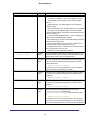
If you configure network parameters, you should execute one of the following commands:
copy system:running-config nvram:startup-config
or
save
These commands copy or save the changes to the configuration file in the switch permanent
memory. You must be in the correct mode to execute the command. If you do not save the
configuration, all changes are lost when a you power down or reset the networking device. In
a stacking environment, the running configuration is saved in all units of the stack.
Command
Mode
Description
show hardware
Privileged
EXEC
Shows hardware version, MAC address, and software version
information.
show users
Privileged
EXEC
• Displays all users who are allowed to access the networking
device.
• Access mode shows whether you can change parameters on
the networking device (Read/Write) or can only view them (Read
Only).
• As a factory default, the admin user has Read/Write access,
and the guest user has Read Only access. There can be only
one Read/Write user. There can be up to five Read Only users.
show loginsession
User EXEC Displays all of the login session information.
Username <username>
Global
Config
• Set the password or change the password for the user name.
Privileged
EXEC
Copy or save passwords and all other changes to the device.
If you do not save the configuration, all changes are lost when you
power down or reset the networking device. In a stacking
environment, the running configuration is saved in all units of the
stack.
copy system:running-config
nvram:startup-config
or
save
logout
You are prompted to enter the user’s old password. In the
absence of an old password, leave the area blank.
• The password should not be more than eight characters in
length.
User EXEC Logs the user out of the networking device.
Privileged
EXEC
11
Managed Switches
Command
Mode
Description
show network
User EXEC Displays the following network configuration information:
• IP Address: IP address of the interface (default: 0.0.0.0).
• Subnet Mask: IP subnet mask for the interface (default:
0.0.0.0).
• Default Gateway: The default gateway for this interface
(default: 0.0.0.0).
• IPv6 Administrative mode: Indicates whether IPv6 is enabled.
• IPv6 Prefix: The prefix/prefix length of the IPv6 address.
• Burned in MAC Address: The burned in MAC address used for
in-band connectivity.
• Locally Administered MAC Address : Can be configured to
allow a locally administered MAC address.
• MAC Address Type: Specifies which MAC address should be
used for in-band connectivity.
• Network Configurations Protocol Current: Indicates which
network protocol is being used (default: none).
• Configured IPv6 Protocol: Indicates which network protocol is
being used (default: none) for IPv6.
• Management VLAN Id:Specifies VLAN ID.
network parms <ipaddr>
<netmask> [gateway]
Privileged
EXEC
Sets the IP address, subnet mask, and gateway of the router. The
IP address and the gateway must be on the same subnet. The IP
address range is from 0.0.0.0 to 255.255.255.255.
copy nvram:startup-config
Privileged
EXEC
Starts the configuration file upload, displays the mode and type of
upload, and confirms that the upload is progressing. The URL
must be specified as:
xmodem:<filepath>/<filename>
For example, if you are using HyperTerminal, you must specify
where the file will be received by the computer.
copy nvram:errorlog
Privileged
EXEC
Starts the error log upload, displays the mode and type of upload,
and confirms that the upload is progressing. The URL must be
specified as:
xmodem:<filepath>/<filename>
copy nvram:traplog
Privileged
EXEC
Starts the trap log upload, displays the mode and type of upload,
and confirms that the upload is progressing. The URL must be
specified as:
xmodem:<filepath>/<filename>
copy nvram:startup-config
Privileged
EXEC
Sets the destination (download) datatype to be an image
(system:image) or a configuration file
(nvram:startup-config). The URL must be specified
as:
xmodem:<filepath>/<filename>
For example, if you are using Hyper Terminal, you must specify
which file is to be sent to the networking device. The networking
device restarts automatically once the code has been downloaded.
12
Managed Switches
Using Ezconfig for Switch Setup
Ezconfig is an interactive utility that provides a simplified procedure for setting up the
following switch parameters:
•
Switch management IP address
•
Switch admin user password
•
Switch name and location
Ezconfig can be entered either in Global Config mode (#) or in Display mode (>). The utility
displays the following text when you enter the ezconfig command:
(Switch) >ezconfig
NETGEAR EZ Configuration Utility
-------------------------------Hello and Welcome!
This utility will walk you through assigning the IP address for the
switch management CPU. It will allow you to save the changes at the
end. After the session, simply use the newly assigned IP address to
access the Web GUI using any public domain Web browser.
Admin password not defined. Do you want to assign the admin password
(password length should vary in a range of 8 - 64 characters)?
(Y/N/Q)
Note: At any point in the setup, you can type Q to abort the program. At
this point, Ezconfig checks to see if there is any change, and
prompts you if the changes should be saved.
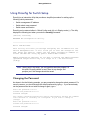
Changing the Password
As shown in the the following example, you are prompted to change the admin password. For
security reasons, you should change the default password by typing Y. If you have already
set the password and do not wish to change it again, type N.
Enter new password:********
Confirm new password:********
Password Changed!
The 'enable' password required for switch configuration through the command
line interface is currently not configured. Do you wish to change it
(Y/N/Q)? y
Enter new password:********
Confirm new password:********
Password Changed!
13
Managed Switches
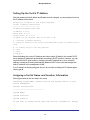
Setting Up the Switch IP Address
After the password for both Admin and Enable mode is changed, you are prompted to set up
the IP address of the switch.
Assigning an IP address to your switch management
Current IP Address Configuration
-------------------------------IP Address Assignment Mode: None
IP Address: 0.0.0.0
Subnet mask: 0.0.0.0
Default Router IP: 0.0.0.0
IP address is not assigned. What do you want to do?
C - Configure IP address manually.
D - Assign IP address for the switch using DHCP mode(current IP address will be
lost).
N - Do nothing and go to the next question.
Q - Quit.
? - Help.
(C/D/N/Q/?)?
Ezconfig displays the current IP address and subnet mask. By default, the network DHCP
server assigns IP addresses automatically according to DHCP protocol. However, you can
overwrite the DHCP client mode by assigning a fixed IP address here. Once a fixed IP
address is assigned, Ezconfig automatically disables DHCP client mode and assigns the
static IP address to the management VLAN.
If an IP address is already assigned, and you do not wish to change the IP address again,
simply type N.
Assigning a Switch Name and Location Information
Ezconfig proceeds to the next step in the setup:
Assigning System Name, System Location and System Contact to your
switch management
Current Configuration
-------------------------------System Name:
System Location:
System Contact:
Do you want to assign switch name and location information? (Y/N/Q)
14
Managed Switches
Note: The System Name, System Location and System Contact fields
accept only alphanumeric characters. Characters such as #$ are not
supported. The value cannot be larger than 31 bytes.
15
Managed Switches
Saving the Configuration
After the name and location values are entered, Ezconfig asks if you would like to have the
changes be saved in flash (permanent storage). Enter Y to save the configuration.
There are changes detected, do you wish to save the changes
permanently (Y/N)?
y
The configuration changes have been saved successfully.
Please enter 'show running-config' to see the final configuration.
Thanks for using EzConfig!
If the switch loses its power during the session, the setup information is lost if Ezconfig does
not have the chance to save the changes before power-down.
Using the Web Interface
This section is a brief introduction to the Web interface; for example, it explains how to
access the Web-based management screens to configure and manage the system.
Tip: Use the Web interface for configuration instead of the CLI. Web
configuration is quicker and easier than entering the multiple required
CLI commands. There are equivalent functions in the Web interface and
the terminal interface—that is, both applications usually employ the same
commands to accomplish a task. For example, when you log in, there is
a main menu with the same functions available.
You can manage your switch through a Web browser and Internet connection. This is
referred to as Web-based management. For you to use Web-based management, the system
must be set up for in-band connectivity.
To access the switch, the Web browser must support:
•
HTML version 4.0, or later
•
HTTP version 1.1, or later
•
JavaScriptTM version 1.6, or later
There are several differences between the Web and terminal interfaces. For example, on the
Web interface the entire forwarding database can be displayed, while the terminal interface
displays only 10 entries starting at specified addresses. To terminate the Web login session,
close the Web browser.
16
Managed Switches
Configuring for Web Access
To enable Web access to the switch:
1. Configure the switch for in-band connectivity. (See Configuring the Switch for In-Band
Connectivity on page 5.)
2. Web access is enabled by default.
Starting the Web Interface
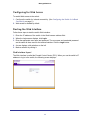
Follow these steps to start the switch Web interface:
1. Enter the IP address of the switch in the Web browser address field.
2. When the Login screen displays, click Login.
3. Enter the appropriate user name and password. The user name and associated password
are the same as those used for the terminal interface. Click the Login button.
4. A menu displays, with selections on the left.
5. Make a selection by clicking it.
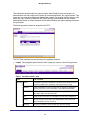
Web Interface Layout
The Web interface is called the Prosafe Control Center (PCC). When you use the switch’s IP
address to log in to the switch, the following screen displays:
17
Managed Switches
The switch can accommodate two types of users: administrative users and guests. An
administrative user can configure the switch for network application, but a guest cannot. The
guest can only view the settings and status of the network. As shipped from the factory, both
users can log in without a password. NETGEAR strongly recommends that the network
administrator create a unique password for the administrative user before placing the switch
into production.
The following screen shows an example of the PCC:
The PCC Web interface has the following four significant features:
1. Layout: The navigation pane has two rows of tabs, as shown in the following screen:
Table 1. PCC Web Interface Tabs
Tabs
Tab Contents
Main tabs System
Configuration and status information for system features and services such
as the timer, DNS server, IP address, and system resource usage.
Switching
Features that relate to Layer 2 services such as VLANs, link aggregation,
spanning tree protocol, port configuration, and the MAC address table.
Routing
Layer 3 services such as VLAN routing, port routing, and protocols such as
RIP, OSPF, VRRP, and other protocols.
QoS
Quality of Service features such as DiffServ and CoS queue assignment.
Security
Security services such as 802.1x port authentication, traffic control with
various forwarding controls, and ACLs.
Monitoring
Ethernet port statistics, various system logs, and port mirroring.
18
Managed Switches
Table 1. PCC Web Interface Tabs (Continued)
Tabs
Tab Contents
Main tabs Maintenance
Services to perform a firmware upgrade, to save the configuration, and to
perform a backup of the configuration.
Sub tabs
Help
Access to the NETGEAR product support website and documentation.
Index
Tthe site index that allows direct access to any of the screens under the
main tabs and sub tabs.
The sub tab content changes depending on the selected main tab. In turn,
each sub tab provides further sub categories of functions.
2. Unified Web Control Buttons: Depending on the selected main tab and sub tab, in the
lower right corner, buttons enable you to perform various screen-dependent operations:
• Add: Add a new class, group, ACL, or VLAN.
•
Apply: Apply all changes that you made to a screen.
•
Cancel: Cancel all changes that you made to a screen.
•
Delete: Delete an existing list or group that was created by using an Add operation.
•
Refresh: Refresh the data on the screen such as log entry, port statistics, and other
data.
3. Index Screen: One of the unique features of the PCC is the Index screen. This screen
provides links to all available screens on the PCC, allowing you to connect to each screen
directly. On the Index screen, you can use your Web browser’s search function to locate a
particular feature, and then connect directly to the screen that enables you to view or
configure that feature. Note that when you access a screen directly from the Index screen,
the navigation pane does not adjust as it normally would when you navigate to the screen by
using a main tag and sub tab.
4. Saving the Configuration: When you click the Apply button to save the changes, the
changes are applied to the switch but not saved in the permanent memory of the switch.
When you reboot the switch, the changes are lost.To save the changes in the permanent
memory of the switch, use the Save Configuration function under the Maintenance tab and
then click the Save Config tab.
Configuring an SNMP V3 User Profile
Configuring an SNMP V3 user profile is a part of user configuration. Any user can connect to
the switch using the SNMPv3 protocol, but for authentication and encryption, additional steps
are needed. Use the following steps to configure an SNMP V3 new user profile.
1. Select System>Configuration>User Accounts from the hierarchical tree on the left
side of the Web interface.
2. In the User field, select Create to create a new user.
3. Enter a new user name in the User Name field.
4. Enter a new password in the Password field and then retype it in the Confirm Password
field.
19
Managed Switches
Note: If SNMPv3 authentication is to be used for this user, the password
must be eight or more alphanumeric characters.
5. If you do not need authentication, go to Step 9.
6. To enable authentication, in the Authentication Protocol field select either MD5 or SHA for
the authentication protocol.
7. If you do not need encryption, go to Step 9.
8. To enable encryption select DES for the encryption scheme in the Encryption Protocol
field. Then, in the Encryption Key field, enter an encryption code of eight or more
alphanumeric characters.
9. Click Apply.
20
2.
Auto Install Configuration
2
Auto Install is a software feature that provides for the configuration of a switch automatically
when the device is initialized and no configuration file is found on the switch. The downloaded
configuration file is not distributed across a stack. When an administrator saves configuration,
the config file is distributed across a stack.
The Auto Install process requires DHCP to be enabled by default in order for it to be completed.
The downloaded config file is not automatically saved to startup-config. An administrator must
explicitly issue a save request in order to save the configuration. The Auto Install process
depends on the configuration of other devices in the network, including a DHCP or BOOTP
server, a TFTP server and, if necessary, a DNS server.
There are three phases to Auto Install:
1. Configuration or assignment of an IP address for the device.
2. Assignment of a TFTP server.
3. Obtaining a configuration file for the device from the TFTP server.
Switch IP Address Assignment
If BOOTP or DHCP is enabled on the switch and an IP address has not been assigned, the
switch issues requests for an IP address assignment. The behavior of BOOTP or DHCP with
respect to IP address assignment is unchanged by the addition of the Auto Install feature.
That is, the following information returned from the server is recognized.
•
The IP address (yiaddr) and subnet mask (option 1) to be assigned to the switch
•
The IP address of a default gateway (option 3), if needed for IP communication. Some
network configurations require the specification of a default gateway through which some
IP communication can occur. The default gateway is specified by Option 3 of a BOOTP
or DHCP response.
After an IP address is assigned to the switch, if a host name is not already assigned, then
Auto Install issues a DNS request for the corresponding host name. This host name is also
displayed as the CLI prompt the same as if the hostname command was used.
20
Managed Switches
TFTP IP Address and the Configuration File Name
The following information is also processed, any of which can be returned by a BOOTP or
DHCP server:
•
The name of the configuration file (bootfile or option 67) to be downloaded from the TFTP
server.
•
The identification of the TFTP server from which to obtain the bootfile. This is given by
any of the following fields:
-
The host name of the TFTP server (option 66 or sname). Either the TFTP address or
name is specified, not both, in most network configurations. If a TFTP host name is
given, a DNS server is required to translate the name to an IP address.
-
The IP address of the TFTP server (option 150).
-
The address of the TFTP server (siaddr) to be used for Auto Install requests.
No configuration assigned by BOOTP or DHCP is saved in startup-config.
Handling Conflicting TFTP Server Configurations
The TFTP server IP address can be deduced from the multiple sources. It is selected from
one of the following fields, listed from the highest priority to the lowest:
•
The sname field of a DHCP or BOOTP reply.
•
The TFTP server name (option 66) of a DHCP reply.
•
The TFTP server address (option 150) field of a DHCP reply.
•
The siaddr field of a DHCP or BOOTP reply.
DNS Server Requirements
A DNS server is needed to resolve the IP address of the TFTP server only if the sname or
option 66 values are used.
Obtaining a Config File
After obtaining IP addresses for both the switch and the TFTP server, the Auto Install process
attempts to download a configuration file. A host-specific configuration file is downloaded, if
possible. Otherwise, a network configuration file is used as a bridge to get the final
configuration. The methods are described in the following sections.
Host-Specific Configuration File
The switch attempts to download a host-specific configuration file if a bootfile name was
specified by the DHCP or BOOTP server. The switch makes three unicast TFTP requests for
21
Managed Switches
the specified bootfile. If the unicast attempts fail, or if a TFTP server address was not
provided, Auto Install process stops. No Broadcast attempts are made.
Note: The bootfile is required to have a file type of *.cfg. The bootfile
cannot have the following names: fastpath.cfg, startup-config and
hpc_broad.cfg. These are reserved
Default Network Configuration File
Attempts are made to download a default network configuration file with the name fp-net.cfg if
the specified bootfile cannot be found, a failure occurs in the download, or the switch was not
provided a specific bootfile name by the DHCP server. The switch issues TFTP requests for a
network configuration file in the same manner as it attempts to download a host-specific
configuration file.
The default network configuration file should have IP address to host-name mappings using
the command ip host <hostname> <address>. If the default network configuration file does
not contain the switch IP address, the switch uses DNS to attempt to resolve its host name.
A sample fp-net.cfg file follows:
config
...
ip host switch_to_setup 192.168.1.10
ip host another_switch 192.168.1.11
... <other hostname definitions>
exit
Once a host name has been determined, the switch then issues a TFTP request for a file
named <hostname>.cfg file, where <hostname> is the first eight characters of the switch’s
host name.
If the switch is unable to map its IP address to a host name, Auto Install sends TFTP requests
for the default configuration file host.cfg.
The following table summarizes the config files that can be downloaded, and the order in
which they are sought.
Order
Sought
File Name
Description
Final File
Sought
1
<bootfile>.cfg
Host-specific config file, ending in a *.cfg file Yes
extension
2
fp-net.cfg
Default network config file
22
No
Managed Switches
Order
Sought
File Name
Description
Final File
Sought
3
<hostname>.cfg
Host-specific config file, associated with
host name
Yes
4
host.cfg
Default config file
Yes
The following table displays the determining factors for issuing unicast TFTP requests.
TFTP Server Host-Specific Router TFTP Request Method
Address
Config File Name
Available
Available
Yes
Yes
Issue a unicast request for the host-specific router config
file to the TFTP server.
Yes
No
Issue a unicast request for a default network or router
config file to the TFTP server.
Monitoring and Completing the Auto Install Process
Upon boot-up in the absence of a saved config file, a message displays on the console
stating that the Auto Install procedure is beginning. A message subsequently displays when
Auto Install is complete. The message also indicates that configuration must be saved to
avoid performing Auto Install on the next reboot.
When Auto Install has been successfully completed, the messages are in buffered log, not on
the console. You can execute a show running-config command to validate the contents of
configuration. You must be logged in as administrator.
Saving Configuration
An administrator must explicitly save the downloaded configuration in nonvolatile memory so
that the configuration will be available on the next reboot. If you are using the CLI, first make
sure the configuration is correct, then issue a copy running-config startup-config
command.
Host-Specific Config File Not Found
If the Auto Install process fails to download any configuration file, a message is logged. If a
“final” configuration file is not downloaded, as described above, the entire process continues
every 10 minutes.
Terminating the Auto Install Process
You can terminate the Auto Install process at any time prior to the downloading of the config
file. This is most optimally done when the switch is disconnected from the network, or if the
23
Managed Switches
requisite configuration files have not been configured on TFTP servers. Termination of the
Auto Install process ends further periodic requests for a host-specific file.
Managing Downloaded Config Files
The configuration files downloaded through Auto Install are stored in the nonvolatile memory.
The files can be managed (viewed, displayed, deleted) along with files downloaded through
the configuration scripting utility.
A file is not automatically deleted after it is downloaded. However, the file does not take effect
upon a reboot. If you opt to save the config file, the saved configuration takes effect upon
reboot. If you do not opt to save the config file, the Auto Install process occurs again on a
subsequent reboot. This might result in a previously downloaded files being overwritten.
Restarting the Auto Install Process
The Auto Install process is automatically started on a subsequent reboot if the configuration
file is not found on the switch. This can occur if configuration has not ever been saved on the
switch, or if the administrator has issued a command to erase the configuration file.
During a particular session, the Auto Install process can be restarted if the administrator has
previously stopped the Auto Install process, and then chooses to restart it. This action
re-initiates the process for this login session only. NETGEAR recommends that this action be
performed only when the administrator is certain that configuration is clear in order to have
predictable results.
Reinitialization of the switch after a clear config automatically activates the Auto Install
process if there is no configuration file stored on the switch.
24
Managed Switches
Logging
A message is logged for each of the following events:
•
The Auto Install component receiving a config file name and other options upon resolving
an IP address by DHCP or BOOTP client. The boot option values are logged.
•
The Auto Install component initiating a TFTP request for a boot (config) file, receiving the
file, or timing out of that request. File names and server IP addresses and host names are
logged.
•
The Auto Install component initiating a request for a host name. The IP address and
resolved hostname are logged.
•
The Auto Install component initiating a TFTP request for a <hostname>.cfg file, receiving
the file, or timing out of that request. File names and server IP addresses and host names
are logged.
•
The beginning of applying a config script.
•
The failure of the CLI scripting utility to apply a config file.
•
The completion of AutoInstall.
•
A conflict in the name of a config file to be downloaded with a reserved config file name.
Auto Install Configuration
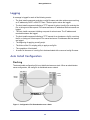
Stacking
The downloaded configuration file is not distributed across a stack. When an administrator
saves configuration, the config file is distributed across a stack.
192.168.0.1
192.168.0.2
TFTP
server
DHCP
server
192.168.0.3
Figure 1. Configuration File Distrubuted across a Stack
25
Managed Switches
DHCP Server Configuration
The following information is configured on the DHCP or BOOTP server:
•
The IP address (yiaddr) and subnet mask (option1)
•
The name of the configuration file (bootfile or option 67)
•
The IP address of the TFTP server (option 150)
TFTP Server Configuration
The configuration file is on the TFTP server (for example, switch.cfg).
CLI: Switch Configuration
1. Have the configuration file saved after download from the TFTP server.
(Netgear Switch) #boot autoinstall auto-save
(Netgear Switch) #boot autoinstall start
Autoinstall starts and waits for the boot options from the DHCP server.
(Netgear Switch) #network protocol dhcp
Changing protocol mode will reset ip configuration.
Are you sure you want to continue? (y/n)y
2. Request an IP address, configuration file name, and TFTP IP address from the DHCP
server.
(Netgear Switch) #
Config file 'startup-config' created successfully.
AutoInstalled configuration is saved.
(Netgear Switch) #show autoinstall
AutoInstall Mode.............................. Stopped
AutoInstall Persistent Mode................... Enabled
AutoSave Mode................................. Disabled
AutoInstall Retry Count....................... 3
AutoInstall State............................. AutoInstall is
completed.
Autoinstall is now completed.
26
Managed Switches
Web Interface
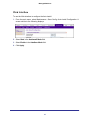
To use the Web interface to configure the Auto Install:
1. From the main menu, select Maintenance > Save Config >Auto Install Configuration. A
screen similar to the following displays.
2. Select Start in the AutoInstall Mode field.
3. Select Enable in the AutoSave Mode field.
4. Click Apply.
27
3.
Software License Activation
3
This chapter describes how to activate software licenses. The software licenses allow some
layer 2 switches to support IPv4/IPv6 routing and Multicast routing. Not all layer 2 switches
support this feature. Support depends on the model.
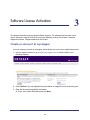
Create an Account at mynetgear
You can create an account at mynetgear, which allows you to view your registered products.
1. Use an Internet browser to go to https://my.netgear.com. A screen similar to the
following displays.
2. Click Continue if you not registered a product before or Log in if you are a returning user.
3. Enter the the product registration information.
a. Enter your contact information and click Next.
28
Managed Switches
b. Enter your switch serial number, date, and other information about your purchase,
then click Next
29
Managed Switches
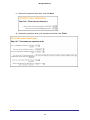
c. Answer the questions listed here, and click Next.
d. Answer the questions about your experience and then click Finish.
30
Managed Switches
Registering Your Product
Before you can activate your license, you must register your product.
1. Use your Internet browser to go to https://my.netgear.com and click login/register.
2. Click login/register, and the following screen displays:
3. If you have an account, enter your email address and password, and click Login. A screen
similar to the folloiwng displays:
Note: If you have previously registered products, you can click my
registered products to see all the products you registered.
4. For a new switch, click register new product on the left hand pane to register the switch.
NETGEAR recommends that you register all new products (switches).
31
Managed Switches
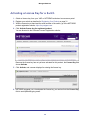
Activating a License Key for a Switch
1. Obtain a license key from your VAR or NETGEAR authorized e-commerce portal.
2. Register your switch as described in Registering Your Product on page 31.
3. With the license key at hand and the serial number of the switch, go to the NETGEAR
product registration website, https://my.netgear.com.
4. Click Activate license key for registered product.
You are directed to the Software License Registration website:
Because the license key has not yet been activated for this product, the License Key field
shows Activate.
5. Click Activate, and a screen displays for entering the license key.
6. NETGEAR suggests you cut and paste the license key you received into the License Key
field to avoid potential typing errors.
32
Managed Switches
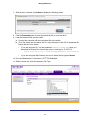
7. After the key is entered, click Submit to display the following screen:
8. Click the Download button to save the license.dat file on your local drive.
9. Load the license.dat file onto the switch
a. Connect the computer with the license.dat file to the switch.
b. Go to the switch and use either the CLI copy command or the GUI to download the
license.dat file to the switch.
• If you are using the CLI, use the parameter nvram:license-key when you
download the license file. Assume tftp server is working on 10.100.5.13.
(Switch) #copy tftp://10.100.5.13/XSM7224S-2ER1080U40004.lic nvram:license-key
•
If you are using the Web interface, be sure to select the file type as license.
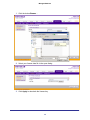
10. Go to the Maintenance > Download > HTTP File Download
11. Select 'License Key' from the dropmenu File Type.
33
Managed Switches
1. Click the button Browse…
2. Select your license data file in the open dialog.
3. Click Apply to downlode the license key.
34
Managed Switches
12. After the file is successfully downloaded, reboot the switch.
(Switch) #reload
Management switch has unsaved changes.
Would you like to save them now? (y/n) y
Config file 'startup-config' created successfully .
Configuration Saved!
Are you sure you want to reload the stack? (y/n) y
13. The switch now has the license software enabled.
(switch) #show license
License date :
License copy :
License Status:
Description
:
July 5, 2012
1
Active
License key is present.
35
Index
A
IP address 14
IP address assignment with auto install 20
name 14
saving the configuration 15
software installation 10
auto install
logging 25
monitoring 23
obtaining a config file 21
web interface 27
W
C
web interface 15
layout 16
saving the configuration 18
commands, quick start 11
connectivity, in-band and out-of-band 5
E
Easy Setup Wizard 9
Ezconfig 13
I
in-band connectivity 6
BootP 6
DHCP 6
EIA-232 6
L
logging
auto install 25
O
out-of-band connectivity 7
P
password 13
S
SNMP V3 user profile 18
software installation 10
stacking 25
switch
Ezconfig 13
initial configuration 8
36