1
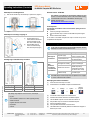
Operating Instructions (Translation) RFID Snap-on Module for Mobile Computer MC 959x Series Worksteps for unlocking/removal (1) Software Version - RFID SDK Press the two "PUSH" keys simultaneously to open the lock (Figure 2). The software is not relevant for the explosion protection for the devices. You will find information on this in the documentation relating to the RFID SDK on the CD or on the BARTEC download page. BARTEC download page: http://www.bartec.de/automation-download/ Final inspection Figure 2 Worksteps for mounting / snapping on (1) (2) Push the RFID snap-on module with latch downwards onto the indentation on the back of the mobile computer. Press the RFID snap-on module in until the latching hook clicks into place (Fig. 3). The following preconditions must be checked before putting the device into operation: Is there any damage to the enclosure? Is the correct RFID snap-on module for the Mobile Computer snapped on? Has the software been installed? Do not switch on the Mobile Computer with snap-on module until you have completed the final inspection. 7. Malfunctioning and Troubleshooting In the event of malfunctioning, take the Mobile Computer with the RFID snap-on module out of the hazardous area. Malfunctioning RFID tags are not detected. Figure 3 Reading range of the RFID snap-on module RFID demonstration software is not detected and identified. Possible Cause No power supply. Incorrect standard set Tag defective The snap-on module has not snapped on correctly. Software does not react Software has not been installed correctly Remedy Release and latch the snap-on module on again. Select the right standard in the software setting. Test another RFID tag. Unlock and snap on the snap-on module again. Perform a cold boot on the Mobile Computer by simultaneously pressing the "Power" and 1 and 9) Uninstall the software and re-install it again. B1-A2Z0-7D0001 / Revision A / 29 January 2014 - Automation Technology - 359518 The RFID snap-on module is only ready for operation if it is snapped on and the software has been installed. Reading range Distance Reading range Distance LF reader up to 6.0 cm UHF (EU) reader up to 30.0 cm HF reader up to 6.0 cm UHF (US) reader up to 30.0 cm Remedying the software installation (1) Unlock and remove the snap-on module. (2) Uninstall all files on the Mobile Computer for the RFID reader. Start => => The reading range depends on factors such as, for example: - tag size site of installation (metal, wood or other supporting surface) ambient conditions magnetic influences from outside temperature moisture BARTEC GmbH Max-Eyth-Straße 16 97980 Bad Mergentheim Germany Tel.: +49 7931 597-0 Fax: +49 7931 597-119 [email protected] www.bartec.de (3) (4) (5) (6) (7) (8) (9) Settings => => System => Remove Programs => Connect the mobile computer via a cradle to the PC. Install the demonstration software on the Mobile Computer. Take the Mobile Computer out of the cradle and switch it off. Snap the RFID snap-on module onto the Mobile Computer. Switch on the Mobile Computer. Call up the RFID demonstration in the Start menu. The RFID Software automatically initialises and detects the snapped on RFID snap-on module. Reservation Technical data subject to change without notice. Changes, errors and misprints may not be used as a basis for any claim for damages. 4/5