1
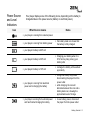
Button
What It Does
Usage Tips
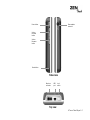
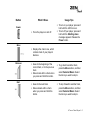
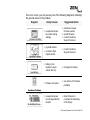
RANDOM BUTTON
❍
Plays random tracks in your
player.
❍
❍
❍
Scrolls up and down menus.
Selects menu options.
Gently rub the middle section of
the touch pad control to scroll
through menu options and press
the OK button to select them.
This action is also referred to as
"Select".
❍ When selecting an option,
instead of pressing the
OK button, you can also tap the
touch pad control. The Tap to
Select feature must be enabled.
To enable this feature, see
"TouchPad" on page 3-24.
❍
Locks and disables all buttons
on your player.
❍
Slide the switch to the right.
❍
❍
Resets your player.
Push the end of a thin object (for
example, a straightened
paperclip) into the Reset hole.
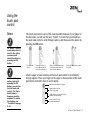
TOUCH PAD CONTROL
OK button for
selecting options
Upper section for fast
scrolling upwards.
Middle section for normal scrolling
upwards or downwards.
Lower section for fast scrolling
downwards.
LOCK SWITCH
RESET HOLE
A Tour of Your Player 1-7