1
EPR110 User’s Manual
3.3 Basic Operations
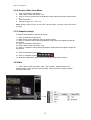
3.3.1 Open DVR HDD/File
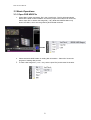
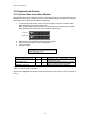
1. Press “Menu” button and select “File”, then “Load Drive”. The PC will automatically
detect all the DVR models available. Choose the proper DVR model to be viewed. Or,
select “Open File” to load a disk image file ( *.edr). Note that HDD/File Menu only
shows the HDD’s, which are recognized by DVR Reader software.
2. Please wait while DVR Reader is reading disk information. “Status Bar” shows the
progress of reading disk process.
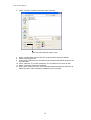
3. To load a disk image file ( *.edr / *.avr), select “Open File”) and browse file location.
8