1
RT2000 Installation & User Guide.book Page 245 Monday, April 2, 2001 3:51 PM
245
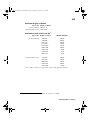
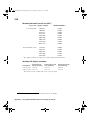
Recommended MPEG data rates for distribution on
DVD-R or CD-R
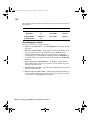
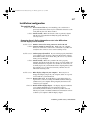
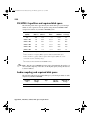
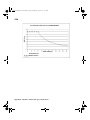
The following charts show the data rate you should select when creating MPEG
files to get the best video quality for your DVD projects. These data rates are
calculated according to the length of your project and the size of your distribution
medium. When disk space is not an issue, such as when your project is short,
you’ll get the best quality using a high constant bit rate (that is, 7 Mbits/sec).
When disk space is at a premium, you should use a variable bit rate.
At data rates of 2 Mbits/sec and higher, you can create an MPEG-2 IBP .avi file
using Adobe Premiere on your Matrox RT2000 system as explained in “Defining
your Export Movie settings” on page 94. At data rates lower than 2 Mbits/sec,
you’ll need to create an MPEG-1 file. You can do this using the Save for Web
export option in Adobe Premiere. For details on this option, see your Adobe
Premiere User Guide.
¯Note These charts assume that your DVD project includes 48-kHz, 16-bit stereo
audio.
Mbits/sec
Recommended data rates for 4.7-GB DVD
Time (minutes)
Constant bit rate
Variable bit rate
Recommended MPEG data rates for distribution on DVD-R or CD-R