1
Operation
Guide
UT35A-L
Digital Indicating Controller (Limit Control Type)
Operation Guide
Parameters
Yokogawa Electric Corporation
Menu symbol:
Parameter
symbol
(AL1)
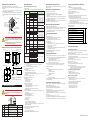
This operation guide describes the functions of parameters briefly. The parameter
symbols listed are in the order shown on the display in each group of menu symbols.
In addition, each parameter table has a “User Setting” column, where you can record
your setpoints when setting them in the controller. The scrolling guide is displayed on
PV display in the Parameter Setting Display. This guide can be turned on/off with
the Fn key.
Operation Parameters
(AL2)
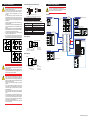
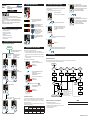
Hold down the PARAMETER key for 3 seconds to move from the Operation Display to
the Operation Parameter Setting Display. Press the DISPLAY key once to return to the
Operation Display.
Operation Dsipaly
DISPLAY key
Hold down PARAMETER key
for 3 sec.
Menu
Menu
key
Menu
Parameter
key
Parameter
key
Parameter
END
(AL3)
key
PARAMETER key
SET/ENTER key
END
Parameter
key
Parameter
END
Parameter
END
Menu Display and
Parameter Setting
Display are changed
in a circular pattern.
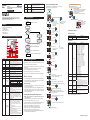
Move to the Setup Parameter Setting Display:
Hold down the PARAMETER key and the Left arrow key simultaneously for 3 sec.
· To select the parameter setting displayed as the initial value, press the Down arrow
key to move to the next parameter.
· To change and set the parameter setting, press the SET/ENTER key to start the setpoint blinking. The blinking state allows you to make changes (setting mode). Use the
Up/Down/Left/Right arrow keys to change the setpoint. Press the SET/ENTER key to
register the setting.
Note that there are some parameters which are not displayed depending on the suffix
codes. The parameters for professional setting mode (LEVL: PRO) are not described in
this manual. See User’s Manual.
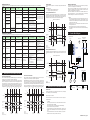
n SP and Alarm Setpoint Setting Parameter
Menu symbol:
Parameter
symbol
(SP)
(A2)
(A3)
PV velocity alarm time
setpoint 2
(HY1)
(HY2)
(HY3)
(DYN1)
Target setpoint
Setting Range
0.0 to 100.0% of PV input range (EU)
(Setting range: SPL to SPH)
Initial
value
User Display
setting level
(DYN3)
Parameter
symbol
(TMU)
Alarm-1 hysteresis
Alarm-2 hysteresis
Alarm-3 hysteresis
Alarm-2 setpoint
Set a display value of setpoint of PV
alarm, deviation alarm, or velocity
alarm.
-19999 to 30000 (Set a value within the
input range.)
Decimal point position depends on the
input type
Alarm-3 setpoint
0.01 to 99.59 (minute.second)
1.00
Set a display value of setpoint of
hysteresis.
-19999 to 30000 (Set a value within
the input range.)
Decimal point position depends on
the input type.
When the decimal point position for
the input type is set to "1", the initial
value of the hysteresis is "1.0".
Hold down PARAMETER key and
Left arrow key simultaneously for 3 sec.
Menu
SET/ENTER key
An alarm output is ON when the delay
timer expires after the alarm setpoint
is reached.
0.00 to 99.59 (minute.second)
EASY
Menu
PARAMETER key
key
Parameter
key
Parameter
END
END
Parameter
key
Parameter
END
Parameter
END
Menu Display and
Parameter Setting
Display are changed
in a circular pattern.
(IN)
Alarm-3 On-delay timer
Operation for Setting
EASY
· To select the parameter setting displayed as the initial value, press the Down arrow
key to move to the next parameter.
· To change and set the parameter setting, press the SET/ENTER key to start the setpoint blinking. The blinking state allows you to make changes (setting mode). Use the
Up/Down/Left/Right arrow keys to change the setpoint. Press the SET/ENTER key to
register the setting.
Note that there are some parameters which are not displayed depending on the Suffix
codes. The parameters for professional setting mode (LEVL: PRO) are not described in
this manual. See User’s Manual.
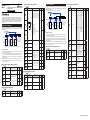
n Control Function Setting Parameter
Menu symbol:
Parameter
symbol
EASY
(HI.LO)
(CNF)
(UNIT)
(BS)
(FL)
(HYS)
PV input unit
(RH)
Maximum value of PV
input range
(RL)
Minimum value of PV
input range
(CTL)
Name of Parameter
Setting Range
Limit control type
LOW: Low limit control
HIGH: High limit control
The way of confirming
operation
KEY: By key operation
DI: By DI
Initial
value
User Display
setting
level
HIGH
EASY
KEY
(SDP)
PV input scale decimal
point position
(SH)
Maximum value of PV
input scale
(SL)
Minimum value of PV
input scale
STD
0.00
(A.BS)
(PVS)
Name of Parameter
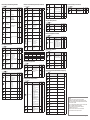
PV input type
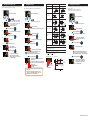
Move to the Operation Parameter Setting Display:
Hold down the PARAMETER key for 3 sec.
10
0.00
(PV)
Name of Parameter
key
0.00
Setting Range
Initial
value
PV input bias
-100.0 to 100.0% of PV input range
span (EUS)
0.0 %
of PV
input
range
span
PV input filter
OFF, 1 to 120 s
OFF
Limit control output
hysteresis
0.0 to 100.0% of PV input range span
(EUS)
EASY
0
Parameter
symbol
(BSL)
Parameter
symbol
0
Menu symbol:
DISPLAY key
Menu
key
Parameter
10
10
n PV Input Setting Parameter
Hold down the PARAMETER key and Left arrow key simultaneously for 3 seconds to
move from the Operation Display or Operation Parameter Setting Display to the Setup
Parameter Setting Display.
Press the DISPLAY key once to return to the Operation Display.
Operation Dsipaly
1.00
Alarm-1 On-delay timer
Alarm-2 On-delay timer
User Display
setting level
n PV-related Setting Parameter
SPH
0
Alarm-1 setpoint
Initial
value
1.00
PV velocity alarm time
setpoint 3
(SP)
Name of Parameter
Setting Range
AL1, Set a 5-digit value in the following
AL3: order.
PV high
[Alarm type: 2 digits (see below)] +
limit (01)
[Without (0) or With (1) Stand-by acWithout
tion] + [Energized (0) or De-energized Stand(1)] + [Latch action (0/1/2/3/4)]
by
For latch action, see User's Manual.
action
(0)
EnerAlarm-1 to 3 type
gized
Example: Alarm-1
(0)
Latch
action
Alarm
(0)
Latch action
Alarm type: 2 digits
type
00: Disable
Energized/
AL2:
De-energize
01: PV high limit
PV low
02: PV low limit
limit (02)
Stand-by
05: Deviation high limit
action
Without
06: Deviation low limit
Stand07: Deviation high and low limits
by
08: Deviation within high and low limits action
29: PV velocity
(0)
30: Fault diagnosis
Ener31: FAIL
gized
(0)
Latch
action
(0)
(VT2)
(DYN2)
n SP-related Setting Parameter
Menu symbol:
Name of Parameter
PV velocity alarm time
setpoint 1
Menu symbol:
(A1)
(ALRM)
(VT1)
(VT3)
Operation for Setting
Setup Parameters
n Alarm Function Setting Parameter
User Display
setting level
(A.FL)
Setting Range
Initial
value
OFF: Disable
K1: -270.0 to 1370.0 0C / -450.0 to 2500.0 0F
K2: -270.0 to 1000.0 0C / -450.0 to 2300.0 0F
K3: -200.0 to 500.0 0C / -200.0 to 1000.0 0F
J: -200.0 to 1200.0 0C / -300.0 to 2300.0 0F
T1: -270.0 to 400.0 0C / -450.0 to 750.0 0F
T2: 0.0 to 400.0 0C / -200.0 to 750.0 0F
B: 0.0 to 1800.0 0C / 32 to 3300 0F
S: 0.0 to 1700.0 0C / 32 to 3100 0F
R: 0.0 to 1700.0 0C / 32 to 3100 0F
N: -200.0 to 1300.0 0C / -300.0 to 2400.0 0F
E: -270.0 to 1000.0 0C / -450.0 to 1800.0 0F
L: -200.0 to 900.0 0C / -300.0 to 1600.0 0F
U1: -200.0 to 400.0 0C / -300.0 to 750.0 0F
U2: 0.0 to 400.0 0C / -200.0 to 1000.0 0F
W: 0.0 to 2300.0 0C / 32 to 4200 0F
PL2: 0.0 to 1390.0 0C / 32.0 to 2500.0 0F
P2040: 0.0 to 1900.0 0C / 32 to 3400 0F
WRE: 0.0 to 2000.0 0C / 32 to 3600 0F
JPT1: -200.0 to 500.0 0C / -300.0 to 1000.0 0F
JPT2: -150.0 to 150.0 0C / -200.0 to 300.0 0F
PT1: -200.0 to 850.0 0C / -300.0 to 1560.0 0F
PT2: -200.0 to 500.0 0C / -300.0 to 1000.0 0F
PT3: -150.00 to 150.00 0C / -200.0 to 300.0 0F
0.4-2V: 0.400 to 2.000 V
1-5V: 1.000 to 5.000 V
4-20: 4.00 to 20.00 mA
0-2V: 0.000 to 2.000 V
0-10V: 0.00 to 10.00 V
0-20 : 0.00 to 20.00 mA
-1020: -10.00 to 20.00 mV
0-100: 0.0 to 100.0 mV
OFF
-: No unit, C: Degree Celsius
-: No unit, - -: No unit, - - -: No unit,
F: Degree Fahrenheit
Depends on the input type.
- For temperature input Set the temperature range that is
actually controlled. (RL<RH)
- For voltage / current input Set the range of a voltage / current
signal that is applied.
The scale across which the voltage/
current signal is actually controlled
should be set using the maximum
value of input scale (SH) and minimum value of input scale (SL).
(Input is always 0% when RL = RH.)
0: No decimal place
1: One decimal place
2: Two decimal places
3: Three decimal places
4: Four decimal places
User Display
level
setting
EASY
F
Depends
on the
input type
Depends
on the
input type
Depends
on the
input type
-19999 to 30000, (SL<SH),
| SH - SL | ≤ 30000
Depends
on the
input type
Depends
on the
input type
PV input burnout action
OFF: Disable
UP: Upscale
DOWN: Downscale
Depends
on the
input type
PV analog input bias
-100.0 to 100.0% of each input range
span (EUS)
0.0 % of
PV input
range
span
PV analog input filter
OFF, 1 to 120 s
STD
OFF
W: W-5% Re/W-26% Re(Hoskins Mfg.Co.). ASTM E988, WRE: W97Re3-W75Re25
EASY
0.5 % of
PV input
range
span
(SPS)
Name of Parameter
Time unit for duration
time
Setting Range
HH.MM: Hour and minute
MM.SS: Minute and second
Initial
value
HH.MM
User Display
setting level
EASY
IM 05P04D41-11EN page 9/10