1
4.0 MENU COMMANDS – CASED HOLE MODE
In this mode (cased hole) the panel is configured to work with the AM3K
measuring head and the Baker Atlas CASE and HOIST acquisition systems.
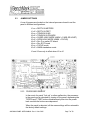
Jumper J3 must be installed to put the system in this mode (refer to section 2.3).
4.1
LOGGING SYSTEM TYPE
Functionality: This setting determines the encoder pulse rate that will be
output to the acquisition system. The tension scale will also
be determined by this setting.
Procedure:
Use +/- switch to select Logging System type.
Indication:
LOGSYS will be displayed on the DEPTH display. and either
CASE or HOIST will be displayed on the TENSION display.
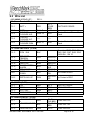
CASE:
Encoder output:
Tension:
256 pulses per foot
1.5vdc = 20,000 lbs
HOIST:
Encoder output:
Tension:
600 pulses per foot
5vdc = 10,000 lbs
Note: Use the 4-20ma output signal for tension to the HOIST
system. Install a 250 ohm resistor across the 4-20ma output
to get the 0 – 5vdc voltage drop required.
4.2
CABLE SIZE
Functionality: Cable size selection automatically sets load pin angle setting
for the selected cable size. Wheel size is also automatically
set for the selected cable size.
If other is selected, the LCA value needs to be entered. This
value is based on the bend angle of the cable over the
tension wheel. This value is empirically derived and must be
furnished by the measuring head manufacturer (Kerr
Measurement Systems Inc.). Contact Kerr with the line
specifications.
Procedure:
Use +/- switch to select cable size.
AMS4A040 PANEL USER MANUAL Rev H Nov 2006
Page 14 of 39