1
Connections (continued)
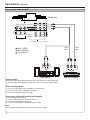
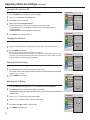
To connect Component input terminals
G
Pb1 Pb 2
Pb
Pr1 Pr 2
Pr
D - Sub
D - Sub IN
R
Y
Y2
AUDIO
DVI
DVI IN
B
COMPONENT IN
Y1
AUDIO R
R1 R 2
AUDIO
Y1
COMPONENT IN
R
W
AUDIO L
L1 L 2
Y2
Pb1 Pb 2
Pr1 Pr 2
R1 R 2
L1 L 2
Audio
cable
Video
cable
W
Side view
white (audio L)
R red (audio R, Pr /Cr )
W
R
R
B
G
G Green (Y)
Video
cable
B Blue (P b /C b )
Audio
cable
G
Y
B
Pbb/C
R
R
W
W
R
R
B
G
DVD player, Set-top Box, etc.
Pr /Cr
COMPONENT OUTPUT
R
L
AUDIO OUTPUT
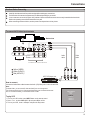
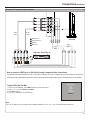
How to connect a DVD Player (or Set-Top Box) using Component Video Connections:
Connect the Video cable between the Y, Pb, Pr input jacks on the unit and Y, Pb, Pr output jacks on the DVD player (or Set-Top Box).
Connect the Audio cable between the AUDIO input jacks on the unit and AUDIO output jacks on the DVD player (or Set-Top Box).
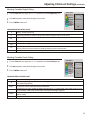
To play DVD or Set-Top Box
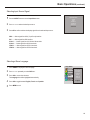
1. Turn on your LCD Monitor , press INPUT button on the remote control.
2. Press 5 or 6 to select YPbPr1 or YPbPr2.
3. Press OK to confirm.
3. Turn on your DVD player (or Set-Top Box) .
Input Select
VGA
DVI
Video1
Video2
YPbPr1
YPbPr2
Note:
The Y, Pb, Pr outputs on your DVD player are sometimes labeled Y, Cb, Cr or Y, U, V. If so, connect the cables to like colors.
12