1
Products Manual
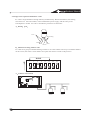
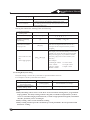
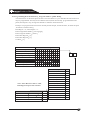
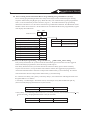
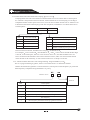
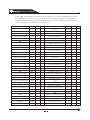
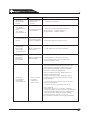
2.2 Changing the Temporary PIN Expiration Dta
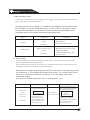
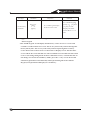
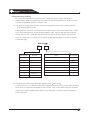
This chart explais the produre for changing the expiration date (for temporary PIN) at the keypad
For example: change the date to "06/06/2006" as following procedure
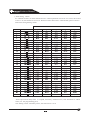
Steps to Change the exp Date
Command Sequence
If accepted, the Display Reads
Enter superuser password
[1234]+[#][0]
0 1 2 3 4 6 8
Enter setting code 3
[3]
Enter month (01
Enter thedate 06
[06]
Enter Day(01
Enter the month
“06”
”
[06]
Enter the year “06”
[06]+[#]
12
31)
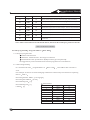
Enter year(XX),and press “#” to confirm
Month, Date, Year A long beep
signifies acceptable
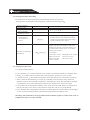
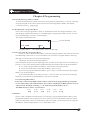
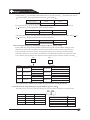
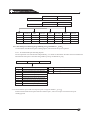
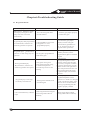
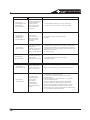
2.3 Changing the time
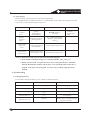
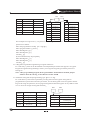
For example, change the time to
4:23 PM, Wednesday as following procedure:
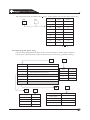
Steps to change the time
Command Sequence
Enter superuser password
[1234]+[#][0]
Enter time setting code “6”
[6]
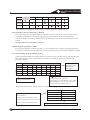
Enter Day (1
[4]
Enter Time(0100
Enter the day 4
Enter time 04
23
[04] [23]
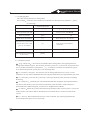
Enter AM or PM
Enter 6
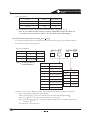
2. Enter Time(0100
1259
,
0 1 2 3 4 6 8
7
1259)
Enter AM/PM(4/6),and press “#”to confirm
Enter Day(1...7) Time AM/PM
A long beep signifies acceptances
[6]+[#]
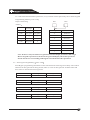
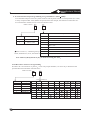
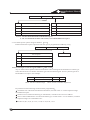
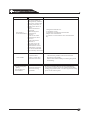
Note: 1. The day should between 1to 7,
If acceptable, the display reads
1
for Friday, “2” for Monday, etc.
0100” for hour
1259
for minute
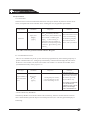
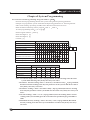
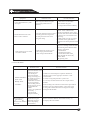
2.4 Automatic arming
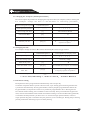
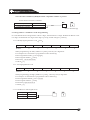
Each partition can be programmed to automatically arm once per day.
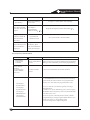
To inform occupants that the system is about to arm, a pre-arming period will begin before the
system arms automatically. The keypad sounders, and any outputs programmed to follow the
keypad sounders, will pulse five times every minute if programmed to do so. During the last
five minutes before arming, these sounders will be on steady. Once per minute the keypad will
read,"Arm in NN min/PIN+OFF-extend" If automatic arming is used to in Master Keypad mode,
it will affect all the partitions you have access to. If used in single partition mode, or from a
single partition keypad, it will affect only the partition you are working in. During the pre-arming
period, perform the following steps to set delay arming:
13