1
Products Manual
0
1
2
3
4
5
6
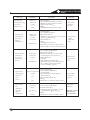
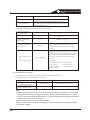
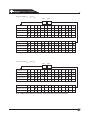
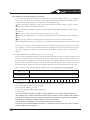
Feature1
Feature2
Feature3
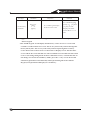
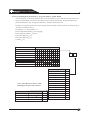
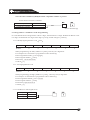
If the default is not shown in reverse print, it will be shown in a separate table.
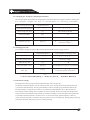
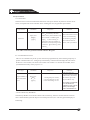
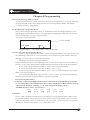
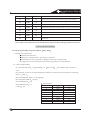
4.5 Setting the Control to the Factory Default
Only enter [0][1][#] in Program Address 4058 when you are completely sure you want to erase
all installer programming. Entering [0][1][#] in Program Address 4058 will immediately
reset the control to the factory default. Any programming already done by the installer will be
erased.
Waring: This action can not be reversed.
4.6 Exiting the Programmer’s Mode
To exit the Programmer’s Mode, press the “*” for a minimum of 4 seconds. If not keypad entries
are made for 4 munites, the control panel will automatically exit you from the Programmer’s Mode
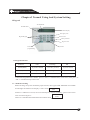
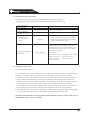
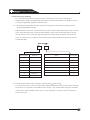
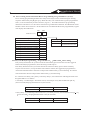
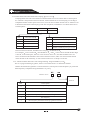
4.7 Understanding the programming charts
The Programming Reference Guide makes ususe of three types of charts. Each is decribed below
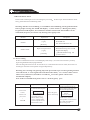
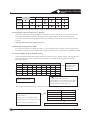
If the chart looks like this, a combination of feature is available to be programmed for that
particular address.
Select
Option1
Partition2
Partition 3
Partition4
0
1
2
Enter the Data Digit as a :
3
4
5
6
Identifies the options/features
availbale for this address
7
Enter one of these
numbers for the
appropriate
data digit
represents which options/feature are
included with each selection
For example: To select Feature 2 only, enter
the data digit as a 1 To select Feature2 and
Feature 4,enter the data digit as a 5
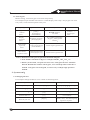
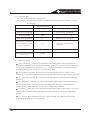
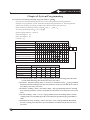
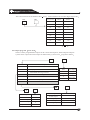
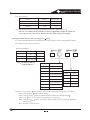
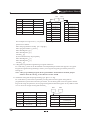
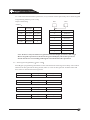
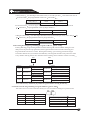
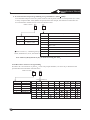
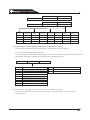
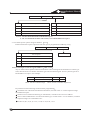
If the chart looks like this, only a feature is available to be programmed for that particular address.
Select Option
Cancel Function
Represents the option/feature available
for this address.
Example: To select Disabled, enter
the data digit as a 0.To select Entry/Exit
Data
0
Perimeter Instant Zone
1
Exit/Entry Delay zone1
3
Exit/Entry Delay zone2
4
Delay#2, enter the data digit as a 4
Enter one of the numbers for the appropriate data digit
20