1
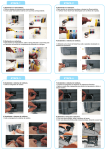
Pic. 3-1-1
Pic. 3-1-2
Pic. 3-1-3
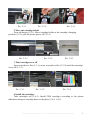
2 Move out cartridge holder
Press ink button (3-2-1). Move cartridge holder to the cartridge, changing
position (3-2-2), pull the printer power off (3-2-3).
Pic. 3-2-1
Pic. 3-2-2
Pic. 3-2-3
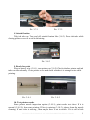
3 Take cartridge cover off
Insert screwdriver like (3-3-1), screw screwdriver like (3-3-2) until take cartridge
cover off (3-3-3).
Pic. 3-3-1
Pic. 3-3-2
Pic. 3-3-3
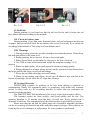
4 Install ink cartridges
Take cartridges out (3-4-1). Install CISS cartridges according to the printer
indication and press cartridge down to the place (3-4-2, 3-4-3).
INSTALLATION MANUAL ON CISS FOR PRINTER EPSON CX8400
3