1
ClubRoller 250 CT
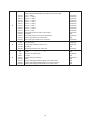
Table of contents
1. Safety instructions ......................................................................................................... 3
2. Operating determinations.............................................................................................. 4
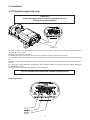
3. Description of the device............................................................................................... 5
4. Installation....................................................................................................................... 6
4.1Fitting/Exchanging the lamp........................................................................................ 6
4.2 Inserting/Exchanging rotating gobos.......................................................................... 7
4.3 Rigging the fixture ...................................................................................................... 8
4.4 Changing the power supply settings ........................................................................ 10
4.5 Connection to the mains .......................................................................................... 11
4.6 DMX-512 connection/connection between fixtures .................................................. 11
5.ClubRoller 250 CT - DMX PROTOCOL ,version 1.0 ................................................... 12
6. Controller mode ........................................................................................................... 14
6.1 DMX addressing....................................................................................................... 14
7.Control menu map......................................................................................................... 15
8. Functions of the control panel .................................................................................... 16
8.1 Fixture Address ....................................................................................................... 16
8.2 Microphone sensitivity.............................................................................................. 16
8.3 Demo-test sequences .............................................................................................. 16
8.4 Stand-alone setting .................................................................................................. 16
8.5 Fixture reset ............................................................................................................ 17
8.6 Special functions ...................................................................................................... 17
9. Stand - alone mode ...................................................................................................... 19
10. Error and information messages .............................................................................. 20
11. Technical specifications ............................................................................................ 20
12. Maintenance and cleaning......................................................................................... 22
2