1
14
Safety Function: Pneumatic Safety Valves
Configure the I/O Modules
Follow these steps to configure the POINT Guard I/O modules.
1. In the Controller Organizer, right-click the 1734-IB8S module and choose
Properties.
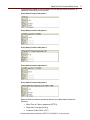
2. Click Input Configuration and configure the module as shown.
3. Click Test Output and configure the module as shown.
4. Click OK.
5. In the Controller Organizer, right-click the 1734-OB8S module and choose
Properties.
6. Click Output Configuration and configure the module as shown.
7. Click OK.
Rockwell Automation Publication SAFETY-AT128A-EN-P – February 2014