1
24CH DMX DIMMER CONSOLE
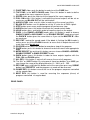
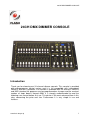
12. FADE TIME slider: push the button in order to set the FADE time.
13. TAP SYNC: in the AUTO CHASE mode. Press this button in order to define
the speed of the scene sequence (chase).
14. SPEED slider: push the slider to set the speed of the scene sequence.
15. FULL ON button: if this button is activated the channel outputs will be set on
maximum and BLACK OUT will be switched off.
16. AUDIO LEVEL slider: use this slider in order to set the sound sensitivity.
17. BLACK OUT button: use this button to set the “0” value for all DMX signals.
18. STEP button: press once and the program will perform one step.
19. AUDIO button: press this button to activate the sound control mode.
20. HOLD button: press and hold in order to keep the signal on the output.
21. PARK: in the CHASE<>SCENES mode, press this button in order to choose
SINGLE CHASE or MIX CHASE. In the DOUBLE PRESET mode pressing of
the PARK`B` button gives the same effect as if you set the MASTER`B` slider
on maximum.
22. REC EXIT: leaving the record mode. If the diode is flashing the KILL mode is
active, press any of the FLASH channels to cause that all output channels will
reach zero value beside one.
23. ROCORD button: press this button to record one step of the program.
24. PAGE button: press this button to choose the desired scene from appropriate
page.
25. MODE SELECT: by pushing this button you can choose CHASE<>SCENES,
DOUBLE PRESET or SINGLE PRESET mode.
26. DARK button: press this button in order to close outputs together with the
FULL ON and FLASH option.
27. ALL REV: if this button is active it will reverse the run of all programs.
28. The “0%” or “0-255” button: By using one of those two buttons % or 0-255 you
can choose the range of the displayed value: 0 – 100% or 0 – 255.
29. REV ONE: press and hold this button and at the same time press any SCENE
button from PRESET`B` and the program run mode will be reversed.
30. CHASE REV: this button reverse the run of the program sequence controlled
via the speed slider.
31. BEAT REV: this button is used for reversing the sequence (chase) of
programs controlled via regular beat.
REAR PANEL
www.flash-butrym.pl
3