1
Getting started
1
Recording
a
b
c
d
e
f
g
Recording indicator lights while
recording.
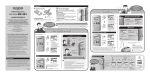
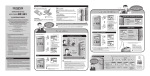
Insert batteries.
```
`
Strap eyelet
• A strap is not supplied with this product.
Battery indicator:
] is displayed on the screen, replace batteries as
If [
soon as possible. If the battery level becomes too low,
] and [Battery Low] are displayed and then the
[
recorder automatically turns off.
2
Turn on the power.
Slide the POWER switch to ON.
• Be sure to remove the
Protective film
protective film on the display
before using this product.
To turn off the power:
While the recorder is in the
stop mode, slide the POWER
switch to OFF/HOLD.
Power save mode:
If no operations are performed
for more than 10 minutes when
the power is on, the display
automatically turns off and the
recorder enters the power save
mode. To exit the power save
mode, press any button.
HOLD:
If sliding the POWER swich to OFF/HOLD while the
recorder is in operation, all buttons and switches are
disabled without interrupting the current operations.
• The [Set Time & Date] screen appears when you use the
recorder for the first time or when the recorder is turned
on after more than 30 minutes without power supply.
• If the time and date are not set, the time and date of
the default settings are recorded to files .
a Current date/ b Recording mode indicator/
c Microphone sensitivity indicator/ d Total
number of recorded files for the date/ e Current
file number/ f Elapsed recording time/ g
Remaining recording time
To pause recording, press the REC (-) button while recording. To
resume the recording, press the REC (-) button again.
Microphone sensitivity
Turn the microphone toward a sound
source to be recorded.
High
Highly sensitive mode
which can record
surrounding noises (H)
Low
Standard sensitivity (L)
• The recorder cannot record if [Memory Full] or [Maximum File Size
is reached] is displayed. Delete unnecessary files to free up some
space in memory.
• When the available recording time becomes less than 60 seconds,
the recording indicator starts flashing. The indicator flashes faster if
the available time decreases to 30 seconds and to 10 seconds.
3