1
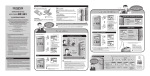
Menu settings
1
2
Press
SEARCH/
MENU for
more than 1
second.
Press 0 or 9 to
highlight the item you want
to set.
Time & Date
Rec Mode
Beep
Language
Turning
the
beep
On/Off
Use the 0 and
9 buttons to
turn the operating
sound On/Off.
Set
Setting time and date
Changing
the
display
language
• English
• Deutsch
• Français
• Español
• Italiano
• Polski
• Русский
Use the 0 and
9 buttons to
select the display
language.
Changing the recording mode
Use the 0 and 9 buttons to switch
recording modes.
Recommended settings by recording condition
File management
will be easier by
setting the time
and date.
Recording condition
The clock will start from
the set date and time.
Press the PLAY/OK (.)
button according to the
time signal.
Set
Previous
Next
6
Check the time and date
settings before using
the product again if it
is left unused for long
periods of time.
Recommended settings
Rec Mode
MIC SENSE
Dictation with a lot of
background noise.
[HQ]
(high quality
sound recording)
[LOW]
Recordings for lessons
and meetings.
[HQ]
(high quality
sound recording)
[HIGH]
[SP]
(standard
recording)
[HIGH]
Lengthy recordings.