1
CPT
PC-Programmable
Temperature Transmitter
Output Damping
Output Damping allows you to introduce a delay into
the response of your unit in order to stop short-lived
spikes from setting off alarms. Output Damping is
activated when the value set in the “Output Step
Threshold” field is exceeded.
1. To enable output damping, select the “Enabled”
button. If you do not wish to use the damping feature,
then select “Disabled”.
A possible source for the occurence above is a
rapid change on the input. Another possiblity would
be an existing output level of 5.6mA upon Start
Measurements from a PC.
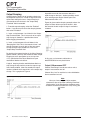
Figure 10 gives another damping example where the
output has been driven upscale to 23.6mA. After
five seconds the 63% output change is reached at
16.98mA.
Figure 10. Damping When Output Driven Upscale to 23.6mA
2. Insert a value between 1 and 16mA in the “Output
Step Threshold” field. This is how much of an output
step change is allowed in a specified time frame
before flagging the software.
3. Insert a value between 0.5 and 120sec in the
“Damping Sec” field. This is the amount of time it will
take for the output to reach 63% of the step output
change once the input exceeds the value in the
“Output Step Threshold” field.
By checking the appropriate box in the Other Damping
Options section, you may also choose to select Output
Damping to occur upon power up or start up from
a PC, upon broken wire failure detection or upon
resolution of broken wire failure.
A typical damping situation would be described as a
step change in output which causes the output to go
from 5.6mA to 20mA. After five seconds the output
reaches 14.58mA which equals 63% of the output step
change. This is graphed in Figure 9.
In this case, an instrument malfunction or
Adc/EEPROM failure may be to blame.
Output if Measurement OFF
Choose “Zero Range” to read zero volts or mA at
output if measurement was off.
Choose “Stay Last” to read the last value held before
the measurement was off.
Figure 9. Typical Damping Scenario
Note:
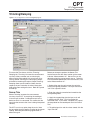
Once you have configured all parameters,
download to the unit by either selecting “Download
Configuration” in the Configuration dropdown menu
located in the Communications bar or by clicking the
button.
16
The Interface Solution Experts