Transcript
User Manual
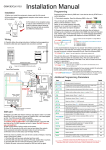
For GSM-3E/S & GSM-3E/SK Wireless Intercom
This GSM intercom system will call up to 3 telephone numbers in sequence when the call button is pressed.
There are several modes of operation depending on how the unit has been programmed by your installer. The
following instructions will assume default programming.
Intercom calling your phone
Press * to open
OR
1
4
7
Call button
pressed
*
2
5
8
0
END
Answer call.
Press # to hold open
3
6
9
#
and
Press 1 to release again
(Only some gate systems allow hold
open control, depending on
manufacturer)
Sending SMS Commands
Default pass code 5678 is shown in all examples. This may have been changed by your installer.
Latch or hold
open gate / door
Unlatch
gate / door
SEND SMS
SEND SMS
SEND SMS
SEND SMS
SEND SMS
*33*5678#
*34*5678#
*35*5678#
*22#
*21#
Trigger Gate /
Door
1
4
7
1 2 3
1 2 3
2 3
5 6
4 5 6
4 5 6
8 9
7 8 9
7 8 9
HOLD OPEN FEATURE, OR “PARTY MODE”
0 systems
#
Some
allow*hold 0
open #control, depending
* gate
* 0 on #
If limit switch fitted,
check gate status..
1 2 3
4 5 6
Reply will indicate
9
7 8or closed.
opened
* 0 #
Check stored
numbers
1 2 3
4 5 6
O = dial out number
9 for
I =7Dial 8
in number
caller ID0access.
#
*
manufacturer. Send the following SMS commands to control
the gates..
Calling the intercom options
*33*5678#
Dialling…
MY GATE
1
4
7
*
END
Option 1) If your number is saved inside the intercom
memory, just dial it and it will activate the door or gate
without answering your call. The intercom will end the
call for you.
2
5
8
0
3
6
9
#
END
Option 2) If your number is not saved in the intercom
memory, it will answer the call. Enter the code on
your telephone keypad to activate the door or gate
(default code shown).