1
Preface
D-Link reserves the right to revise this publication and to make changes in the content hereof without obligation to notify any
person or organization of such revisions or changes.
Manual Revisions
Revision
Date
Description
1.0
September 5, 2012
• Initial release for Revision A1
1.1
August 27, 2013
• Initial release for Revision A2
Trademarks
D-Link and the D-Link logo are trademarks or registered trademarks of D-Link Corporation or its subsidiaries in the United
States or other countries. All other company or product names mentioned herein are trademarks or registered trademarks of
their respective companies.
Copyright © 2013 by D-Link Systems, Inc.
All rights reserved. This publication may not be reproduced, in whole or in part, without prior expressed written permission
from D-Link Systems, Inc.
D-Link DAP-1320 User Manual
i
Table of Contents
Table of Contents
Preface.................................................................................. i
Manual Revisions............................................................................ i
Trademarks....................................................................................... i
Product Overview............................................................... 1
Package Contents.......................................................................... 1
Minimum Requirements............................................................. 2
Introduction.................................................................................... 3
What is a Wireless Extender?............................................. 4
Features............................................................................................. 5
Front/LED Indicator............................................................... 6
Side and Bottom/WPS and Reset..................................... 7
Wireless Installation Considerations....................................... 8
Installation.......................................................................... 9
Connect Your DAP-1320 to Your Router Using WPS.......... 9
Configuration....................................................................11
Wireless Setup Wizard................................................................11
QRS Mobile App Setup..............................................................15
Web-based Configuration Utility...........................................19
Login.........................................................................................19
Setup Wizard.........................................................................20
Home........................................................................................23
Wi-Fi Settings........................................................................24
Extended Wi-Fi Settings....................................................25
Network Settings.................................................................26
Advanced Settings.........................................................26
D-Link DAP-1320 User Manual
Tools.................................................................................................29
Admin......................................................................................29
System.....................................................................................30
Upgrade Firmware...............................................................31
Statistics..................................................................................32
Wireless Security Options................................................33
Security Protocols................................................................33
Encryption..............................................................................34
Authentication......................................................................34
Configuring WPA/WPA2 Personal..........................................35
Connecting to a Wireless Network..................................37
Connecting to Wireless Clients Using WPS........................37
Windows® 8....................................................................................38
Windows® 7....................................................................................40
WPA/WPA2.............................................................................40
Windows Vista®.............................................................................43
WPA/WPA2.............................................................................44
WPS/WCN 2.0........................................................................46
Windows® XP.................................................................................47
WPA/WPA2.............................................................................48
Troubleshooting...............................................................50
Wireless Basics..................................................................52
What is Wireless?..........................................................................53
Tips....................................................................................................55
ii
Table of Contents
Networking Basics............................................................56
Windows® 8 Users................................................................56
Windows® 7/Vista® Users..................................................56
Windows® XP Users.............................................................56
Statically Assign an IP Address...............................................57
Windows® 8 Users................................................................57
Windows® 7/ Vista® Users..................................................58
Technical Specifications...................................................59
Contacting Technical Support.........................................60
Warranty............................................................................61
Registration......................................................................68
D-Link DAP-1320 User Manual
iii
Section 1 - Product Overview
Product
PackageOverview
Contents
DAP-1320 Wireless Range Extender
Wi-Fi Configuration Card
Quick Install Guide
If any of the above items are missing, please contact your reseller.
D-Link DAP-1320 User Manual
1
Section 1 - Product Overview
Minimum Requirements
Network Requirements
• IEEE 802.11n or 802.11g wireless clients
• IEEE 802.11n or 802.11g wireless router or access point
Computer with the following:
• Windows®, Macintosh, Android or Linux-based operating
system
Web-based Configuration
Utility Requirements
Browser Requirements:
• Internet Explorer 6
• Safari 4
• Firefox
• Chrome
Windows® Users: Make sure you have the latest version of Java
installed. Visit www.java.com to download the latest version.
D-Link DAP-1320 User Manual
2
Section 1 - Product Overview
Introduction
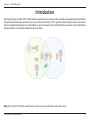
The Wireless Range Extender (DAP-1320) enables you to extend your existing wireless network coverage by placing the Wireless
Range Extender in between your router and your wireless client devices. This is great for extending your wireless coverage to
hard-to-reach places like basements, home offices or upstairs bedrooms that are distant from your wireless router. The Wireless
Range Extender is also ideal for mobile device connections.
Note: Place the DAP-1320 within equal distance of your existing network/router and wireless clients.
D-Link DAP-1320 User Manual
3
Section 1 - Product Overview
What is a Wireless Extender?
The DAP-1320 acts as a repeater to extend the range of an existing wireless network to provide better signal for parts of your
home or office that may have poor or no reception. Your existing wireless signal will be rebroadcast by the DAP-1320, allowing you
to reach the farthest corners of your home or office . The extended network can simply use the same network credentials as the
existing network, or you can specify a different network name and password, giving you the flexibility to control network access.
Mobile Device
Internet
Wireless Router
D-Link DAP-1320 User Manual
DAP-1320
Computer
4
Section 1 - Product Overview
Features
• Faster Wireless Networking - The DAP-1320 provides up to 300Mbps* wireless connection with other 802.11n
wireless clients. This capability allows users to participate in real-time activities online, such as video streaming,
online gaming, and real-time audio.
•Extend Internet access for wireless devices - Allows you to extend your internet access throughout your
home with devices such as laptops, smartphones, tablets and more.
• IEEE 802.11n and 802.11g Compliant - The DAP-1320 is still fully compatible with the IEEE 802.11g standards,
so it can connect with existing 802.11g USB and Cardbus adapters.
* Maximum wireless signal rate derived from IEEE Standard 802.11g and 802.11n specifications. Actual data throughput will vary. Network conditions and environmental factors,
including volume of network traffic, building materials and construction, and network overhead, lower actual data throughput rate. Environmental conditions will adversely
affect wireless signal range.
D-Link DAP-1320 User Manual
5
Section 1 - Product Overview
Hardware Overview
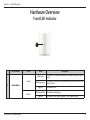
Front/LED Indicator
1
LED Indicator
Color
Status
Solid Green
Green
1
Power/Status
Light off
Amber
D-Link DAP-1320 User Manual
Blinking Green
Blinking Amber
Light off
Description
The device is securely connected to a wireless router or access
point.
The device is processing a connection after the WPS button has
been pushed.
The device is off.
The device is booting up.
The device is not receiving power. Try a different outlet.
6
Section 1 - Product Overview
Hardware Overview
Side and Bottom/WPS and Reset
1
2
1
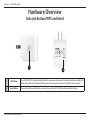
WPS Button
Press the WPS (Wi-Fi Protected Setup) button for a minimum of one second to automatically connect with Wi-Fi
clients. When the LED on the front of the device turns solid green, this means the DAP-1320 is connected.
2
Reset Button
Press and hold the reset button for six seconds to reset the DAP-1320 to the factory default settings.
D-Link DAP-1320 User Manual
7
Section 2 - Installation
Wireless Installation Considerations
The D-Link wireless device lets you access your network using a wireless connection from virtually anywhere within the
operating range of your wireless network. Keep in mind, however, that the number, thickness and location of walls, ceilings,
or other objects that the wireless signals must pass through, may limit the range. Typical ranges vary depending on the types
of materials and background RF (radio frequency) noise in your home or business. The key to maximizing wireless range is to
follow these basic guidelines:
1.Keep the number of walls and ceilings between the D-Link device and other network devices to a minimum.
Each wall or ceiling can reduce your adapter’s range from 3-90 feet (1-30 meters.) Position your devices so that
the number of walls or ceilings is minimized.
2. Be aware of the direct line between network devices. A wall that is 1.5 feet thick (.5 meters), at a 45-degree angle
appears to be almost 3 feet (1 meter) thick. At a 2-degree angle it looks over 42 feet (14 meters) thick! Position
devices so that the signal will travel straight through a wall or ceiling (instead of at an angle) for better reception.
3. Building Materials make a difference. A solid metal door or aluminum studs may have a negative effect on range.
Try to position access points, wireless routers, and computers so that the signal passes through drywall or open
doorways. Materials and objects such as glass, steel, metal, walls with insulation, water (fish tanks), mirrors, file
cabinets, brick, and concrete will degrade your wireless signal.
4.Keep your product away (at least 3-6 feet or 1-2 meters) from electrical devices or appliances that generate RF
noise.
5. If you are using 2.4GHz cordless phones or X-10 (wireless products such as ceiling fans, lights, and home security
systems), your wireless connection may degrade dramatically or drop completely. Make sure your 2.4GHz phone
base is as far away from your wireless devices as possible. The base transmits a signal even if the phone in not
in use.
D-Link DAP-1320 User Manual
8
Section 2 - Installation
Installation
Connect Your DAP-1320 to Your Router Using WPS
The easiest and most secure way to connect your DAP-1320 to your the router or access point is with WPS (Wi-Fi Protected
Setup). Refer to your user manual for your router or access point to make sure you understand how to enable WPS. Once you
know, follow the steps below:
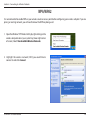
Step 1 - Find an available outlet near your wireless router. Plug the
DAP-1320 in, and wait until the power LED is blinking amber.
DAP-1320
Step 2 - Press the WPS button on your wireless router.
WPS Button
Note: Usually the WPS LED will blink once it is pressed. Check your
router’s user manual for more information.
Step 3 -Within one minute, press and hold the WPS button on the
DAP-1320 until the light starts blinking green and then release.
Allow up to two minutes for the WPS process to finish.
D-Link DAP-1320 User Manual
WPS Button
9
Section 2 - Installation
Step 4 -Your router or access point and DAP-1320 will be securely
connected when the LED light turns solid green.
Note: If your devices are not connected, try moving your DAP-1320 closer
to your wireless router or access point and repeat steps 2 and 3.
Step 5 -You can now unplug and move the DAP-1320 to a location
between your wireless router and the area that you need to
extend wireless coverage to.
Step 6 -To connect your wireless clients to the DAP-1320, You can
use the Wi-Fi Network Name (SSID) and the Wi-Fi Password
located on your Wi-Fi Configuration Card. Or use WPS (Wi-Fi
Protected Setup). Refer to “Connecting to Wireless Clients
Using WPS” on page 37.
Note: For your wireless client to connect to the DAP-1320, you must use the same Wi-Fi Network Name (SSID) and Wi-Fi Password
as your DAP-1320 that is located on the Wi-Fi Configuration Card. If you would like to change your Wi-Fi Network Name (SSID) and
Wi-Fi Password refer to “Extended Wi-Fi Settings” on page 25.
D-Link DAP-1320 User Manual
10
Section 3 - Configuration
Configuration
Wireless Setup Wizard
Use a wireless computer or mobile device with a web browser to access the Setup Wizard. As an alternative , you can go to the
“Web-based Configuration Utility” on page 19.
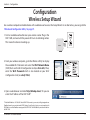
1. Find an available wall outlet near your wireless router. Plug in the
DAP-1320, and wait until the power LED turns to a blinking amber.
This means the device is booting up.
DAP-1320
2. From your wireless computer, go to the Wireless Utility to display
the available Wi-Fi Networks and select the Wi-Fi Network Name
(SSID) that is on the Wi-Fi Configuration Card (ex: dlink-a8fa). Then,
enter the Wi-Fi Password which is also located on your Wi-Fi
Configuration Card. (ex: akbdj19368).
Wi-Fi Name(SSID) 2.4Ghz:
dlink-2c19
Wi-Fi Name(SSID) 5GHz:
dlink-2C1B-media
Password:gccnu80856
3. Open a web browser and enter http://dlinkap.local./. Or you can
enter the IP address of the DAP-1320.*
* The default IP address is 192.168.0.50. Once the DAP-1320 connects to your router, it will get assigned a new
IP address based on your router/network’s DHCP settings. You will need to log in to your router and view the
DHCP table to see what IP address was assigned to the DAP-1320. The MAC address is printed on the label on
the DAP-1320.
D-Link DAP-1320 User Manual
11
Section 3 - Configuration
4.By default, Admin is the user name. Enter the Admin Password
(blank by default) and click Login.
Note: If this is your first time logging into the DAP-1320, you will be
directed to the Setup Wizard automatically.
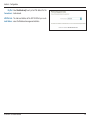
5.Select your Language from the drop-down menu and click Next
to continue.
6.If your wireless device supports WPS, click on Select this option if
your wireless device supports WPS (Wi-Fi Protected Setup). For
manual setup, skip to Step 8 on the next page.
Click Next to continue. You will see instructions on the screen that
say, Press the Push Button (physical or virtual) on the AP or Router...
D-Link DAP-1320 User Manual
12
Section 3 - Configuration
7.Press and hold the WPS button on your wireless router or access
point until the light starts blinking green and then release. Allow
up to two minutes for the WPS process to finish. When a connection
is successfully established, the LED on the device should turn solid
green.
WPS Button
Note: Refer to your router or access point’s user manual instructions
for the WPS process.
8.If your wireless device does not support WPS, click Select this
option if you want to set up your network manually.
Click Next to continue.
9. Wait while your device scans for available Wi-Fi networks. You will
see a list of networks found. Select the Wi-Fi Network you wish to
use, and click Select.
Note: If the network you would like to connect to is not listed, click
Back and select the manual option again to perform another scan.
Make sure you are in range of your wireless router.
D-Link DAP-1320 User Manual
13
Section 3 - Configuration
10.If the wireless network you selected is secure, you will be prompted
to enter the Wi-Fi Password.
Click Next to continue.
11.The DAP-1320 will rebroadcast the Wi-Fi connection from the uplink
router as an Extended Network. Enter an Extended Wi-Fi network
name and Extended Wi-Fi network password.
If you would like to use the same SSID and password as your uplink
router, check the box at the bottom of the screen. This will extend
the network that your router is currently broadcasting.
Click Next to continue.
12.The setup process is now complete. A summary page will appear
displaying the settings for both the connection to the Wi-Fi Network
and the Extended Wi-Fi network. It is recommended that you make
a note of this information for future reference.
Click Save to save your settings and exit the wizard.
D-Link DAP-1320 User Manual
14
Section 2 - Installation
QRS Mobile App Setup
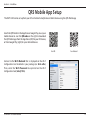
The DAP-1320 can be set up from your iOS or Android smartphone or tablet device using the QRS Mobile app.
Search for QRS Mobile in the App Store or Google Play, or use your
mobile device to scan the QR codes on the right to download
the QRS Mobile app from the App Store (left) for your iOS device,
or from Google Play (right) for your Android device.
For iOS
For Android
Connect to the Wi-Fi Network that is displayed on the Wi-Fi
Configuration Card included in your package (ex: dlink-a8fa).
Then, enter the Wi-Fi Password also printed on the Wi-Fi
Configuration Card (akbdj1936).
D-Link DAP-1320 User Manual
15
Section 2 - Installation
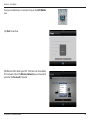
Once your mobile device is connected, tap on the QRS Mobile
icon.
Tap Start to continue.
QRS Mobile will first detect your DAP-1320, then scan for available
Wi-Fi networks. Select the Wireless Network you wish to extend
and enter the Password if required.
D-Link DAP-1320 User Manual
16
Section 2 - Installation
Enter a Network Name (SSID) and a Password for the extended
Wi-Fi network. You may keep the existing SSID and password if you
wish. Tap Next to continue.
By default, your DAP-1320 does not have an admin password for the
Web-based configuration utility. You can enter a Device Password.
Tap Next to continue.
D-Link DAP-1320 User Manual
17
Section 2 - Installation
A summary of your settings will be displayed. To complete the
setup, tap Save to save your settings and reboot the device.
After configuration is complete, the following screen will appear.
You can follow the on-screen instructions to change your mobile
device and laptop Wi-Fi settings to the wireless Network Name
and Password you just created.
D-Link DAP-1320 User Manual
18
Section 3 - Configuration
Web-based Configuration Utility
Login
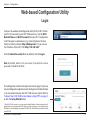
To access the web-based configuration utility for the DAP-1320 on
your PC, first connect to your DAP-1320 wirelessly. Use the Wi-Fi
Network Name and Wi-Fi Password from your Wi-Fi Configuration
Card. Then open a web-browser (e.g., Internet Explorer, Chrome,
Firefox, or Safari) and enter http://dlinkap.local./. Or you can use
the IP address of the DAP-1320, http://192.168.0.50.*
Enter the Admin Password (blank by default) and click Login.
Note: By default, Admin is the user name. If you did not create a
password, it should be left blank.
The configuration interface will open to the Home page. If you have
not yet configured an uplink network, the diagram will indicate there
is no connection between the DAP-1320 and your router. Refer to
“Connect Your DAP-1320 to Your Router Using WPS” on page 9,
or click the Setup Wizard button.
* Once the DAP-1320 connects to your router using the default IP address, it will get assigned a new IP
address based on your router/network’s DHCP settings. You will need to log in to your router and view the
DHCP table to see what IP address was assigned to the DAP-1320. The MAC address is printed on the label
on the DAP-1320.
D-Link DAP-1320 User Manual
19
Section 3 - Configuration
Setup Wizard
From the Home page, click Setup Wizard. The Setup Wizard will guide you through the process to configuring your DAP-1320.
If you prefer to configure your W-Fi Nework settings manually, refer to ”Wi-Fi Settings” on page 24.
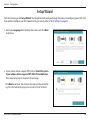
1. Select your Language from the drop-down menu and click Next
to continue.
2. If your wireless device supports WPS, click on Select this option
if your wireless device supports WPS (Wi-Fi Protected Setup).
For manual setup, skip to Step 4 on the next page .
Click Next to continue. You will see instructions on the screen that
say, Press the Push Button (physical or virtual) on the AP or Router...
D-Link DAP-1320 User Manual
20
Section 3 - Configuration
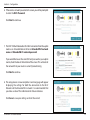
3. Press and hold the WPS button on your wireless router or access
point until the light starts blinking green and then release.
Allow up to two minutes for the WPS process to finish. When a
connection is successfully established, the LED on the device
should turn solid green.
WPS Button
Note: Refer to your router or access point’s user manual instructions
for the WPS process.
4. If your wireless device does not support WPS, click Select this
option if you want to set up your network manually as the
configuration method.
Click Next to continue.
5. Wait while your device scans for available Wi-Fi networks. You will
see a list of networks found. Select the Wi-Fi Network you wish
to use, click Select.
Note: If the network you would like to connect to isn’t listed, click
Back and select the manual option again to perform another scan.
Make sure you are in range of your wireless router.
D-Link DAP-1320 User Manual
21
Section 3 - Configuration
6. If the wireless network you selected is secure, you will be prompted
to enter the Wi-Fi Password.
Click Next to continue.
7. The DAP-1320 will rebroadcast the Wi-Fi connection from the uplink
router as an Extended Network. Enter an Extended Wi-Fi network
name and Extended Wi-Fi network password.
If you would like to use the same SSID and password as your uplink
router, check the box at the bottom of the screen. This will extend
the network that your router is currently broadcasting.
Click Next to continue.
8. The setup process is now complete. A summary page will appear
displaying the settings for both the connection to the Wi-Fi
Network and the Extended Wi-Fi network. It is recommended that
you make a note of this information for future reference.
Click Save to save your settings and exit the wizard.
D-Link DAP-1320 User Manual
22
Section 3 - Configuration
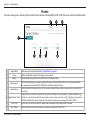
Home
The Home screen gives a summary of the current status of devices connected to the DAP-1320. Click on an icon for more information.
2
3
4
1
5
1
Setup Wizard
2
Home
3
Settings
7
DAP-1320
8
Wi-Fi Clients
6
7
8
Click to launch the setup wizard. Refer to “Setup Wizard” on page 20.
Click to navigate to the Current Status page (as shown above).
Click to change/view your Wi-Fi, Extended Wi-Fi, and network settings.
Click to change the login password, upgrade firmware, view data traffic statistics, save/load configuration
4
Management
files, reboot, and restore the DAP-1320 back to the factory default settings.
Click to display the network settings of the wireless network (if connected) or to connect to a network if not
5
Uplink Router
connected.
Displays the status of your connection to the wireless network you are “repeating”. A green check mark ( )
6 Uplink Router Status indicates a successful connection to your wireless router or access point. A red ( ) indicates no connection.
Click the Uplink Router icon to display a list of wireless networks you can connect the DAP-1320 to.
D-Link DAP-1320 User Manual
Click to view the details of both the uplink router network and the extended Wi-Fi network.
Click to display a list of clients (devices) currently connected to the DAP-1320.
23
Section 3 - Configuration
Wi-Fi Settings
From the Home page, click on the Settings drop-down menu at the top of the page and select Wi-Fi. Here you can configure
the Wi-Fi Network you would like your DAP-1320 to connect to. Use Site Survey to scan available Wi-Fi networks so you can
select the one you would like to extend.
Wireless Mode: This is set to Repeater mode and cannot be changed.
Wi-Fi Network Click Scan to use Site Survey to display available wireless
Name (SSID): networks within range of the DAP-1320. Select the one you
want to extend. You can also type in the name (SSID) of the
wireless network. The SSID is case-sensitive and must be
entered exactly the same as your router or access point.
Security: Select the security method that is being used by the wireless
network that you have selected: WEP, WPA/WPA2, or None.
Password: If you selected WEP or WPA/WPA2, you will be required to
enter the password or security key for the network you are
attempting to join.
Save: Click Save to save the settings and return to the home page.
D-Link DAP-1320 User Manual
24
Section 3 - Configuration
Extended Wi-Fi Settings
From the Home page, click on the Settings drop-down menu at the top of the page, and select Extended Wi-Fi. This page
allows you configure the settings for the DAP-1320’s extended wireless network.
Wi-Fi Name This is the name of the DAP-1320’s extended network.
(SSID): The DAP-1320 will rebroadcast the uplink router’s Internet
connection under this SSID. You can also choose to make the
SSID and password for the extended network the same as
the SSID and password for the uplink network. This means
the DAP-1320 will extend the network that your router is
currently broadcasting.
Security: Select the type of wireless security you wish to use for
the extended network. Select None, WEP, or WPA/WPA2
Personal (recommended).
Password: Enter the password or network key that you wish to use
for the extended network. You can also choose to make
the password for the extended network the same as the
password for the uplink network.
Save: Click Save to save the settings and return to the home page.
D-Link DAP-1320 User Manual
25
Section 3 - Configuration
Network Settings
From the Home page, click on the Settings drop-down menu at the top of the page, and select Network. This page allows you
to configure the Network Settings for the DAP-1320.
Device Name: You may change the name of the device by editing the text
in the text box. If you change this Device Name, you will need
to enter http://xxxx.local./ (where “xxxx” corresponds to the
name of the device) in the address bar of your web browser
in order to access the configuration utility.
Advanced Settings
The Advanced Settings section of the Network Settings page allows you to configure both IPv4 and IPv6 settings that will be
used by the DAP-1320’s extended network. Below is the IPv4 Device Management Interface. See the next page for IPv6 settings.
My LAN Select whether you want the IP to have a Dynamic IP (DHCP)
Connection is: or Static IP address. Select Dynamic IP to obtain the IP
address information automatically from your ISP (Internet
Service Provider.)
IP Address: Enter the Static IP Address that you want to assign to the
extended network AP. This address should be outside of the
uplink router’s DHCP address pool.
Subnet Mask: Enter the Subnet Mask.
Gateway Enter the Gateway Address. (Usually this is the IP address
Address: of the uplink router.)
Primary DNS Enter the address of the Primary DNS Server.
Server:
Secondary Enter the address of the Secondary DNS Server. This is
DNS Server: optional but will provide backup if the primary server fails.
D-Link DAP-1320 User Manual
26
Section 3 - Configuration
IPv6 Device Management Interface: You can select Autoconfiguration (SLAAC/DHCPv6), Static IPv6, or Link-local only:
My IPv6 Select Autoconfiguration (SLAAC/DHCPv6) to have the
Connection is: DAP-1320 automatically receive an IPv6 address from the
uplink router.
Obtain DNS You can select to Obtain IPv6 DNS Servers automatically,
Server Address: or you can select Use the following IPv6 DNS Servers and
enter IPv6 DNS server addresses manually.
Primary DNS If you selected the second option above, enter the Primary
Server: DNS Server address.
Secondary DNS
Server: Enter the Secondary DNS Server address. This is optional
but will provide backup if the Primary DNS server fails.
My IPv6 Select Static IPv6 to manually assign an IP address to the
Connection is: DAP-1320.
IPv6 Address: Enter the IPv6 Address that you want to assign to the
extended network AP. This address should be outside of the
uplink router’s DHCP address pool.
Subnet Prefix Enter the length of the IPv6 subnet prefix.
Length:
Default Gateway: Enter the Default Gateway. (Usually this is the IP address
of the uplink router.)
Primary DNS Enter the Primary DNS Server address.
Server:
Secondary DNS Enter the Secondary DNS Server address. This is optional
Server: but will provide backup if the primary server fails.
D-Link DAP-1320 User Manual
27
Section 3 - Configuration
My IPv6 Select Link-local only to only set an IPv6 address for the
Connection is: local network.
LAN IPv6 Link- The Link-Local Address of the DAP-1320 that you use to
Local Address: access the Web-based management interface.
D-Link DAP-1320 User Manual
28
Section 3 - Configuration
Tools
Admin
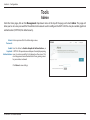
From the Home page, click on the Management drop-down menu at the top of the page, and select Admin. This page will
allow you to set a new password for the administrator account used to configure the DAP-1320. You may also enable graphical
authentication (CAPTCHA) for added security.
Admin Enter a password for the Admin login name.
Password:
Enable Use the slider to Enable Graphical Authentication, or
Graphical CAPTCHA. This provides an extra layer of security by requiring
Authentication: users to enter a code that is displayed on the screen. This
can help prevent unauthorized users from gaining access
to your wireless network.
Click Save to save settings.
D-Link DAP-1320 User Manual
29
Section 3 - Configuration
System
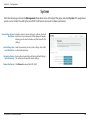
From the Home page, click on the Management drop-down menu at the top of the page, and select System. This page allows
you to save or restore the settings for your DAP-1320, You can also reset or reboot your device.
Save Settings to Local Save the current system settings to a file on the local
Hard Drive: hard drive of your computer. A file dialog will appear,
allowing you to select a location and file name for the
settings.
Load Settings from Load the previously saved system settings from a file
Local Hard Drive: on the local hard drive.
Restore to Factory Restore the system settings to factory default settings.
Default Settings: This will erase all currently stored settings.
Reboot the Device: Click Reboot to reboot the DAP-1320.
D-Link DAP-1320 User Manual
30
Section 3 - Configuration
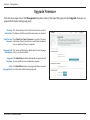
Upgrade Firmware
From the Home page, click on the Management drop-down menu at the top of the page and select Upgrade. Here you can
upgrade the firmware and language packs.
Firmware This section displays the Current Firmware Version, as well as
Information: the date on which the current firmware version was released.
Check for New Click Check For New Firmware to update Firmware
Firmware: Information. If you discover there is new firmware available,
you can download it to your computer.
Language Pack This section will display the details about Current Language
Information: Packs, or say None installed.
Upgrade Click Select File to locate the firmware file on your local hard
Firmware: drive and perform a manual firmware upgrade.
Add a Click Select File to locate a language pack file on your local
Language Pack: hard drive and upload the language pack.
D-Link DAP-1320 User Manual
31
Section 3 - Configuration
Statistics
From the Home page, click on the Management drop-down menu at the top of the page, and select Statistics. This page displays
traffic statistics about the total number of packets transmitted and received.
Wi-Fi: Click on the Wi-Fi tab to display the statistics for the connection
between the DAP-1320 and the uplink router.
Clear: Click the Clear button to reset the statistics.
Extended Wi-Fi: Click on the Extended Wi-Fi tab to display the statistics for the
connection between the DAP-1320 and any connected clients.
Clear: Click the Clear button to reset the statistics.
D-Link DAP-1320 User Manual
32
Section 3 - Configuration
Wireless Security Options
What is the best way to secure your wireless computer network? There are several security protocols with various versions from
which to choose. Depending on the wireless device, you may have to select from different levels of security. The description
of security protocols, encryption and authentication that follows is intended to help you better understand your choices.
Security Protocols
WPA ( Wi-Fi Protected Access) and WPA2 (Wi-Fi Protected Access II ) are two security protocols that were developed by the Wi-Fi Alliance (WFA)
to replace the less-secure WEP (Wired Equivalent Privacy). The WFA is a trade association that certifies Wi-Fi® products that are compliant with
standards of interoperability. IEEE 802.11 is the set of specifications for implementing WLAN (Wireless Local Area Network) computer communication
within the 2.4 to 5GHZ frequency bands. WLAN typically provides a connection between wireless devices to the Internet using an AP (access point).
WPA was originally referred to as the draft IEEE 802.11i standard, since it became available first, and was intended as an intermediate solution
pending the availability of a full IEEE 802.11i standard. WPA2 was known as IEEE 802.11i-2004, the year it first became available. Wi-Fi devices that
have been certified since 2006 generally support both WPA and WPA2.
WPS (Wi-Fi Protected Setup™) provides the easiest way to establish a secure wireless network for home or small office (SOHO) environments.
Introduced in 2007, WPS was created by WFA so that users who might otherwise be intimidated by the available security options could set up a
secure network, and later add new devices, with a simple automated process. PBC (Push Button Configuration) requires just the push of a button.
Today most wireless devices, from routers to wireless printers and cameras, have a WPS button. WPS enables WPA2 security protocol.
D-Link DAP-1320 User Manual
33
Section 3 - Configuration
Encryption
WPA typically provides data encryption using TKIP (Temporal Key Integrity Protocol), which dynamically generates a new 128-bit key for each data
packet that is transmitted between networks. WPA also has an integrity checking feature, designed to prevent a hacker from altering and re-sending
the data packets.
WPA2 uses CCMP, for Counter Cipher Mode with Block Chaining Message Authentication Code Protocol, which uses a higher standard known as
AES (Advanced Encryption Standard). Therefore CCMP provides stronger security than TKIP. It was designed to provide data confidentiality, user
authentication, and access control. WPS also uses a form of AES.
Authentication
With both WPA and WPA2, there are two types of authentication. For home or small office environments, WPA-Personal and WPA2-Personal are
widely used. Enterprise networks for business use WPA-Enterprise and WPA2-Enterprise.
WPA-Personal, also called WPA-PSK (for Pre-shared key) / WPA2-Personal or WPA2-PSK:
Was designed for home and small office networks, and does not require an authentication server. Instead, each network device authenticates with
the AP (access point) using the same key generated from an alpha-numeric password or passphrase. The password must be between 8-64 characters,
and should not be a commonly known phrase.
WPA-Enterprise, also known as WPA-802.1X / WPA2-Enterprise or WPA2-802.1X:
Was designed for enterprise networks, and requires a RADIUS authentication server. The server uses a set of protocols to implement secure access
for devices attempting to communicate with the network.
Although this is a more complicated setup, it provides the best security through EAP, for Extensible Authentication Protocol. EAP is actually a general
framework, or architecture, for creation of keying material for message authentication. For example, when EAP is implemented in an 802.1X-enabled
Network Access Server (NAS) device, EAP methods are used to generate a secure private key that can be used for wireless encryption. This will
ensure that only authorized network devices can access the network.
The WPS protocol uses EAP message exchanges for authentication. There are two methods:
1. Push-Button-Method means the user simply pushes a button on the access point or router, and within a minute or two pushes a button on the
new wireless client device, in order to connect it to the wireless network.
2. The PIN method uses a Personal Identification Number that must be read from either a sticker, wireless configuration card, or the display on the
wireless device. Support for this mode is mandatory for access points. However, there is some concern that the messages sent between the AP
and the wireless client when attempting to validate the PIN could make the network vulnerable to attack. Most companies have fixed this issue
with updated firmware.
D-Link DAP-1320 User Manual
34
Section 3 - Configuration
Configuring WPA/WPA2 Personal
If you did not enable wireless security during initial setup, it is recommended that you do so using the web-based configuration
utility. Establish wireless connectivity before enabling wireless security. If you prefer WPS, proceed to “Connecting to Wireless
Clients Using WPS” on page 37.
1. Log into the web-based configuration by opening a web browser
and entering http://dlinkap.local./.
2.Enter the Admin Password (blank by default) and click Login.
Note: By default, Admin is the user name. If you did not create a
password, it should be left blank.
3.The configuration interface will open to the Home page. Click on
the Settings drop-down menu and select Wi-Fi. Then configure
the Wi-Fi network you would like your DAP-1320 to connect to.
D-Link DAP-1320 User Manual
35
Section 3 - Configuration
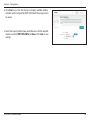
4.Click Scan to use the Site Survey to display available wireless
networks within range of the DAP-1320. Select the one you want
to secure.
5.Select the security method you would like to use for the selected
wireless network: WEP, WPA/WPA2, or None. Click Save to save
settings.
D-Link DAP-1320 User Manual
36
Section 4 - Connecting to a Wireless Network
Connecting to a Wireless Network
Connecting to Wireless Clients Using WPS
The easiest and most secure way to connect your wireless devices to the DAP-1320 is WPS (Wi-Fi Protected Setup). Most
wireless devices such as wireless adapters, media players, Blu-ray DVD players, wireless printers and cameras will have a WPS
button (or a software utility with WPS) that you can press to connect to the DAP-1320. Please refer to your user manual for
the wireless device you want to connect to make sure you understand how to enable WPS. Once you know, follow the steps
below:
Step 1 - Press and release the WPS button on the DAP- 1320. The LED
will blink green during the WPS process.
Step 2 -Within two minutes, press the WPS button on your wireless
client (or launch the software utility and start the WPS
process).
Step 3 - Allow up to two minutes to connect. Once the connection is
successful the LED will be solid green.
D-Link DAP-1320 User Manual
37
Section 4 - Connecting to a Wireless Network
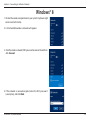
Windows® 8
1. Click on the wireless computer icon in your system tray (lower-right
corner next to the time).
2.A list of available wireless networks will appear.
3. Click the wireless network (SSID) you want to connect to and then
click Connect.
4.If the network is secure/encrypted, enter the Wi-Fi password
(security key) and click Next.
D-Link DAP-1320 User Manual
38
Section 4 - Connecting to a Wireless Network
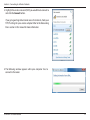
5.Click either to enable or disable file sharing.
6.You will now be connected to your wireless network.
If you get a good signal but cannot access the Internet, confirm the encryption by reviewing the profile or check the TCP/IP
settings for your wireless adapter. Refer to the Networking Basics section in this manual for more information.
D-Link DAP-1320 User Manual
39
Section 4 - Connecting to a Wireless Network
Windows® 7
WPA/WPA2
It is recommended to enable wireless security (WPA/WPA2) on your wireless router or access point before configuring your
wireless adapter. If you are joining an existing network, you will need to know the security key or passphrase being used.
1.Click on the wireless icon in your system tray (lower-right corner).
Wireless Icon
2.The utility will display any available wireless networks in your area.
D-Link DAP-1320 User Manual
40
Section 4 - Connecting to a Wireless Network
3. Highlight the wireless network (SSID) you would like to connect to
and click the Connect button.
If you get a good signal but cannot access the Internet, check your
TCP/IP settings for your wireless adapter. Refer to the Networking
Basics section in this manual for more information.
4.The following window appears while your computer tries to
connect to the router.
D-Link DAP-1320 User Manual
41
Section 4 - Connecting to a Wireless Network
5. Enter the same security key or passphrase that is on your router and
click Connect. You can also connect by pushing the WPS button on
the router.
It may take 20-30 seconds to connect to the wireless network. If the
connection fails, please verify that the security settings are correct. The
key or passphrase must be exactly the same as on the wireless router.
D-Link DAP-1320 User Manual
42
Section 4 - Connecting to a Wireless Network
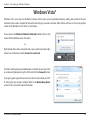
Windows Vista®
Windows Vista® users may use the built-in wireless utility. If you are using another company’s utility, please refer to the user
manual of your wireless adapter for help with connecting to a wireless network. Most utilities will have a “site survey” option
similar to the Windows Vista® utility as seen below.
If you receive the Wireless Networks Detected bubble, click on the
center of the bubble to access the utility.
or
Right-click on the wireless computer icon in your system tray (lower-right
corner next to the time). Select Connect to a network.
The utility will display any available wireless networks in your area. Click
on a network (displayed using the SSID) and click the Connect button.
If you get a good signal but cannot access the Internet, check you TCP/
IP settings for your wireless adapter. Refer to the Networking Basics
section in this manual for more information.
D-Link DAP-1320 User Manual
43
Section 4 - Connecting to a Wireless Network
WPA/WPA2
It is recommended to enable wireless security (WPA/WPA2) on your wireless router or access point before configuring your
wireless adapter. If you are joining an existing network, you will need to know the security key or passphrase being used.
1. Open the Windows Vista® Wireless Utility by right-clicking on the
wireless computer icon in your system tray (lower right corner of
screen). Select Connect to a network.
2. Highlight the wireless network (SSID) you would like to connect
to and click Connect.
D-Link DAP-1320 User Manual
44
Section 4 - Connecting to a Wireless Network
3. Enter the same security key or passphrase that is on your router and
click Connect.
It may take 20-30 seconds to connect to the wireless network. If the
connection fails, please verify that the security settings are correct. The
key or passphrase must be exactly the same as on the wireless router.
D-Link DAP-1320 User Manual
45
Section 4 - Connecting to a Wireless Network
WPS/WCN 2.0
The router supports Wi-Fi protection, referred to as WCN 2.0 in Windows Vista®. The following instructions for setting this up
depends on whether you are using Windows Vista® to configure the router or third party software.
When you first set up the router, Wi-Fi protection is disabled and unconfigured. To enjoy the benefits of Wi-Fi protection, the
router must be both enabled and configured. There are three basic methods to accomplish this: use Windows Vista’s built-in
support for WCN 2.0, use software provided by a third party, or manually configure.
If you are running Windows Vista®, log into the router and click the Enable checkbox in the Basic > Wireless section. Use the
Current PIN that is displayed on the Advanced > Wi-Fi Protected Setup section or choose to click the Generate New PIN
button or Reset PIN to Default button.
If you are using third party software to set up Wi-Fi Protection, carefully follow the directions. When you are finished, proceed
to the next section to set up the newly-configured router.
D-Link DAP-1320 User Manual
46
Section 4 - Connecting to a Wireless Network
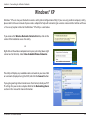
Windows® XP
Windows® XP users may use the built-in wireless utility (Zero Configuration Utility). If you are using another company’s utility,
please refer to the user manual of your wireless adapter for help with connecting to a wireless network. Most utilities will have
a “site survey” option similar to the Windows® XP utility as seen below.
If you receive the Wireless Networks Detected bubble, click on the
center of the bubble to access the utility.
or
Right-click on the wireless computer icon in your system tray (lower-right
corner next to the time). Select View Available Wireless Networks.
The utility will display any available wireless networks in your area. Click
on a network (displayed using the SSID) and click the Connect button.
If you get a good signal but cannot access the Internet, check you TCP/
IP settings for your wireless adapter. Refer to the Networking Basics
section in this manual for more information.
D-Link DAP-1320 User Manual
47
Section 4 - Connecting to a Wireless Network
WPA/WPA2
It is recommended to enable WPA on your wireless router or access point before configuring your wireless adapter. If you are
joining an existing network, you will need to know the WPA key being used.
1. Open the Windows® XP Wireless Utility by right-clicking on the
wireless computer icon in your system tray (lower-right corner
of screen). Select View Available Wireless Networks.
2. Highlight the wireless network (SSID) you would like to
connect to and click Connect.
D-Link DAP-1320 User Manual
48
Section 4 - Connecting to a Wireless Network
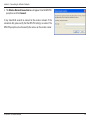
3.The Wireless Network Connection box will appear. Enter the WPA-PSK
passphrase and click Connect.
It may take 20-30 seconds to connect to the wireless network. If the
connection fails, please verify that the WPA-PSK settings are correct. The
WPA-PSK passphrase must be exactly the same as on the wireless router.
D-Link DAP-1320 User Manual
49
Section 5 - Troubleshooting
Troubleshooting
This chapter provides solutions to problems that can occur during the installation and operation of the DAP-1320. Read the
following descriptions if you are having problems.
1. Why can’t I access the web-based configuration utility?
When entering the IP address of the DAP-1320 (192.168.0.50 for example), you are not connecting to a website, nor do you
have to be connected to the Internet. The device has the utility built-in to a ROM chip in the device itself. Your computer must
be on the same IP subnet to connect to the web-based utility.
• Make sure you have an updated Java-enabled web browser. We recommend the following:
-Microsoft Internet Explorer® 6 and higher
-Mozilla Firefox
-Google™ Chrome
-Apple Safari 4 and higher
• Verify physical connectivity by checking for solid link lights on the devices. If you do not get a solid link light, try using a
different cable or connect to a different port on the device if possible. If the computer is turned off, the link light may not be
on.
• Disable any Internet security software running on the computer. Software firewalls such as Zone Alarm, Black Ice, Sygate,
Norton Personal Firewall, and Windows® XP firewall may block access to the configuration pages. Check the help files included
with your firewall software for more information on disabling or configuring it.
D-Link DAP-1320 User Manual
50
Section 5 - Troubleshooting
• Configure your Internet settings:
• Go to Start > Settings > Control Panel. Double-click the Internet Options Icon. From the Security tab, click
the button to restore the settings to their defaults.
• Click the Connection tab and set the dial-up option to Never Dial a Connection. Click the LAN Settings button.
Make sure nothing is checked. Click OK.
• Go to the Advanced tab and click the Reset button to restore these settings to their defaults. Click OK three
times.
• Close your web browser (if open) and open it.
• Access the Web Management. Open your web browser and enter the IP address of your DAP-1320 in the address bar. This
should open the login page for your Web Management.
• If you still cannot access the configuration, unplug the device for 10 seconds and plug back in. Wait about 30 seconds and
try accessing the configuration. If you have multiple computers, try connecting using a different computer.
2. What can I do if I forgot my password?
If you forgot your password, you must reset your DAP-1320 Unfortunately, this process will change all your settings back to
the factory default settings.
To reset the DAP-1320, locate the reset button (hole) on the bottom of the unit. With the device powered on, use a paperclip
to hold the button down for 10 seconds. Release the button and the device will reboot. Wait about 30 seconds to access the
DAP-1320. The default IP address is 192.168.0.50. When logging in, the username is admin and leave the password field empty.
Reset
D-Link DAP-1320 User Manual
51
Appendix A - Wireless Basics
Wireless Basics
D-Link wireless products are based on industry standards to provide easy-to-use and compatible high-speed wireless
connectivity within your home, business or public access wireless networks. Strictly adhering to the IEEE standard, the D-Link
wireless family of products will allow you to securely access the data you want, when and where you want it. You will be able
to enjoy the freedom that wireless networking delivers.
A wireless local area network (WLAN) is a cellular computer network that transmits and receives data with radio signals instead of
wires. Wireless LANs are used increasingly in both home and office environments, and public areas such as airports, coffee shops
and universities. Innovative ways to utilize WLAN technology are helping people to work and communicate more efficiently.
Increased mobility and the absence of cabling and other fixed infrastructure have proven to be beneficial for many users.
Wireless users can use the same applications they use on a wired network. Wireless adapter cards used on laptop and desktop
systems support the same protocols as Ethernet adapter cards.
Under many circumstances, it may be desirable for mobile network devices to link to a conventional Ethernet LAN in order to
use servers, printers or an Internet connection supplied through the wired LAN. A Wireless Router is a device used to provide
this link.
D-Link DAP-1320 User Manual
52
Appendix A - Wireless Basics
What is Wireless?
Wireless or Wi-Fi technology is another way of connecting your computer to the network without using wires. Wi-Fi uses radio
frequency to connect wirelessly, so you have the freedom to connect computers anywhere in your home or office network.
Why D-Link Wireless?
D-Link is the worldwide leader and award winning designer, developer, and manufacturer of networking products. D-Link
delivers the performance you need at a price you can afford. D-Link has all the products you need to build your network.
How does wireless work?
Wireless works similar to how cordless phone work, through radio signals to transmit data from one point A to point B. But
wireless technology has restrictions as to how you can access the network. You must be within the wireless network range area
to be able to connect your computer. There are two different types of wireless networks Wireless Local Area Network (WLAN),
and Wireless Personal Area Network (WPAN).
Wireless Local Area Network (WLAN)
In a wireless local area network, a device called an Access Point (AP) connects computers to the network. The access point has
a small antenna attached to it, which allows it to transmit data back and forth over radio signals. With an indoor access point,
the signal can travel up to 300 feet. With an outdoor access point the signal can reach out up to 30 miles to serve places like
manufacturing plants, industrial locations, college and high school campuses, airports, golf courses, and many other outdoor
venues.
D-Link DAP-1320 User Manual
53
Appendix A - Wireless Basics
Wireless Personal Area Network (WPAN)
Bluetooth is the industry standard wireless technology used for WPAN. Bluetooth devices in WPAN operate in a range up to
30 feet away.
Compared to WLAN the speed and wireless operation range are both less than WLAN, but in return it doesn’t use nearly as
much power which makes it ideal for personal devices, such as mobile phones, PDAs, headphones, laptops, speakers, and other
devices that operate on batteries.
Who uses wireless?
Wireless technology as become so popular in recent years that almost everyone is using it, whether it’s for home, office, business,
D-Link has a wireless solution for it.
Home
• Gives everyone at home broadband access
• Surf the web, check email, instant message, etc.
• Gets rid of the cables around the house
• Simple and easy to use
Small Office and Home Office
• Stay on top of everything at home as you would at office
• Remotely access your office network from home
• Share Internet connection and printer with multiple computers
• No need to dedicate office space
D-Link DAP-1320 User Manual
54
Appendix A - Wireless Basics
Where is wireless used?
Wireless technology is expanding everywhere not just at home or office. People like the freedom of mobility and it’s becoming
so popular that more and more public facilities now provide wireless access to attract people. The wireless connection in public
places is usually called “hotspots”.
Using a D-Link Cardbus Adapter with your laptop, you can access the hotspot to connect to Internet from remote locations
like: Airports, Hotels, Coffee Shops, Libraries, Restaurants, and Convention Centers.
Wireless network is easy to setup, but if you’re installing it for the first time it could be quite a task not knowing where to start.
That’s why we’ve put together a few setup steps and tips to help you through the process of setting up a wireless network.
Tips
Here are a few things to keep in mind, when you install a wireless network.
Centralize your router or Access Point
Make sure you place the router/access point in a centralized location within your network for the best performance. Try to
place the router/access point as high as possible in the room, so the signal gets dispersed throughout your home. If you have
a two-story home, you may need a repeater to boost the signal to extend the range.
Eliminate Interference
Place home appliances such as cordless telephones, microwaves, and televisions as far away as possible from the router/access
point. This would significantly reduce any interference that the appliances might cause since they operate on same frequency.
Security
Don’t let you next-door neighbors or intruders connect to your wireless network. Secure your wireless network by turning on
the WPA or WEP security feature on your router. Refer to product manual for detail information on how to set it up.
D-Link DAP-1320 User Manual
55
Appendix B - Networking Basics
Networking Basics
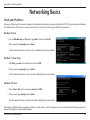
Check your IP address
After you install your new D-Link wireless adapter and have established a wireless connection, by default, the TCP/IP settings should be set to obtain
an IP address from a DHCP server (i.e., router) automatically. To verify your IP address, please follow the steps below.
Windows® 8 Users
• Press the Windows key and R together. Type cmd in the box and click OK.
• At the prompt, type ipconfig and press Enter.
• This will display the IP address, subnet mask, and default gateway of your adapter.
Windows® 7/Vista® Users
•Click Start, type cmd in the search box and then click OK.
• At the prompt, type ipconfig and press Enter.
• This will display the IP address, subnet mask, and default gateway of your adapter.
Windows® XP Users
• Click on Start > Run. In the run box type cmd and click OK.
• At the prompt, type ipconfig and press Enter.
• This will display the IP address, subnet mask, and the default gateway of your adapter.
If the address is 0.0.0.0, check your adapter installation, security settings, and the settings on your router. Some firewall software programs may
block a DHCP request on newly installed adapters.
D-Link DAP-1320 User Manual
56
Appendix B - Networking Basics
Statically Assign an IP Address
If you are not using a DHCP capable gateway/router, or you need to assign a static IP address, please follow the steps below:
Windows® 8 Users
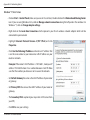
• Press the Windows key and then type IP. Click Settings on the right side and then click View Network Connections.
• Right-click on the adapter which represents your D-Link wireless network adapter.
•Highlight Internet Protocol Version 4 (TCP /IPv4) and click
Properties.
•Click Use the following IP address and enter an IP address that is on
the same subnet as your network or LAN IP address on your router
or network.
Example: If the router’s LAN IP address is 192.168.0.1, make your IP
address 192.168.0.X where X is a number between 2 and 99. Make
sure that the number you choose is not in use on the network.
•Set Default Gateway the same as the LAN IP address of your router
or gateway.
•Set Primary DNS the same as the LAN IP address of your router or
gateway.
•The Secondary DNS is optional (you may enter a DNS server from
your ISP).
•Click OK to save your settings.
D-Link DAP-1320 User Manual
57
Appendix B - Networking Basics
Windows® 7/ Vista® Users
• Click on Start > Control Panel (make sure you are in Classic View). Double-click on the Network and Sharing Center
icon. If you are using Windows Vista, click on Manage network connections along the left panel in the window. For
Windows® 7, click on Change adapter settings.
•Right-click on the Local Area Connection which represents your D-Link wireless network adapter which will be
connected to your network.
•Highlight Internet Protocol Version 4 (TCP /IPv4) and click
Properties.
•Click Use the following IP address and enter an IP address that
is on the same subnet as your network or LAN IP address on your
router or network.
Example: If the router’s LAN IP address is 192.168.0.1, make your IP
address 192.168.0.X where X is a number between 2 and 99. Make
sure that the number you choose is not in use on the network.
•Set Default Gateway the same as the LAN IP address of your router
or gateway.
•Set Primary DNS the same as the LAN IP address of your router or
gateway.
•The Secondary DNS is optional (you may enter a DNS server from
your ISP).
•Click OK to save your settings.
D-Link DAP-1320 User Manual
58
Appendix C - Technical Specifications
Technical Specifications
Standards
• IEEE 802.11n
• IEEE 802.11g
Wireless Frequency Range
• 2.4 GHz to 2.4835 GHz
Antennas
• Internal Antenna
Security
• Wi-Fi Protected Access (WPA/WPA2)
• WPS™ (PBC)
• 0% to 90% non-condensing
Certifications
• Wi-Fi Certified
• FCC
Dimensions
• 2.11” x 1.65” x 1.89’’ (53.5 x 42 x 48mm)
Weight
• 2.56 oz. (72.57g)
Warranty
• 1-Year Limited Warranty
Advanced Features
• Quick Router Setup app for iOS
Device Management
• Web UI
Diagnostic LEDs
• Power/ Status
Operating Temperature
• 32 to 104 ˚F (0 to 40 ˚C)
Operating Humidity
1 Maximum wireless signal rate derived from IEEE Standard 802.11g and 802.11n specifications. Actual data throughput will vary. Network conditions and environmental factors, including volume
of network traffic, building materials and construction, and network overhead, lower actual data throughput rate. Environmental factors will adversely affect wireless signal range.
2 Frequency Range varies depending on country’s regulation
D-Link DAP-1320 User Manual
59
Appendix D - Contacting Technical Support
Contacting Technical Support
U.S. and Canadian customers can contact D-Link technical support through our web site or by phone.
Before you contact technical support, please have the following ready:
• Model number of the product (e.g. DAP-1320)
• Hardware Revision (located on the label on the device (e.g. rev A2))
• Serial Number (s/n number located on the label on the device).
You can find software updates and user documentation on the D-Link website as well as frequently asked questions and
answers to technical issues.
For customers within the United States:
Phone Support:
(877) 453-5465
For customers within Canada:
Internet Support:
http://support.dlink.com
Phone Support:
(800) 361-5265
Internet Support:
http://support.dlink.ca
D-Link DAP-1320 User Manual
60
Appendix F - Warranty
Warranty
Subject to the terms and conditions set forth herein, D-Link Systems, Inc. (“D-Link”) provides this Limited Warranty:
• Only to the person or entity that originally purchased the product from D-Link or its authorized reseller or distributor, and
• Only for products purchased and delivered within the fifty states of the United States, the District of Columbia, U.S. Possessions
or Protectorates, U.S. Military Installations, or addresses with an APO or FPO.
Limited Warranty:
D-Link warrants that the hardware portion of the D-Link product described below (“Hardware”) will be free from material defects in workmanship
and materials under normal use from the date of original retail purchase of the product, for the period set forth below (“Warranty Period”), except
as otherwise stated herein.
• Hardware (excluding power supplies and fans): One (1) year
• Power supplies and fans: One (1) year
• Spare parts and spare kits: Ninety (90) days
The customer’s sole and exclusive remedy and the entire liability of D-Link and its suppliers under this Limited Warranty will be, at
D-Link’s option, to repair or replace the defective Hardware during the Warranty Period at no charge to the original owner or to refund the actual
purchase price paid. Any repair or replacement will be rendered by D-Link at an Authorized D-Link Service Office. The replacement hardware
need not be new or have an identical make, model or part. D-Link may, at its option, replace the defective Hardware or any part thereof with any
reconditioned product that D-Link reasonably determines is substantially equivalent (or superior) in all material respects to the defective Hardware.
Repaired or replacement hardware will be warranted for the remainder of the original Warranty Period or ninety (90) days, whichever is longer,
and is subject to the same limitations and exclusions. If a material defect is incapable of correction, or if D-Link determines that it is not practical
to repair or replace the defective Hardware, the actual price paid by the original purchaser for the defective Hardware will be refunded by D-Link
upon return to D-Link of the defective Hardware. All Hardware or part thereof that is replaced by D-Link, or for which the purchase price is refunded,
shall become the property of D-Link upon replacement or refund.
D-Link DAP-1320 User Manual
61
Appendix F - Warranty
Limited Software Warranty:
D-Link warrants that the software portion of the product (“Software”) will substantially conform to D-Link’s then current functional specifications
for the Software, as set forth in the applicable documentation, from the date of original retail purchase of the Software for a period of ninety (90)
days (“Software Warranty Period”), provided that the Software is properly installed on approved hardware and operated as contemplated in its
documentation. D-Link further warrants that, during the Software Warranty Period, the magnetic media on which D-Link delivers the Software will be
free of physical defects. The customer’s sole and exclusive remedy and the entire liability of D-Link and its suppliers under this Limited Warranty will
be, at D-Link’s option, to replace the non-conforming Software (or defective media) with software that substantially conforms to D-Link’s functional
specifications for the Software or to refund the portion of the actual purchase price paid that is attributable to the Software. Except as otherwise
agreed by D-Link in writing, the replacement Software is provided only to the original licensee, and is subject to the terms and conditions of the
license granted by D-Link for the Software. Replacement Software will be warranted for the remainder of the original Warranty Period and is subject
to the same limitations and exclusions. If a material non-conformance is incapable of correction, or if D-Link determines in its sole discretion that it
is not practical to replace the non-conforming Software, the price paid by the original licensee for the non-conforming Software will be refunded by
D-Link; provided that the non-conforming Software (and all copies thereof ) is first returned to D-Link. The license granted respecting any Software
for which a refund is given automatically terminates.
Non-Applicability of Warranty:
The Limited Warranty provided hereunder for Hardware and Software portions of D-Link’s products will not be applied to and does not cover any
refurbished product and any product purchased through the inventory clearance or liquidation sale or other sales in which D-Link, the sellers, or
the liquidators expressly disclaim their warranty obligation pertaining to the product and in that case, the product is being sold “As-Is” without any
warranty whatsoever including, without limitation, the Limited Warranty as described herein, notwithstanding anything stated herein to the contrary.
Submitting A Claim (USA):
The customer shall return the product to the original purchase point based on its return policy. In case the return policy period has expired and
the product is within warranty, the customer shall submit a claim to D-Link as outlined below:
• The customer must submit with the product as part of the claim a written description of the Hardware defect or Software
nonconformance in sufficient detail to allow DLink to confirm the same, along with proof of purchase of the product (such as a
copy of the dated purchase invoice for the product) if the product is not registered.
• The customer must obtain a Case ID Number from D-Link Technical Support at 1-877-453-5465, who will attempt to assist the
customer in resolving any suspected defects with the product. If the product is considered defective, the customer must obtain a
Return Material Authorization (“RMA”) number by completing the RMA form and entering the assigned Case ID Number at https://
rma.dlink.com/.
D-Link DAP-1320 User Manual
62
Appendix F - Warranty
• After an RMA number is issued, the defective product must be packaged securely in the original or other suitable shipping package
to ensure that it will not be damaged in transit, and the RMA number must be prominently marked on the outside of the package.
Do not include any manuals or accessories in the shipping package. D-Link will only replace the defective portion of the product
and will not ship back any accessories.
• The customer is responsible for all in-bound shipping charges to D-Link. No Cash on Delivery (“COD”) is allowed. Products sent COD
will either be rejected by D-Link or become the property of D-Link. Products shall be fully insured by the customer and shipped
to D-Link Systems, Inc., 17595 Mt. Herrmann, Fountain Valley, CA 92708. D-Link will not be held responsible for any packages that
are lost in transit to D-Link. The repaired or replaced packages will be shipped to the customer via UPS Ground or any common
carrier selected by D-Link. Return shipping charges shall be prepaid by D-Link if you use an address in the United States, otherwise
we will ship the product to you freight collect. Expedited shipping is available upon request and provided shipping charges are
prepaid by the customer. D-Link may reject or return any product that is not packaged and shipped in strict compliance with the
foregoing requirements, or for which an RMA number is not visible from the outside of the package. The product owner agrees to
pay D-Link’s reasonable handling and return shipping charges for any product that is not packaged and shipped in accordance
with the foregoing requirements, or that is determined by D-Link not to be defective or non-conforming.
Submitting A Claim (Canada):
The customer shall return the product to the original purchase point based on its return policy. In case the return policy period has expired and
the product is within warranty, the customer shall submit a claim to D-Link as outlined below:
• Customers need to provide their receipt (proof of purchase) even if the product is registered. Without a receipt, no warranty service will
be done. The registration is not considered a proof of purchase.
• The customer must submit with the product as part of the claim a written description of the Hardware defect or Software nonconformance
in sufficient detail to allow D-Link to confirm the same, along with proof of purchase of the product (such as a copy of the dated purchase
invoice for the product) if the product is not registered.
• The customer must obtain a Case ID Number from D-Link Technical Support at 1-800-361-5265, who will attempt to assist the customer
in resolving any suspected defects with the product. If the product is considered defective, the customer must obtain a Return Material
Authorization (“RMA”) number by completing the RMA form and entering the assigned Case ID Number at https://rma.dlink.ca/.
• After an RMA number is issued, the defective product must be packaged securely in the original or other suitable shipping package to
ensure that it will not be damaged in transit, and the RMA number must be prominently marked on the outside of the package. Do not
include any manuals or accessories in the shipping package. D-Link will only replace the defective portion of the product and will not ship
back any accessories.
D-Link DAP-1320 User Manual
63
Appendix F - Warranty
• The customer is responsible for all in-bound shipping charges to D-Link. No Cash on Delivery (“COD”) is allowed. Products sent COD will
be rejected by D-Link. Products shall be fully insured by the customer and shipped to D-Link Networks, Inc., 2525 Meadowvale Boulevard
Mississauga, Ontario, L5N 5S2 Canada. D-Link will not be held responsible for any packages that are lost in transit to D-Link. The repaired
or replaced packages will be shipped to the customer via Purolator Canada or any common carrier selected by D-Link. Return shipping
charges shall be prepaid by D-Link if you use an address in Canada, otherwise we will ship the product to you freight collect. Expedited
shipping is available upon request and provided shipping charges are prepaid by the customer. D-Link may reject or return any product
that is not packaged and shipped in strict compliance with the foregoing requirements, or for which an RMA number is not visible from
the outside of the package. The product owner agrees to pay D-Link’s reasonable handling and return shipping charges for any product
that is not packaged and shipped in accordance with the foregoing requirements, or that is determined by D-Link not to be defective or
non-conforming.
• RMA phone number: 1-800-361-5265 Hours of Operation: Monday-Friday, 9:00AM – 9:00PM EST
What Is Not Covered:
The Limited Warranty provided herein by D-Link does not cover:
Products that, in D-Link’s judgment, have been subjected to abuse, accident, alteration, modification, tampering, negligence, misuse, faulty installation,
lack of reasonable care, repair or service in any way that is not contemplated in the documentation for the product, or if the model or serial number
has been altered, tampered with, defaced or removed; Initial installation, installation and removal of the product for repair, and shipping costs;
Operational adjustments covered in the operating manual for the product, and normal maintenance; Damage that occurs in shipment, due to act
of God, failures due to power surge, and cosmetic damage; Any hardware, software, firmware or other products or services provided by anyone
other than D-Link; and Products that have been purchased from inventory clearance or liquidation sales or other sales in which D-Link, the sellers,
or the liquidators expressly disclaim their warranty obligation pertaining to the product.
While necessary maintenance or repairs on your Product can be performed by any company, we recommend that you use only an Authorized D-Link
Service Office. Improper or incorrectly performed maintenance or repair voids this Limited Warranty.
Disclaimer of Other Warranties:
EXCEPT FOR THE LIMITED WARRANTY SPECIFIED HEREIN, THE PRODUCT IS PROVIDED “AS-IS” WITHOUT ANY WARRANTY OF ANY KIND WHATSOEVER
INCLUDING, WITHOUT LIMITATION, ANY WARRANTY OF MERCHANTABILITY, FITNESS FOR A PARTICULAR PURPOSE AND NONINFRINGEMENT.
IF ANY IMPLIED WARRANTY CANNOT BE DISCLAIMED IN ANY TERRITORY WHERE A PRODUCT IS SOLD, THE DURATION OF SUCH IMPLIED WARRANTY
SHALL BE LIMITED TO THE DURATION OF THE APPLICABLE WARRANTY PERIOD SET FORTH ABOVE. EXCEPT AS EXPRESSLY COVERED UNDER THE
LIMITED WARRANTY PROVIDED HEREIN, THE ENTIRE RISK AS TO THE QUALITY, SELECTION AND PERFORMANCE OF THE PRODUCT IS WITH THE
PURCHASER OF THE PRODUCT.
D-Link DAP-1320 User Manual
64
Appendix F - Warranty
Limitation of Liability:
TO THE MAXIMUM EXTENT PERMITTED BY LAW, D-LINK IS NOT LIABLE UNDER ANY CONTRACT, NEGLIGENCE, STRICT LIABILITY OR OTHER LEGAL
OR EQUITABLE THEORY FOR ANY LOSS OF USE OF THE PRODUCT, INCONVENIENCE OR DAMAGES OF ANY CHARACTER, WHETHER DIRECT, SPECIAL,
INCIDENTAL OR CONSEQUENTIAL (INCLUDING, BUT NOT LIMITED TO, DAMAGES FOR LOSS OF GOODWILL, LOSS OF REVENUE OR PROFIT, WORK
STOPPAGE, COMPUTER FAILURE OR MALFUNCTION, FAILURE OF OTHER EQUIPMENT OR COMPUTER PROGRAMS TO WHICH D-LINK’S PRODUCT
IS CONNECTED WITH, LOSS OF INFORMATION OR DATA CONTAINED IN, STORED ON, OR INTEGRATED WITH ANY PRODUCT RETURNED TO D-LINK
FOR WARRANTY SERVICE) RESULTING FROM THE USE OF THE PRODUCT, RELATING TO WARRANTY SERVICE, OR ARISING OUT OF ANY BREACH OF
THIS LIMITED WARRANTY, EVEN IF D-LINK HAS BEEN ADVISED OF THE POSSIBILITY OF SUCH DAMAGES. THE SOLE REMEDY FOR A BREACH OF
THE FOREGOING LIMITED WARRANTY IS REPAIR, REPLACEMENT OR REFUND OF THE DEFECTIVE OR NONCONFORMING PRODUCT. THE MAXIMUM
LIABILITY OF D-LINK UNDER THIS WARRANTY IS LIMITED TO THE PURCHASE PRICE OF THE PRODUCT COVERED BY THE WARRANTY. THE FOREGOING
EXPRESS WRITTEN WARRANTIES AND REMEDIES ARE EXCLUSIVE AND ARE IN LIEU OF ANY OTHER WARRANTIES OR REMEDIES, EXPRESS, IMPLIED
OR STATUTORY.
Governing Law:
This Limited Warranty shall be governed by the laws of the State of California. Some states do not allow exclusion or limitation of incidental or
consequential damages, or limitations on how long an implied warranty lasts, so the foregoing limitations and exclusions may not apply. This
Limited Warranty provides specific legal rights and you may also have other rights which vary from state to state.
Trademarks:
D-Link is a registered trademark of D-Link Corporation/D-Link Systems, Inc. Other trademarks or registered trademarks are the property of their
respective owners.
Copyright Statement:
No part of this publication or documentation accompanying this product may be reproduced in any form or by any means or used to make any
derivative such as translation, transformation, or adaptation without permission from D-Link Corporation/D-Link Systems, Inc., as stipulated by the
United States Copyright Act of 1976 and any amendments thereto. Contents are subject to change without prior notice.
Copyright ©2013 by D-Link Corporation/D-Link Systems, Inc. All rights reserved.
CE Mark Warning:
This is a Class B product. In a domestic environment, this product may cause radio interference, in which case the user may be required to take
adequate measures.
D-Link DAP-1320 User Manual
65
Appendix F - Warranty
FCC Statement:
This device complies with Part 15 of the FCC Rules. Operation is subject to the following two conditions: (1) This device may not cause harmful
interference, and (2) this device must accept any interference received, including interference that may cause undesired operation.
This equipment has been tested and found to comply with the limits for a Class B digital device, pursuant to Part 15 of the FCC Rules. These limits are
designed to provide reasonable protection against harmful interference in a residential installation. This equipment generates, uses and can radiate
radio frequency energy and, if not installed and used in accordance with the instructions, may cause harmful interference to radio communications.
However, there is no guarantee that interference will not occur in a particular installation. If this equipment does cause harmful interference to radio
or television reception, which can be determined by turning the equipment off and on, the user is encouraged to try to correct the interference by
one of the following measures:
• Reorient or relocate the receiving antenna.
• Increase the separation between the equipment and receiver.
• Connect the equipment into an outlet on a circuit different from that to which the receiver is connected.
• Consult the dealer or an experienced radio/TV technician for help.
FCC Caution: Any changes or modifications not expressly approved by the party responsible for compliance could void the user’s authority to
operate this equipment.
This transmitter must not be co-located or operating in conjunction with any other antenna or transmitter.
Note: The country code selection is for non-US model only and is not available to all US model. Per FCC regulation, all WiFi product marketed in US
must fixed to US operation channels only.
IMPORTANT NOTICE:
FCC Radiation Exposure Statement:
This equipment complies with FCC radiation exposure limits set forth for an uncontrolled environment. This equipment should be installed and
operated with minimum distance 20cm between the radiator & your body.to match the intended destination. The firmware setting is not accessible
by the end user.
D-Link DAP-1320 User Manual
66
Appendix F - Warranty
Industry Canada statement:
This device complies with RSS-210 of the Industry Canada Rules. Operation is subject to the following two conditions: (1) This device may not cause
harmful interference, and (2) this device must accept any interference received, including interference that may cause undesired operation.
Ce dispositif est conforme à la norme CNR-210 d’Industrie Canada applicable aux appareils radio exempts de licence. Son fonctionnement est sujet
aux deux conditions suivantes: (1) le dispositif ne doit pas produire de brouillage préjudiciable, et (2) ce dispositif doit accepter tout brouillage reçu,
y compris un brouillage susceptible de provoquer un fonctionnement indésirable.
Radiation Exposure Statement:
This equipment complies with IC radiation exposure limits set forth for an uncontrolled environment. This equipment should be installed and
operated with minimum distance 20cm between the radiator & your body.
Declaration d’exposition aux radiations:
Cet equipement est conforme aux limites d’exposition aux rayonnements IC etablies pour un environnement non controle. Cet equipement doit
etre installe et utilise avec un minimum de 20 cm de distance entre la source de rayonnement et votre corps.
D-Link DAP-1320 User Manual
67
Appendix G - Registration
Registration
Product registration is entirely voluntary and failure to complete or return this form will not diminish your warranty rights.
Version 1.1
August 27, 2013
D-Link DAP-1320 User Manual
68