1
Outdoor CPE User Manual
3.2
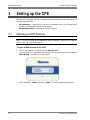
Setting up the CPE
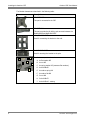
Navigating the Web Based Manager
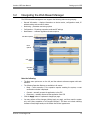
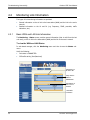
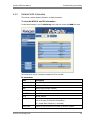
The CPE Web-based management tool supports the following main menus grouping:
•
General Information – displays information on device version, configuration mode, IP
address setting and connection status.
•
Monitoring – parameter monitoring options
•
Configuration – IP settings, operation mode and RF settings
•
Maintenance – software upgrade and restore options
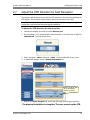
Sub-Menu Options
Menu
Options
Sub –menu
display
Operation
Buttons
Note the following:
•
The Main menu options are on the left, and the relevant sub-menus appear with each
selection.
•
The following Operation Buttons are available in all menus:
•
Reset – reset connection. If the operation requires resetting the system, a reset
confirmation window is displayed.
•
Connect – manually connect the application to the CPE
•
Disconnect – manually disconnect the application from CPE
•
Click the Apply button to implement changes per page.
•
You may perform all the changes (clicking Apply per page), and then reset the system
only once (after completion of all required changes). This does not include switching
between router/bridge modes, as this affects the screens’ appearance.
Runcom Technologies Ltd.
15