1
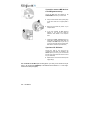
1. Unplug the power supply cable(s).
2. Remove the PC cover (for further information,
consult your PC manual).
3. If a sound card has not been previously installed,
unscrew the slot cover corresponding to the
appropriate PCI slot and remove it.
User Manual – 3/14
FRANÇAIS
HOTLINE
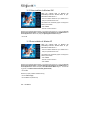
Static electricity can severely damage electronic components. Before removing the
card from its plastic bag, touch the metallic back plate of your PC with your hand to discharge
any static electricity from your body.
- Do not touch the printed circuits on the card.
- Do not let anybody else hold the card.
- Do not let your clothes touch any of the components.
PORTUGUÊS
ESPAÑOL
If your PC already has a sound card, remove it,
keeping the screw which attached the previous
card.
DEUTSCH
Switch off the PC and any peripherals such as the
monitor or printer.
NEDERLAND
Some sound cards are integrated into your PC motherboard and cannot therefore be
physically uninstalled. Contact your PC manufacturer for details on how to disable these
chipsets.
ITALIANO
If your computer is already equipped with a sound card, you must remove all existing drivers to
avoid any subsequent conflict between old and new drivers.
ENGLISH
2. HARDWARE INSTALLATION