1
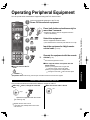
■ Press ASPECT to cycle through the aspect modes. (p. 47)
Change
aspect
ratio
• 480i, 480p: FULL/JUST/4:3/ZOOM
• 1080p, 1080i, 720p: FULL/H-FILL/JUST/4:3/ZOOM
■ FAVORITE
Call up
a favorite
channel
•
•
Channel numbers registered in Favorite are displayed on the favorite tune
screen. Select the desired broadcast station with the cursor or use number
buttons. (see below)
Note
Reselect “Cable” or “Antenna” in “ANT in” of “Program channel” to switch the signal reception between cable TV
and antenna. (p. 19, 35)
The channel number and volume level remain the same even after the TV is turned off.
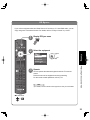
Set Favorite Feature
Use Favorite Feature
1 Display the SUB MENU.
1
Press FAVORITE.
• Press FAVORITE repeatedly
to change between pages (1/3,
2/3, 3/3, or exit).
Setup SUB MENU
Surf mode
All
Set favorite
Off
CC
Caption select
Favorite channels 1/3
Signal meter
2
---
2
“Set favorite”
All
Surf mode
1 26-1
select
Setup SUB MENU
3
Set favorite
ok
Caption select
Signal meter
2
Set favorite
1
---
2
---
3
---
4
---
3
1/3
select
ok
Set favorite
1 26-1
1/3
---
2
3
•
•
4
select
• Press FAVORITE repeatedly
to change between pages (1/3,
2/3, 3/3, or exit).
Press ▲▼to highlight a position
on the list.
Then, press OK to save the
displayed channel in that position.
• You can also use the NUMBER
buttons (1-9 and 0) to select a
list number (1-9 and 0). By doing
so, the displayed channel will
be saved on that list number
without pressing OK.
3
ok
Press ▲▼ or a Numbered key
(1-9 and 0) to highlight a channel
on the list.
• Selecting a channel number
from the list with the number
button will display the channel
directly.
Watching TV
4
Off
CC
Viewing
SUB
MENU
Press OK to display the
highlighted channel.
To delete a favorite channel
A saved channel can be removed from the list by holding
down OK while its position is highlighted.
To change the page
Pressing ◄ changes the page backward.
Pressing ► changes the page forward.
21