1
octopus - MIDI Control Sequencer
IX Advanced topics
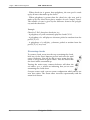
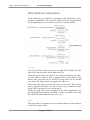
Pressing the EFF button will toggle it off, with the track not participating in Effector modulation.
Playing
For the Effector to work, it is merely the offsets of its Steps that
count, and it is completely irrelevant whether those steps are generating MIDI notes or not.
However, if an effector feeder does contain active steps, these will be
played regularly, as they would independent of the effector.
Muting
If a feeder track is muted, it will not have any effect on listener
tracks. Toggling feeder tracks is a quick way to introduce changes to a
track and then to go back to the original sound.
The Effector at work
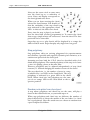
Designate a feeder track. Set step 1 in the feeder track and pitch it up
or down.
Now select a track with an index smaller than the effector feeder (this
is essential) and build a pattern into it involving lots (if not all) steps.
Make sure that step 1 is set as part of the pattern and play the pattern.
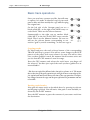
Now make this track listen to the effector by toggling its EFF mutator to red by double clicking on the EFF button.
You should now hear that the step in column 1 of the listening track
is now played differently, with the PIT offset from the Feeder track
applied to it.
The popular thing to do now is to start changing the track lengths for
feeder and listener to get long-running modulation results.
105
Navigation Guide