1
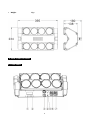
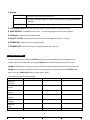
1. Button:
FUNCTION
DOWN / UP
ENTER
To return to the upper menu one by one
To browse or change through the various Setup Options and change values (Add
or subtract).
To select the functions, save your settings or enter the next menu
2. LCD Display Menu: Used to show the various menus and the selected functions;
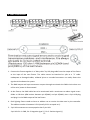
3. DMX IN/OUT: For DMX512 links, use 3‐pin XLR plug cable to link the unit together;
4. Pothook: Used to hook the safety cable
5. Fuse (T 3.15A): Used to protect the unit from the damage of the over‐current;
6. POWER IN: Used to connect to supply power;
7. POWER OUT: Used to connect to supply power to the next unit;
3.2 Main Function
To select any functions, press the ENTER button until the required function is showing on the
display. Select the function by pressing the ENTER button and the display will blink. Use the
DOWN and UP button to change the mode. Once the required mode has been selected, press the
ENTER button to setup to go back to the functions without any changes press the ENTER button
again. Press the FUNCTION button exit the menu mode.
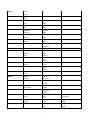
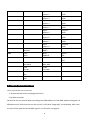
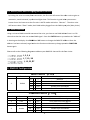
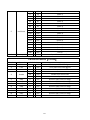
The main functions are shown below:
LEVEL 1
LEVEL 2
BEAM-V8
Addr=001
BEAM-V8
A=Auto
BEAM-V8
M=Auto
BEAM-V8
A=Music
BEAM-V8
M=Music
BEAM-V8
Slave
Address
LEVEL 3
Address
6
=001
LEVEL 4