1
HOW TO CONNECT YOUR BLUETOOTH HEADSET
IMPORTANT—PLEASE READ THIS FIRST BEFORE USING YOUR HEADSET
®
Pairing Your Bluetooth Headset
Easy as1-2-3
IMPORTANT- Be sure your phone or mobile device is Bluetooth
®
capable. Check the Owner’s Manual or
manufacturer’s website to verify your phone or mobile has this feature.
Now, let’s get started:
®
1. Make sure your Bluetooth function on your phone has been turned “ON”. This can usually be done by
going to SETTINGS} BLUETOOTH or CONNECTIONS}”Turn On”.
Make sure the Headset is charged and turned “OFF”. (See Headset Owner’s Manual for initial and
subsequent charging instructions)
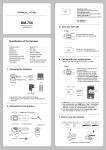
2. Next, on the headset, Press and hold the Power button for 5 seconds until the Indicator Light flashes
alternating “Red – Blue – Red – Blue” to enter the pairing mode.
NOTE: If your phone or mobile device exits PAIRING mode before you complete the PAIRING process, you
must repeat the Headset’s “Press and hold the Function button for 5 seconds” step until the Headset’s
Indicator Light flashes alternating “Red-Blue-Red-Blue” again to re-enter the PAIRING mode.
®
3. On your phone or mobile device, locate the Bluetooth MENU and select the ADD NEW DEVICE or SEARCH
function:
®
a. Once you are in PAIRING mode, you must choose and confirm the Headset as your Bluetooth paired
device. Your phone or mobile device should first “locate” your Headset and then ask you if this is the
device you want to pair your phone with. Answer”Yes”. ( Device will show up as Replay Audio)
b. Your phone or mobile device should now prompt you to key in a headset “PASSCODE”.
c. Key in “0000”. (Some phones will not require a passcode)
d. Once you have keyed in the PASSCODE-your phone or mobile device should prompt you to press
“YES” or another key to confirm the code you just entered.(please see your phone or mobile device’s
Owner’s manual for additional information)
After you have successfully paired your Headset with your phone or mobile device, the Indicator Light on
the headset will flash the Bluetooth light ONLY, the Headset should now be in STANDBY mode.
®
The Bluetooth word mark and logos are registered trademarks owned by Bluetooth SIG, Inc.