1
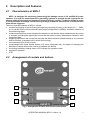
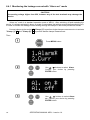
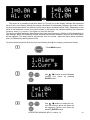
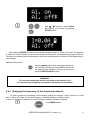
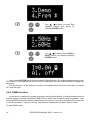
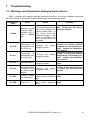
4.2.1 Keyboard 1 ON/OFF button Turning the device ON/OFF. 2 MENU button Selecting the measurement function: Alarm – setting the alarm on or off; Curr – setting the alarm threshold for current flow; Demo – simulation of an alarm condition; Freq – setting the rated frequency of the network (50Hz or 60Hz); Info – activation of information about the operation of the device; Lang – selection of the user interface language; Reset – restoring factory (default) settings. 3 ENTER button Approving entered settings, exiting to menu. 4 LED indicating the operational status of the device Measuring Mode: - LED is illuminated in green – the device is in operational mode, - LED is illuminated in red – device error (additional error code is displayed, as described below), - LED flashes red – low battery charge level, Battery charging mode" - LED flashes red – low battery charge level, - LED flashes green – charging the battery, - LED is illuminated in green – battery fully charged, 5 Buttons and A set of cursors with auto-repetition for choosing MENU options and changing setting values 6 Alarm LEDs A set of red alarm LEDs arranged in two rows on the front panel (5 LEDs in each row), and in two rows at the sides of the device (5 LEDs on each side). Their operation is described in the next sections. 8 OPERATING MANUAL MPU-1 version 1.4