1
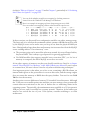
I need to point out one thing about the performance troubleshooting section in the
previous chapter, “Slow Queries” on page 24. In that section, I wrote that indexes can
decrease the performance of inserts because they need to update index files as well as
insert data. But when row locks are in use, indexes can increase overall application
performance, especially when an index is unique, because while updating such an
indexed field, insert would not block access to the whole table.
Next, I take a short break from locks to describe transactions. Later, we will return to
metadata locking. I decided to order the information in this way because we need to
be acquainted with transactions before discussing metadata locks.
Transactions
MySQL supports transactions at the storage engine level. The most popular among the
officially supported storage engines, InnoDB, provides transaction support. In this
section, we discuss how to troubleshoot InnoDB transactions.
In MySQL, you can start a transaction using a START TRANSACTION or BEGIN statement.
To commit a transaction, call COMMIT, and to roll it back (cancel it), call ROLLBACK.
An alternate way to start a multistatement transaction is to set the variable autocom
mit to zero. This will override the default MySQL behavior, which sends an implicit
commit after each statement. With autocommit set to 0, you need to call COMMIT or
ROLLBACK explicitly. After that, the next statement begins a new transaction
automatically.
MySQL also provides SAVEPOINT and XA transaction interfaces. Although InnoDB
supports both, I will not describe them in this book, because it would not offer any
extra insight related to our troubleshooting techniques. In other words, the same techniques I describe can be applied to such transactions.
Hidden Queries
InnoDB treats every request for data as a transaction. It does not matter whether the
transaction is a single statement or if it is multiple statements. With regard to troubleshooting, you can handle single-query transactions as described in “Row
Locks” on page 57. You need to find out which queries run concurrently and which
locks get in the way of each other.
Things change when you have transactions that consist of multiple statements. In this
case, the transaction can lock rows even when you see no query in the SHOW
PROCESSLIST output.
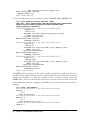
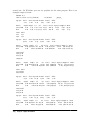
To illustrate this problem, let’s modify our example one more time. Now we don’t even
need to call sleep to create a delay. Before running this example, I reverted the changed
rows, so the table has the same values as in the initial test setup.
Transactions | 63