1
8. Appendix
� Troubleshooting
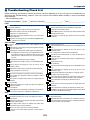
This section helps you resolve problems you may encounter while setting up or using the projector.
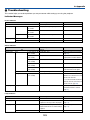
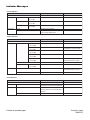
Indicator Messages
Power Indicator
Indicator Condition
Projector Condition
Off
Blinking light
Green
0.5 sec On,
0.5 sec Off
2.5 sec On,
0.5 sec Off
0.5 sec On,
0.5 sec Off
Orange
Steady light
Green
Orange
Note
The main power is off
–
The projector is getting ready to turn on. Wait for a moment.
Off Timer is activated.
–
The projector is cooling down.
Wait for a moment.
The projector is turned on.
The projector is in Standby.
–
–
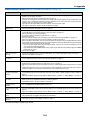
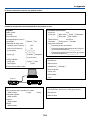
Status Indicator
Indicator Condition
Off
Blinking light
Red
Green
Orange
Steady light
Projector Condition
Normal
1 cycle (0.5 sec On, Lamp cover error
2.5 sec Off)
2 cycle (0.5 sec On, Temperature error
0.5 sec Of)
3 cycle (0.5 sec On, Power error
0.5 sec Off)
4 cycle (0.5 sec On, Fan error
0.5 sec Off)
6 cycle (0.5 sec On, Lamp error
0.5 sec Off)
Re-firing the lamp
1 cycle(0.5 sec On, Network conflict
2.5 sec Off)
Orange
Cabinet button is locked
Note
–
Replace the lamp cover correctly.
(Page 121)
The projector is overheated. Move
the projector to a cooler location.
Power unit will not work correctly.
Fans will not work correctly.
Lamp fails to light. Wait a full
minute and then turn on again.
The projector is re-firing.
Both the built-in LAN and the wireless
LAN cannot be connected to the same
network at the same time.
To use both built-in LAN and wireless
LAN at the same time, connect them to
different networks. (page 100)
You have pressed cabinet button
when Cabinet Button is locked.
(Page 93)
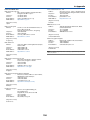
Lamp Indicator
Indicator Condition
Off
Blinking light
Red
Steady light
Red
Green
Projector Condition
Normal
Lamp has reached its end of life. Lamp
replacement message will be displayed.
Lamp has been used beyond its limit. The
projector will not turn on until the lamp is
replaced.
Lamp mode is set to Eco mode
123
Note
–
Replace the lamp.
(Page 119)
Replace the lamp.
(Page 119)
–